
More project photos (2)

The problem
Students increasingly study together online, but generic video-call tools are built for meetings, not for sustained group study. A study group needs a lobby to find rooms, a shared whiteboard for working through derivations, a timer that keeps focus sessions honest, and a chat that survives the call — juggling three or four separate apps fragments attention and session history. WebRTC solves the hardest part: peer-to-peer audio and video directly in the browser, with data channels that carry whiteboard strokes and chat at negligible latency, all without plugins or a media server. This project builds the complete study-first platform: a room lobby, WebRTC mesh video rooms for up to 8 members, a synchronized canvas whiteboard, room chat, screen sharing and a Pomodoro focus timer with session goals. Everything runs in the browser; the only backend is a small Socket.io signalling server that never touches media.
How it works
- The Node.js + Socket.io signalling server starts; the browser client connects and the lobby lists active rooms.
- Creating or joining a room captures local audio/video with getUserMedia (or falls back to an avatar tile).
- The client exchanges SDP offers/answers and ICE candidates through the signalling server and opens an RTCPeerConnection to each member.
- Audio/video flows peer-to-peer over SRTP; a reliable RTCDataChannel per peer carries chat and whiteboard strokes.
- Whiteboard strokes are broadcast as compact JSON and replayed on every member's canvas; late joiners receive a snapshot from an existing member.
- Screen sharing adds a getDisplayMedia track alongside the camera; the tile grid re-renders automatically.
- Leaving a room closes peer connections and notifies the signalling server; the room disappears from the lobby when empty.
Tech stack:
- WebRTC (getUserMedia, RTCPeerConnection, RTCDataChannel, getDisplayMedia)
- Node.js 18+, Socket.io (signalling server)
- Vanilla JavaScript + HTML canvas (room app, no build step)
- Public STUN server for NAT traversal
- HTTPS or localhost (required by browsers for camera/mic access)
| Parameter | Value |
|---|---|
| Media path | Peer-to-peer WebRTC mesh (SRTP); signalling only on server |
| Max participants | Up to 8 members per room (mesh bandwidth limit) |
| Video | getUserMedia capture, per-member mute/camera controls, responsive tile grid |
| Whiteboard | HTML canvas, strokes synced over RTCDataChannel, undo/clear/PNG export |
| Chat | Room messaging over peer data channel with presence and join/leave notices |
| Screen share | getDisplayMedia as an additional video track |
| Signalling | Node.js + Socket.io: SDP/ICE exchange, room create/join/leave |
| NAT traversal | STUN for most networks; TURN (e.g. coturn) is an optional add-on |
| Timer | Pomodoro 25/5 sessions, session goals and checklists, per-user state |
| Browser support | Chrome/Edge/Firefox on desktop; media access needs HTTPS or localhost |
Project features
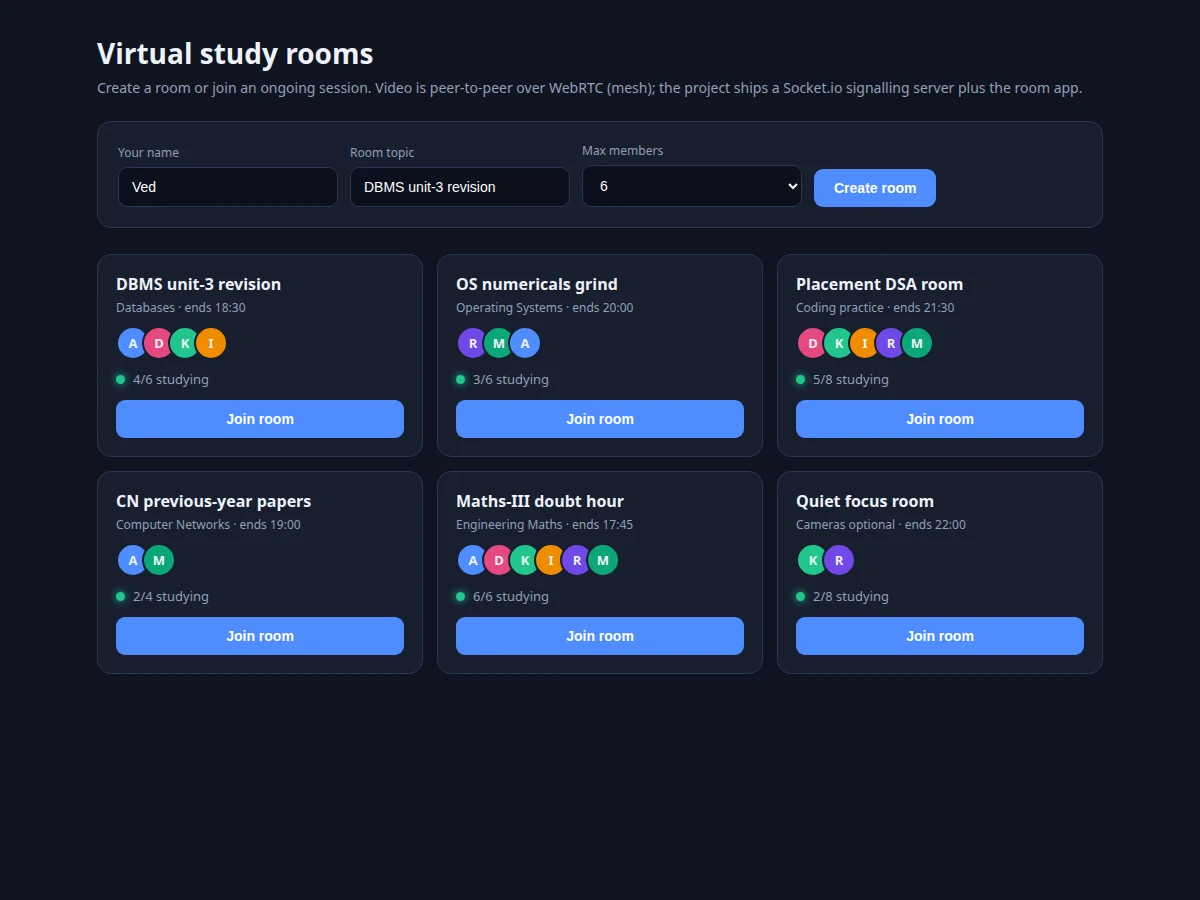
- [Room lobby] Create rooms with a topic and member cap, or join live rooms showing subjects, member counts and end times.
- [WebRTC mesh video] Peer-to-peer audio/video rooms (getUserMedia capture, RTCPeerConnection mesh) with mute, camera and tile-grid layout for up to 8 members.
- [Shared whiteboard] A canvas whose strokes sync to every room member over the WebRTC data channel, with color and brush controls, undo, clear and PNG export.
- [Room chat] Low-latency messaging over the same peer data channel, with presence counts and system messages for joins and leaves.
- [Screen sharing] Share a screen or window as an additional video track via getDisplayMedia, ideal for walking through slides or code.
- [Pomodoro focus timer] 25/5 focus and break sessions with session goals, checklists and completion tracking per user.
- [Lightweight signalling] Node.js + Socket.io server that exchanges SDP offers/answers and ICE candidates; it stores no media and no message history.
- [Demo-safe media fallback] When camera access is unavailable, avatar tiles keep the room fully usable — the whiteboard, chat and timer all keep working.
What is included
- Complete source code (signalling server, room client, whiteboard, chat, timer, lobby)
- Project report PDF (WebRTC architecture, signalling design, data-channel sync, testing)
- PPT presentation for final review
- Viva Q&A preparation document (WebRTC, SDP/ICE, STUN/TURN, mesh vs SFU, data channels)
- Setup and deployment guide (running the signalling server, HTTPS notes, demo checklist)
Limitations & prerequisites
- The mesh topology is honest about scale: up to 8 members work well; beyond that each member's uplink bandwidth becomes the bottleneck (an SFU is the documented upgrade path).
- Symmetric-NAT networks need a TURN server, which is an optional add-on — the base build ships STUN only, and the report documents exactly which networks this covers.
- No session recording and no persistent chat/whiteboard history in the base build; rooms are ephemeral by design.
- Mobile browsers support WebRTC but camera/mic behavior varies by device; the demo checklist targets desktop Chrome/Edge.
- Camera and microphone require HTTPS or localhost — plain HTTP deployments cannot access media, a browser security rule.
- Screen-share quality depends on the sharer's uplink; it is a study aid, not a broadcast tool.
Frequently Asked Questions
How is video transmitted?
Peer-to-peer over WebRTC: each member opens an encrypted RTCPeerConnection to every other member. The Node.js server only exchanges signalling messages (SDP offers/answers, ICE candidates) — no audio or video passes through it.
How many members can a room hold?
Up to 8. In a mesh, each member uploads one stream per other member, so uplink bandwidth sets the limit. The report explains this honestly and documents the SFU architecture as the scaling upgrade.
How does the shared whiteboard work?
Strokes are drawn on an HTML canvas and broadcast as compact JSON over the WebRTC data channel to every member, who replay them locally. Undo, clear and PNG export are included; late joiners get a board snapshot.
Does it work without a camera?
Yes. When getUserMedia is unavailable or denied, the member appears as an avatar tile and the whiteboard, chat and timer keep working normally.
What about networks that block peer connections?
STUN handles most home and campus NATs. Symmetric corporate NATs need a TURN relay, which is an optional documented add-on; the report states this boundary explicitly.
Is this project suitable for a final-year project?
Yes — for Computer Science, Web Development and IT programs. It demonstrates WebRTC end to end: signalling, ICE, SDP negotiation, media capture and data channels, all excellent viva material. Suitable for B.E./B.Tech final-year projects in Computer Science, Web Development and IT.
Components & software requirements
- WebRTC (getUserMedia, RTCPeerConnection, RTCDataChannel, getDisplayMedia)
- Node.js 18+, Socket.io (signalling server)
- Vanilla JavaScript + HTML canvas (room app, no build step)
- Public STUN server for NAT traversal
- HTTPS or localhost (required by browsers for camera/mic access)
Delivery information
Built-to-order project. Delivery timeline is shared after order confirmation based on current queue.
Support terms
Complete documentation, setup guide, and viva preparation included. Support for setup and explanation provided.