
More project photos (2)
The problem
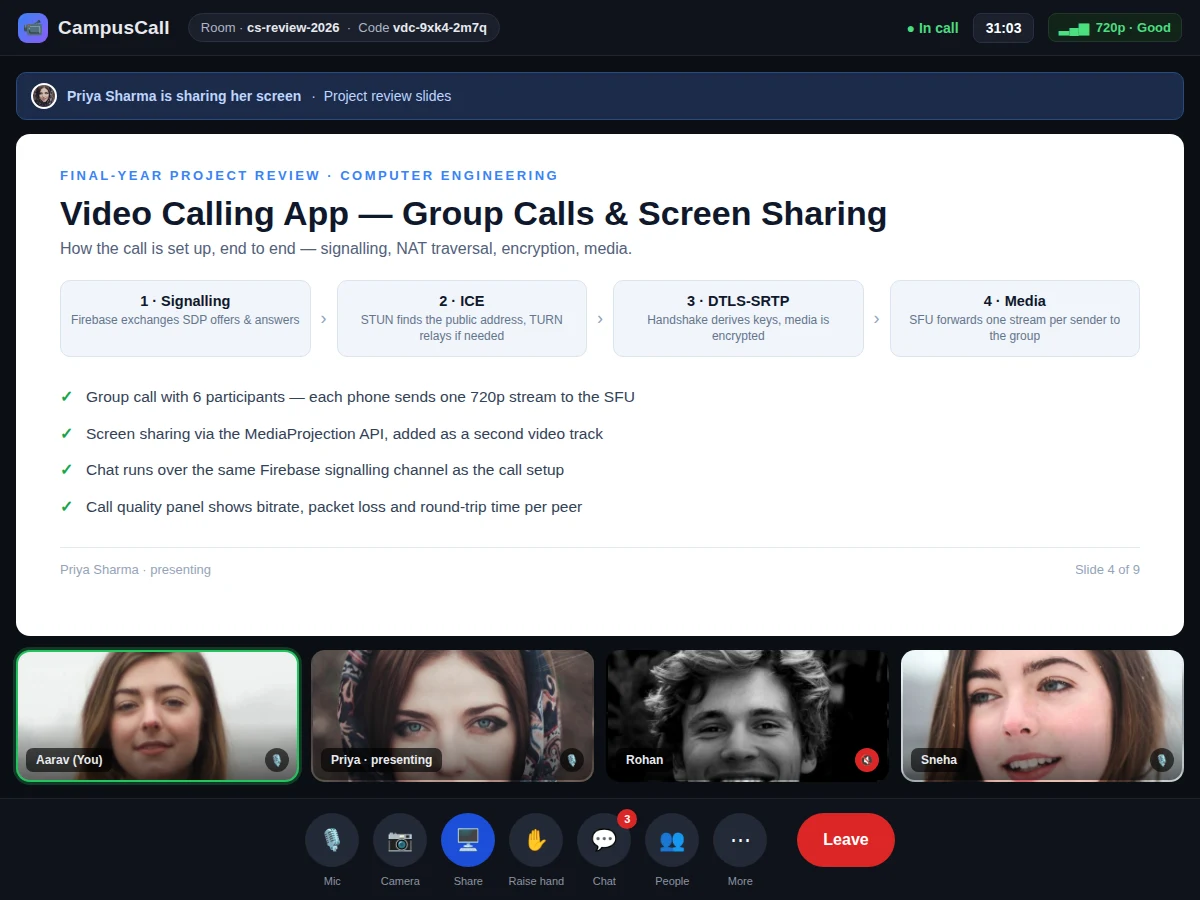
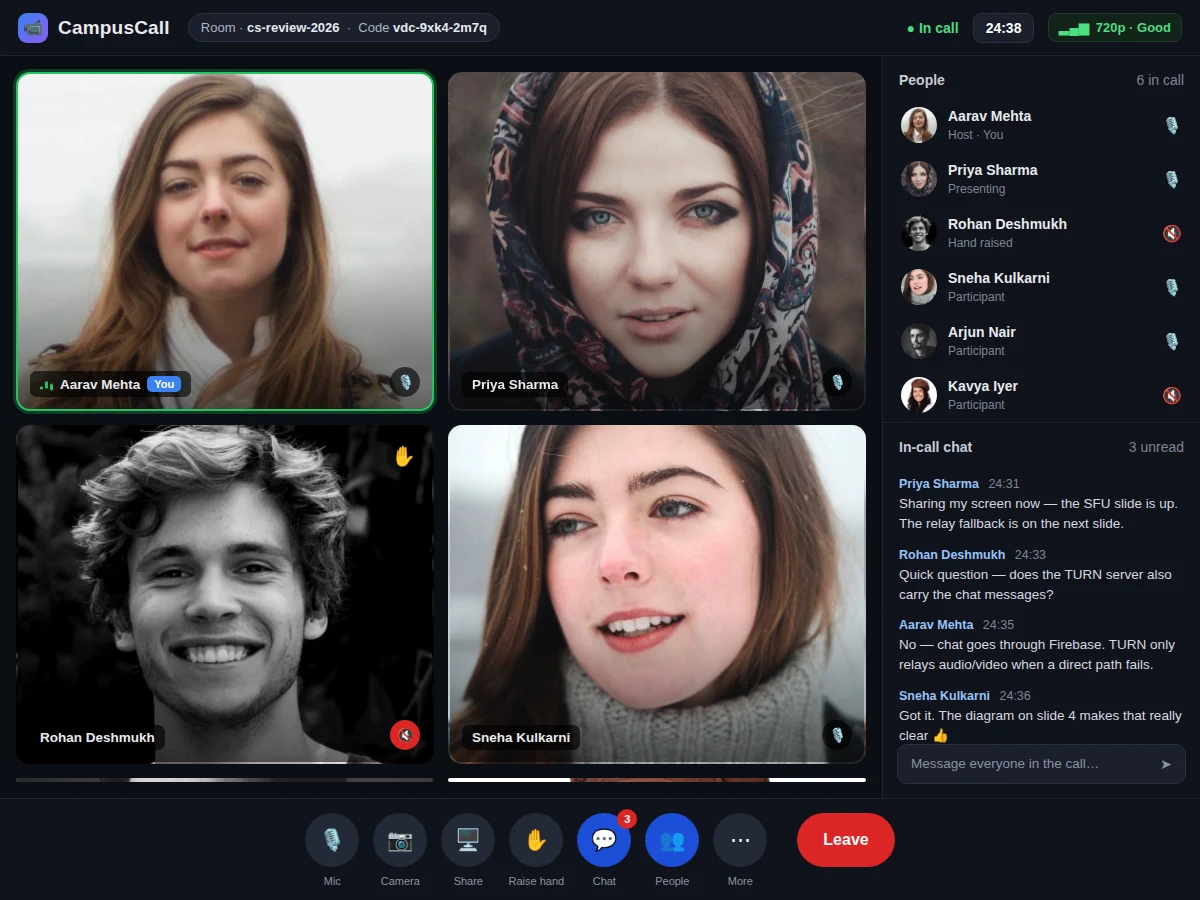
Video calling is now the default way student teams meet their guides, run reviews and present demos, yet the apps they rely on are closed products whose internals cannot be studied or explained in a viva. A student who wants to understand how this video calling Android app actually works — how two phones find each other across networks, agree on codecs, encrypt the media and keep six video streams in sync — finds no open implementation. This project closes that gap by building a video calling Android app with group calls and screen sharing, using WebRTC for the media plane and Firebase for signalling. The app supports one-to-one and group calls, in-call chat, mute and camera controls, room codes for joining, and screen sharing through Android's MediaProjection API. Because every layer is visible — signalling, ICE negotiation, DTLS-SRTP encryption and SFU forwarding — the student can trace a call from the join button to the first video frame.
Host creates a room in the app and shares the room code with the group.
Follow the working sequence
How it works
A call begins when the host creates a room and the app writes a room code to Firebase; the other phones join with that code and the signalling channel opens. Each phone creates an RTCPeerConnection, gathers ICE candidates — its local address, the public address a STUN server reports, and, if needed, a relay address from the TURN server — and exchanges an SDP offer and answer through Firebase to agree codecs and encryption. The DTLS handshake runs over the chosen path, derives the SRTP keys, and media starts flowing: in a group call each phone sends one stream to the selective forwarding unit, which forwards it to the other participants without decoding it. Screen sharing adds a second video track from the MediaProjection API through renegotiation on the same connection. Chat messages travel over Firebase, mute and camera toggles update the local tracks, and when the last participant leaves, the room closes and its signalling records are removed.
- The host creates a room in the app; Firebase stores the room code and the host's SDP offer.
- Joining phones enter the code, read the offer, and answer with their own SDP and ICE candidates.
- ICE tests the candidate pairs — host address, server-reflexive address via STUN, relay address via TURN — and picks a working path through any NAT.
- The DTLS handshake derives the SRTP keys, and encrypted audio and video start flowing peer-to-peer for a two-person call, or through the SFU for a group call.
- Each participant's video is rendered in the grid, the active speaker is highlighted, and the call timer runs.
- Screen sharing starts from the share button after the Android capture-consent prompt; the display is sent as a second video track.
- Chat, mute, camera toggle, hand-raise and leave update through Firebase and the local peer connection.
- When the call ends, media tracks are stopped, peer connections are closed, and the room record is removed from Firebase.
Builder note (from the demo build): screen sharing is added as a second video track on the same RTCPeerConnection through a renegotiation offer — adding it without renegotiation leaves the remote side showing the camera only, which is the most common first-build failure in this project.
Tech stack:
- Kotlin · Android SDK
- WebRTC (RTCPeerConnection)
- Firebase Realtime Database (signalling + chat)
- Firebase Authentication
- MediaProjection API (screen share)
- Node.js · mediasoup SFU (group media)
- coturn (TURN relay)
- Git
| Parameter | Value |
|---|---|
| Platform | Android 8.0 (API 26) or higher (minimum) |
| Language | Kotlin |
| Media engine | WebRTC · RTCPeerConnection · DTLS-SRTP encrypted media |
| Signalling | Firebase Realtime Database (SDP + ICE exchange) |
| Group media | Node.js · mediasoup SFU (design target) |
| Participants per room | Up to 6 (design target) |
| Video | 720p at 30 fps (design target) |
| Screen share | 1080p capture via MediaProjection API (design target) |
| STUN | stun.l.google.com:19302 (public server, development use) |
| TURN | Self-hosted coturn relay (required for symmetric NAT) |
| Chat | Text messages over Firebase (base build) |
| App size | Approximately 25 MB (expected) |
Project features
The app is built around four capabilities that together make a calling product: group video calls for up to 6 participants, screen sharing, in-call chat, and room-code joining. Group calls run through a selective forwarding unit, so each phone sends one 720p video stream upstream and receives one stream per other participant, which keeps mobile bandwidth and battery use far lower than a mesh where every phone sends a stream to every other phone. Screen sharing captures the display through Android's MediaProjection API and adds it as a second video track on the same peer connection, so a presenter can walk the group through slides or code without leaving the call. In-call chat, mute and camera controls, a live call timer, a participant list with hand-raise, and a per-peer call-quality panel round out the experience, and every one of these features is implemented in the base build — nothing in the list below is a mock-up or a planned addition.
- [Group video calls] Up to 6 participants in one room through a selective forwarding unit (SFU): each phone sends one video stream upstream and receives one stream per other participant, instead of a mesh where every phone streams to every other phone.
- [Screen sharing] The display is captured through Android's MediaProjection API and sent as a second video track on the same peer connection, so slides, code or documents can be presented live inside the call.
- [One-to-one video calls] Direct peer-to-peer calls between two phones with DTLS-SRTP encrypted media; no media server sits in the path for a two-person call.
- [In-call chat] Text messages sent over the same Firebase channel used for call signalling, with sender names and timestamps, visible to everyone in the room.
- [Room codes and join links] Every call gets a short room code and a shareable link; joining needs no account beyond Firebase Authentication, and the host controls who is admitted.
- [Call controls and participant list] Mute, camera toggle, hand-raise, active-speaker highlighting, a live call timer and a participant list showing who is speaking, muted or presenting.
- [Call-quality panel] Per-peer bitrate, packet loss and round-trip time read from WebRTC getStats, so connection problems can be diagnosed during the call instead of guessed at afterwards.
Optional customisation (not in the base build): server-side call recording and live captions. Future scope: breakout rooms, virtual backgrounds and a whiteboard.
What is included
- Complete Android source code (Kotlin) with WebRTC integration
- Node.js mediasoup SFU server code with setup guide
- Firebase project configuration (Authentication + Realtime Database rules)
- Working demo build with the group-call, screen-share and chat screens
- Project report PDF (architecture, signalling flow, ICE and DTLS explanation)
- PPT presentation for final review
- Viva Q&A preparation document (WebRTC, SDP, ICE, STUN/TURN, SFU)
Limitations & prerequisites
- Group calls need internet in the base build: signalling and media both travel over the network, and same-Wi-Fi calls without internet are not included.
- Call quality depends on each participant's network: packet loss and low bandwidth reduce video quality, and the app adapts resolution down rather than dropping the call (design behaviour).
- Screen sharing needs the Android capture-consent prompt every session, and windows marked FLAG_SECURE appear black in the shared stream.
- Without a TURN relay, calls fail for participants behind symmetric NATs or strict firewalls; the relay must be hosted and kept running.
- The base build has no call recording; recording needs a server-side recorder and is an optional add-on.
- Video is 720p by design target; 1080p group video would raise bandwidth and battery use beyond what typical student phones sustain (design decision, not a measured limit).
- Media is encrypted in transit with DTLS-SRTP, but the SFU terminates the encrypted transport to forward streams, so group calls are not end-to-end encrypted in the strict sense.
Frequently Asked Questions
Is this project suitable for a final-year project?
Yes — for Computer Engineering, IT and Electronics & Telecommunication students. It demonstrates real-time media over WebRTC, signalling design, NAT traversal with ICE/STUN/TURN, DTLS-SRTP encryption and SFU-based group calling, all in a working Android app that can be shown live. The report explains each layer, so the work can be defended in a review without relying on any closed product.
What is an SFU and why does this project use one?
An SFU (selective forwarding unit) is a server that receives one video stream from each participant and forwards it to the others without decoding it. In a 6-person mesh each phone would send 5 streams and receive 5; with an SFU each phone sends 1 and receives 5, which keeps mobile bandwidth and battery use manageable. That is why group calls route through the SFU while one-to-one calls stay direct peer-to-peer.
Does it work without internet?
No, not in the base build — every participant needs an internet connection, because signalling runs over Firebase and media runs over the internet, and without connectivity the app cannot exchange SDP offers or ICE candidates, so no call can start. Same-Wi-Fi direct calling with host ICE candidates is possible in principle, but not implemented — it is a possible extension.
Can calls be recorded?
Not in the base build. Recording a WebRTC call needs a server-side recorder that subscribes to the SFU streams and writes them to disk, which is a separate component with its own storage, consent prompts and file handling, so it cannot be switched on from the app alone. It can be added as an optional customisation on request, with an on-screen recording indicator.
What does screen sharing need on Android?
The MediaProjection API, available from Android 5.0 and used here with Android 8.0 as the minimum. Every sharing session starts with a system consent prompt that names the app, and the user can stop sharing from the notification shade at any time. The captured display is added as a second video track on the existing peer connection.
How many people can join one call?
Up to 6 participants per room in the base build, which is a design target chosen so a mid-range phone can decode 5 incoming 720p streams. The SFU itself can forward to more, but each extra participant adds one more downstream stream per phone, so larger rooms need lower resolutions or stronger devices.
Components & software requirements
- Kotlin · Android SDK
- WebRTC (RTCPeerConnection)
- Firebase Realtime Database (signalling + chat)
- Firebase Authentication
- MediaProjection API (screen share)
- Node.js · mediasoup SFU (group media)
- coturn (TURN relay)
- Git
Delivery information
Built-to-order project. Delivery timeline is shared after order confirmation based on current queue.
Support terms
Complete documentation, setup guide, and viva preparation included. Support for setup and explanation provided.
Download free synopsis (PDF)
Enter your name and WhatsApp number — the synopsis PDF downloads immediately. We may send occasional project updates on WhatsApp; no spam.