
More project photos (2)
The problem
Vehicle Document Wallet is an Android app that keeps every vehicle document — registration certificate, insurance policy, PUC certificate, driving licence and FASTag details — in one offline vault on the owner's phone, with expiry tracking and renewal reminders for insurance, PUC and service. The problem it answers is ordinary: vehicle papers live in gloveboxes, wallets and chat apps, so expiries surface only after lapsing. An expired PUC or insurance means a fine at a traffic check, a rejected claim after an accident, and a vehicle running beyond its emission limits. Remembering half a dozen dates across vehicles is the kind of chore memory drops, and the usual fix — a calendar entry set months ago — dies with the old phone. This wallet turns every document into a dated record with a photographed copy, computes days-left continuously, and fires local reminders at 30, 15, 7 and 1 day before expiry, plus service-due alerts from odometer and date intervals.
Adds each vehicle with its documents, photos and expiry dates, and acts on the renewal reminders.
Follow the working sequence
How it works
Vehicle Document Wallet works as a fully offline Android app: the owner creates one profile per vehicle, adds each document with its number, issuer, issue date and expiry date plus a photo of the certificate, and the app's expiry engine computes days-remaining for every dated record from the device clock. For each document with an expiry, the engine schedules four local notifications — 30, 15, 7 and 1 day before the date — through WorkManager, so reminders fire even with mobile data switched off. A service log records each workshop visit with date, odometer reading and cost; the next service due is derived from whichever comes first, the configured kilometre interval or the month interval. The home dashboard ranks vehicles by urgency, each document detail shows its certificate preview, and a share action renders a one-page PDF dossier of the vehicle's documents for traffic checks. All data lives in an on-device Room database with encrypted backup and restore.
- The owner creates a vehicle profile: registration number, make and model, fuel type and current odometer reading — one row per vehicle in the Room database.
- Each document is added with its type (PUC, insurance, RC, driving licence, FASTag), document number, issuer, issue and expiry dates, and a photo of the certificate taken with CameraX or picked from the gallery.
- The expiry engine converts every expiry date to epoch milliseconds at save time — a builder decision from the demo build, so a phone crossing a timezone can never push a reminder across midnight.
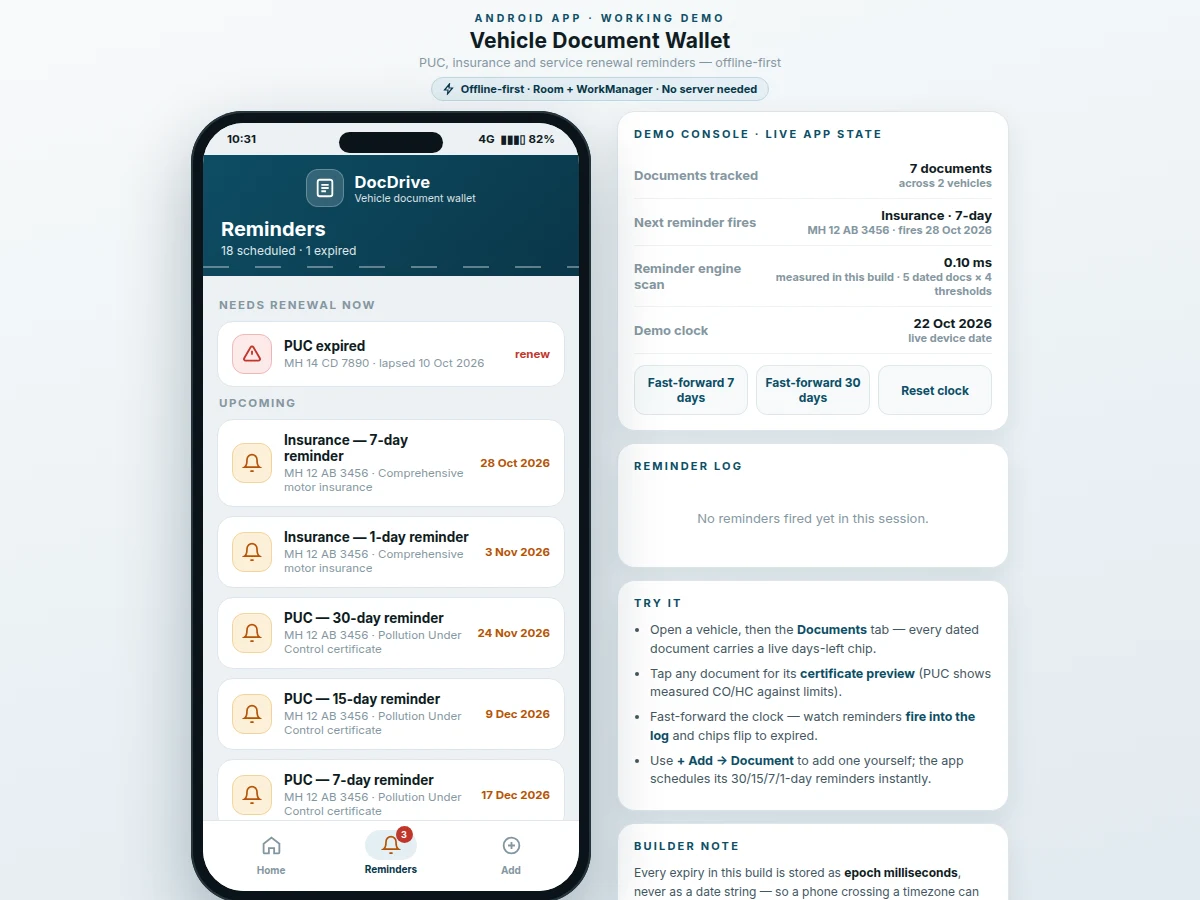
- For each dated document, WorkManager enqueues one-shot workers for the 30, 15, 7 and 1-day thresholds; only thresholds still in the future are scheduled, the rest are logged as already notified.
- Service visits are logged with date, odometer, cost, garage and work done; the next service due is computed as the earlier of (last service + kilometre interval) and (last service + month interval).
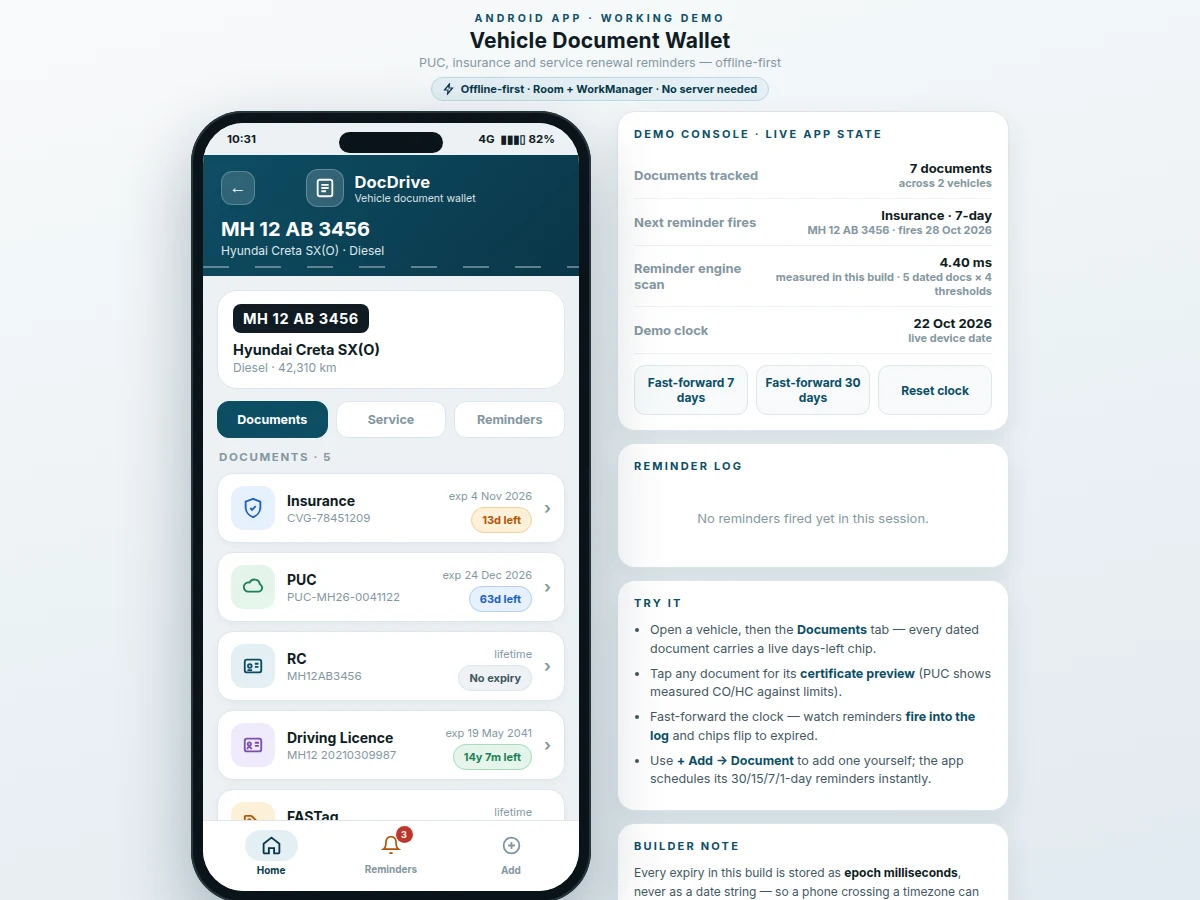
- The dashboard renders every vehicle with its worst-status chip; opening a vehicle shows the documents tab with live days-left chips, the service tab with history and next-due card, and the reminders tab with that vehicle's full schedule.
- Tapping a document opens its certificate preview and its scheduled reminders; the share action compiles the vehicle's documents into a one-page PDF dossier sent through the Android sharesheet.
Tech stack:
- Kotlin (app language)
- Android SDK · design target minSdk 26 (Android 8.0)
- Room · on-device SQLite database
- WorkManager · local reminder scheduling
- CameraX · certificate photo capture
- PdfDocument API · one-page dossier generation
- Jetpack Security · EncryptedFile backup
- Material 3 components · app UI
| Parameter | Value |
|---|---|
| Platform | Android (design target: minSdk 26 / Android 8.0) |
| Language | Kotlin |
| Local database | Room over SQLite, on-device only |
| Reminder thresholds | 30 / 15 / 7 / 1 days before expiry (design choice) |
| Service reminder thresholds | 15 / 3 days before next due date (design choice) |
| Expiry storage | Epoch milliseconds (builder note from the demo build) |
| Engine scan | Under 5 ms for 5 dated documents × 4 thresholds (measured in the demo build) |
| Photo storage | App-private storage (scoped-storage compliant) |
| Dossier output | 1-page PDF via the PdfDocument API |
| Network needed | None for the vault or reminders (offline-first design) |
Project features
Vehicle Document Wallet centres on four capabilities that together replace the glovebox folder. First, the document vault: every vehicle gets dated records for RC, insurance, PUC, driving licence and FASTag, each carrying the certificate's number and issuer plus a photographed copy, so the originals can stay safely at home. Second, the expiry engine: days-remaining is computed continuously from the device clock and rendered as colour-coded chips — red for expired or under a week, amber under a month — so urgency reads at a glance. Third, local renewal reminders: WorkManager schedules 30/15/7/1-day notifications per document plus service-due alerts, all firing offline with no server and no account. Fourth, the service log and PDF dossier: workshop visits accumulate with odometer and cost history, and one tap compiles the vehicle's documents into a shareable one-page PDF for traffic checks.
- [Multi-vehicle document vault] One profile per vehicle holds RC, insurance, PUC, driving licence and FASTag records with numbers, issuers, dates and certificate photos. Lifetime documents like the RC are marked "no expiry" instead of forcing a fake date.
- [Expiry engine with days-left chips] Every dated document gets a live countdown computed from the device clock, colour-coded by urgency. In the demo build, the engine's scan over 5 dated documents × 4 reminder thresholds completed in under 5 ms (measured).
- [Local renewal reminders] WorkManager schedules 30/15/7/1-day notifications per expiring document, plus service reminders 15 and 3 days before the next due date. All fire offline — a reminder that needs a server dies the day your data pack does.
- [Service log with due-date maths] Workshop visits record date, odometer, cost and work done; the next service is derived from whichever comes first of the kilometre interval or the month interval (design default 10,000 km / 6 months, configurable per vehicle).
- [Certificate preview] Each document opens a certificate-style preview of its fields. PUC previews show the measured emission values against their limits — sample data in the demo: CO 0.28 % against a 0.5 % limit, HC 148 ppm against 750 ppm.
- [One-tap PDF dossier] Compiles a vehicle's documents into a single-page PDF for traffic checks, shared through the Android sharesheet to any installed app.
- [Photo capture of certificates] CameraX capture or gallery import attaches a photographed copy to each document, stored in app-private storage so other apps cannot read it.
- [Encrypted backup and restore] The Room database exports to an encrypted backup file, so the whole wallet survives a phone change or a reinstall.
What is included
- Complete Android source code in Kotlin
- Room database schema with migration notes
- WorkManager reminder-scheduling module
- Document capture, certificate preview and dossier screens
- Service log with next-due computation
- Encrypted backup and restore utility
- Project report PDF (architecture, expiry-engine design, methodology)
- PPT presentation for the final review
- Viva Q&A preparation document (Room, WorkManager, scoped storage, notification channels)
Limitations & prerequisites
- Reminders are local notifications: if the phone is switched off at the scheduled moment or aggressive battery optimization blocks WorkManager, a reminder can arrive late — the setup guide documents the exemption step.
- The app trusts the dates you enter; it cannot verify a PUC or policy against the RTO or insurer, so wrong dates produce wrong reminders.
- Certificate photos are user-taken — glare or blur can make them unreadable at a check, which is why the typed details are always kept alongside the photo.
- Service due-date maths is only as good as the logged odometer readings; skipped entries shift the kilometre-based due date.
- The PDF dossier is a convenience copy — traffic police may still ask for originals or the government's own vehicle app.
- Encrypted backups restore only into the same app signing key; the handover notes document this before delivery.
Frequently Asked Questions
Is this project suitable for a final-year project?
Yes — for Computer Science, IT and mobile-application development programs. It demonstrates offline-first architecture with Room, background scheduling with WorkManager, camera integration with CameraX, PDF generation and encrypted local backup, all wrapped around a problem every vehicle owner recognises, which makes the viva demonstration unusually easy to motivate. The expiry engine and reminder scheduling give strong viva material on Android internals.
Does it need the internet to send reminders?
No — every reminder is a local notification scheduled on the phone itself with WorkManager, so it fires with mobile data switched off, in a basement parking lot, or on a phone with no SIM at all. There is no server, no account and no push-notification service in the design. The whole wallet, including the certificate photos, lives in the on-device Room database.
How are the reminder dates decided?
The app schedules four reminders per expiring document — 30, 15, 7 and 1 day before the date — which is a design choice tuned to how renewals actually happen: a month out to plan, a fortnight to act, a week as the nudge, and a day as the last call. Service reminders use 15 and 3 days. All thresholds are constants in one file, so an evaluator can ask you to change them and you can do it live.
Can it handle more than one vehicle?
Yes — the data model is one profile per vehicle, each with its own documents, service history and reminder schedule, and the dashboard ranks all vehicles by urgency so the most overdue one always surfaces first. The demo ships with two sample vehicles — a car and a two-wheeler — so multi-vehicle behaviour is visible immediately. One of them carries an expired PUC, which demonstrates the overdue state honestly.
What happens if I change my phone?
The app exports the entire Room database to an encrypted backup file using Jetpack Security's EncryptedFile, and the fresh install restores from it — photos travel inside the backup, so nothing is lost. One honest caveat: the backup restores only into an app signed with the same signing key, which is standard Android behaviour for encrypted app data. The handover notes document this before delivery.
Components & software requirements
- Kotlin (app language)
- Android SDK · design target minSdk 26 (Android 8.0)
- Room · on-device SQLite database
- WorkManager · local reminder scheduling
- CameraX · certificate photo capture
- PdfDocument API · one-page dossier generation
- Jetpack Security · EncryptedFile backup
- Material 3 components · app UI
Delivery information
Built-to-order project. Delivery timeline is shared after order confirmation based on current queue.
Support terms
Complete documentation, setup guide, and viva preparation included. Support for setup and explanation provided.
Download free synopsis (PDF)
Enter your name and WhatsApp number — the synopsis PDF downloads immediately. We may send occasional project updates on WhatsApp; no spam.