
More project photos (2)
The problem
Every semester, engineering students spend thousands of rupees on new textbooks that they use for four months and then shelve. Meanwhile seniors sell the same books to scrap dealers for a fraction of their value, and juniors keep buying new copies at full MRP. The exchange does happen — in WhatsApp groups and hostel notice boards — but it is chaotic: no photos of the actual copy, no standard way to describe condition, no price transparency, and conversations that vanish into a scrolling group chat. Buyers cannot tell a highlighted-to-death copy from a barely-opened one until they meet the seller, and deals collapse over mismatched expectations. A dedicated portal fixes the information gap at the center of this market: every listing carries seller-taken condition photos and a graded condition scale, prices sit next to the MRP so the saving is obvious, and each listing gets its own chat thread where buyer and seller negotiate, share extra photos, and record the agreed price.
The buyer who searches listings, compares prices with the MRP and chats with sellers.
Follow the working sequence
How it works
- A seller creates a listing: book title, author, edition, condition grade, asking price, MRP, city, a description, and uploads condition photos of the actual copy.
- The listing renders in the marketplace grid; the card shows the cover photo, price next to the struck-through MRP, the computed discount, the condition badge, and the seller's rating.
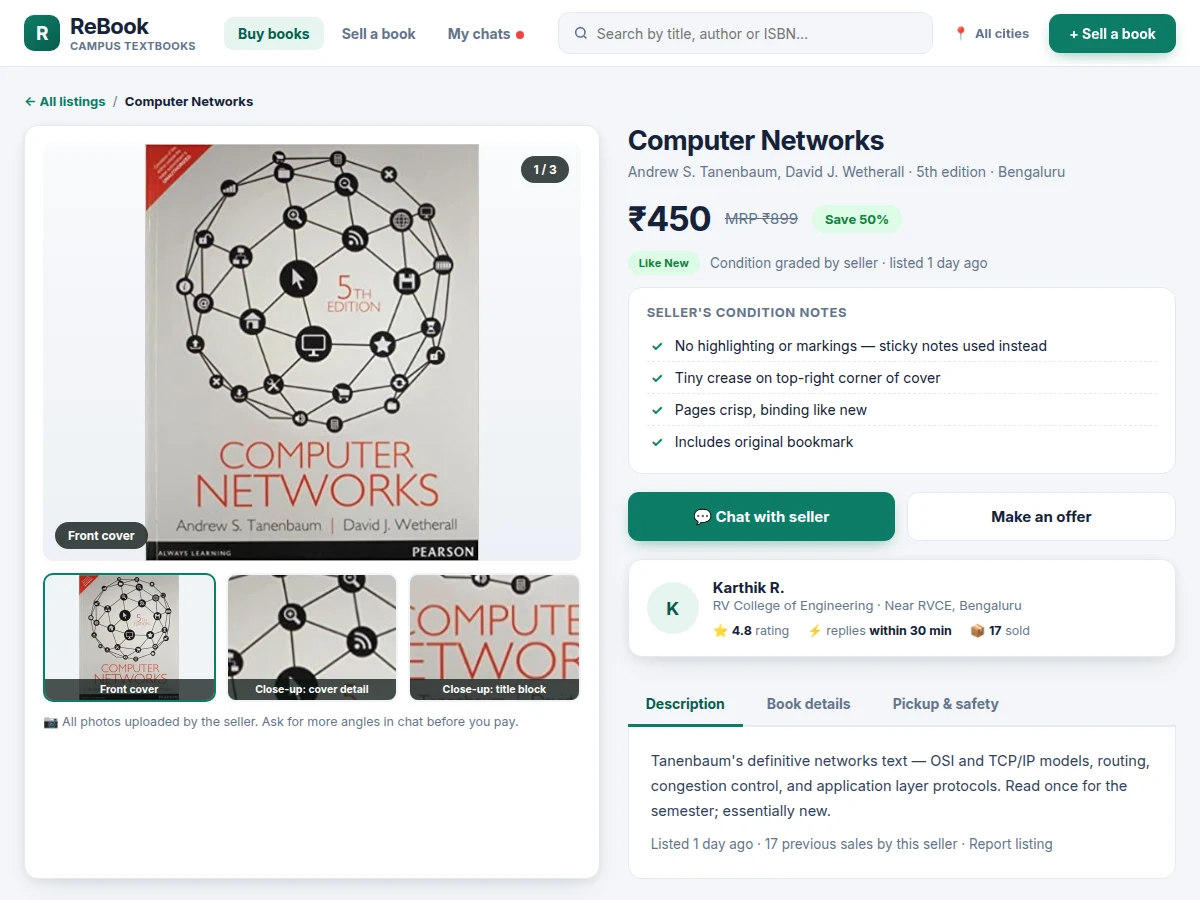
- A buyer searches by title, author or ISBN, filters by condition and city, sorts by price or discount, and opens a listing to see the full photo gallery and the seller's condition notes.
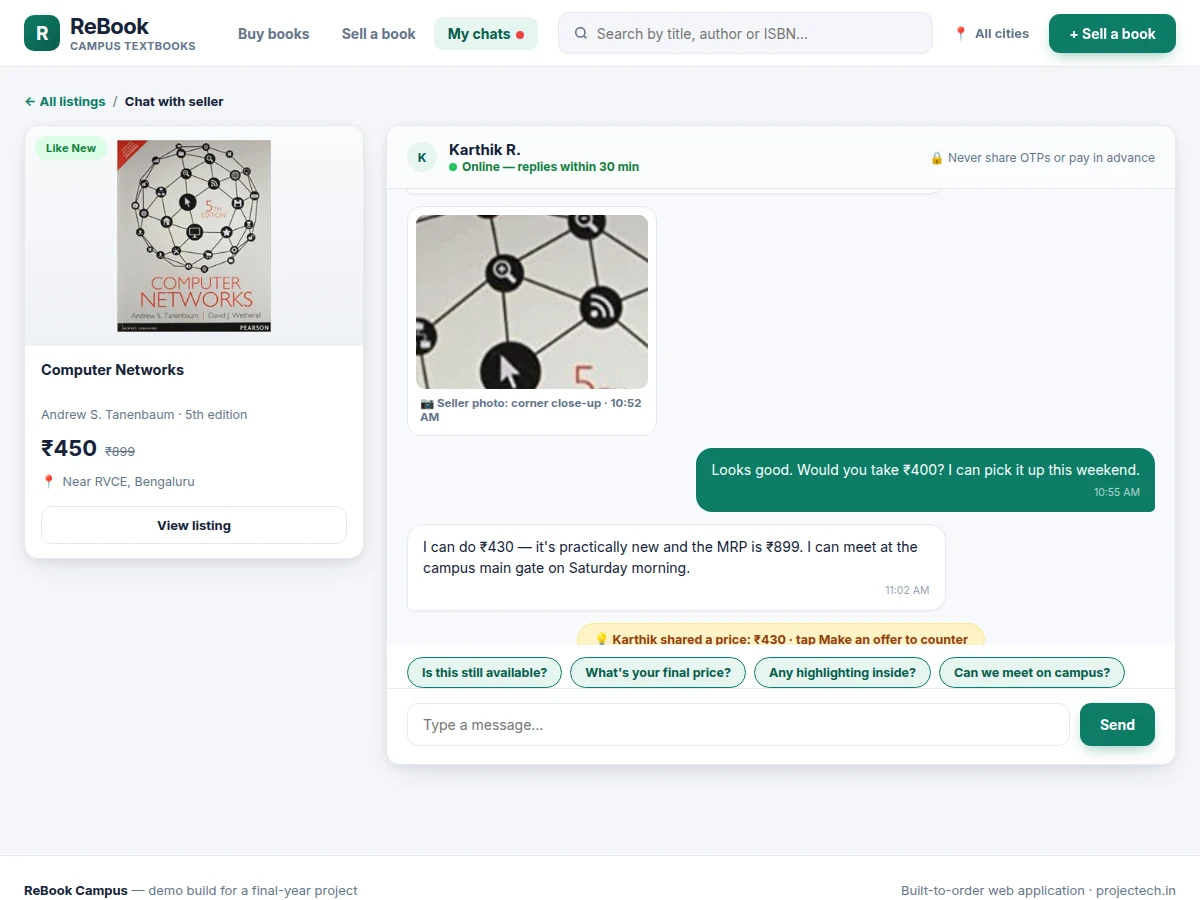
- The "Chat with seller" button opens a dedicated thread for that listing; quick replies cover the standard questions so the conversation starts fast.
- Buyer and seller negotiate in the thread and can share extra condition photos; structured offers record each proposal and counter with the amounts visible.
- They agree on a campus pickup point — the demo suggests public campus spots — and the agreed price is recorded in the thread.
- After the exchange the buyer rates the seller, which updates the public rating and response-time figures on the seller's profile.
Tech stack:
- HTML5, CSS3, JavaScript (ES6)
- Single-file front-end app (no build step)
- Browser LocalStorage (demo data persistence)
- Responsive CSS grid layout
- REST API contract documentation (for backend integration)
- Static-hosting deployment guide
| Parameter | Value |
|---|---|
| Listings in demo seed data | 8 listings |
| Condition grades | 4 (Like New, Very Good, Good, Fair) |
| Photos per listing in demo | 3 photos |
| Chat quick-reply prompts | 4 prompts |
| Demo file size | Approximately 600 KB (single HTML file) |
| Demo load time | Approximately 1 s on broadband (expected) |
| Supported viewport widths | 360 px to 1920 px (responsive, design target) |
| Browsers | Latest Chrome, Edge, Firefox (expected) |
| Currency | INR only |
| UI language | English only |
Project features
- [Listings marketplace] A searchable grid of used textbooks where each card shows the real cover photo, asking price with the MRP struck through, the discount percentage, a condition badge, the city, and the seller's rating.
- [Condition photo gallery] Every listing carries multiple seller-uploaded photos — front cover plus close-up detail shots — with captions, so buyers inspect the actual copy before starting a conversation.
- [Four-grade condition scale] Sellers grade each book as Like New, Very Good, Good or Fair and attach written condition notes (highlighting, binding, missing pages), giving buyers a consistent vocabulary for used-book condition.
- [In-app buyer-seller chat] A per-listing conversation thread with timestamps, photo sharing inside the chat, and quick-reply prompts for the questions every buyer asks — availability, final price, highlighting, and meeting point.
- [Structured price offers] Buyers propose a price and sellers counter inside the chat; each offer is recorded in the thread so both sides see the negotiation history instead of scrolling back through messages.
- [Search, filters and sorting] Find books by title, author or ISBN, narrow by condition grade and city, and sort by price or by biggest discount off MRP.
- [Sell-a-book flow] A listing form with photo upload and preview, a visual condition picker with plain-language definitions, MRP-based price guidance, and a live card preview that updates as the seller types.
- [Seller profiles and ratings] Each seller shows a star rating, typical response time and completed-sale count, so buyers can weigh trust before they chat.
What is included
- Complete single-file web application source (listings grid, listing detail with photo gallery, in-app chat, sell-a-book flow)
- Realistic seed dataset: 8 listings with real book titles, editions, Indian prices, condition notes and seeded chat conversations
- Database schema and REST API endpoint documentation for connecting a production backend
- Project report PDF (problem analysis, design decisions, data model, screen walkthrough)
- PPT presentation for final review
- Viva Q&A preparation document (marketplace design, state management, chat UX, deployment)
- Static-hosting deployment guide
Limitations & prerequisites
- The demo runs entirely in the browser with seeded data — there is no live backend, and the simulated seller replies reset when the page reloads (demo state persists in LocalStorage).
- Payment is deliberately out of scope: the project assumes in-person campus exchange, and the UI says so explicitly rather than pretending to handle money.
- Condition grades are seller-declared and the portal does not verify them; trust rests on photos, chat evidence and seller ratings.
- No real user accounts or authentication ship in the demo; the login and session endpoints are documented in the API contract for the built version.
- The UI is English-only and prices are INR-only; multi-language and multi-currency support are listed as future scope.
- Demo photo upload uses the browser file picker; production image storage (object store plus CDN) is documented, not implemented.
Frequently Asked Questions
How do the condition photos work?
Sellers upload a front-cover shot plus close-up detail photos of each listing, shown in a captioned gallery on the detail page. Buyers can ask for more angles inside the chat, and the seller can share additional photos directly in the thread before anyone travels to meet.
Does the project include a backend?
The demo is a single-file front-end with realistic seeded data so it runs anywhere. The built-to-order package adds the database schema and a documented REST API contract — listings, threads, messages, offers, ratings — so a backend can be implemented against it without redesigning the app.
How do buyer and seller agree on a price?
Through structured offers inside the per-listing chat: the buyer proposes an amount, the seller counters, and each step is recorded in the thread with the amounts visible, ending in an agreed price both sides can refer back to at pickup.
How is this better than selling in a WhatsApp group?
Listings are structured and searchable instead of buried in a scrolling chat, every book has condition photos and a standard grade, prices sit next to the MRP, and each deal gets its own thread — so nothing about the negotiation gets lost.
What stops fake listings or disputes?
Seller ratings with completed-sale counts, photo evidence preserved in chat threads, and pickup guidance that keeps exchanges on campus in public spots. A formal moderation and reporting workflow is scoped as future work in the report.
Is this project suitable for a final-year project?
Yes — for Computer Science, IT and Web Development programs. It covers marketplace data modeling, front-end state management across four views, chat UX design, and honest scoping of what a demo proves versus what a production backend would need.
Components & software requirements
- HTML5, CSS3, JavaScript (ES6)
- Single-file front-end app (no build step)
- Browser LocalStorage (demo data persistence)
- Responsive CSS grid layout
- REST API contract documentation (for backend integration)
- Static-hosting deployment guide
Delivery information
Built-to-order project. Delivery timeline is shared after order confirmation based on current queue.
Support terms
Complete documentation, setup guide, and viva preparation included. Support for setup and explanation provided.
Download free synopsis (PDF)
Enter your name and email — the synopsis PDF downloads immediately. We may send occasional project updates; no spam, unsubscribe anytime.