
More project photos (2)
The problem
A passenger with a confirmed railway ticket still faces three small questions at the station: is my PNR confirmed, which coach is mine, and where is the train right now? The Train PNR Status Android App answers all three from one 10-digit number, and its headline feature is a platform coach-position map that shows where each coach stops, so a passenger with luggage can stand at the right marker instead of running along the platform when the train arrives. The app reads a stored reservation record for the PNR, draws the train's coach order as blocks along the platform, and compares the published timetable with the latest station events to build a running-status timeline. The demo is built around the 12951 Mumbai Rajdhani Express from Mumbai Central to New Delhi, a 1,386 km overnight service, and it deliberately contains no booking flow, no fares and no payment — it only reports status, position and running information.
Enters a 10-digit PNR or picks one from the saved list.
Follow the working sequence
How it works
The app is a thin client over an enquiry API: every screen reads the same reservation record, so the coach and berth a PNR shows are the ones the coach-position map highlights. A passenger types a 10-digit PNR and the app sends it to the API, which returns the record — train, journey date, route, class, chart status and each passenger's coach and berth. The coach-position screen reads one ordered coach list for that train and date and draws each coach as a block along the platform, highlighting the block matching the PNR's coach code. Running status compares the published timetable against the latest station events, marking each halt departed, due or scheduled with its delay. A PNR is only a pointer to a reservation record, so the app never stores the ticket itself — it only reads the record's current state, which is why one booking can show confirmed, RAC or waitlisted passengers side by side.
- The passenger opens the app and enters a 10-digit PNR, or picks one from the saved PNR list.
- The app sends the PNR to the enquiry API, which returns the stored reservation record for that number.
- The PNR screen renders the train, journey date, route, class, chart status and every passenger's coach, berth and status.
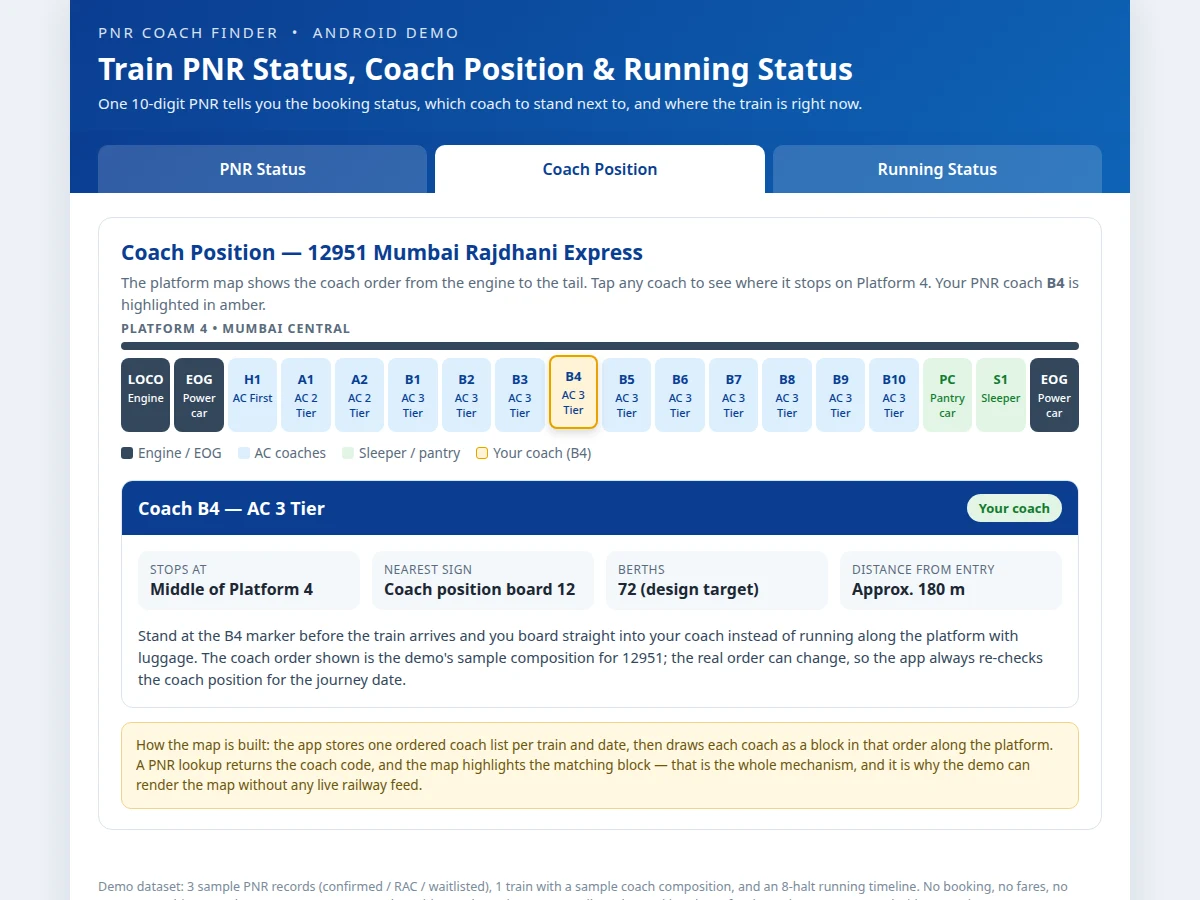
- The coach-position screen reads the ordered coach list for the train and date and draws the 18-coach map along the platform.
- The passenger's coach block is highlighted on the map with its stopping point and nearest coach-position board.
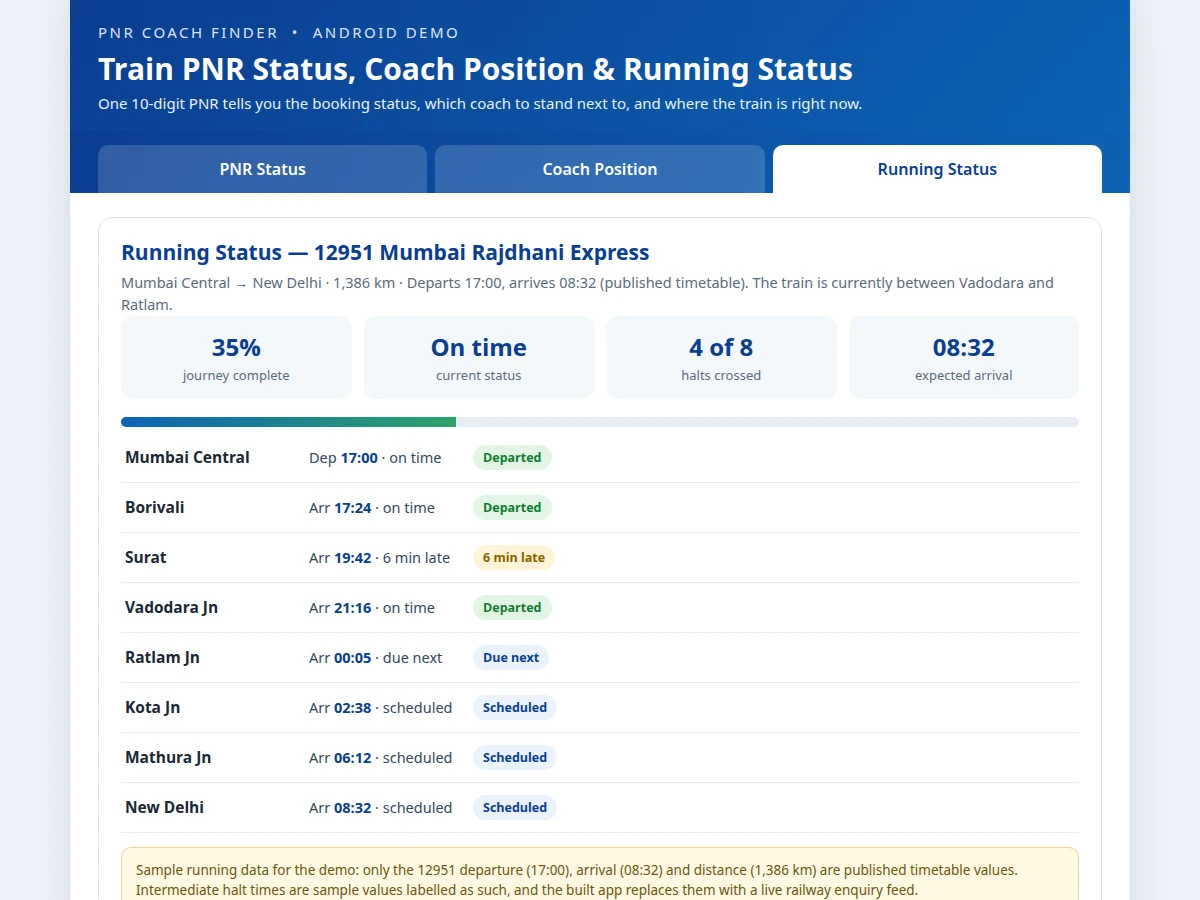
- Running status reads the published timetable and station events, then renders the 8-halt timeline with scheduled versus actual times and the delay at each halt.
This app vs separate status apps
| Aspect | This app | Separate PNR and running-status apps |
|---|---|---|
| PNR enquiry | 10-digit PNR resolves to coach and berth per passenger | PNR status only, with no link to the coach |
| Coach position | Full platform map with the passenger's coach highlighted | No coach-position information at all |
| Running status | Station-by-station timeline with the delay at each halt | Live status only, with no booking context |
| Saved journeys | Saved PNR list keeps every journey in one place | Re-enter the PNR for every check |
| Booking flow | None — status, position and running only | Often bundled with booking and fares |
| Offline demo | Demo dataset works without a live connection | Needs a live connection for every lookup |
Tech stack:
- Android Studio, Java
- Android SDK (API level 33)
- Retrofit · REST API · JSON
- MySQL · PHP backend
- SQLite local cache
- HTML5 · CSS · JavaScript (working demo)
- Git
| Parameter | Value |
|---|---|
| Platform | Android, API level 33 (design target) |
| PNR format | 10 digits (Indian Railways standard) |
| Booking flow | None — status, position and running only (by design) |
| Demo trains | 1 (12951 Mumbai Rajdhani Express, demo dataset) |
| Sample PNR records | 3 — confirmed, RAC and waitlisted (demo build) |
| Coach composition | 18 coaches in the demo map (sample composition) |
| Running-status halts | 8 (12951 published halts) |
| 12951 route | Mumbai Central → New Delhi, 1,386 km (published timetable) |
| 12951 schedule | Departs 17:00, arrives 08:32, 15h 32m (published timetable) |
| Demo screens | 3 (PNR status, coach position, running status) |
Project features
The app's strongest capabilities are its 10-digit PNR enquiry with per-passenger coach and berth details, its platform coach-position map that highlights the passenger's own coach, and its station-by-station running-status timeline for the 12951 Mumbai Rajdhani Express. PNR enquiry resolves a number to the train, journey date, route, class, chart status and each passenger's status — confirmed, RAC or waitlisted — shown separately. The coach map draws the train's 18-coach order from engine to tail along the platform, so the passenger can see that coach B4 stops near the middle of Platform 4 at Mumbai Central. Running status follows the train across its 8 published halts with scheduled and actual times and the delay at each stop. Around those three capabilities, the app adds a saved-PNR list and a demo dataset that works without any live railway connection.
- [10-digit PNR enquiry] Enter a PNR to see the train, journey date, route, class, chart status and every passenger's coach and berth, with confirmed, RAC and waitlisted shown separately.
- [Platform coach-position map] The train's full coach order is drawn as blocks along the platform; tapping a coach shows where it stops and the nearest coach-position board, and the passenger's own coach is highlighted.
- [Live running-status timeline] The 12951 Mumbai Rajdhani Express is followed across its 8 published halts, each with scheduled and actual times and the delay at that stop, plus journey progress and expected arrival.
- [Per-passenger berth details] Each passenger's coach, berth number and berth type (lower, middle, upper) are shown, so a family can see at a glance who sits where.
- [Chart-status display] The app shows whether the chart is prepared, which decides whether a waitlisted or RAC passenger has a confirmed berth yet.
- [Saved PNR list] Checked PNRs stay in one list with their current status, so a passenger can re-check a journey without retyping the 10-digit number.
- [Offline demo dataset] The demo ships with 3 sample PNR records and the 8-halt running-status timeline, so every screen works end to end without a live railway connection.
- [Coach-position reminder] The PNR result names the coach's stopping point on the platform, so the passenger knows where to stand before reaching the station.
What is included
- Complete Android app source code (Java, Android Studio project)
- MySQL database schema with a PHP REST API for PNR lookup, coach positions and running status
- Working single-file HTML demo of the 3 screens (PNR status, coach position, running status)
- Demo dataset: 3 sample PNR records, an 18-coach position map and the 8-halt running-status timeline
- Project report PDF (background, problem statement, methodology, system working, outcomes)
- PPT presentation for final review
- Viva Q&A preparation document (PNR lifecycle, coach-position logic, chart preparation, REST design)
- Typical build timeline: approximately 3–4 weeks from requirements confirmation to delivery (expected)
- To get this project, message Projectech on WhatsApp with the project name, your branch and your deadline — you receive a written quotation stating the exact scope, the price and the delivery date before any payment.
Limitations & prerequisites
- The demo does not connect to the live railway enquiry system; PNR lookups and running status run against the bundled sample dataset.
- The coach order in the demo is a sample composition for 12951; the real order can change, so the built app must re-check the coach position for the journey date.
- Only the 12951 departure (17:00), arrival (08:32) and distance (1,386 km) are published timetable values; intermediate halt times in the demo are sample values and must be replaced with timetable data before any real use.
- The app reports status only — it cannot book, cancel or modify a ticket, and it cannot create a real PNR without authorised access.
- Real PNR data belongs to the railway system; the app can only display what the connected API returns.
- Running status in the demo simulates station events from the published timetable; live GPS or railway-feed integration is future scope.
Frequently Asked Questions
What is a PNR and how does the enquiry work?
A PNR is the 10-digit Passenger Name Record number issued when a railway ticket is booked, and it is the single pointer to that reservation, so entering it lets the app pull the whole booking — train, journey date, route, class, chart status and every passenger's coach and berth — from the enquiry API in one lookup. In the demo, 3 sample PNRs are included — one confirmed, one RAC and one waitlisted — so all three states can be shown and compared on the same screen.
How does the coach-position map know where my coach stops?
The app stores one ordered coach list per train and journey date, draws each coach as a block in that order along the platform, and highlights the block matching the coach code returned by the PNR lookup, together with its stopping point and the nearest coach-position board. In the demo, coach B4 of the 12951 stops near the middle of Platform 4 at Mumbai Central, about 180 m from the entry. The real coach order can change, so the built app re-checks the position for the journey date.
How does running status know where the train is?
Running status compares the train's published timetable against the latest station events — each halt's scheduled time against its actual arrival or departure — and marks every halt departed, due or scheduled, with the delay shown at each stop, so a passenger waiting at the next station knows whether to hurry or relax. The demo walks the 12951 across its 8 published halts. Only the departure (17:00), arrival (08:32) and distance (1,386 km) are published timetable values; intermediate halt times are sample values, and the built app would read a railway enquiry feed instead.
Can I book a ticket or check berth availability in this app?
No — this app deliberately has no booking flow, no berth-availability search and no fares, because it only reports PNR status, platform coach position and running status for a ticket that already exists, and booking, availability and fares belong to a separate reservation app. Projectech's separate Train Ticket Reservation project covers that flow. Keeping this app to three read-only screens is what makes it small enough to build well and explain clearly in a review.
What happens if my PNR is waitlisted or RAC?
A waitlisted PNR shows its waitlist position and an RAC PNR shows its shared-seat details on the same screen as confirmed passengers, while the chart-status display tells you whether the chart is prepared yet, which is what decides whether a waitlisted or RAC passenger has moved to a confirmed berth. In the demo, sample PNR 6392058174 is waitlisted at positions 12 and 13, and sample PNR 4719082356 is RAC, so both states can be shown without a real ticket.
Is this project suitable for a final-year project?
Yes — for Computer Science, IT and Electronics & Telecommunication programs, because it demonstrates Android app development, REST API design, MySQL database modelling and JSON data handling around a genuinely different feature, the platform coach-position map, with a working demo a reviewer can tap through. The three read-only screens keep the scope tight while still showing real client-server thinking.
Components & software requirements
- Android Studio, Java
- Android SDK (API level 33)
- Retrofit · REST API · JSON
- MySQL · PHP backend
- SQLite local cache
- HTML5 · CSS · JavaScript (working demo)
- Git
Delivery information
Built-to-order project. Delivery timeline is shared after order confirmation based on current queue.
Support terms
Complete documentation, setup guide, and viva preparation included. Support for setup and explanation provided.
Download free synopsis (PDF)
Enter your name and WhatsApp number — the synopsis PDF downloads immediately. We may send occasional project updates on WhatsApp; no spam.