
More project photos (2)
The problem
To-Do List App with Priority Tags, Reminders and Offline Storage is an Android productivity app that gives every task an explicit priority, a due date and a system-scheduled reminder, while keeping all data in an on-device database so nothing depends on the internet. It is built for students who juggle assignments, exam preparation, project milestones and daily errands across scattered notes and chat messages, where urgent deadlines slip among equally-weighted items. The app forces a High, Medium or Low priority decision up front, surfaces overdue items first, and fires reminders through the Android alarm framework even when the app is closed. Search spans titles, notes and tags, filters slice the list by priority or by tasks carrying reminders, and a statistics screen reports completion rate, priority mix and tag breakdowns computed live locally. The stack is modern Android throughout — Kotlin, Jetpack Compose with Material 3, and the Room persistence library — so the codebase doubles as interview-relevant mobile-development experience.
Paper lists get lost and generic reminder apps treat every task as equally urgent, which is exactly how important deadlines slip. Cloud-synced alternatives add accounts, subscriptions and a hard internet dependency that fails in low-connectivity hostels and campuses. This project answers with a single-user, offline-first design: explicit prioritization up front, reminders that do not need the app open, and a local database as the single source of truth. The working demo ships with 19 realistic student tasks so every screen can be evaluated immediately.
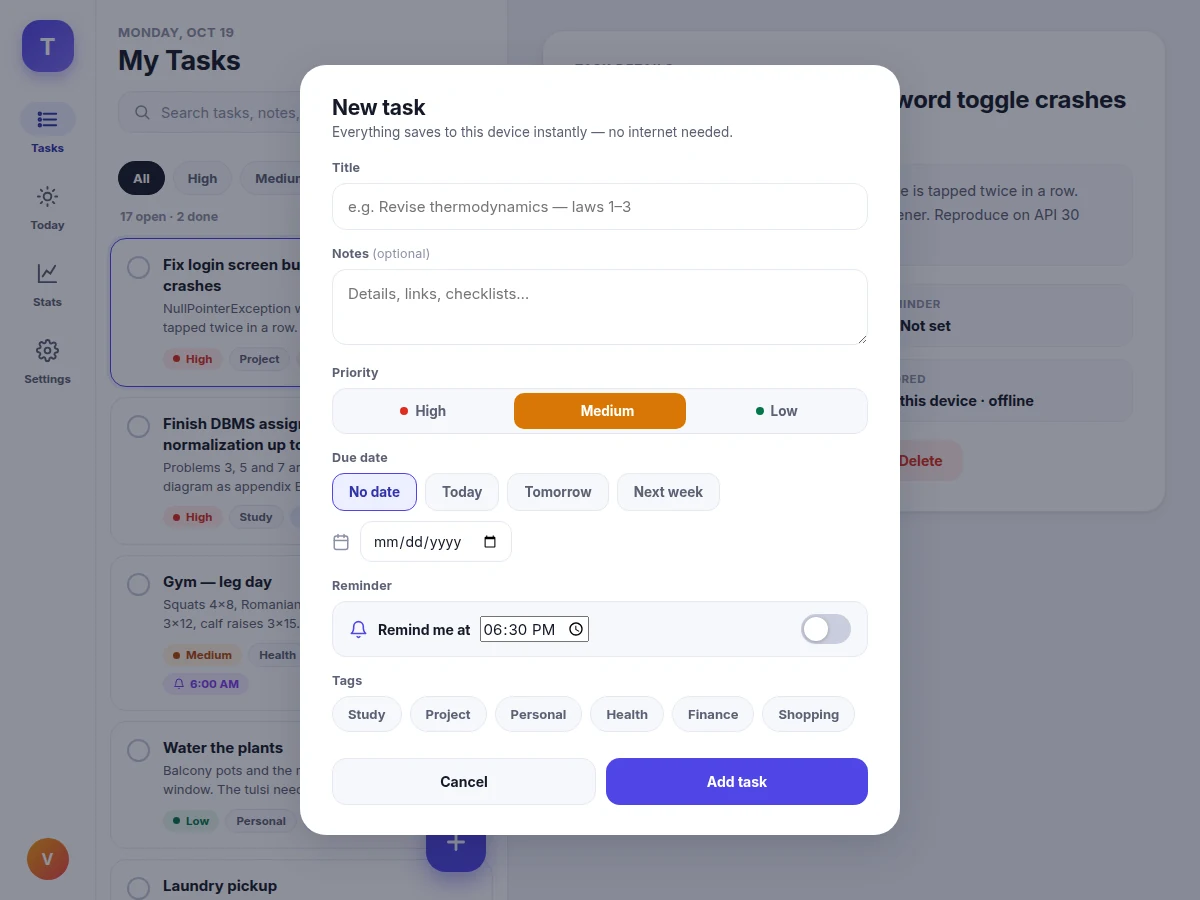
The user creates a task and sets a reminder time in the TaskFlow app.
How it works
Creating a task writes one row into the Room database — title, notes, priority, tags, due date, reminder time, status and timestamps, 11 fields in total — and the task list observes the database as a reactive stream, so the UI updates instantly with no manual refresh. Open tasks sort overdue-first, then by due date, then priority; completed tasks sink with a strikethrough. Setting a reminder stores its trigger time in the same row and registers an exact alarm with the Android alarm service; on firing, a receiver posts a notification that deep-links to the task, and a boot receiver re-registers pending alarms after restart. Toggling a task complete stamps its completion time, feeding the completion ring and counts on the statistics screen. Search and filters run as database queries. Because the database is the single source of truth and lives entirely on the device, the whole flow behaves identically with zero connectivity.
- The Task entity defines 11 fields (title, notes, priority, tags, due date, reminder time, reminder-fired flag, completion status, created and completed timestamps) in a Room database.
- A DAO exposes the task list as a reactive Flow; the repository hands it to ViewModels and Compose screens re-render automatically on every write.
- Creating or editing a task opens the task sheet — title, notes, priority selector, due-date chips or calendar picker, reminder toggle with time, and tag multi-select — and saves one database row.
- The list sorts open tasks by overdue first, then due date, then priority; the Today view shows only tasks due today or overdue.
- Setting a reminder registers an exact alarm with the Android alarm service and stores the trigger time in the task row.
- When an alarm fires, a broadcast receiver posts a notification that opens the task directly; a boot receiver re-registers pending alarms after restart, and each fired reminder is flagged in storage so it never fires twice.
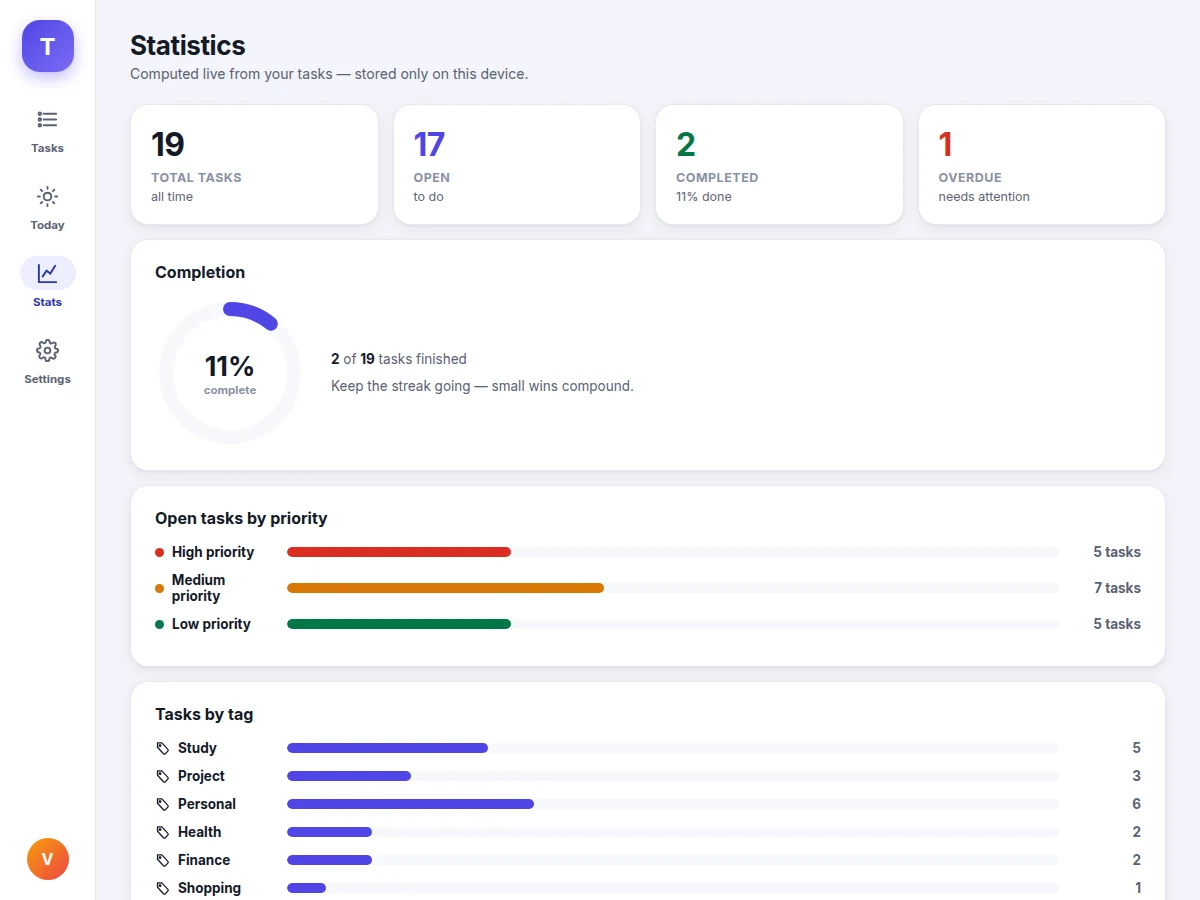
- Toggling completion stamps the task done; the statistics screen aggregates counts, completion percentage, priority mix and tag breakdowns live from the database.
Tech stack:
- Kotlin
- Jetpack Compose · Material 3
- Room persistence library (SQLite)
- AlarmManager · WorkManager (reminder scheduling)
- Gradle build system
- JavaScript · HTML · CSS (interactive demo)
| Parameter | Value |
|---|---|
| Platform | Android 8.0 (API 26) and above (design target) |
| Language and UI | Kotlin with Jetpack Compose and Material 3 |
| Local database | Room (SQLite), stored on-device only |
| Fields per task | 11 (title, notes, priority, tags, due date, reminder time, reminder-fired flag, status, 2 timestamps) |
| Priority levels | 3 — High, Medium, Low |
| App views | 4 — Tasks, Today, Statistics, Settings |
| Sample data footprint | 6,082 bytes for 19 tasks, approximately 5.9 KB (measured in the demo build) |
| Reminder delivery | System alarm scheduler; fires with the app closed, re-registered after reboot |
| Exact-alarm permission | Required on Android 12+ (user-granted; documented in the setup guide) |
| Network dependency | None — 100% of features work offline (design) |
| Demo file | Single HTML file, approximately 46 KB, runs offline in any modern browser |
Project features
The app is organized around four capabilities that work together: priority tags, system-scheduled reminders, fully offline storage, and a live statistics dashboard. Every task carries a High, Medium or Low priority chosen at creation time, and the list sorts overdue items first so the most urgent work is impossible to miss. Reminders are registered with the Android alarm framework, which means they fire at the set time even when the app is closed, and the receiver re-registers them after a device reboot. All 11 fields of every task live in a Room database on the device itself — measured at just 6,082 bytes for the 19-task demo set, about 5.9 KB — so airplane mode changes nothing. The statistics screen then turns that local data into completion rate, priority distribution and tag breakdowns, computed live with every toggle.
- [Priority tags on every task] Each task is tagged High, Medium or Low at creation, shown as a color-coded pill; the list can be filtered to one priority and the stats screen breaks open work down by priority.
- [System-scheduled reminders] Pick a time per task and the OS alarm framework fires a notification even with the app closed; alarms are re-registered automatically after reboot, and each fired reminder is marked in storage so it never double-fires.
- [Fully offline Room database] All tasks persist in an on-device Room (SQLite) database — no account, no server, no internet needed for any feature, verified in the demo where every screen works with networking disabled.
- [Due dates with overdue surfacing] Optional due dates with Today, Tomorrow and calendar pickers; overdue tasks rise to the top of the list with a red marker and feed the overdue count on the dashboard.
- [Search, filters and tags] Full-text search across titles, notes and tags, plus one-tap filters for All, each priority level, and tasks carrying reminders; free-form tags (Study, Project, Personal, Health, Finance, Shopping) organize across contexts.
- [Statistics dashboard] Total, open, completed and overdue counts, a completion ring, priority-distribution bars, per-tag breakdowns and upcoming reminders — every number computed live from the local database.
- [Adaptive Material 3 interface] Four views — Tasks, Today, Statistics, Settings — in an adaptive layout: bottom navigation on phones, navigation rail with a task-detail pane on tablets, all in Material 3 styling.
- [Data export and reset] One-tap JSON export of all tasks for backup, plus demo-data reset and full erase, all handled on-device without any cloud step.
What is included
- Complete Android source code (Kotlin, Jetpack Compose, Room, alarm scheduling)
- Single-file interactive demo mirroring the app's screens and logic, with 19 realistic sample tasks
- Project report PDF (architecture, Room schema, alarm-scheduling design, methodology)
- Abstract PDF (10-section, matching this page)
- PPT presentation for final review
- Viva Q&A preparation document (Room and DAOs, Compose state management, AlarmManager, offline-first design)
- Setup and build guide (Android Studio, emulator or physical device, permission notes)
Limitations & prerequisites
- On Android 12 and above, exact alarms need the user-granted SCHEDULE_EXACT_ALARM permission; without it, reminders fall back to inexact timing windows.
- Aggressive battery optimization on some OEM skins can delay alarms; the setup guide documents the exemption step, but behavior varies by device.
- The design is single-user with no accounts and no cloud sync — multi-device synchronization is future scope, not included.
- In the browser demo, reminders fire only while the tab is open; the native Android build uses the OS alarm scheduler instead.
- Reminder logic (fired-flagging, reboot re-registration design) was verified in the demo build, not across a physical device farm — device-specific timing should be buyer-tested.
- Search is local text matching over titles, notes and tags; it does not do semantic or voice search.
Frequently Asked Questions
How do the reminders work?
Each reminder is registered with Android's alarm service for its trigger time, so the notification fires even when the app is closed; a boot receiver re-registers pending alarms after a restart, and every fired reminder is flagged in the database, preventing double-fires. On Android 12 and above the app requests the SCHEDULE_EXACT_ALARM permission — without it, the OS only allows inexact windows, which the setup guide explains. In the interactive demo the same logic runs in the browser tab, firing an in-app alert while the page is open.
Does the app really work without internet?
Yes — every feature works fully offline. All tasks live in a Room (SQLite) database on the device itself: creating, editing, prioritizing, searching, filtering and the statistics dashboard never touch the network, and reminders are delivered by the OS alarm scheduler, not a server. The demo proves this directly: disable networking and every screen behaves identically, and the 19-task sample set occupies only about 5.9 KB on disk.
Which is the main technology used?
Kotlin with Jetpack Compose and Material 3 for the user interface, and the Room persistence library (SQLite) for storage — the current recommended stack for native Android development. Reminders use AlarmManager with WorkManager as the scheduling companion, and the project builds with Gradle in Android Studio. The evaluation demo is a single HTML, CSS and JavaScript file that mirrors the app's screens and data logic.
Can this project be customized?
Yes, within realistic bounds. Common requests include recurring tasks with auto-rescheduling reminders, home-screen widgets, subtask checklists inside a task, additional tags or custom priority labels, an opt-in cloud backup layer over the local database, and UI theming with adjustable statistics. College-specific documentation formatting can also be arranged. Each customization is scoped separately against timeline and technical feasibility.
What are the main limitations?
Exact alarms need a user-granted permission on Android 12+, some phone makers delay alarms under aggressive battery saving, and the app is single-user with no cloud sync by design. The demo's reminders only fire while the browser tab is open — the native build uses the OS scheduler instead. These are documented honestly in the report so there are no surprises in the viva or the review.
Is this project suitable for a final-year project?
Yes — for Computer Science and IT programs. It demonstrates modern native Android development end to end: Room database design with reactive queries, Jetpack Compose state management, Material 3 interface design, and background alarm scheduling with reboot handling — plus an offline-first architecture and a working demo that makes the viva discussion concrete.
Components & software requirements
- Kotlin
- Jetpack Compose · Material 3
- Room persistence library (SQLite)
- AlarmManager · WorkManager (reminder scheduling)
- Gradle build system
- JavaScript · HTML · CSS (interactive demo)
Delivery information
Built-to-order project. Delivery timeline is shared after order confirmation based on current queue.
Support terms
Complete documentation, setup guide, and viva preparation included. Support for setup and explanation provided.
Download free synopsis (PDF)
Enter your name and WhatsApp number — the synopsis PDF downloads immediately. We may send occasional project updates on WhatsApp; no spam.