
More project photos (5)




The problem
In most Indian colleges, a student with a grievance — a wrongly charged exam fee, a hostel water purifier that has not worked for a week, a flickering lab projector — has nowhere dependable to complain. The Student Grievance Redressal Portal with Escalation Workflow and Committee Dashboard answers this gap, because today such issues travel as word-of-mouth to a class teacher, a register entry at the warden's office, or informal messages nobody tracks. There is no ticket number, no promised response time, and no record of what followed, so cases quietly die and students stop reporting. The portal replaces this informal chain with a structured, time-bound system: students file categorized grievances online and receive a ticket ID, and every category carries an SLA window (24 to 120 hours as a design target). If the department committee misses its window, the ticket auto-escalates to the institute committee and then the principal's office, while the dashboard shows every live SLA countdown.
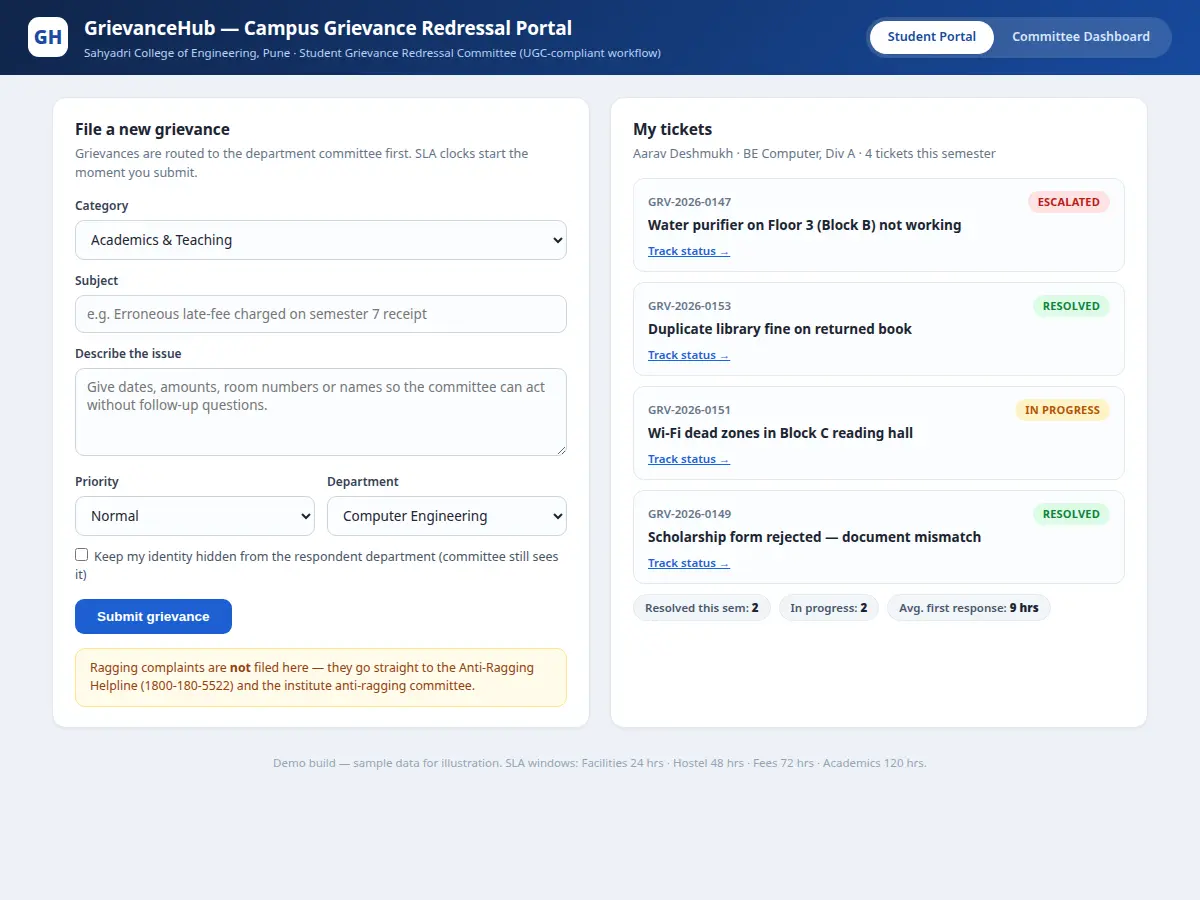
The student files a grievance under one of 8 categories with subject, priority and department.
Follow the working sequence
How it works
A student logs in, picks one of 8 grievance categories, and files the complaint with subject, description, priority and department; the portal creates a ticket ID such as GRV-2026-0147 and starts that category's SLA clock — 24 hours for facilities, 48 for hostel, 72 for fees, up to 120 for academics (all design targets). The ticket routes to the Level 1 department committee, which acknowledges it and posts progress remarks the student can read. The escalation engine watches every SLA window: at 50% elapsed it emails the owner, at 100% it reassigns the ticket to the Level 2 institute committee, and at 150% it escalates to the Level 3 principal's office. When the committee marks the ticket resolved, the student confirms the fix or reopens it within 7 days, while the dashboard aggregates resolution rate, average resolution hours, category distribution and pending-by-age into monthly review charts.
- The student registers, logs in, and files a grievance under one of 8 categories with a subject, description, priority and department.
- The portal creates a ticket ID (for example GRV-2026-0147), starts the category's SLA clock, and routes the ticket to the Level 1 department committee.
- The committee acknowledges the ticket; its live SLA countdown appears in the dashboard queue, sorted by urgency.
- The escalation engine fires at 50% of the SLA window (reminder email to the owner), 100% (auto-reassign to the next committee level with owner notification), and 150% (escalation to the principal's office).
- Committee members post timestamped remarks; the student watches the public status timeline from filing to resolution.
- On resolution, the student confirms the fix or reopens the ticket within 7 days; the dashboard folds every ticket into resolution-rate, average-time, category and pending-by-age analytics.
Builder note from the demo build: the committee queue re-renders its SLA countdowns on a 60-second interval, and a ticket row flips from the green countdown to the red "Breached" badge at exactly 100% of its SLA window — the same state the escalation engine evaluates before reassigning ownership.
Tech stack:
- HTML5 · CSS3 · JavaScript (ES6) for the student portal and dashboard
- Node.js · Express REST API for tickets, escalation rules and roles
- MySQL 8 relational store for tickets, users, committees and audit trail
- Chart.js for the committee dashboard's resolution analytics charts
- JWT-based authentication with student, committee and admin roles
- Nodemailer for SLA reminder and escalation email alerts
- CSV export of ticket data for monthly committee reviews
| Parameter | Value |
|---|---|
| Platform | Web application, desktop-first responsive layout |
| Frontend | HTML5 · CSS3 · JavaScript (ES6) |
| Backend | Node.js with Express REST API |
| Database | MySQL 8 (relational ticket store) |
| Authentication | JWT-based, 3 roles: student, committee member, admin |
| Grievance categories | 8 fixed categories (configurable in admin settings) |
| Ticket lifecycle | 5 stages: Filed → Acknowledged → In progress → Resolved → Closed |
| Escalation levels | 3 (department committee → institute committee → principal's office) |
| SLA windows | 24–120 hours per category (design target) |
| Escalation triggers | 50% reminder · 100% level-up · 150% principal's office |
| Queue refresh | 60-second interval in the committee dashboard (demo build) |
| Reopen window | 7 days after resolution |
| Report export | CSV download of committee analytics |
| Notifications | Email via SMTP (Nodemailer); SMS available as customization |
Project features
The portal's four most important capabilities are categorized grievance filing, SLA-based auto-escalation, the committee dashboard, and transparent ticket tracking. Filing offers 8 fixed categories — academics, fees, hostel, mess, library and laboratories, transport, placements, facilities — so every complaint reaches the right committee with priority and department attached. The escalation workflow binds an SLA window to each category: 50% elapsed triggers an owner reminder, 100% moves the ticket up one committee level, 150% reaches the principal's office — no human click needed. The committee dashboard shows the live queue sorted by urgency, per-ticket SLA countdowns, and analytics on resolution rate, average resolution time, category mix and pending-by-age. Every ticket also carries a public, timestamped status timeline, so students watch each state change instead of wondering whether their complaint was read.
- [Categorized grievance filing] Students file under 8 fixed categories — academics, fees, hostel, mess, library and labs, transport, placements, facilities — so every complaint lands with the right committee instead of a generic inbox, with priority and department attached.
- [SLA-based auto-escalation] Each category carries an SLA window (24–120 hours, design target). At 50% elapsed the owner gets a reminder email; at 100% the engine reassigns the ticket to the next committee level; at 150% it reaches the principal's office — no human clicks anything.
- [Committee dashboard] A live ticket queue sorted by urgency with per-ticket SLA countdowns, escalation badges, and owner assignment across the 3 committee levels.
- [Resolution analytics] Charts for resolution rate, average resolution time, tickets by category, and pending-by-age buckets, with CSV export for monthly committee reviews.
- [Public ticket timeline] Every ticket shows a timestamped status history — filed, acknowledged, in progress, escalated, resolved — so the student sees exactly what happened and when.
- [Role-based access] Three roles — student, committee member, admin — with JWT authentication; students can optionally hide their identity from the respondent department.
- [Reopen window] A resolved ticket can be reopened within 7 days if the fix did not hold, which keeps committees accountable for the quality of resolutions.
What is included
- Complete source code: student portal, committee dashboard and Express REST API
- MySQL schema with seed data (8 categories, 3 escalation levels, sample tickets)
- Setup and deployment guide for local and shared-hosting environments
- Project report PDF (background, workflow design, SLA rules, testing)
- Abstract PDF (10-section academic format)
- PPT presentation for the final review
- Viva Q&A document (workflow engines, SLA timers, role-based access, analytics queries)
Limitations & prerequisites
- Email notifications need a working SMTP account; SMS alerts are not in the base build and are offered as customization.
- SLA timers run on the server clock — pausing the clock for holidays and weekends is configurable but not automatic.
- The committee structure mirrors the UGC (Redressal of Grievances of Students) Regulations, 2023, but the portal is an academic build, not a certified compliance product.
- Anonymous filing hides the student's identity only from the respondent department; the committee chair still sees it, by design.
- Analytics reflect only tickets filed in the portal — complaints made offline never enter the charts.
- Concurrent load beyond a single college (thousands of simultaneous users) is untested; the design target is department-scale usage.
- Report export is CSV; formatted PDF reports are available as customization.
Frequently Asked Questions
Is this project suitable for a final-year project?
Yes — it fits Computer Engineering, Information Technology and MCA programs particularly well because it demonstrates role-based access control, a rule-driven workflow engine, time-based automation with SLA timers, relational database design, and a data-visualization dashboard — all standard, viva-friendly web engineering concepts. The build is substantial enough for a major project yet achievable in one semester with the included source and documentation.
How is this different from an anti-ragging portal?
They solve different problems. This portal handles everyday institutional grievances — fees, hostel, mess, academics, facilities — with a full ticket lifecycle and SLA-based escalation to committees, while an anti-ragging portal is a confidential reporting channel for harassment incidents with disciplinary handling. Ragging complaints are deliberately excluded here; the filing page redirects them to the national anti-ragging helpline and the institute's anti-ragging committee.
What happens when a committee misses an SLA deadline?
The ticket escalates automatically — nobody has to click anything. At 50% of the SLA window the owner receives a reminder email; at 100% the workflow engine reassigns the ticket to the next committee level and notifies the new owner; at 150% it reaches the principal's office. The breach stays recorded on the ticket timeline and in the committee analytics, so repeated misses surface in the monthly review.
Can a college change the categories and SLA windows?
Yes — both are configuration, not code. The 8 categories and their SLA windows live in the admin settings, so a college can rename categories, add new ones, or change a window from 48 to 72 hours without touching the source. Escalation levels and notification templates are configurable the same way, which adapts the portal to any institute's committee structure.
Is the database included, and can the portal be hosted online?
Yes on both counts. The project ships with the complete MySQL schema and seed data covering all 8 categories, the 3 escalation levels and sample tickets, plus working step-by-step setup instructions for local XAMPP and shared-hosting deployment including SMTP credentials for the email alerts. The database is populated from the first login, so the analytics charts render immediately. The backend is a standard Node.js and Express REST API with no exotic dependencies, so it runs on any host that supports Node.js.
What will I receive with the project?
The complete source code (student portal, committee dashboard, Express API, MySQL schema with seed data), the working demo build, setup and deployment instructions, the project report PDF, a viva Q&A document covering workflow-engine and SLA-timer design questions, and a PPT for the final review. Extras like SMS alerts or a mobile app are available separately based on requirements and timeline.
Components & software requirements
- HTML5 · CSS3 · JavaScript (ES6) for the student portal and dashboard
- Node.js · Express REST API for tickets, escalation rules and roles
- MySQL 8 relational store for tickets, users, committees and audit trail
- Chart.js for the committee dashboard's resolution analytics charts
- JWT-based authentication with student, committee and admin roles
- Nodemailer for SLA reminder and escalation email alerts
- CSV export of ticket data for monthly committee reviews
Delivery information
Built-to-order project. Delivery timeline is shared after order confirmation based on current queue.
Support terms
Complete documentation, setup guide, and viva preparation included. Support for setup and explanation provided.
Download free synopsis (PDF)
Enter your name and WhatsApp number — the synopsis PDF downloads immediately. We may send occasional project updates on WhatsApp; no spam.