
More project photos (2)
The problem
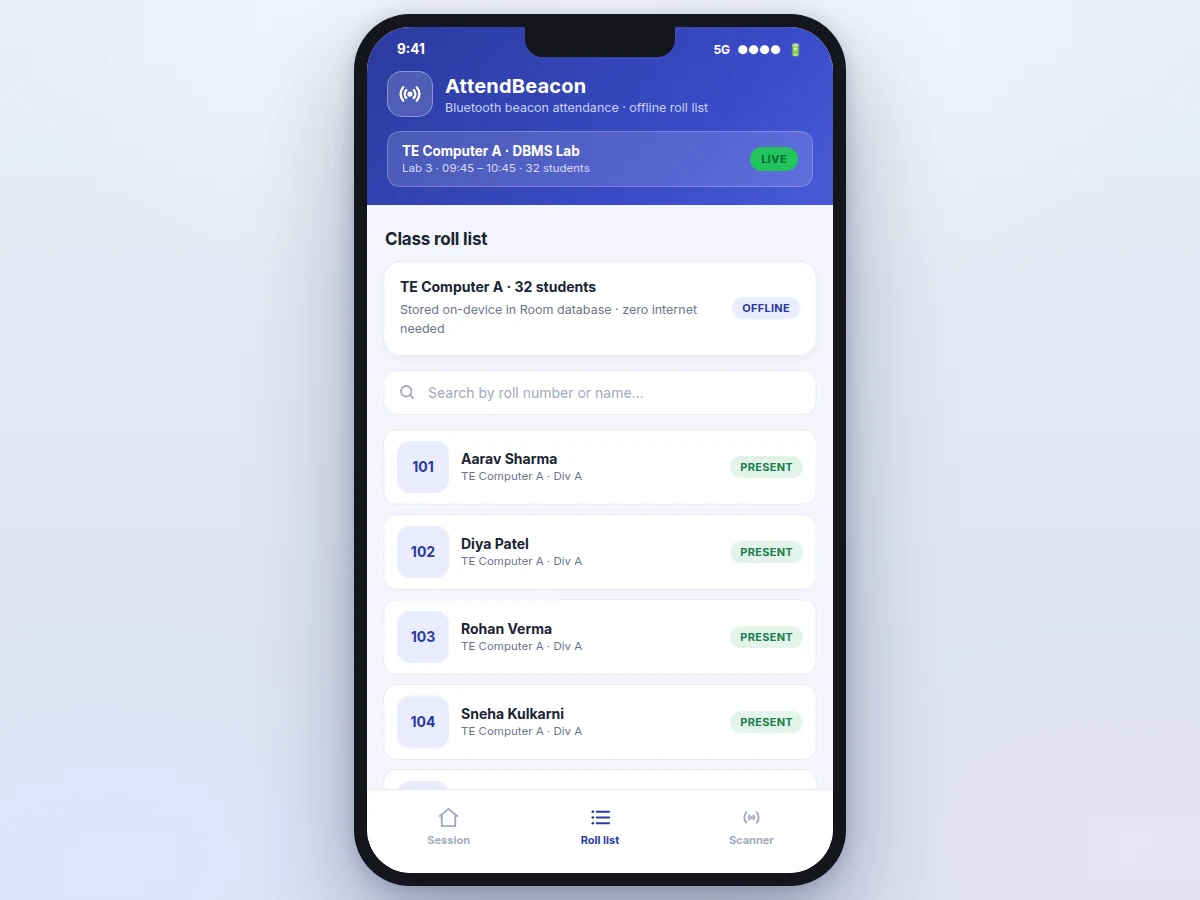
College attendance still runs on shouted roll calls and paper registers: a 60-student class can lose 8–10 minutes every period, proxy attendance is trivial to pull off, and the register itself is one fragile copy. The Student Attendance App with Bluetooth Beacon Auto-Marking and Offline Roll Number List replaces the roll call with radio proximity. The teacher's phone broadcasts a Bluetooth Low Energy beacon carrying a unique session ID; every student's phone runs the AttendBeacon app, which scans for that beacon in the background. When the received signal strength (RSSI) stays above a −70 dBm threshold — roughly inside the classroom — the app marks that student's roll number present in the on-device database, with no taps and no internet. The full class roll-number list is stored offline in a Room database, so a whole session runs on zero connectivity; teachers get manual override, a live session dashboard, and date-wise CSV export of attendance.
How it works
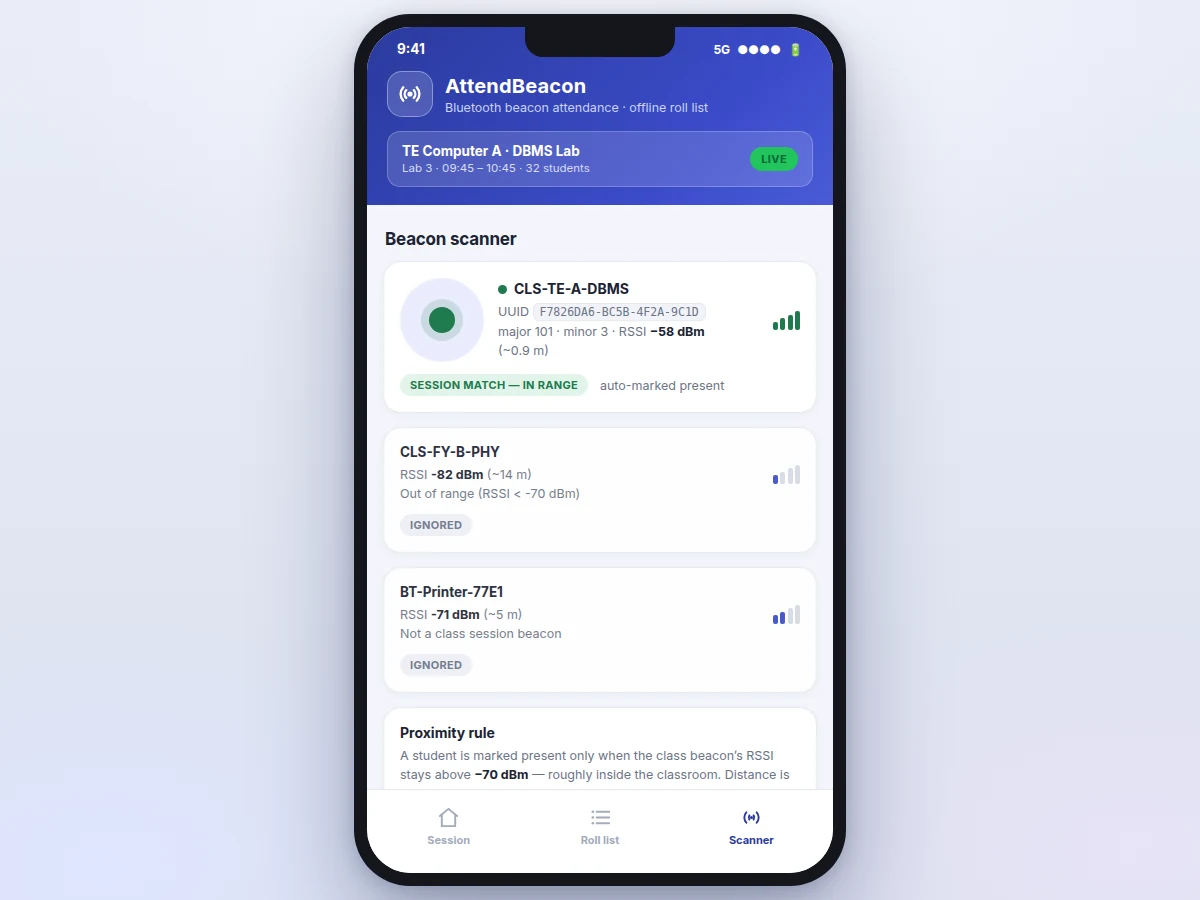
End to end: the teacher opens the app, selects the class and starts a session — and the teacher's phone begins advertising a Bluetooth Low Energy beacon packet carrying a 16-byte session UUID plus major and minor codes that identify the class and period, rebroadcast roughly every 100 ms. Each student's phone runs a background BLE scan; every received packet carries a signal-strength reading (RSSI) that falls as distance grows. The app keeps only packets matching the session UUID, converts RSSI to an estimated distance with the log-distance formula, and applies the proximity rule: an RSSI of −70 dBm or stronger — about 3 metres — means the student is inside the classroom. The moment that threshold is crossed, the app writes a timestamped PRESENT row for the student's roll number into the on-device Room database, which is also why the whole session runs offline. Weak or unknown beacons are ignored, and the teacher can override any entry manually.
- The teacher selects the class and starts a session; the teacher's phone advertises a BLE beacon packet — 16-byte session UUID, 2-byte major and 2-byte minor codes — rebroadcast approximately every 100 ms.
- Each student's phone runs a background BLE scan (BluetoothLeScanner); every received advertisement reports its RSSI, which weakens with distance.
- The app discards packets whose UUID does not match the session, then converts the beacon's RSSI to an estimated distance using the log-distance formula d = 10^((TxPower − RSSI) / (10 · n)), with TxPower −59 dBm calibrated at 1 m.
- When the beacon's RSSI reaches −70 dBm or stronger — roughly inside the classroom — the proximity rule fires and the app writes a timestamped PRESENT row for the student's roll number into the on-device Room database.
- The teacher watches the live session dashboard as rows flip to present; any entry can be corrected by hand and is tagged MANUAL for the record.
- When the session ends, the teacher exports the date-wise CSV. Everything — roll list, marks, log — stayed on the device; no internet was needed at any point.
Tech stack:
- Kotlin
- Android Jetpack (ViewModel · LiveData · Navigation)
- BluetoothLeScanner · BluetoothLeAdvertiser (Android BLE APIs, API 21+)
- Room database (offline-first storage)
- Kotlin Coroutines · Flow
- Material 3 (Material You UI)
- WorkManager (background scan scheduling)
- Date-wise CSV export
| Parameter | Value |
|---|---|
| BLE APIs | BluetoothLeScanner + BluetoothLeAdvertiser, Android 5.0 (API 21) and above (official Android APIs) |
| Beacon packet | 16-byte session UUID + 2-byte major + 2-byte minor (iBeacon-style layout) |
| Advertising interval | 100 ms – 1 s, configurable (Approximate) |
| Proximity threshold | RSSI ≥ −70 dBm, approximately within 3 m (design, configurable per room) |
| Detect-to-mark latency | Approximately 44 ms in the concept build's browser demo (measured); under 2 s in the app (design target) |
| Roll list capacity | 32 students in the demo seed; thousands supported (design) |
| Storage | On-device Room (SQLite) database; zero internet required |
| Roles | Teacher mode (broadcast + session dashboard) and student mode (scan + auto-mark) |
| Export | Date-wise CSV: roll number, name, status, timestamp |
| Deliverable | Android Studio source + demo seed + report PDF + PPT + viva Q&A |
Project features
The AttendBeacon app's four most important capabilities are beacon auto-marking, the offline roll-number list, teacher broadcast mode, and the proximity threshold control. Beacon auto-marking runs a continuous BLE scan in student mode; the moment the class beacon's RSSI crosses the −70 dBm threshold, the app writes a timestamped PRESENT row to the local Room database — in the concept build's browser demo, the detect-to-mark UI update measured about 44 ms. The offline roll-number list holds the whole class in an on-device Room database (32 students in the demo seed, expandable to thousands), so sessions work with zero connectivity. Teacher broadcast mode turns the teacher's phone into the classroom beacon, advertising the session UUID with major and minor codes per class and period. The proximity threshold control makes the −70 dBm cutoff configurable per room, so corridor signals and the next classroom's beacon are ignored instead of marking the wrong student.
- [BLE beacon auto-marking] In student mode the app scans continuously for the class session beacon; when its RSSI crosses the −70 dBm proximity threshold, the student's roll number is marked present with a timestamp — no taps, no QR scan, no internet.
- [Offline roll-number list] The entire class list (roll numbers, names, divisions) is stored in an on-device Room database. Teachers can add, search and import students from CSV; a session runs with zero connectivity.
- [Teacher broadcast mode] The teacher's phone advertises the session beacon itself — a 16-byte session UUID with major and minor codes identifying the class and period — so no extra beacon hardware is needed for the demo classroom.
- [Configurable proximity threshold] The −70 dBm cutoff is adjustable per room; weaker signals (corridor, adjacent classroom) and unknown beacons are filtered out before they can mark anyone.
- [Manual override with audit trail] The teacher can mark any student present or absent by hand; manual entries are tagged MANUAL in the list, so beacon-marked and hand-marked rows stay distinguishable.
- [Date-wise CSV export] One tap exports the session's attendance — roll number, name, status, timestamp — as a CSV file the teacher can submit as the official record.
- [Scan log and signal view] Every detection is logged with beacon name, RSSI, estimated distance and the measured detect-to-mark latency, which makes the proximity mechanism demonstrable in a viva.
- [Cloud sync (optional)] Syncing attendance to a department portal or Firebase backend can be added as an optional customization; the base build is fully offline by design.
What is included
- Complete Android Studio project source (Kotlin, teacher + student modes)
- Seeded demo dataset: 32-student roll list and session fixtures used in the concept build
- Proximity-marking module with the RSSI threshold and filtering logic, documented for the viva
- Project report PDF (BLE background, proximity mechanism, data model, methodology)
- PPT presentation for final review
- Viva Q&A preparation document (BLE advertising/scanning, RSSI proximity, Room, background execution, permissions)
Limitations & prerequisites
- BLE proximity is not a perfect anti-proxy: a student who leaves their phone inside the classroom is still marked present — determined proxy needs invigilator process, not just radio.
- Broadcasting the session beacon needs a phone with BLE peripheral-mode support; most modern phones qualify, but the build should be tested on the buyer's actual devices.
- RSSI fluctuates with bodies, walls and phone orientation, so the −70 dBm threshold is a design default that may need per-room tuning during setup.
- Continuous BLE scanning uses battery; the base build uses balanced scan settings and expects the teacher to start and stop each session.
- Android 12 and above require BLUETOOTH_SCAN / BLUETOOTH_ADVERTISE runtime permissions (plus location for scanning); a denied permission disables auto-marking until granted.
- The base build is Android-only; iOS BLE advertising APIs differ and an iPhone version is future scope.
Frequently Asked Questions
How does the app know I am actually inside the classroom?
It checks signal strength, not just the beacon's presence. The student's phone measures the beacon's RSSI and marks attendance only when it stays at or above −70 dBm — roughly within 3 metres of the teacher's phone. A beacon heard faintly from the corridor or the next classroom is ignored.
Does the attendance system work without internet?
Yes — fully offline. The roll-number list, the session marks and the scan log all live in an on-device Room database, and the beacon link is pure Bluetooth. The concept build's demo seed covers 32 students with zero connectivity; internet is only needed if you later add the optional cloud-sync customization.
Can a friend mark my attendance from outside the classroom?
Not by standing outside — any signal weaker than the −70 dBm threshold is dropped before it can mark anyone. The honest limit is physical: if you leave your own phone inside the classroom, it will be marked present. Proximity proves the phone was in the room, not the person.
Which Android phones can run this?
Any phone on Android 5.0 (API 21) or above for scanning; broadcasting the session beacon additionally needs BLE peripheral-mode support, which most phones made in the last several years have. The build should be tested on the buyer's actual classroom devices before the demo day.
How do I get the attendance record out of the app?
One tap exports a date-wise CSV with roll number, name, status and timestamp for every student — the file a teacher submits as the official record. You can export right after a session, or re-export any old session from the history. Because everything is stored on-device, the export works offline too.
Is this project suitable for a final-year project?
Yes — for Computer Science, IT and Computer Applications programs. It demonstrates BLE advertising and scanning, RSSI-based proximity logic, background execution, offline-first database design and a real classroom workflow. The proximity mechanism and the offline data model give examiners concrete technical questions — with concrete answers.
Components & software requirements
- Kotlin
- Android Jetpack (ViewModel · LiveData · Navigation)
- BluetoothLeScanner · BluetoothLeAdvertiser (Android BLE APIs, API 21+)
- Room database (offline-first storage)
- Kotlin Coroutines · Flow
- Material 3 (Material You UI)
- WorkManager (background scan scheduling)
- Date-wise CSV export
Delivery information
Built-to-order project. Delivery timeline is shared after order confirmation based on current queue.
Support terms
Complete documentation, setup guide, and viva preparation included. Support for setup and explanation provided.
Download free synopsis (PDF)
Enter your name and WhatsApp number — the synopsis PDF downloads immediately. We may send occasional project updates on WhatsApp; no spam.