
More project photos (2)
The problem
Android App for Local Train Status with Platform Alerts is an Android app that answers one question for a daily local-train commuter: is my train on time, which platform will it arrive on, and has that changed since I last checked? Instead of a printed timetable, the app polls a live running-status feed, compares each train's actual position against its schedule, and shows delay in minutes alongside the expected platform, so a platform change is learned about before the train arrives rather than after it leaves. Saved commutes get delay push notifications checked in the background, and a GPS-based get-off alarm rings two stops before the destination station, even when the phone is locked. The demo runs on seeded simulated feed data; the production build connects to the documented live-feed integration point. Unlike a static offline timetable app, which can only estimate running status from the timetable, this project treats the live feed as the source of truth.
Picks a train or opens a saved commute to check live running status.
Follow the working sequence
How it works
The flow is a loop, not a lookup: the commuter selects a train or a saved commute, and the app polls the live running-status feed for that route; each feed reply carries the train's last reported position and time, and the app compares it with the scheduled timetable to compute delay in minutes and read off the expected platform. A mismatch between the expected platform and the scheduled platform raises a platform-change alert, while the board refreshes on pull-to-refresh and on a timed poll. Saved commutes are checked in the background by WorkManager, which Android limits to a minimum 15-minute periodic interval, so delay alerts arrive without the app open. Separately, the GPS get-off alarm watches the phone's position against the destination station and rings two stops before it. The demo runs this whole loop on seeded simulated feed data; the production build points the same polling code at the documented live-feed integration point.
- The user picks a home station and destination, or opens a saved commute; the app requests live running status from the feed for trains on that route.
- The feed returns each train's last reported position and time; the app compares it with the scheduled timetable to compute delay in minutes.
- The expected platform from the feed is shown next to the scheduled platform; a mismatch raises a platform-change alert in the app and as a notification.
- The board refreshes on pull-to-refresh and on a timed poll; the demo re-renders a 6-train board in 0.1 ms median (demo-measured, 5 runs on the build machine).
- Saved commutes are checked in the background by WorkManager at a minimum 15-minute periodic interval (Android-enforced limit), and delay, platform-change or cancellation alerts are pushed.
- The GPS get-off alarm tracks distance to the destination station and rings two stops before it; the alarm state is stored locally and works offline once the trip is saved.
Tech stack:
- Kotlin · Jetpack Compose
- Android Studio
- WorkManager background scheduling
- Fused Location Provider (GPS)
- Retrofit · OkHttp (feed client)
- Room database (offline cache)
- Firebase Cloud Messaging (push alerts)
- Material 3 design
| Parameter | Value |
|---|---|
| Platform | Android 8.0 (API level 26) and above (minimum supported) |
| Language | Kotlin (primary) |
| Live feed | NTES-sourced running-status feed via an authorised provider (integration point documented; feed access arranged by the buyer) |
| Delay display | Minutes, computed live against the schedule |
| Background check interval | 15 minutes (minimum, Android WorkManager limit) |
| Get-off alarm trigger | 2 stops before destination (configurable) |
| GPS accuracy | ±10 m in open sky (design target) |
| Board re-render | 0.1 ms median for 6 trains (demo-measured, 5 runs on the build machine) |
| Offline cache | Last known status for saved trips (Room database) |
| Demo data | 6 seeded trains, Mumbai Western/Central lines (simulated feed) |
Project features
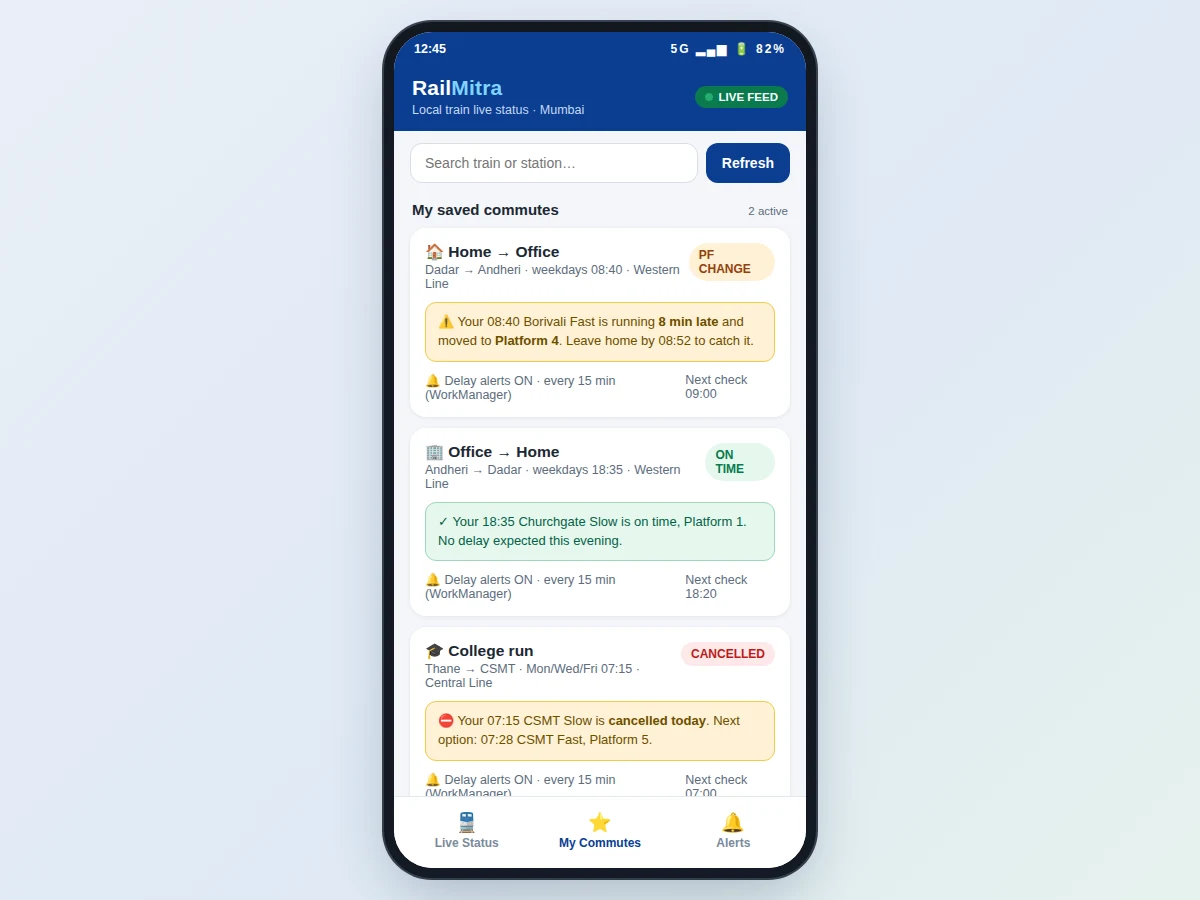
Live status is the centre of this app, and four capabilities carry it: the live running-status board shows delay in minutes and the expected platform for every train on the route; platform-change alerts fire the moment the feed reports a different platform from the scheduled one; a GPS-based get-off alarm rings two stops before the destination so a commuter never misses a stop while looking at a phone; and saved commutes are checked in the background so delay notifications arrive without opening the app. Around those four, train search and filter, next-train suggestions when a train is cancelled, and an offline cache of the last known status make the app usable on a crowded platform with patchy signal. Every feature below is implemented in the demo and the delivered source code.
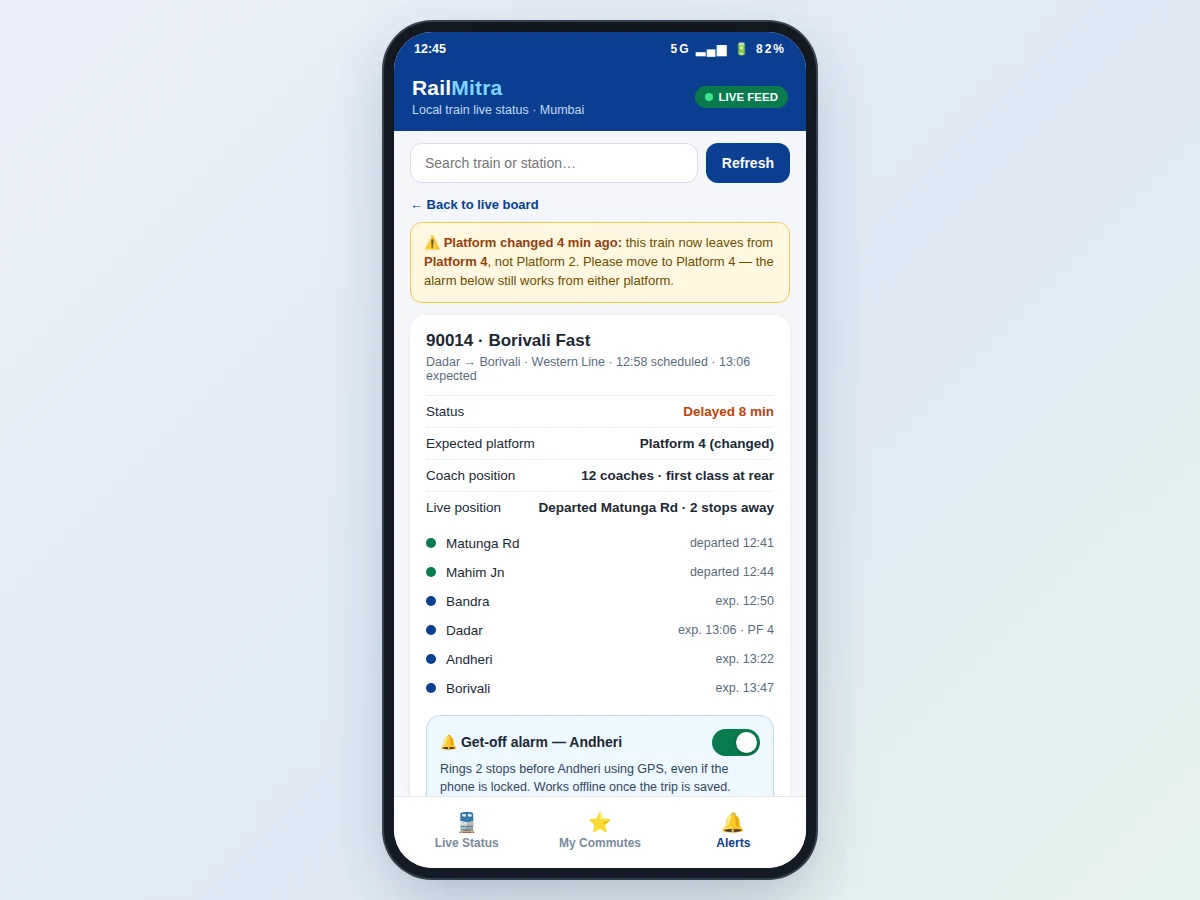
- [Live running-status board] Each train shows scheduled time, expected time, delay in minutes, expected platform and a cancelled flag, computed from the live feed against the timetable — not from the timetable alone.
- [Platform-change alerts] When the feed reports an expected platform different from the scheduled one, the app raises an in-app banner and a push notification naming the old and new platform, as shown in the demo for train 90014 moving from Platform 2 to Platform 4.
- [GPS-based get-off alarm] The alarm tracks the phone's position against the destination station and rings two stops before it, even when the phone is locked; it works offline once the trip is saved.
- [Saved commutes with delay notifications] Daily routes are saved with a departure time; WorkManager checks the feed in the background and notifies the user of delays, platform changes or cancellations.
- [Train and station search] Filter the board by train number, train name or station so a commuter finds their train without scrolling the full departure list.
- [Next-train suggestions] When a saved train is cancelled, the app suggests the next departure on the same route with its platform, instead of leaving the commuter to re-search.
- [Offline trip cache] The last known status of saved trips is stored in a local Room database, so the app still shows the most recent delay and platform with its timestamp when the network drops.
What is included
- Complete Android source code (Kotlin + Jetpack Compose)
- Working demo build with seeded simulated feed data
- Feed-integration document (NTES integration point, polling design, error handling)
- Project report PDF, PPT presentation and viva Q&A document
- Setup instructions (Android Studio, SDK version, feed-key configuration)
- Project abstract PDF
Limitations & prerequisites
- The demo runs on seeded simulated feed data; live data needs an authorised NTES-sourced feed, and its access terms are the buyer's responsibility.
- Live status needs internet; without it the app shows only the last cached status with its timestamp.
- Background delay checks run at most every 15 minutes when the app is closed (Android WorkManager minimum), so an alert can lag a platform change by up to 15 minutes.
- GPS get-off alarm accuracy is a design target (±10 m in open sky); GPS is weak indoors, underground and in tunnels.
- Platform and delay data depend on the feed provider; the app cannot correct wrong feed data.
- The seeded demo covers Mumbai Western/Central lines only; other cities need their feed routes configured.
Frequently Asked Questions
How is this different from a local train timetable app?
A timetable app shows scheduled times from a bundled timetable and can only estimate running status, so it cannot tell you a train is actually 8 minutes late or has moved platforms. This app polls a live running-status feed, compares each train's actual position against the schedule, and shows delay in minutes with the expected platform. The live feed is the source of truth; the timetable is only the baseline it is compared against.
Where does the live train data come from?
Live data comes from an NTES-sourced running-status feed accessed through an authorised provider, which is the documented integration point in the delivered code. The demo shipped with this project runs on seeded simulated feed data so the full flow can be shown without feed credentials. Feed access and its terms are arranged by the buyer; the integration document explains the polling design and error handling.
How do platform-change alerts work?
The app compares the expected platform in each feed reply with the scheduled platform for that train. When they differ, it raises an in-app banner naming the old and new platform and sends a push notification, so a commuter on the wrong platform is warned before the train arrives. Saved commutes get the same alert from the background check, at most every 15 minutes when the app is closed.
Will the get-off alarm work if my phone is locked?
Yes. The get-off alarm uses GPS to track the phone's distance to the destination station and rings two stops before it, even when the phone is locked, so a commuter who falls asleep or looks away still gets off at the right station. Once a trip is saved, the alarm works offline because the destination and the alarm state are stored locally. GPS accuracy is a design target of ±10 m in open sky, and the alarm is weaker indoors, underground and in tunnels.
Does the app work without internet?
Partly. Without internet the app shows the last cached status of saved trips — delay, platform and the time that status was fetched — from its local Room database, so the most recent known information is still available offline with its timestamp. Live delay, platform changes and new departures need a network connection, and background delay checks also need network. The get-off alarm itself works offline once the trip is saved.
Is this project suitable for a final-year project?
Yes — for Computer Science, IT and Electronics & Telecommunication programs. It demonstrates Android development with Kotlin and Jetpack Compose, REST feed integration, background scheduling with WorkManager, GPS location handling and offline caching with Room, all wrapped around a problem every commuter understands.
Components & software requirements
- Kotlin · Jetpack Compose
- Android Studio
- WorkManager background scheduling
- Fused Location Provider (GPS)
- Retrofit · OkHttp (feed client)
- Room database (offline cache)
- Firebase Cloud Messaging (push alerts)
- Material 3 design
Delivery information
Built-to-order project. Delivery timeline is shared after order confirmation based on current queue.
Support terms
Complete documentation, setup guide, and viva preparation included. Support for setup and explanation provided.
Download free synopsis (PDF)
Enter your name and WhatsApp number — the synopsis PDF downloads immediately. We may send occasional project updates on WhatsApp; no spam.