
More project photos (2)
The problem
The average smartphone user receives dozens of SMS messages a day — bank alerts, delivery OTPs, recharge reminders and promotional blasts all land in one flat inbox, and finding a transaction record or an OTP under time pressure becomes a chore. Default messaging apps sort by time alone, so a bank debit alert sits next to a casino-spam text and an expiring OTP. This project builds a native Android SMS organizer in Kotlin that fixes exactly that: every incoming message is classified into Personal, Transactions, Promotions or OTP tabs by a transparent rule-based engine, promotional spam is quarantined with the matching rule shown, and OTP codes are captured with the SMS Retriever API so they auto-fill into the requesting app without demanding full SMS permission. Everything runs on-device — no message ever leaves the phone.
Reads the sorted tabs, taps OTP codes to auto-fill and mutes unwanted senders.
Follow the working sequence
How it works
- Incoming SMS are read through Android's SMS provider (or the SMS Retriever API for OTPs), and each message's sender ID and body are passed to the classifier.
- The rule engine checks the sender against DLT promotional-header patterns (AD-, DM-, VM-, AX- style IDs) and scans the body against the promotional keyword list.
- Messages matching spam signals are quarantined in the spam section with the triggering rule named; everything else lands in its category tab.
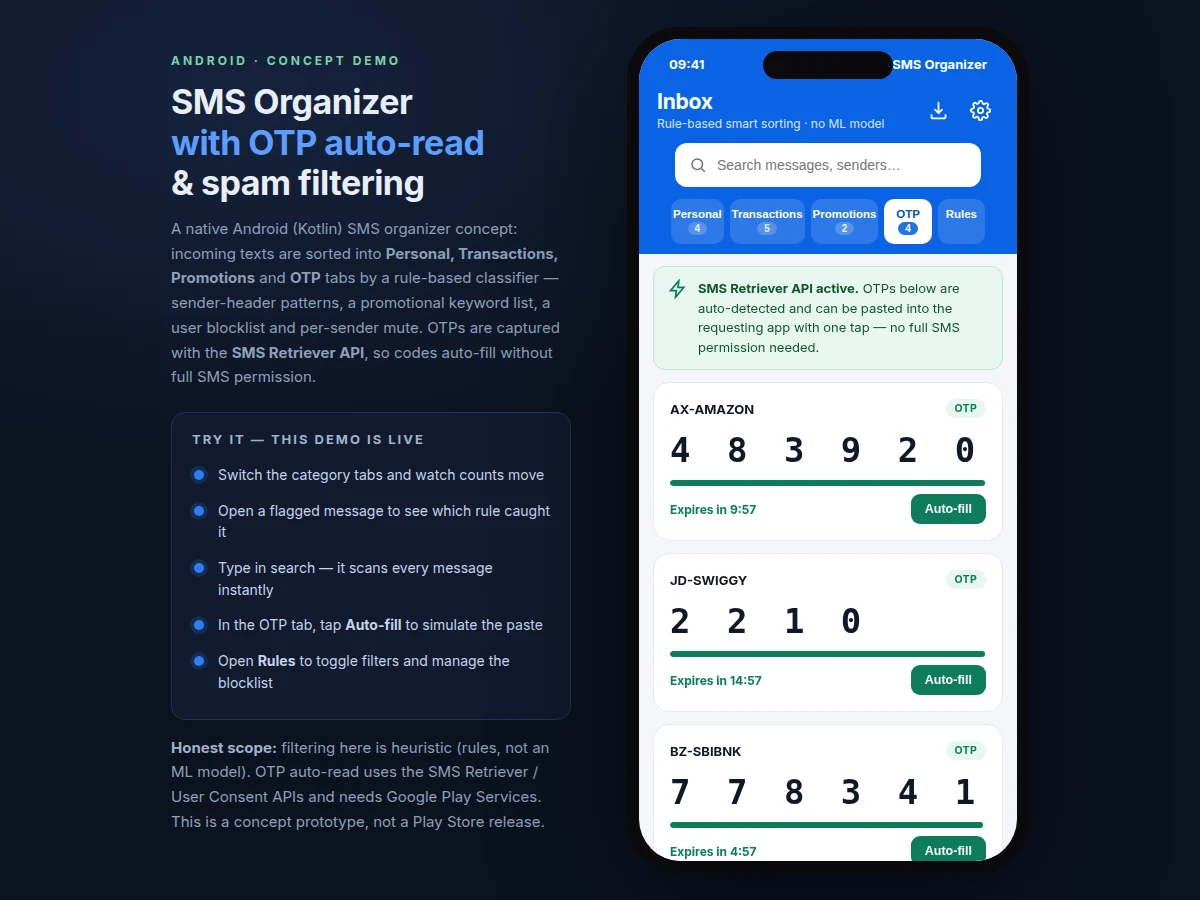
- Bodies containing 4–8 digit code patterns are routed to the OTP tab, where the SMS Retriever API binds the code to the requesting app's hash for auto-fill.
- Each OTP card runs an expiry countdown derived from the sender's stated validity window, greying out when the code lapses.
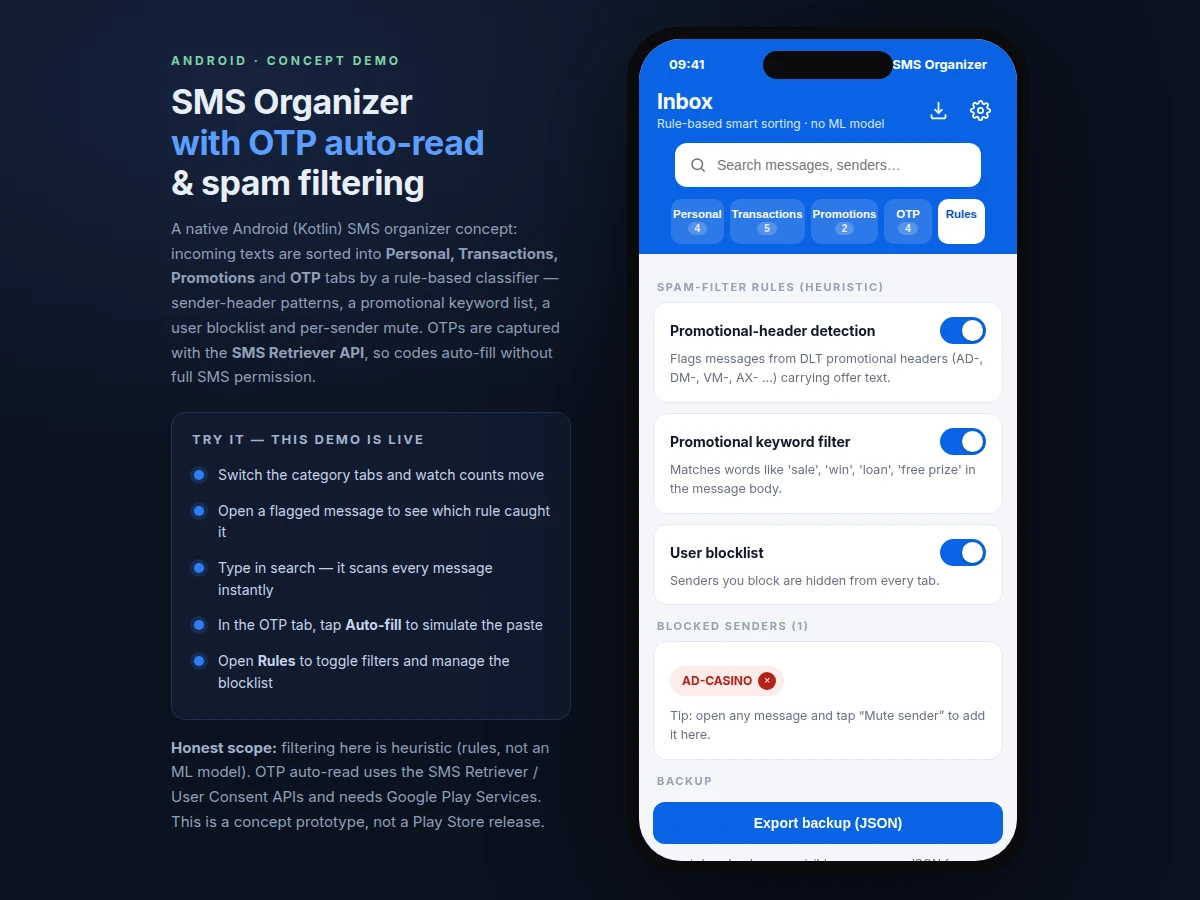
- The user can mute senders (blocklist), toggle any filter rule (the inbox re-sorts live), search across all messages, and export the inbox as JSON.
- All storage stays on-device in a Room (SQLite) database — no account, no server, no message upload.
Tech stack:
- Kotlin
- Android SDK (API 26+)
- SMS Retriever API · SMS User Consent API
- Room (SQLite on-device storage)
- WorkManager (background message sync)
- Material Design 3
- Gson (JSON backup export)
- Gradle
| Parameter | Value |
|---|---|
| Platform | Android 8.0 (API 26) and above (design target) |
| Language | Kotlin |
| Inbox categories | 4 (Personal, Transactions, Promotions, OTP) |
| Spam-filter rules | 3 heuristic rules + user blocklist |
| OTP capture | SMS Retriever API (requires Google Play Services) |
| OTP code format | 4–8 digit numeric codes (typical) |
| Message storage | On-device SQLite via Room, no cloud sync |
| Backup format | JSON export; OTP codes excluded by design |
| Demo message set | 18 sample messages (concept demo) |
Project features
- [Rule-based smart categorization] Incoming SMS are sorted into Personal, Transactions, Promotions and OTP tabs using sender-header patterns, keyword lists and per-sender overrides — fully transparent, with no black-box model to explain in the viva.
- [Heuristic spam filtering] Promotional spam is quarantined by three toggleable rules — DLT sender-header detection, a promotional keyword list, and a user blocklist — and each flagged message shows exactly which rule caught it.
- [OTP auto-read & auto-fill] OTPs are captured via the SMS Retriever API and presented as large tappable code cards with a live expiry countdown; one tap fills the code into the requesting app, no full SMS permission needed.
- [Per-sender mute & blocklist] Any sender can be muted from the message view; muted senders move to the blocklist and their messages disappear from every tab until unblocked.
- [Instant on-device search] A single search box scans senders and message bodies across all tabs with results updating as you type.
- [JSON backup & export] The full visible inbox exports to a JSON file for restore on a new device; OTP codes are excluded from backups by design.
- [Working concept demo] A single-file interactive prototype demonstrates every feature above with realistic sample messages, included for walkthroughs and reviews.
What is included
- Complete Kotlin source code for the SMS organizer app
- Working concept demo (interactive prototype for walkthroughs)
- Rule-engine documentation (header patterns, keyword lists, classification flow)
- Project report PDF (background, methodology, API flow, limitations)
- PPT presentation for final review
- Viva Q&A preparation document (SMS Retriever API, permissions model, rule-based vs ML classification)
Limitations & prerequisites
- Filtering is heuristic and rule-based — no ML model is used, so novel spam phrasing outside the keyword lists can slip through until rules are updated.
- OTP auto-read depends on Google Play Services; it does not work on de-Googled devices or emulators without Play Services.
- Sender-header detection is tuned to the Indian DLT format (XY-HEADER); other countries' sender formats need rule changes.
- Full inbox access requires the app to be set as the default SMS app on Android; the Retriever path avoids this only for OTP capture.
- There is no cloud sync or multi-device backup in the base build — storage and export are on-device only.
- The demo ships with 18 sample messages; real-device testing needs an Android phone with an active SIM.
Frequently Asked Questions
Does this app use any AI or ML model for spam detection?
No. Filtering is entirely rule-based: DLT sender-header patterns, a promotional keyword list and a user blocklist. Each flagged message names the rule that caught it, which makes the logic easy to demonstrate and defend in a viva — there is no black-box model to explain.
How does OTP auto-read work without full SMS permission?
Through Google's SMS Retriever API (and the User Consent API as fallback). The sending server includes an 11-character app hash in the OTP message; Play Services delivers only matching messages to the app. The app never needs blanket SMS-read permission for this path.
Can this project be customized?
Yes. Realistic extensions include auto-archiving rules, scheduled message summaries, dual-SIM inbox separation, regional-language keyword lists, a dark theme, and cloud backup as an optional add-on. Each is scoped separately against timeline and feasibility.
What will I receive with the project?
The complete Kotlin source, a working concept demo, rule-engine documentation, the project report PDF, a review PPT and a viva Q&A document covering the SMS Retriever flow, the permissions model and rule-based classification.
Does it work without the internet?
Yes. Classification, search, mute and backup are fully on-device and work offline. Only OTP auto-read depends on Google Play Services being present on the device, not on an active data connection at the moment of reading.
Is this project suitable for a final-year project?
Yes — for Computer Science, IT and Mobile Application Development programs. It demonstrates Android app architecture, the SMS Retriever API permission model, rule-based text classification, on-device storage with Room and background sync with WorkManager.
Components & software requirements
- Kotlin
- Android SDK (API 26+)
- SMS Retriever API · SMS User Consent API
- Room (SQLite on-device storage)
- WorkManager (background message sync)
- Material Design 3
- Gson (JSON backup export)
- Gradle
Delivery information
Built-to-order project. Delivery timeline is shared after order confirmation based on current queue.
Support terms
Complete documentation, setup guide, and viva preparation included. Support for setup and explanation provided.
Download free synopsis (PDF)
Enter your name and email — the synopsis PDF downloads immediately. We may send occasional project updates; no spam, unsubscribe anytime.