
More project photos (2)
The problem
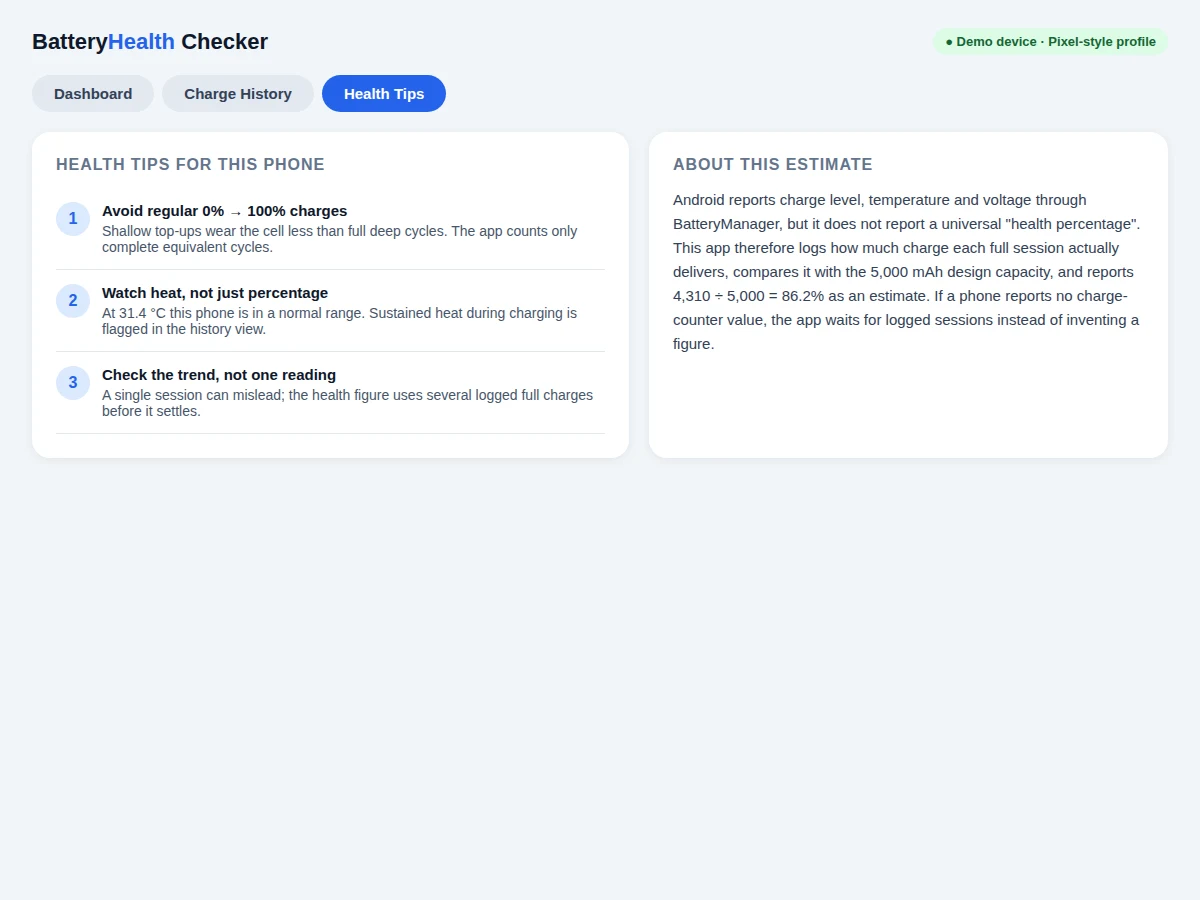
A smartphone battery health checker for Android is an app that reads the battery values Android already exposes, logs charge sessions over time, and turns those logs into a plain health estimate for the phone in your hand. It answers a single question: how much charge can this battery still hold compared with when it was new? It records how much energy full charges actually deliver, compares that figure with the phone's design capacity, and shows the result as a percentage alongside a session history, rather than repeating Android's single health label. The demo profile makes the arithmetic concrete: a phone with a 5,000 mAh design capacity whose logged full charges average 4,310 mAh earns an estimate of 86.2%, because 4,310 divided by 5,000 equals 0.862. That transparency is the point: every figure on the dashboard can be traced back to a logged session.
| Compared | What it shows | Health estimate | History |
|---|---|---|---|
| Battery health checker app | Charge, temperature, voltage, cycle count and health estimate in one dashboard | Percentage estimated from logged full-charge capacity against design capacity | Session-by-session chart of health over time |
| Phone's built-in battery settings | Charge level and recent usage, with a coarse health label on some phones | A single label such as good, not a capacity percentage on most phones | Usage over hours or days, not long-term capacity wear |
| Hardware battery tester | Voltage and load behaviour measured with test equipment | A bench measurement, not a day-to-day phone reading | No phone usage history unless sessions are recorded by hand |
This is a built-to-order software project: the Android app source code, the working demo, and the complete documentation set are prepared fresh for you.
The Problem
Most Android phones show a battery percentage but no clear capacity health figure, so a user who notices shorter backup cannot tell whether the battery has worn or an app is draining it. Android's own health field is a coarse label, and the design capacity that a percentage would need is often not reported by the phone at all. That leaves students and phone owners guessing from one day's drain, which is noisy and misleading. This project closes that gap with a method that can be explained and checked: log what full charges actually deliver, compare the result with design capacity, and show the trend across sessions. The build is honest about its limits from the start — the percentage is an estimate from logged sessions, never presented as a direct hardware readout — and that honesty is what makes it defensible as academic work.
Android reports level and status.
Follow the working sequence
How it works
End to end, the app listens for Android's battery broadcasts, records each charge session, and converts the session log into a health figure the user can inspect. When the battery state changes, the app reads level, temperature, voltage and charging status from BatteryManager and stores a timestamped record on the device. When a session reaches a full charge, the energy delivered during that session is added to the session log. The health estimate then compares recent full-charge deliveries with the phone's design capacity and updates the dashboard percentage and the history chart together, so the headline number and its evidence always move together. If a phone reports no charge-counter value, the app waits for logged sessions instead of inventing a figure. The same records feed the tips screen, so guidance always reflects the phone's own recent behaviour rather than generic advice.
- The app registers for Android's battery-changed broadcast and reads level, scale, temperature, voltage, status and technology from BatteryManager.
- Level and scale are combined into a charge percentage, temperature is converted from tenths of a degree into degrees Celsius, and voltage is converted from millivolts into volts.
- Each reading is stored as a timestamped session record in the on-device Room database, with no account and no cloud upload.
- When a charge session reaches a full charge, the energy delivered in that session is recorded and the equivalent full-charge cycle count is updated.
- The health estimate divides recent logged full-charge capacity by the phone's design capacity and multiplies by 100 to give a percentage.
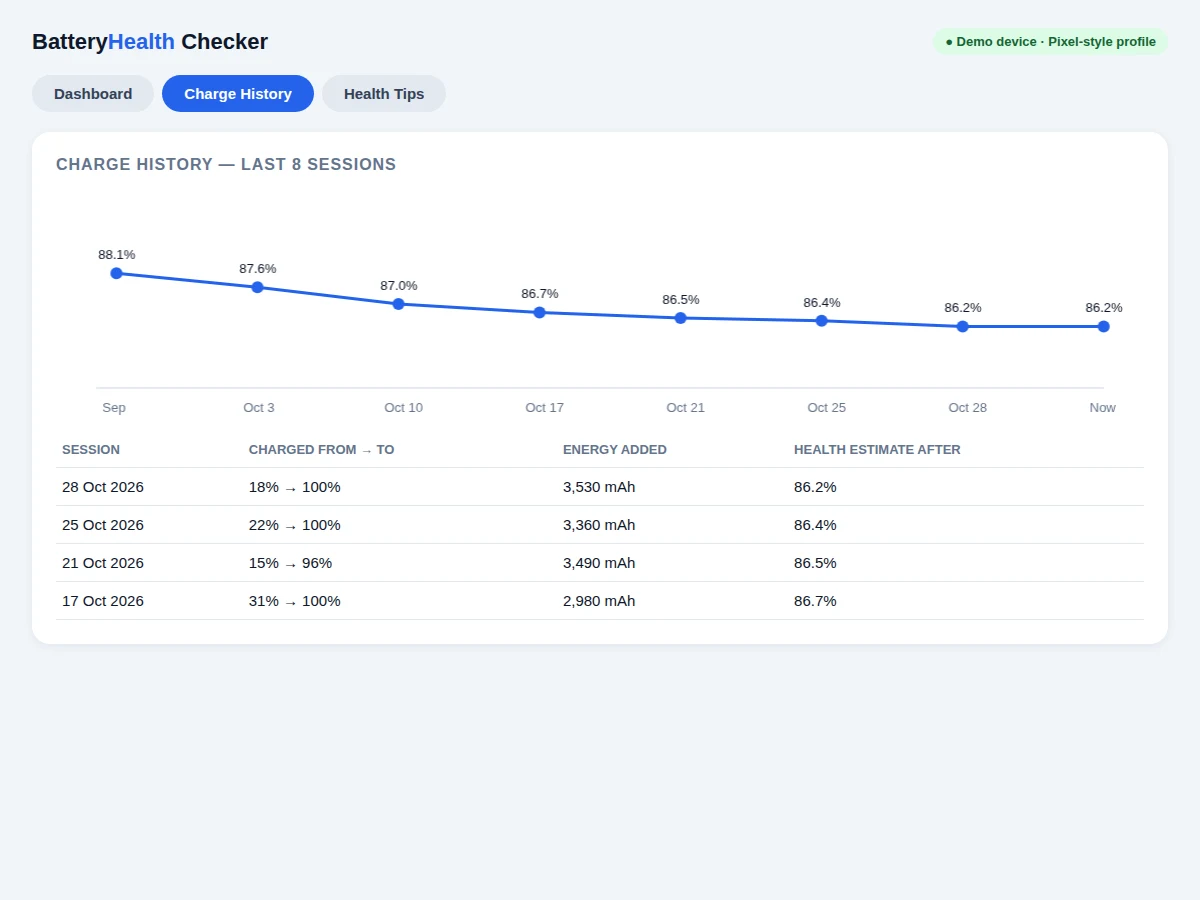
- The dashboard, the history chart and the session table are updated from the same stored records, so all three views agree.
Tech stack:
- Kotlin · Android SDK
- Android BatteryManager API
- Room database
- MPAndroidChart
- Material Design 3
- WorkManager · background logging
- Android Studio
| Parameter | Value |
|---|---|
| Platform | Android 7.0 and newer (minimum version, design target) |
| Language | Kotlin |
| Battery source | Android BatteryManager API (official Android API) |
| Design capacity (demo profile) | 5,000 mAh |
| Estimated full-charge capacity (demo profile) | 4,310 mAh |
| Health estimate (demo profile) | 86.2% (calculated: 4,310 mAh ÷ 5,000 mAh × 100) |
| Cycles logged (demo profile) | 412 cycles |
| Current charge (demo reading) | 68% |
| Temperature (demo reading) | 31.4 °C |
| Voltage (demo reading) | 3.92 V |
| History sessions charted | 8 sessions |
| Demo app screens | 3 screens (Dashboard, Charge History, Health Tips) |
| Session storage | Room database on the device, no account |
| Internet required | No, for the base build |
Project features
The app is built around 4 capabilities a student can demonstrate without special hardware: a live dashboard, a health estimate, a charge history, and a cycle count. The dashboard shows current charge, temperature, voltage and charging status in one place, so the phone's present state is visible at a glance. The health estimate turns logged full charges into a single percentage against design capacity, with the working shown rather than hidden. The history view charts that percentage across sessions, so gradual wear reads as a trend instead of a one-off number. The cycle count records equivalent full charges, giving the wear figure a usage context that a bare percentage lacks. Together these 4 capabilities cover reading system values, storing them, computing from them, and presenting them — the full span of an Android app build.
- [Live battery dashboard] Current charge, temperature, voltage, charging status and battery technology on one screen, read through BatteryManager whenever the battery state changes.
- [Health estimate from logged sessions] A percentage computed from logged full-charge capacity against the phone's design capacity, with the arithmetic shown in the app so the figure can be checked.
- [Charge-history chart] A session-by-session chart of the health estimate over time, with a table of recent sessions showing the charge range and energy added in each session.
- [Cycle counting] Equivalent full charges counted from logged sessions, so the health figure is always read next to how much use the battery has seen.
- [Temperature and voltage readout] Battery temperature in degrees Celsius and voltage in volts, converted from the raw Android values (tenths of a degree and millivolts) before display.
- [Health tips tied to readings] Plain guidance linked to the phone's own readings, such as avoiding routine deep discharges and watching sustained heat during charging.
- [Local-only session storage] Session records stored on the device with Room, with no account and no cloud upload in the base build.
Optional additions (not in the base build): charge-complete reminders, per-session charging-speed notes, and an export of the session log as a file. Future scope (not included): comparing estimates across device models, and a wear-forecast view that would need a longer session history before it could be trusted.
What is included
- Complete Android app source code (Kotlin) with the dashboard, history chart, cycle counting and tips screens
- Working web demo mirroring the 3 app screens, for demonstration before installation on a phone
- Project report PDF covering background, method, the estimate arithmetic, and limitations
- Project abstract PDF (10 sections, matching this page)
- PPT presentation for final review
- Viva Q&A preparation document (BatteryManager values, unit conversions, why the figure is an estimate)
- Setup guide for building the app in Android Studio and running it on a phone
To request a quotation, message Projectech on WhatsApp with the project title, your branch, and your delivery deadline: you will receive a quotation covering the full scope (app source code, demo, report, abstract and presentation), the price, and the delivery timeline before any work starts.
Limitations & prerequisites
- The health percentage is an estimate from logged full-charge sessions, not a direct hardware readout; Android reports no universal health percentage.
- Design capacity is often not reported through Android APIs, so it is entered for the device model; a wrong design capacity makes the estimate wrong.
- Cycle count reporting varies by phone: EXTRA_CYCLE_COUNT is available on supported devices only, so some phones rely on the app's own logged sessions.
- If a phone reports no charge-counter value, the app cannot produce an estimate until enough full-charge sessions have been logged.
- The estimate needs several logged full charges before it settles; a single session can mislead and must not be quoted alone.
- This app checks battery wear only; it does not repair a battery, calibrate a fuel gauge, or diagnose a faulty cell, and it must not be presented as a repair tool.
- Demo figures (86.2%, 4,310 mAh, 412 cycles) describe the demo profile only; a real phone will show its own values.
Frequently Asked Questions
What does the health percentage actually mean?
The health percentage estimates how much charge the battery can still hold compared with its design capacity, expressed as a percentage. In the demo profile, logged full charges average 4,310 mAh against a 5,000 mAh design capacity, giving 86.2%. That means the battery is estimated to hold about 86.2% of the charge it held when new, based on logged sessions rather than a single reading. In detail: the figure comes from the session log, not from a sensor that measures wear directly. Each full charge adds one measured delivery to the log, and the estimate uses recent deliveries so that an old or unusual session does not dominate the result.
Why can't Android just report battery health directly?
Android reports battery level, temperature, voltage and charging status through BatteryManager, but it provides no universal health percentage across phones. Some phones expose a coarse health label or a cycle count, while others expose neither, and design capacity is often absent. That inconsistency is exactly why this app estimates health from its own logged sessions instead of reading a single field. In detail: the app reads EXTRA_LEVEL with EXTRA_SCALE for charge, EXTRA_TEMPERATURE in tenths of a degree, EXTRA_VOLTAGE in millivolts, and BATTERY_PROPERTY_CHARGE_COUNTER in microampere-hours where the phone provides it, converting each value before display.
Is this project suitable for a final-year project?
Yes. This build fits final-year work in Computer Science, IT and Electronics because it combines Android system APIs, background logging, on-device storage, and charting in one complete app. It also gives the student a method they can defend: an estimate with its working shown, its limits stated, and its evidence in a session log. In detail: the viva discussion can cover BatteryManager values and their units, why design capacity matters, why the estimate needs several sessions, and where the method breaks down on phones that report fewer values.
Does the app work on any Android phone?
The app runs on Android 7.0 and newer as a design target, but the completeness of its readings depends on what each phone reports. Phones that expose a charge counter give faster estimates, while phones that do not must wait for logged full-charge sessions. The dashboard always labels the health figure as an estimate, so a phone with fewer reported values never shows a false precise reading. In detail: temperature, voltage, level and charging status come from the standard battery broadcast and are widely available; the cycle count and charge counter are the values that vary most between models.
Can the app be customized for my college requirements?
Yes. Realistic customizations include a different dashboard layout, additional readings where the phone reports them, charge-complete reminders, and an export of the session log as a file. Customizations are developed on request and are quoted separately from the base build, so the base app is never described as containing a feature it does not have. In detail: college-specific requirements such as a different report format or an extra presentation section can be added to the documentation set, and the app screens can be adjusted to match the report.
Components & software requirements
- Kotlin · Android SDK
- Android BatteryManager API
- Room database
- MPAndroidChart
- Material Design 3
- WorkManager · background logging
- Android Studio
Delivery information
Built-to-order project. Delivery timeline is shared after order confirmation based on current queue.
Support terms
Complete documentation, setup guide, and viva preparation included. Support for setup and explanation provided.
Download free synopsis (PDF)
Enter your name and WhatsApp number — the synopsis PDF downloads immediately. We may send occasional project updates on WhatsApp; no spam.