
More project photos (2)

The problem
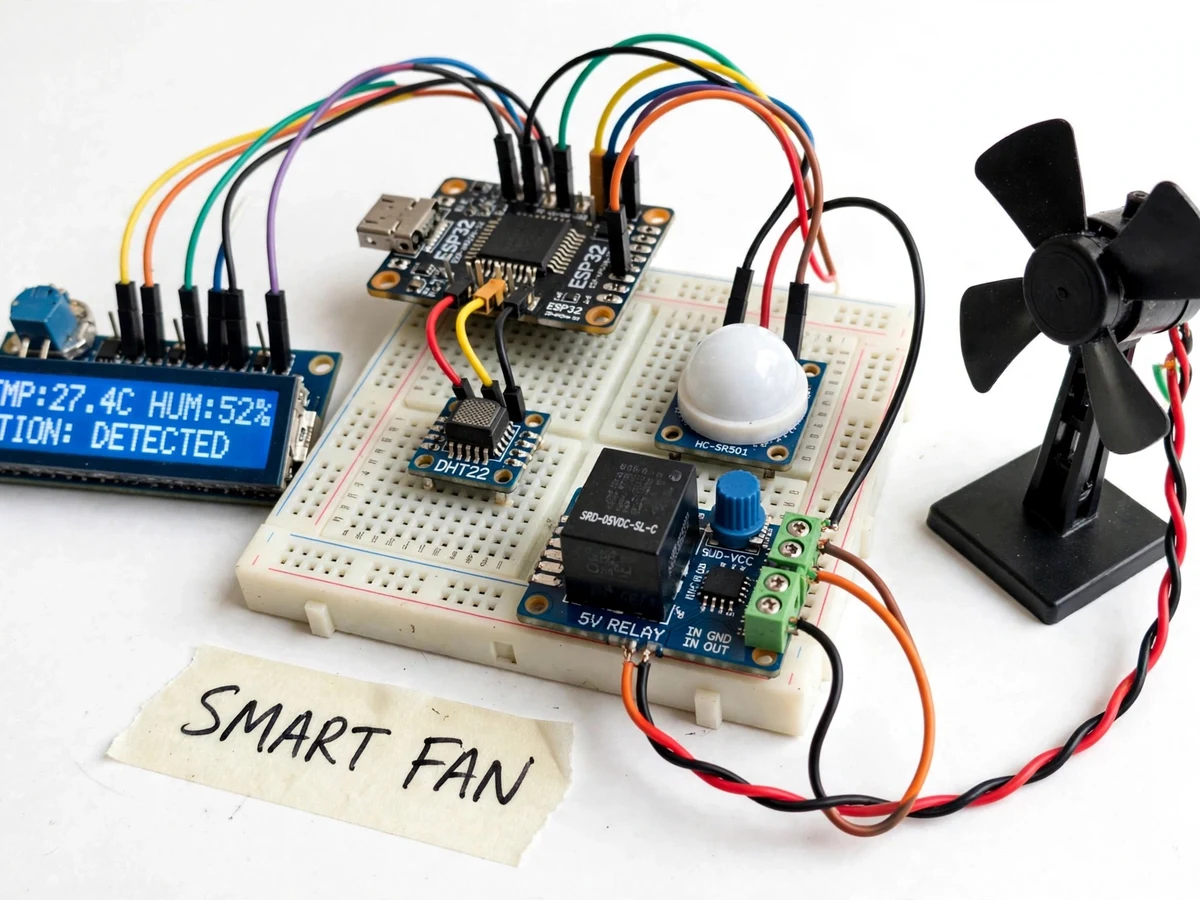
Fans are left running in empty rooms all day — wasted electricity and wasted motor life. The fix is a controller that knows two things: how hot the room is, and whether anyone is in it. This project builds that controller: a DHT22 temperature/humidity sensor and a PIR motion sensor feed an ESP32, which drives a fan through a relay plus speed-control stage. The logic is straightforward and demonstrable: no motion for a configurable timeout switches the fan off; on occupancy, fan speed steps up with temperature across three bands. The 16x2 LCD shows temperature, humidity, motion state and fan speed at all times, and push buttons allow manual speed override. A cloud dashboard logs temperature and fan state so the energy-saving behavior is visible as data, not just claimed.
How it works
- The DHT22 is sampled every few seconds for temperature and humidity; the PIR sensor reports motion events.
- If no motion has been detected for the timeout period, the ESP32 switches the fan off and the LCD shows "NO OCCUPANCY".
- On motion, the controller reads the temperature and selects the speed band: below the low threshold the fan stays off, between thresholds low/medium, above the high threshold full speed.
- Hysteresis bands prevent rapid switching when the temperature hovers at a boundary.
- The LCD updates with temperature, humidity, motion state and fan speed; manual buttons can override at any time.
- Every state change and periodic readings publish over Wi-Fi to the cloud dashboard for the occupancy and temperature history.
Tech stack:
- ESP32 development board (Wi-Fi)
- Arduino IDE (C/C++ firmware)
- DHT22 temperature/humidity sensor (±0.5 °C datasheet)
- PIR motion sensor module (HC-SR501 class)
- Relay module + speed-control stage for the demo fan
- 16x2 LCD with I2C backpack
- Push buttons for manual override
- Cloud dashboard (ThingSpeak/Blynk class) over MQTT/HTTP
- Model fan + 5 V/12 V supplies
| Parameter | Value |
|---|---|
| Controller | ESP32, 3.3 V logic, Wi-Fi 802.11 b/g/n |
| Temperature sensor | DHT22: -40 to +80 °C, ±0.5 °C; humidity 0–100% RH, ±2% RH (datasheet) |
| Occupancy sensor | PIR, detection range approximately 5–7 m (module spec) |
| Auto-off timeout | Approximately 5 minutes of no motion (configurable) |
| Speed bands | 3 bands with hysteresis (design) |
| Display | 16x2 LCD (I2C): temp, humidity, motion, fan state |
| Dashboard | Temperature/occupancy/fan-state history, MQTT/HTTP |
| Power | 5 V logic supply; fan on its own rated feed |
Project features
- [Temperature-based speed] The DHT22 (±0.5 °C datasheet) feeds a three-band speed map — low, medium, high — with hysteresis so the fan does not hunt between speeds at the boundary.
- [Occupancy auto-off] The PIR motion sensor watches the room; if no motion is seen for the configurable timeout (default approximately 5 minutes), the fan switches off automatically.
- [Speed-control stage] A relay plus PWM/triac-style speed stage drives the demo fan at the selected speed band; the wiring guide documents the stage for the demo motor.
- [Live LCD status] The 16x2 LCD continuously shows temperature, humidity, motion state and current fan speed — the whole control loop is visible.
- [Manual override] Push buttons set the speed manually or force the fan off; automatic control resumes on the next occupancy/temperature change.
- [Cloud logging] Temperature, humidity, occupancy and fan state publish over Wi-Fi to a dashboard, producing a visible record of the auto-off energy saving.
- [Hysteresis design] Speed-band switching uses separate up/down thresholds so the fan never oscillates — the report documents the hysteresis values.
What is included
- Working prototype: ESP32, DHT22, PIR sensor, relay + speed stage, model fan, LCD, buttons
- Complete ESP32 firmware (sensor reading, occupancy timeout, hysteresis speed logic, LCD, cloud publishing)
- Speed-band and hysteresis configuration guide
- Cloud dashboard setup guide
- Wiring diagram and connection table
- Project report PDF (background, control logic, methodology, working, results)
- PPT presentation for final review
- Viva Q&A preparation document (DHT22/PIR interfacing, hysteresis, relay driving, IoT logging)
Limitations & prerequisites
- The demo uses a low-voltage model fan; switching a real 230 V ceiling fan needs a properly rated isolation stage and is electrical-installation work outside the project scope.
- PIR sensors detect motion, not presence — a perfectly still person can time out; the report documents this honestly and the timeout is configurable.
- The DHT22's ±0.5 °C is a datasheet figure; band thresholds should be set with that tolerance in mind.
- Speed control on the demo fan is stepped (3 bands), not continuously variable.
- The dashboard needs Wi-Fi; the controller and LCD work locally without it.
Frequently Asked Questions
How does it save energy?
Two ways: the fan switches off automatically when the room stays empty past the timeout, and when occupied it runs at the lowest speed the temperature allows instead of full speed always.
Why doesn't the fan keep switching speeds?
Hysteresis — the temperature thresholds for stepping up differ from those for stepping down, so hovering at a boundary does not cause oscillation. The report documents the values.
Will it turn off while I'm sitting still?
Possibly, after the timeout — PIR sensors see motion, not still presence. The timeout is configurable, and any movement (or a button press) wakes it immediately.
Can it control my real ceiling fan?
Not as shipped — the prototype drives a low-voltage demo fan. A mains-fan version needs a rated isolation/switching stage and proper electrical installation, listed as future scope.
What does the dashboard show?
Temperature, humidity, occupancy events and fan state over time — the auto-off behavior shows up as a visible pattern in the history.
Is this project suitable for a final-year project?
Yes — for IoT & Embedded programs. It is a complete sense-decide-actuate loop with hysteresis design, occupancy logic and cloud logging in one build. Suitable for B.E./B.Tech final-year projects in IoT & Embedded.
Components & software requirements
- ESP32 development board (Wi-Fi)
- Arduino IDE (C/C++ firmware)
- DHT22 temperature/humidity sensor (±0.5 °C datasheet)
- PIR motion sensor module (HC-SR501 class)
- Relay module + speed-control stage for the demo fan
- 16x2 LCD with I2C backpack
- Push buttons for manual override
- Cloud dashboard (ThingSpeak/Blynk class) over MQTT/HTTP
- Model fan + 5 V/12 V supplies
Delivery information
Built-to-order project. Delivery timeline is shared after order confirmation based on current queue.
Support terms
Complete documentation, setup guide, and viva preparation included. Support for setup and explanation provided.