
More project photos (2)
The problem
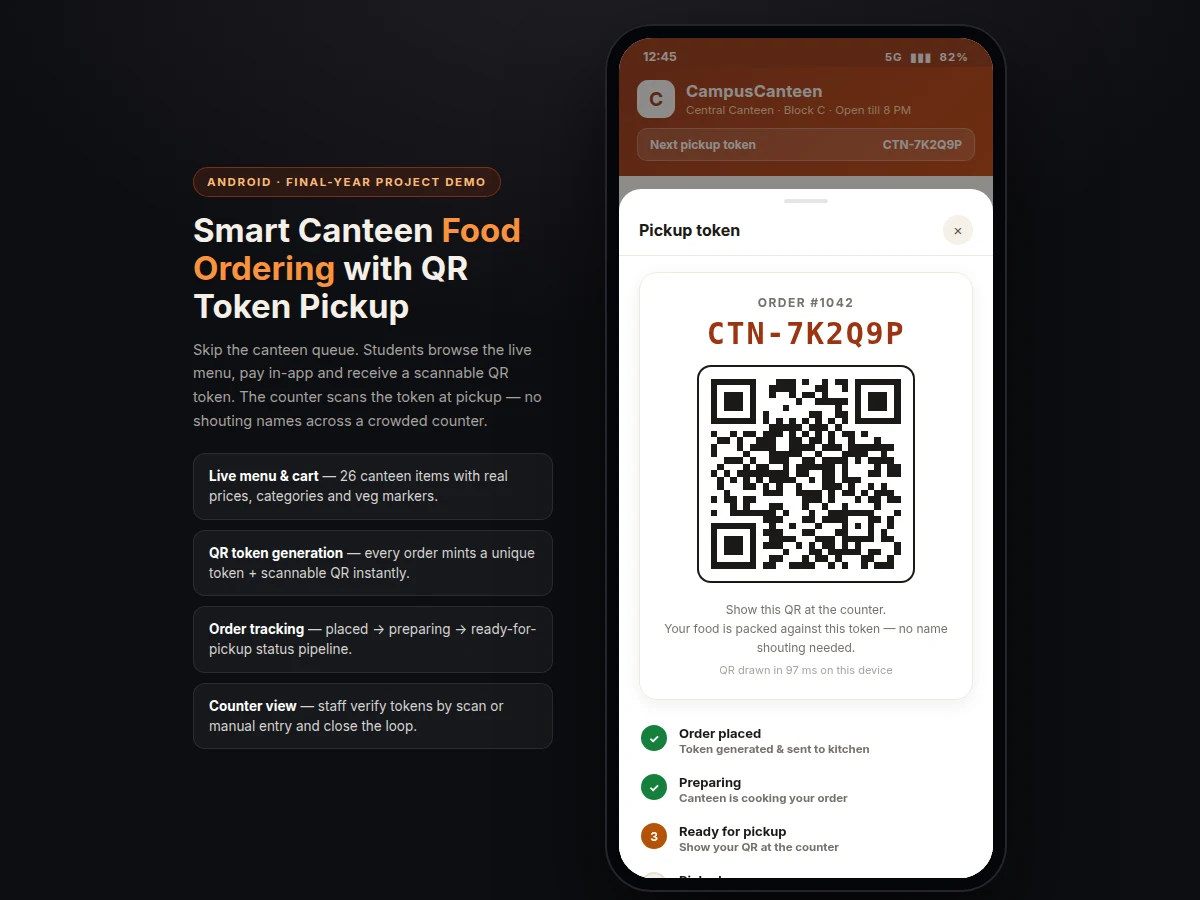
The Smart Canteen Food Ordering App with QR Token Pickup answers the daily chaos of the college canteen lunch rush. Right now, students queue to order, pay at one counter, wait at another, and listen for their name shouted across a noisy hall — orders get mixed up, food reaches the wrong student, and the canteen keeps no record. This app moves the flow onto the phone: the student browses a live menu with real prices, pays in-app, and instantly receives a unique QR pickup token. Counter staff verify the token — by scanning the QR or typing it in — and hand over exactly the right order. Single-use tokens end mix-ups and give the canteen a clean digital order log. The scope fits a final-year build: three roles (student, counter staff, admin), one backend, and a QR pipeline demonstrable on two phones in the viva room.
How it works
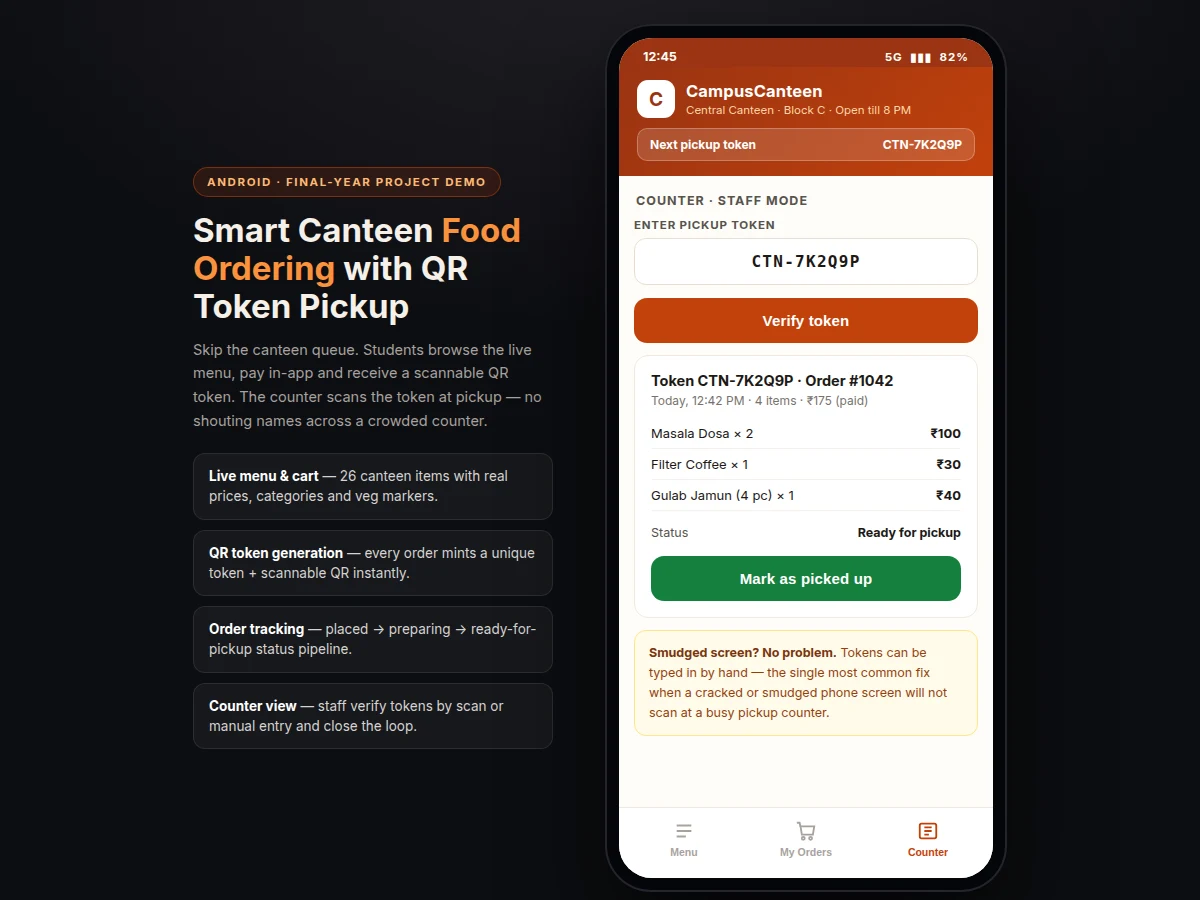
A student opens the Smart Canteen Food Ordering App with QR Token Pickup, browses the live menu and adds items to the cart. At checkout the app totals the bill, takes payment through the integrated UPI/card flow, and — the moment payment succeeds — mints a unique single-use token and renders it as a QR code on the pickup-token screen, a step with a design target of about 2 seconds end to end. The order lands in the canteen's queue with the token attached, moving through placed → preparing → ready-for-pickup as the kitchen works. The student watches the status in My Orders and walks to the counter when it reads ready. At the counter, staff scan the QR or type the token in manually, see the itemised order with its paid status, hand over the food, and tap "mark as picked up" — the token is consumed and the order closes out.
- The student signs in and browses the live menu (26 items, 6 categories, search, veg markers).
- Items go into the cart with quantity steppers; the app computes subtotal, packaging and total.
- Checkout takes payment via the integrated UPI/card flow (test mode available for the demo).
- On payment success the backend mints a unique single-use token (CTN-XXXXXX) and stores the order against it.
- The app renders the token as a scannable QR code on the pickup-token screen (measured at roughly 100–200 ms per render in the demo build).
- The order appears in the canteen queue and moves through placed → preparing → ready for pickup.
- At the counter, staff scan the QR or type the token manually and see the itemised, paid order.
- Staff hand over the food and tap "mark as picked up" — the token is consumed and the order closes.
Tech stack:
- Kotlin · Android SDK
- Firebase Authentication
- Cloud Firestore
- Firebase Cloud Messaging
- ZXing QR library
- Razorpay · UPI payments
- Node.js backend API
- HTML · CSS · JavaScript (demo build)
| Parameter | Value |
|---|---|
| Platform | Android (Kotlin) — iOS as optional customization |
| Demo screens | Approximately 6 screens (menu, cart, token, orders, counter, tracking) |
| Menu items (demo) | 26 items across 6 categories |
| Token format | CTN-XXXXXX, unique and single-use per order |
| QR encoding | QR Code with medium error correction (ZXing) |
| Order-to-token time | Approximately 2 seconds end to end (design target) |
| QR render time | Approximately 100–200 ms per token (measured in the demo build) |
| Order status stages | 4 (placed, preparing, ready for pickup, picked up) |
| User roles | 3 (student, counter staff, admin) |
| Payment | UPI · cards via Razorpay (test mode for demo; merchant approval needed for live) |
| Backend | Cloud Firestore + Node.js API (design target architecture) |
| Notifications | Push on status change via FCM (design target) |
Project features
The Smart Canteen Food Ordering App with QR Token Pickup is built around four capabilities that carry the demo. First, a live menu and cart: 26 canteen items across 6 categories with real prices, veg markers and search, like a food-delivery app examiners already know. Second, instant QR token generation: each order mints a unique single-use token (CTN-XXXXXX format) and renders it as a scannable QR — measured at roughly 100–200 ms per render in the demo build, so tokens feel instant. Third, order tracking: every order moves through a visible placed → preparing → ready-for-pickup → picked-up pipeline that both the student and the counter can see. Fourth, a counter-side verification view where staff confirm a token by camera scan or by typing it in manually — the manual-entry fallback is the single most common fix when a smudged or cracked phone screen refuses to scan at a busy pickup counter.
- [Live menu & smart cart] 26 canteen items across 6 categories with real prices, veg/non-veg markers, search and quantity steppers — the cart computes subtotal, packaging and total before checkout.
- [Instant QR token generation] Every placed order mints a unique single-use token and renders it as a genuine scannable QR code in roughly 100–200 ms (measured in the demo build).
- [Order status tracking] A 4-stage pipeline — placed → preparing → ready for pickup → picked up — visible to the student in My Orders and to the counter staff.
- [Counter verification view] Staff enter or scan the token, see the full itemised order with paid status, and close the loop with a "mark as picked up" action.
- [Manual token fallback] Tokens can be typed in by hand when a phone screen is too smudged or cracked to scan — the fix canteen staff actually reach for during rush hour.
- [Role-separated access] Student, counter-staff and admin views stay separate, so the viva demo can show the same order from both sides of the counter on two devices.
- [In-app payment flow] UPI/card payment integrated at checkout with a test-mode path, so the order-to-token flow is demonstrable without a live merchant account.
What is included
- Complete Android app source code (Kotlin) with student, counter and admin views
- Backend setup guide (Firestore schema, Node.js API, FCM configuration)
- QR token generation & verification module (ZXing-based)
- Payment integration guide (Razorpay test mode to live checklist)
- Working single-file HTML/CSS/JS demo of the full order-to-pickup flow
- Project report PDF (background, system design, module breakdown, testing)
- PPT presentation for final review
- Viva Q&A preparation document (Android lifecycle, Firebase, QR encoding, payment flow)
Limitations & prerequisites
- Live payment collection needs a Razorpay merchant account in the buyer's name — the build ships with test mode so the full flow is demonstrable without it.
- QR scanning needs camera permission and a working rear camera; the manual token-entry fallback covers damaged screens.
- The demo build runs on in-browser data; the production backend (Firestore + API) is configured during the built-to-order setup.
- Token expiry and refund-on-cancel policies are configurable but not pre-set — the canteen's rules decide them.
- Push notifications need FCM setup and a signed release build; they do not work from a debug APK alone.
- Base scope is Android only; an iOS build is an optional customization, not included.
- The kitchen display view is out of base scope — order status is updated from the counter view.
Frequently Asked Questions
How does the QR token pickup actually work?
When you pay for an order, the app mints a unique single-use token and shows it as a QR code on your phone. You walk to the counter, staff scan the QR (or type the token in manually), see your exact itemised order with its paid status, hand over the food, and mark it picked up — the token is consumed so it cannot be reused.
Does it include a counter/admin panel, or only the student app?
It includes both. The build has three role-separated views: the student app (menu, cart, token, tracking), the counter view (token verification, mark-as-picked-up), and an admin view for menu and order oversight — all demonstrated working in the single-file demo. The demo lets you switch roles and watch one order from both sides of the counter.
Is the payment real or simulated?
The integration is real Razorpay/UPI code with a test-mode path, so the entire order-to-token flow works in the viva without a merchant account. Collecting live money needs a Razorpay account in the buyer's name, and the delivery includes the test-to-live checklist.
Can the menu be changed for my college canteen?
Yes. Menu items, prices, categories and veg markers are data-driven, so the whole catalogue can be swapped for your canteen's actual menu without touching the ordering, token or counter logic. This makes the project easy to personalize for your college's real canteen during the viva demonstration.
Is this project suitable for a final-year project?
Yes — for Computer Science, IT and Mobile Application Development programs. It demonstrates Android app development, Firebase backend integration, QR-code generation and scanning, payment-gateway integration and a real multi-role workflow, all demoable on two phones in the viva room. The single-file demo makes the whole flow easy to present to examiners.
Components & software requirements
- Kotlin · Android SDK
- Firebase Authentication
- Cloud Firestore
- Firebase Cloud Messaging
- ZXing QR library
- Razorpay · UPI payments
- Node.js backend API
- HTML · CSS · JavaScript (demo build)
Delivery information
Built-to-order project. Delivery timeline is shared after order confirmation based on current queue.
Support terms
Complete documentation, setup guide, and viva preparation included. Support for setup and explanation provided.
Download free synopsis (PDF)
Enter your name and WhatsApp number — the synopsis PDF downloads immediately. We may send occasional project updates on WhatsApp; no spam.