
More project photos (2)
The problem
College canteen breaks are short and the counter queue is long: students stand in line just to see the menu, place an order verbally, and then wait without knowing when their food will be ready. The canteen staff, meanwhile, juggle shouted orders, lose track of who ordered what, and handle cash at the same counter where food is served. The result is wasted break time, wrong orders and peak-hour chaos. This project replaces that chaos with a token-based ordering app: students order from their phones, get a token number, and watch the order move from Placed to Preparing to Ready, while the canteen works through a single live queue instead of a shouting crowd. The delivered build uses Flutter for the Android app and Firebase (Auth, Firestore, Cloud Messaging) as the backend, so order status syncs in real time without the student maintaining any server.
How it works
- The student signs in with college credentials through Firebase Auth (the demo uses a preset student profile so the flow can be tried immediately).
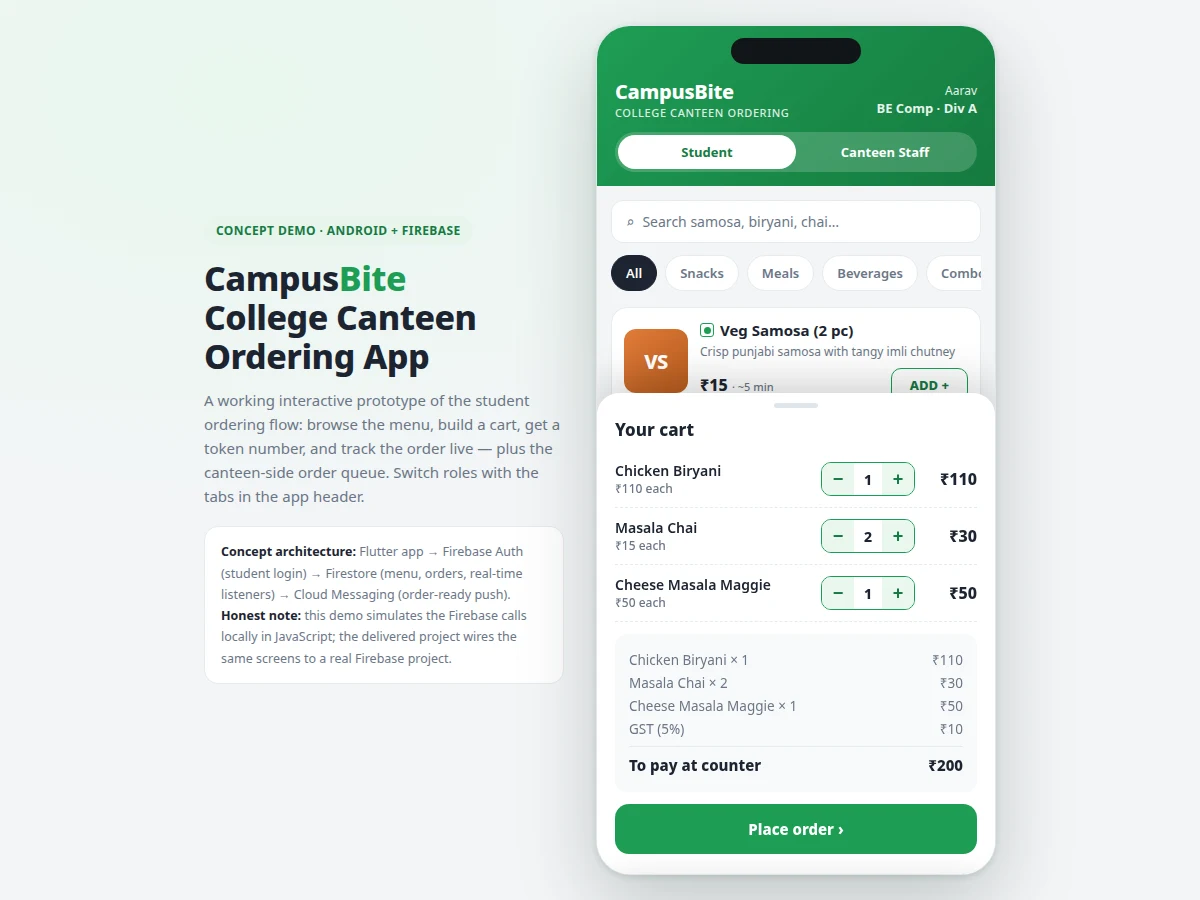
- The menu loads from Firestore — seeded as a 16-item local menu in the demo — and category chips filter Snacks, Meals, Beverages and Combos.
- Items go into a cart with quantity steppers; checkout writes an order document containing the token number, items, total and timestamp.
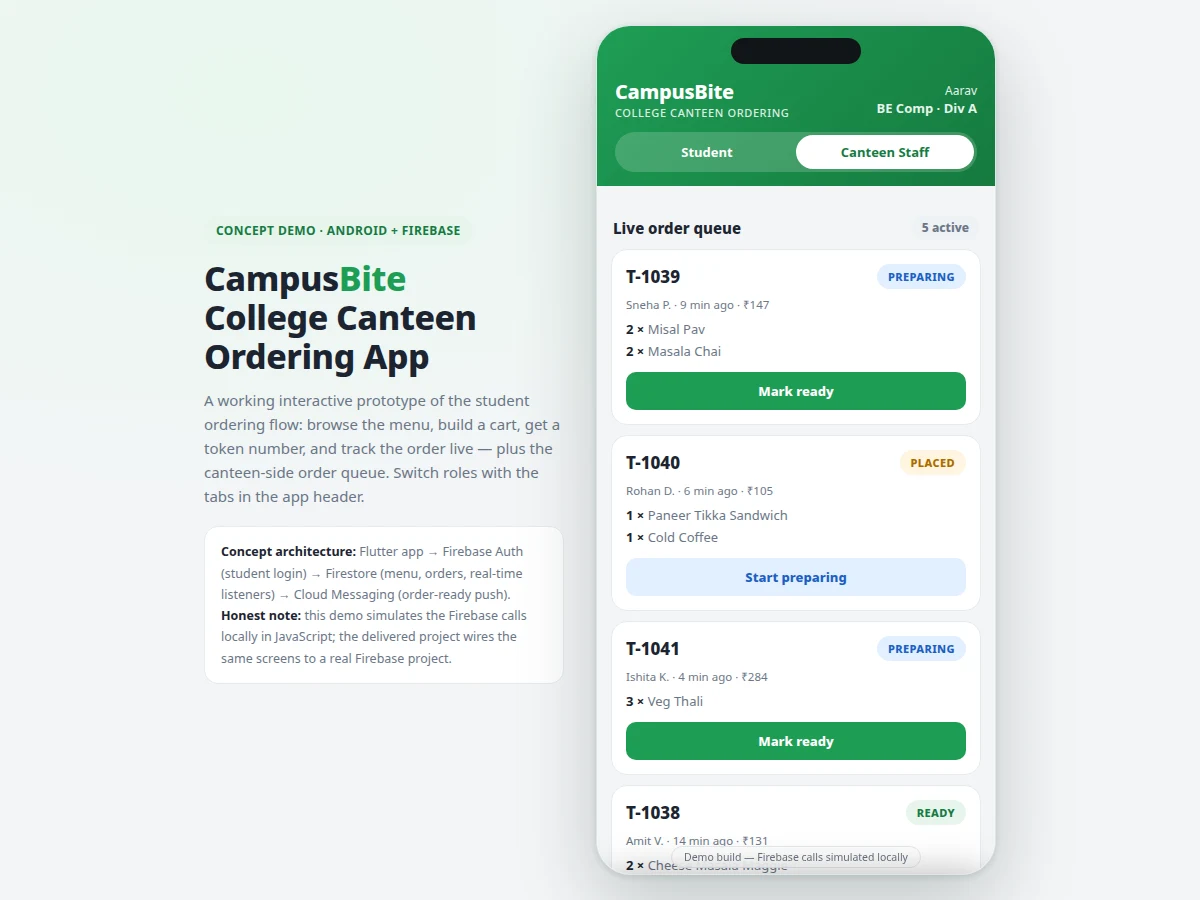
- The new order appears instantly in the canteen-side queue; in the delivered build this is a Firestore real-time listener, simulated locally in the demo.
- Staff tap Start preparing, then Mark ready; each transition updates the order document and the student's tracking timeline follows it.
- On Ready, Cloud Messaging sends an order-ready notification; the student shows the token at the counter, pays, and collects the food, and the order moves to history.
Tech stack:
- Flutter (Dart)
- Firebase Authentication
- Cloud Firestore
- Firebase Cloud Messaging
- Android Studio
- Git
- HTML/CSS/JavaScript (interactive demo prototype)
| Parameter | Value |
|---|---|
| Platform | Android app built with Flutter (demo is a single-file HTML/JS prototype) |
| Demo menu | 16 items across 4 categories (counted in the demo build) |
| Order flow length | Menu → cart → token → queue in 4 taps (counted in the demo build) |
| Order statuses | 4: Placed, Preparing, Ready, Collected |
| Demo status simulation | Placed → Preparing in ~6 s, → Ready in ~16 s (demo timing, not a performance claim) |
| Backend (delivered build) | Firebase: Auth + Firestore + Cloud Messaging (design-target architecture) |
| Payment | Pay-at-counter in the base build; no payment gateway included |
Project features
- [Live canteen menu] A 16-item menu across Snacks, Meals, Beverages and Combos with rupee prices, veg/non-veg markers and per-item preparation-time hints; in the delivered build the menu reads from a Firestore collection so the canteen can edit items without an app update.
- [Cart with bill breakdown] Quantity steppers on every item, an itemized bill with 5% GST and a "pay at counter" total; checkout captures the student's name, PRN and pickup counter.
- [Token-based ordering] Every placed order is issued a token number (T-1043 style) shown on a confirmation card; the token is the single reference both the student and the canteen use.
- [Live order tracking] A Placed → Preparing → Ready timeline with an estimated wait; in the delivered build Firestore real-time listeners push each status change and Cloud Messaging delivers the order-ready notification (simulated with timers in the demo).
- [Canteen-side order queue] The staff view lists active orders with items, elapsed time and one-tap transitions (Start preparing → Mark ready → Mark collected); finished orders move into a daily completed history.
- [Order history] Each student sees past orders with items, dates and totals; in the delivered build this history is persisted per user in Firestore.
- [Firebase backend wiring (delivered build)] The shipped project connects the same screens to a real Firebase project: Firebase Auth for student login, Firestore for menu and orders, and Cloud Messaging for notifications — the demo simulates these calls locally so the flow can be tried without any setup.
What is included
- Complete Flutter (Dart) source code for the student app and canteen queue screens
- Firebase wiring: Auth login, Firestore menu/order data model and security-rules draft, Cloud Messaging setup
- Single-file interactive demo (HTML/CSS/JavaScript) simulating the full order flow
- Firebase project setup guide (creating the project, collections, and FCM configuration)
- Project report PDF (background, architecture, methodology, screens, limitations)
- PPT presentation for final review
- Viva Q&A preparation document (Flutter widgets, Firebase services, real-time listeners, token flow)
Limitations & prerequisites
- The demo simulates Firebase calls locally in JavaScript; true cross-device real-time sync needs the delivered Firebase wiring and an internet connection.
- No online payment in the base build — pay-at-counter only; a UPI gateway is an optional customization.
- Push notifications require FCM configuration and device tokens in the delivered build; the demo shows an in-app notification banner instead.
- Menu item visuals in the demo are initial-letter tiles; photo menus need Firebase Storage, listed as optional customization.
- The base build assumes a single canteen counter; multi-outlet or multi-counter support is a customization.
- Demo status timings are fixed simulation delays for demonstration, not measured kitchen performance.
Frequently Asked Questions
Is this project suitable for a final-year project?
Yes — for Computer Engineering and Information Technology programs. It demonstrates cross-platform mobile development with Flutter, a serverless Firebase backend (Auth, Firestore, Cloud Messaging), real-time data synchronization, and a complete two-sided workflow (student app plus canteen staff queue) that is easy to demonstrate live in a viva.
What is the main technology used?
Flutter (Dart) for the Android app and Firebase as the backend: Firebase Authentication for student login, Cloud Firestore for the menu and orders with real-time listeners, and Firebase Cloud Messaging for order-ready push notifications.
Does the app need an internet connection?
The delivered build does — Firestore synchronization, authentication and push notifications all require connectivity. The single-file demo, however, runs fully offline in a browser because it simulates the Firebase calls locally.
Can the canteen staff edit the menu themselves?
Yes, in the delivered build the menu lives in a Firestore collection, so items and prices can be changed from the Firebase console without rebuilding the app. A dedicated staff-side menu editor screen can be added as an optional customization.
Can online payment be added?
Yes, as an optional customization — a UPI payment gateway can be integrated at checkout. The base build is pay-at-counter: the bill is shown in the app and the student pays while collecting the order.
Components & software requirements
- Flutter (Dart)
- Firebase Authentication
- Cloud Firestore
- Firebase Cloud Messaging
- Android Studio
- Git
- HTML/CSS/JavaScript (interactive demo prototype)
Delivery information
Built-to-order project. Delivery timeline is shared after order confirmation based on current queue.
Support terms
Complete documentation, setup guide, and viva preparation included. Support for setup and explanation provided.
Download free synopsis (PDF)
Enter your name and WhatsApp number — the synopsis PDF downloads immediately. We may send occasional project updates on WhatsApp; no spam.