
More project photos (2)
The problem
Communication between sign-language users and non-signers still breaks down in everyday situations — classrooms, clinics, interviews — because very few people can read signs, and human interpreters are not always available. Automatic sign recognition is hard: signs are dynamic hand movements, so a single image is not enough; the system must understand motion over time, tolerate different signers, lighting and camera angles, and respond fast enough to feel conversational. This project tackles that with a two-stage pipeline. First, MediaPipe Hands extracts 21 three-dimensional hand landmarks from every webcam frame, turning raw pixels into a compact, lighting-tolerant skeletal representation. Then an LSTM classifier reads 30-frame sequences of those landmarks and predicts which word was signed, so the temporal shape of the gesture — not just a static pose — drives the decision. A live desktop app shows the landmark skeleton, top predictions with confidence, and a sentence builder that accumulates recognized words into copyable text. The training notebook walks through the full WLASL data pipeline, so the student can explain and defend every design choice.
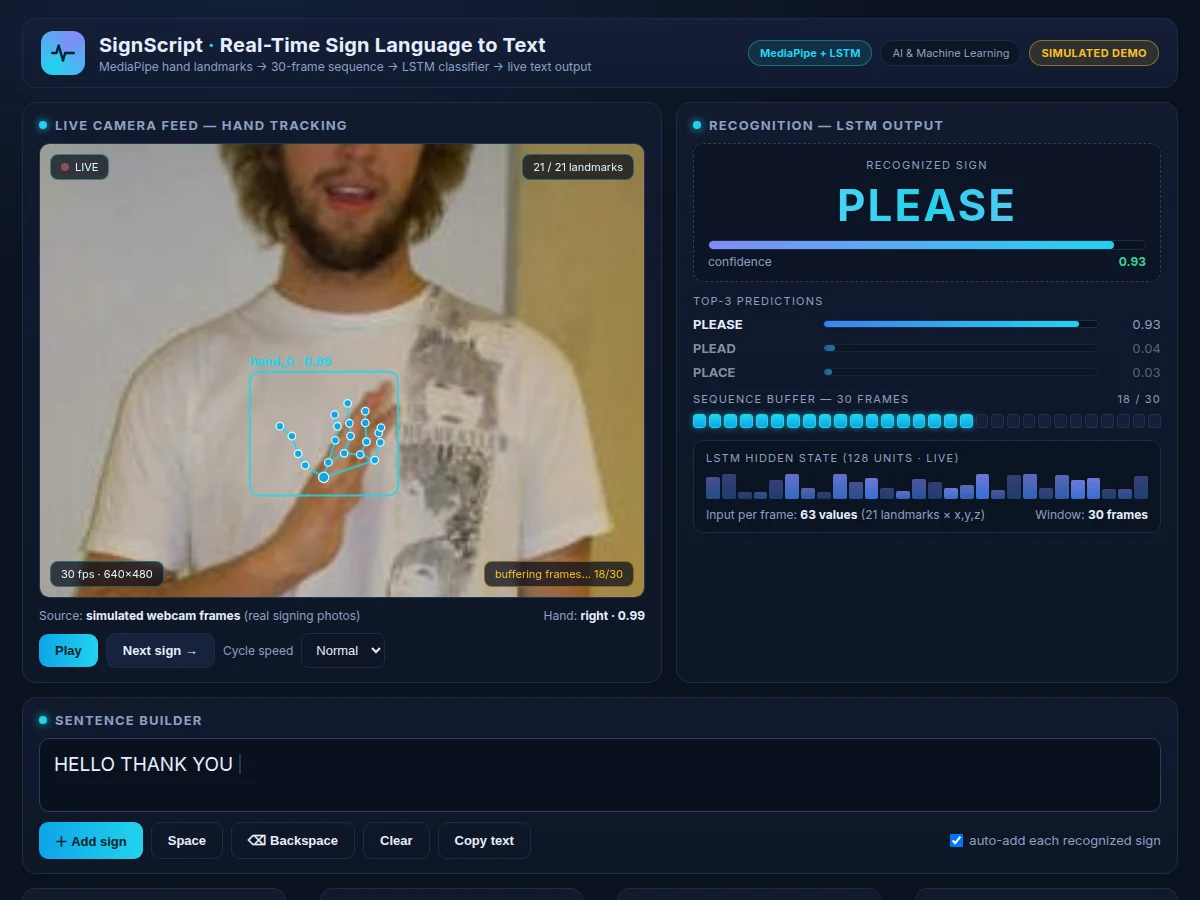
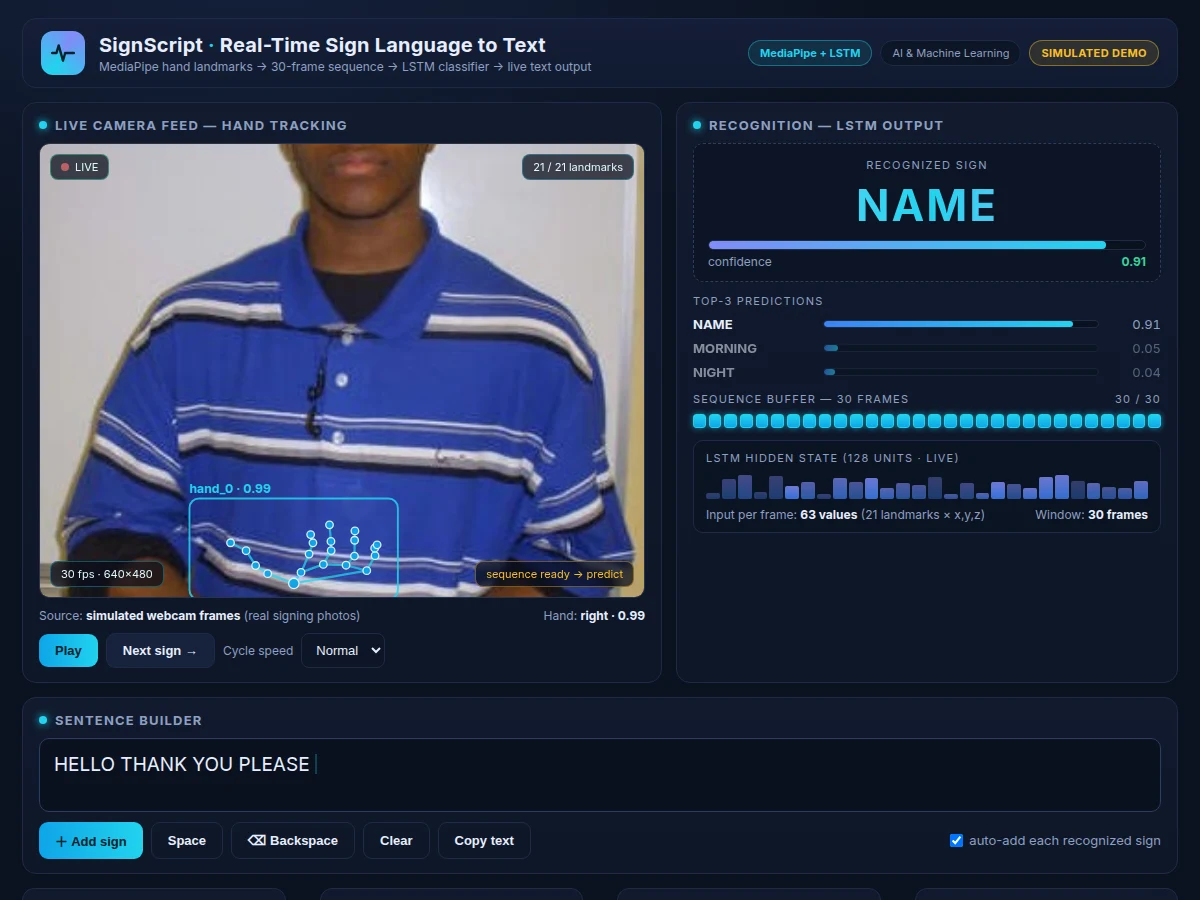
Signs toward the camera and reads back recognized words in the sentence builder.
Follow the working sequence
How it works
- The webcam captures frames at 30 fps and each frame is passed to MediaPipe Hands, which detects the hand and returns 21 landmarks with x, y and z coordinates.
- Landmarks are normalized relative to the wrist landmark and flattened into a 63-value vector per frame, which removes the effect of hand size and camera position.
- A sliding window keeps the most recent 30 frames (about one second of signing) as a 30 × 63 tensor — the temporal input the LSTM needs.
- The trained LSTM processes the sequence and outputs softmax probabilities over the vocabulary; the top word is accepted when its confidence crosses the configured threshold.
- The desktop app draws the landmark skeleton over the live feed, displays the top-3 predictions with confidence bars, and shows the frame-buffer filling in real time.
- Accepted words are appended to the sentence builder, where the user can edit, delete or copy the accumulated text.
- For training: WLASL videos are downloaded, frames are sampled, landmarks are extracted per frame, sequences are labeled by word gloss, and the LSTM is trained with a held-out validation split before the final evaluation run.
Tech stack:
- Python 3, TensorFlow/Keras
- MediaPipe Hands (landmark extraction)
- OpenCV (webcam capture & frame handling)
- NumPy, scikit-learn (metrics)
- WLASL word-level ASL video dataset
- Jupyter Notebook (training & evaluation)
- HTML, CSS, JavaScript (demo front end)
Dataset & model details
- Dataset: WLASL (Word-Level American Sign Language) — 2,000 word classes, 21,083 sign videos from 119 signers (Li et al., WACV 2020; official repository github.com/dxli94/WLASL). Standard subsets: WLASL100 / WLASL300 / WLASL1000 / WLASL2000. A selected subset of 25 common words is used for this implementation.
- Task: Isolated word-level sign classification from video; input = 30-frame sequence of 63 landmark values (21 landmarks × x,y,z); output = probability distribution over the 25-word vocabulary.
- Model: MediaPipe Hands (pre-trained landmark detector, frozen) feeding a trainable LSTM classifier: LSTM(128) → Dropout(0.3) → Dense(64, ReLU) → Dense(25, softmax), trained with categorical cross-entropy and Adam.
- Metrics: Top-1 and top-5 accuracy, per-class precision/recall/F1, confusion matrix on a held-out split. Design target: approximately 80% top-1 accuracy on the 25-word subset under consistent lighting — stated as a development target, not a measured result; the report documents the actual achieved figures after the training run.
| Parameter | Value |
|---|---|
| Input video | 640 × 480 webcam at 30 fps (expected) |
| Landmarks per frame | 21 hand landmarks, x/y/z (MediaPipe Hands) |
| Sequence window | 30 frames, approximately 1 second of signing |
| Feature vector | 63 values per frame (design) |
| LSTM classifier | 128 hidden units, single layer, dropout 0.3 (design) |
| Vocabulary | 25-word selected subset of WLASL (configurable) |
| Inference latency | Design target: under 150 ms per prediction on a laptop CPU |
| Training time | Approximately 1–3 hours for the 25-word subset (expected, hardware-dependent) |
| Model file | Approximately 2–5 MB (.h5, subset-dependent) |
| Demo app | Desktop Python app + single-file web demo, runs offline after download |
Project features
- [MediaPipe hand-landmark extraction] Every webcam frame is processed by MediaPipe Hands to produce 21 x/y/z hand landmarks, normalized relative to the wrist so the representation is robust to hand size and position in frame.
- [LSTM word classifier] A trained LSTM (128 hidden units, dropout, dense softmax head) reads 30-frame landmark sequences and outputs a probability distribution over the project vocabulary.
- [Live webcam recognition app] Point the camera, sign, and watch predictions appear with per-word confidence; the landmark skeleton is drawn over the live feed so the tracking is visible.
- [Top-3 predictions panel] The app shows the three most likely words with confidence bars, which makes near-miss cases (similar handshapes) transparent and gives strong viva material.
- [Sentence builder] Recognized words accumulate into an editable sentence with add, space, backspace, clear and copy-to-clipboard controls.
- [Full training notebook] WLASL video download, frame sampling, landmark extraction, sequence building, train/validation split, LSTM training loop and evaluation in one reproducible Jupyter notebook.
- [Evaluation pack] Top-1/top-5 accuracy, confusion matrix and per-class precision/recall/F1 on a held-out split, with interpretation notes on which sign pairs confuse the model.
- [Configurable vocabulary] The word subset size is a single configuration value; expanding it to more WLASL classes is a documented, supported change.
What is included
- Complete training & evaluation Jupyter notebook (WLASL pipeline, LSTM training, metrics)
- Trained LSTM model file (.h5) with the landmark preprocessing code
- Live webcam recognition app with landmark overlay, top-3 panel and sentence builder
- Single-file web demo illustrating the pipeline
- Confusion matrix, per-class metrics and training-curve plots
- Project report PDF (background, MediaPipe + LSTM theory, methodology, results)
- PPT presentation for final review
- Viva Q&A preparation document (landmarks, sequences, LSTM vs CNN, overfitting, dataset limits)
Limitations & prerequisites
- Recognizes only the words in the trained 25-word subset — out-of-vocabulary signs are not handled and are a documented future-scope item.
- The model is signer- and environment-sensitive: new signers, cluttered backgrounds and poor lighting reduce accuracy; the report quantifies this on the held-out split.
- Requires a clear, unobstructed view of one signing hand; two-handed signs and heavy occlusion are out of scope.
- 80% top-1 is a design target for the training run, stated honestly — the report documents the actual achieved figure after training.
- The system classifies isolated words, not continuous signing or full grammar; it does not translate sentence structure.
- Webcam and a reasonably modern laptop CPU are required for the live demo; very old hardware may not sustain 30 fps.
Frequently Asked Questions
Which dataset is used and why?
WLASL (Word-Level American Sign Language) — 2,000 word classes and 21,083 videos from 119 signers, the standard academic benchmark for isolated sign recognition. This project trains on a selected 25-word subset so it trains in hours on student hardware instead of days, and the subset choice is documented.
How does the MediaPipe + LSTM pipeline work?
MediaPipe Hands converts each frame into 21 skeletal landmarks (x, y, z), which are normalized and stacked into 30-frame sequences. The LSTM reads the sequence and learns the temporal pattern of each sign — the motion trajectory, not just a static pose — then outputs word probabilities.
Can it work with a live camera?
Yes. The shipped desktop app captures webcam frames at 30 fps, draws the landmark skeleton over the live feed, and shows predictions with confidence as you sign. A steady camera, plain background and good lighting give the best results.
Is the accuracy guaranteed?
No measured accuracy is claimed before the training run. The design target is approximately 80% top-1 on the 25-word subset under consistent lighting; the report documents the actual achieved accuracy, confusion matrix and per-class scores after training, so the viva discussion is grounded in real numbers.
Can new signs or words be added?
Yes — the vocabulary is a configuration value. Adding words means extracting landmark sequences for the new WLASL classes and retraining the LSTM's softmax head, a documented procedure included in the notebook; larger vocabularies need more training data and time.
Is this project suitable for a final-year project?
Yes — for Computer Science, IT and AI/ML programs. It demonstrates computer vision (landmark extraction), sequence modeling with LSTMs, dataset discipline on a real academic benchmark, and a working live demo with honest evaluation. Suitable for B.E./B.Tech final-year projects in Computer Science, IT and AI & Machine Learning.
Components & software requirements
- Python 3, TensorFlow/Keras
- MediaPipe Hands (landmark extraction)
- OpenCV (webcam capture & frame handling)
- NumPy, scikit-learn (metrics)
- WLASL word-level ASL video dataset
- Jupyter Notebook (training & evaluation)
- HTML, CSS, JavaScript (demo front end)
Dataset & model details
- Dataset: WLASL (Word-Level American Sign Language) — 2,000 word classes, 21,083 sign videos from 119 signers (Li et al., WACV 2020; official repository github.com/dxli94/WLASL). Standard subsets: WLASL100 / WLASL300 / WLASL1000 / WLASL2000. A selected subset of 25 common words is used for this implementation.
- Task: Isolated word-level sign classification from video; input = 30-frame sequence of 63 landmark values (21 landmarks × x,y,z); output = probability distribution over the 25-word vocabulary.
- Model: MediaPipe Hands (pre-trained landmark detector, frozen) feeding a trainable LSTM classifier: LSTM(128) → Dropout(0.3) → Dense(64, ReLU) → Dense(25, softmax), trained with categorical cross-entropy and Adam.
- Metrics: Top-1 and top-5 accuracy, per-class precision/recall/F1, confusion matrix on a held-out split. Design target: approximately 80% top-1 accuracy on the 25-word subset under consistent lighting — stated as a development target, not a measured result; the report documents the actual achieved figures after the training run.
Delivery information
Built-to-order project. Delivery timeline is shared after order confirmation based on current queue.
Support terms
Complete documentation, setup guide, and viva preparation included. Support for setup and explanation provided.
Download free synopsis (PDF)
Enter your name and email — the synopsis PDF downloads immediately. We may send occasional project updates; no spam, unsubscribe anytime.