
More project photos (2)
The problem
Reading emotion from a face is something humans do instantly, yet teaching a machine to do it is a genuinely hard computer-vision problem: the same emotion looks different across people, lighting, pose and occlusion, and the differences between fear and surprise or anger and disgust can be a few pixels around the eyes and mouth. The FER-2013 dataset captures this difficulty honestly — 35,887 grayscale face images collected in the wild, unevenly spread across 7 emotions, with real label noise. Many students approach this project by downloading a pretrained model they cannot explain, and struggle when the viva turns to architecture, preprocessing or why their model confuses specific emotion pairs. This project takes the opposite route: a custom CNN is designed, trained and evaluated in the open on FER-2013, with the class imbalance, augmentation and metric analysis documented. The real-time demo makes the trained model tangible — point a webcam at a face and watch the detection box, predicted emotion and probability bars update frame by frame.
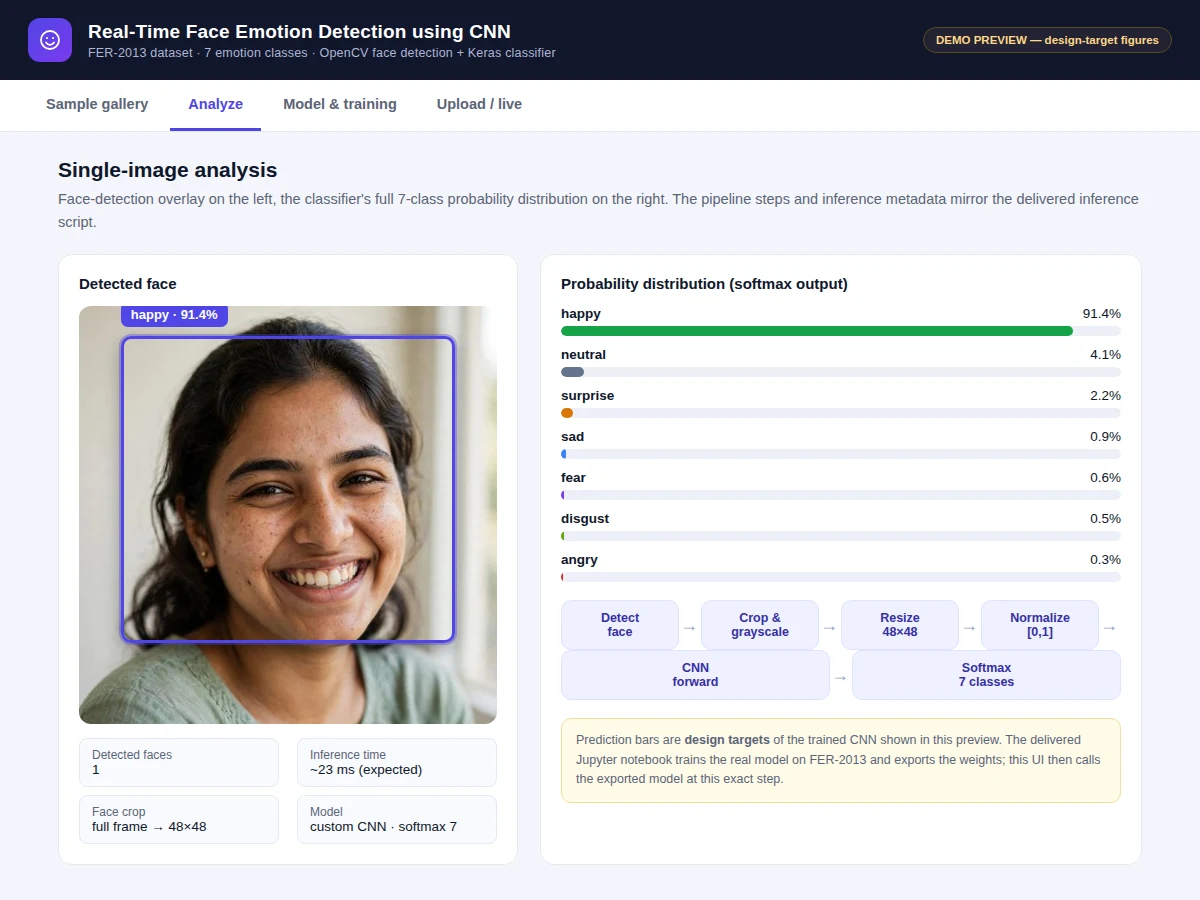
Person in front of the webcam whose face is detected and classified in real time.
Follow the working sequence
How it works
- The FER-2013 CSV is loaded: pixel strings are parsed into 48×48 grayscale arrays and labels 0–6 map to angry, disgust, fear, happy, sad, surprise, neutral; the data splits into 28,709 train, 3,589 validation and 3,589 test images.
- Images are normalized to [0, 1]; training-time augmentation (rotation ±10°, shifts, zoom, horizontal flip) teaches tolerance to pose and framing variation.
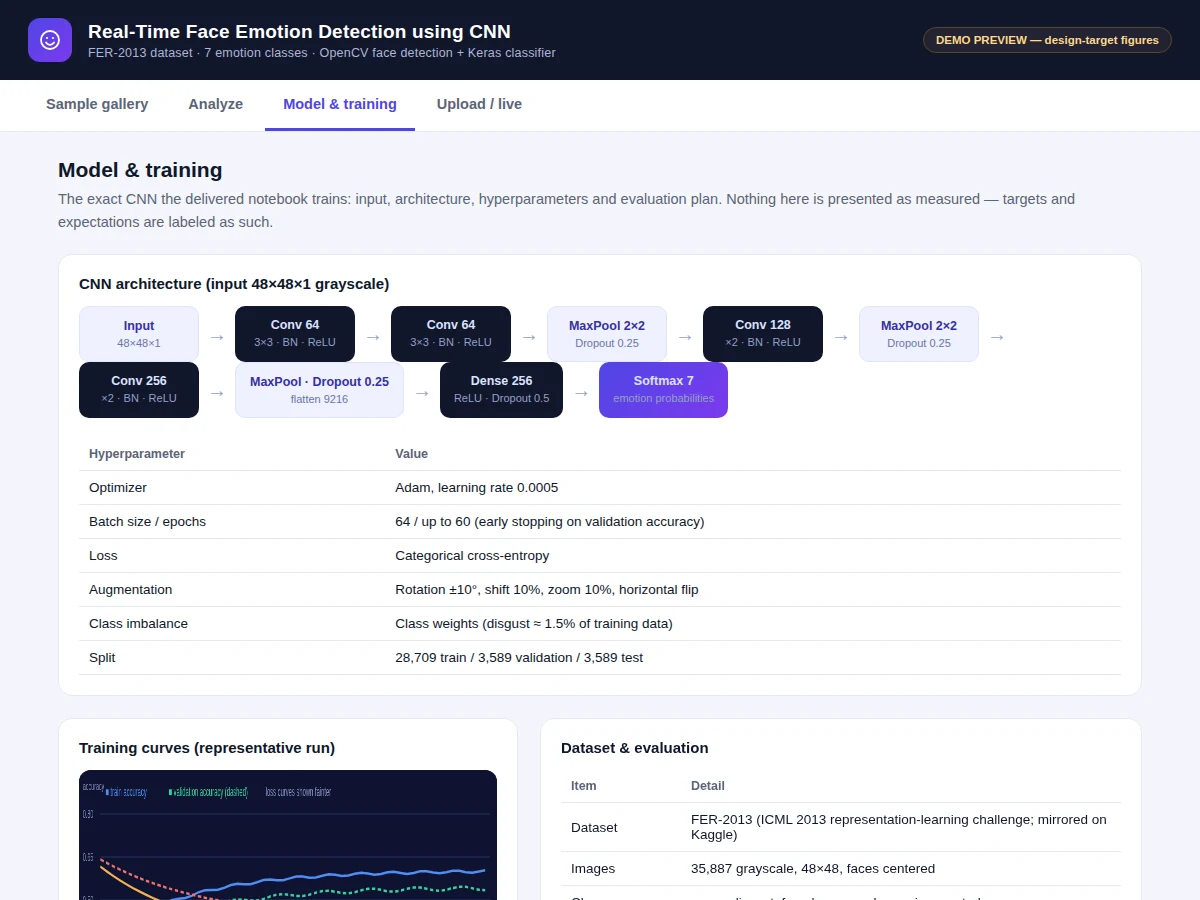
- The custom CNN — Conv(64)×2 → MaxPool → Conv(128)×2 → MaxPool → Conv(256)×2 → MaxPool → Dense(256) → Softmax(7), with batch normalization and dropout — is compiled with Adam and categorical cross-entropy.
- Training runs up to 60 epochs with early stopping on validation accuracy; class weights compensate for the imbalanced classes.
- The test split is evaluated once: overall accuracy, confusion matrix and per-class precision/recall/F1 are generated for the report.
- The best weights are exported as a .h5 file together with the preprocessing steps.
- At inference, OpenCV detects faces in each webcam frame; each face is cropped, grayscaled, resized to 48×48 and normalized identically to training data, then passed through the model for a live emotion label with probabilities.
Tech stack:
- Python 3, TensorFlow/Keras
- OpenCV (face detection + real-time inference)
- NumPy, Matplotlib, scikit-learn (metrics)
- Jupyter Notebook (training & evaluation)
- FER-2013 dataset (ICML 2013 / Kaggle)
- HTML + JavaScript (demo web UI)
Dataset & model details
- Dataset: FER-2013 facial expression recognition — 35,887 grayscale 48×48 face images (28,709 train / 3,589 validation / 3,589 test), 7 emotion classes (angry, disgust, fear, happy, sad, surprise, neutral). Created for the ICML 2013 Challenges in Representation Learning workshop (Carrier & Courville) and mirrored on Kaggle; faces are centered, in-the-wild, and the classes are imbalanced (disgust ≈ 1.5% of training images).
- Task: 7-class image classification; input = 48×48×1 grayscale face, output = probability distribution over the 7 emotions.
- Model: Custom CNN (~3.5M trainable parameters, design): Conv2D(64)×2, 3×3, BN, ReLU → MaxPool(2×2) → Dropout(0.25) → Conv2D(128)×2 → MaxPool → Dropout(0.25) → Conv2D(256)×2 → MaxPool → Dropout(0.25) → Flatten → Dense(256, ReLU) → Dropout(0.5) → Dense(7, softmax). Adam (lr 0.0005), batch 64, categorical cross-entropy, early stopping.
- Metrics: Test accuracy 66–70% (design target for the built-to-order training run, not a measured claim), per-class precision/recall/F1, confusion matrix. No accuracy is claimed as measured until the training run is executed for the order.
| Parameter | Value |
|---|---|
| Input format | 48 × 48 grayscale face, normalized [0, 1] |
| Classes | 7 (angry, disgust, fear, happy, sad, surprise, neutral) |
| Dataset | 35,887 images (28,709 / 3,589 / 3,589 split) |
| Model parameters | Approximately 3,500,000 trainable (design) |
| Test accuracy | 66–70% (design target, not a measured claim) |
| Training time | Approximately 45–70 min on a Colab-class GPU (expected) |
| Inference | Approximately 20–30 ms per face on a laptop CPU (expected) |
| Model file | Approximately 15 MB (.h5 weights) (expected) |
| Demo | Single-file web app, runs offline after download |
Project features
- [Custom CNN architecture] Three convolution blocks (64, 128, 256 filters) with batch normalization, max-pooling and dropout, ending in a dense layer and 7-way softmax — designed for 48×48 inputs with every layer choice documented.
- [Real-time webcam inference] OpenCV face detection feeds each detected face to the trained Keras model; the live window draws a bounding box with the predicted emotion and confidence per frame.
- [Full training notebook] FER-2013 CSV loading, pixel parsing to 48×48 arrays, preprocessing, augmentation, model definition, training loop with early stopping, and evaluation — one reproducible notebook.
- [Class-imbalance handling] Disgust is only about 1.5% of training images; class weights are used so the rare classes are not ignored, and the report explains the trade-off.
- [Confusion matrix & per-class report] Precision, recall and F1 for all 7 emotions, showing exactly which pairs confuse the model (typically fear/surprise, angry/disgust, sad/neutral) — strong viva material.
- [Training curves] Accuracy and loss plots for train vs validation with interpretation notes, so overfitting and the early-stopping point can be explained.
- [Exported trained model] Saved .h5 weights plus the exact preprocessing pipeline (grayscale, 48×48 resize, normalization), so the demo runs the real network without retraining.
- [Demo web UI] Upload interface that runs the real preprocessing live in the browser (48×48 grayscale tensor preview) and a sample gallery showing the annotated prediction pipeline the shipped inference uses.
What is included
- Complete training & evaluation Jupyter notebook (FER-2013 loading to metrics)
- Trained CNN model file (.h5) with the exact preprocessing pipeline
- Real-time inference script (webcam + single-image modes, OpenCV detection)
- Demo web UI with live preprocessing preview and annotated sample gallery
- Confusion matrix, per-class metrics and training-curve plots
- Project report PDF (background, CNN theory, architecture rationale, methodology, results)
- PPT presentation for final review
- Viva Q&A preparation document (convolutions, batch norm, dropout, softmax, class imbalance, overfitting)
Limitations & prerequisites
- FER-2013 images are collected in the wild with real label noise; the model learns the dataset's labeling quirks, not a universal theory of emotion.
- The disgust class is only about 1.5% of training data — even with class weights it remains the weakest class, which the report states plainly.
- 66–70% is a design target for the training run, stated honestly — the report documents the actual achieved figure after training.
- Harsh lighting, heavy occlusion (masks, hands), extreme pose and very low-resolution faces reduce prediction quality.
- Similar-looking pairs (fear/surprise, angry/disgust, sad/neutral) are genuinely confused; the confusion matrix shows this rather than hiding it.
- The model reads facial expression only — it is not a certified emotion-analysis or medical device and makes no claim about a person's inner state.
Frequently Asked Questions
Which dataset is used and why?
FER-2013 — 35,887 grayscale 48×48 face images across 7 emotions, from the ICML 2013 representation-learning challenge. It is the standard benchmark for this task: large enough to train a real CNN, hard enough (in-the-wild images, imbalanced classes) to teach genuine evaluation discipline, and every result is comparable against published work.
What accuracy does the model achieve?
The design target is 66–70% test accuracy, which is the realistic band for a custom CNN of this size on FER-2013. It is stated as a target, not a measured result — the notebook trains the model fresh for the order, and the report documents the actual figure the run achieves, including per-class precision, recall and F1.
Can it work with a live webcam?
Yes. The shipped inference script uses OpenCV face detection on each webcam frame, crops and preprocesses every detected face to 48×48, and overlays the predicted emotion with confidence on the live window. Expected speed is roughly 20–30 ms per face on a laptop CPU.
Can new emotion classes be added?
The 7 classes come from the dataset's labels, so a genuinely new emotion needs labeled training images for it. The notebook is structured so a new class means adding the images, re-mapping the labels and retraining — listed as a customization, not a one-click change.
Can a custom dataset be used instead?
Yes, with conditions. The training pipeline accepts any folder of labeled face images, but they must be face-centered and reasonably consistent in framing for the 48×48 preprocessing to work well. The notebook documents exactly how to prepare a custom set, and mixing or replacing datasets changes the expected accuracy, which the report then re-measures honestly.
Is this project suitable for a final-year project?
Yes — for Computer Science, IT and AI/ML programs. It demonstrates CNN architecture design, a real benchmark dataset with class imbalance, disciplined training methodology, honest evaluation with confusion matrices and per-class metrics, plus a working real-time deployment with a demo UI. Suitable for B.E./B.Tech final-year projects in Computer Science, IT and AI & Machine Learning.
Components & software requirements
- Python 3, TensorFlow/Keras
- OpenCV (face detection + real-time inference)
- NumPy, Matplotlib, scikit-learn (metrics)
- Jupyter Notebook (training & evaluation)
- FER-2013 dataset (ICML 2013 / Kaggle)
- HTML + JavaScript (demo web UI)
Dataset & model details
- Dataset: FER-2013 facial expression recognition — 35,887 grayscale 48×48 face images (28,709 train / 3,589 validation / 3,589 test), 7 emotion classes (angry, disgust, fear, happy, sad, surprise, neutral). Created for the ICML 2013 Challenges in Representation Learning workshop (Carrier & Courville) and mirrored on Kaggle; faces are centered, in-the-wild, and the classes are imbalanced (disgust ≈ 1.5% of training images).
- Task: 7-class image classification; input = 48×48×1 grayscale face, output = probability distribution over the 7 emotions.
- Model: Custom CNN (~3.5M trainable parameters, design): Conv2D(64)×2, 3×3, BN, ReLU → MaxPool(2×2) → Dropout(0.25) → Conv2D(128)×2 → MaxPool → Dropout(0.25) → Conv2D(256)×2 → MaxPool → Dropout(0.25) → Flatten → Dense(256, ReLU) → Dropout(0.5) → Dense(7, softmax). Adam (lr 0.0005), batch 64, categorical cross-entropy, early stopping.
- Metrics: Test accuracy 66–70% (design target for the built-to-order training run, not a measured claim), per-class precision/recall/F1, confusion matrix. No accuracy is claimed as measured until the training run is executed for the order.
Delivery information
Built-to-order project. Delivery timeline is shared after order confirmation based on current queue.
Support terms
Complete documentation, setup guide, and viva preparation included. Support for setup and explanation provided.
Download free synopsis (PDF)
Enter your name and email — the synopsis PDF downloads immediately. We may send occasional project updates; no spam, unsubscribe anytime.