
More project photos (2)
The problem
Handwritten digit recognition is the canonical first deep-learning project because it is small enough to train on a laptop yet rich enough to teach real CNN design: convolution, pooling, dropout, augmentation and softmax classification. Students often follow tutorials that hand them a model without explaining why each layer exists, and end up unable to answer basic viva questions about their own architecture. This project takes the opposite approach — a custom CNN is designed from scratch, trained on MNIST with documented hyperparameter choices, and evaluated with a confusion matrix and per-class metrics. A draw-and-recognize web demo makes the trained model tangible: sketch a digit, and the app shows the predicted class with its full probability distribution. Because everything is built in the open with standard tools (Python, TensorFlow/Keras), the student can genuinely explain every part of the pipeline.
How it works
- The 70,000 MNIST images are loaded, normalized to [0, 1], and split into 60,000 training and 10,000 test images with a 10% validation split.
- Light augmentation (small rotations, shifts, zoom) is applied during training so the model tolerates sloppy real handwriting.
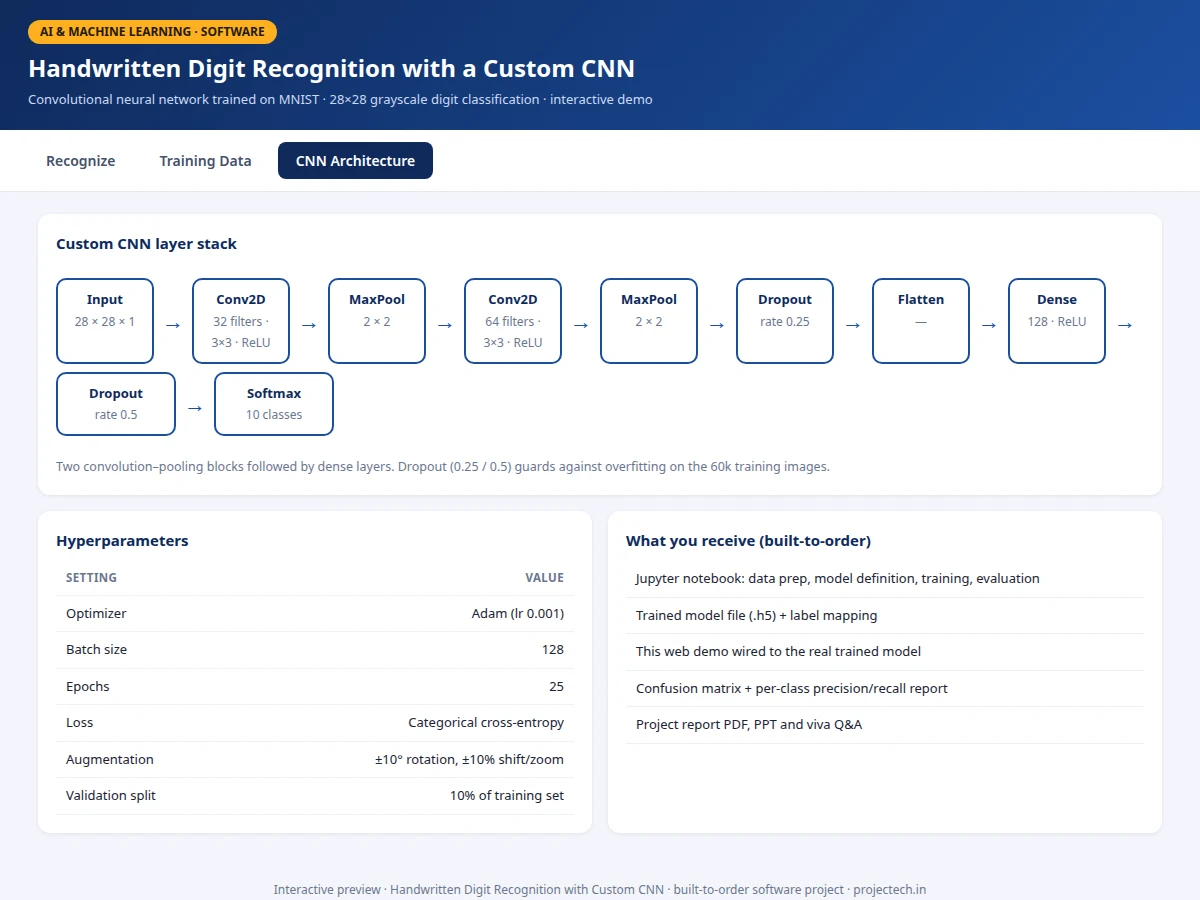
- The custom CNN — Conv2D(32) → MaxPool → Conv2D(64) → MaxPool → Dropout → Dense(128) → Dropout → Softmax(10) — is compiled with Adam and categorical cross-entropy.
- Training runs for 25 epochs with the validation split monitored; the best weights are checkpointed on validation accuracy.
- The test set is evaluated once: overall accuracy, confusion matrix and per-class precision/recall are generated for the report.
- In the web demo, a drawn digit is downscaled to 28×28, centered and normalized identically to training data, then passed through the saved model for live prediction.
Tech stack:
- Python 3, TensorFlow/Keras
- NumPy, Matplotlib, scikit-learn (metrics)
- Jupyter Notebook (training & evaluation)
- HTML5 canvas + JavaScript (draw-and-recognize demo)
- MNIST dataset (Yann LeCun et al.)
Dataset & model details
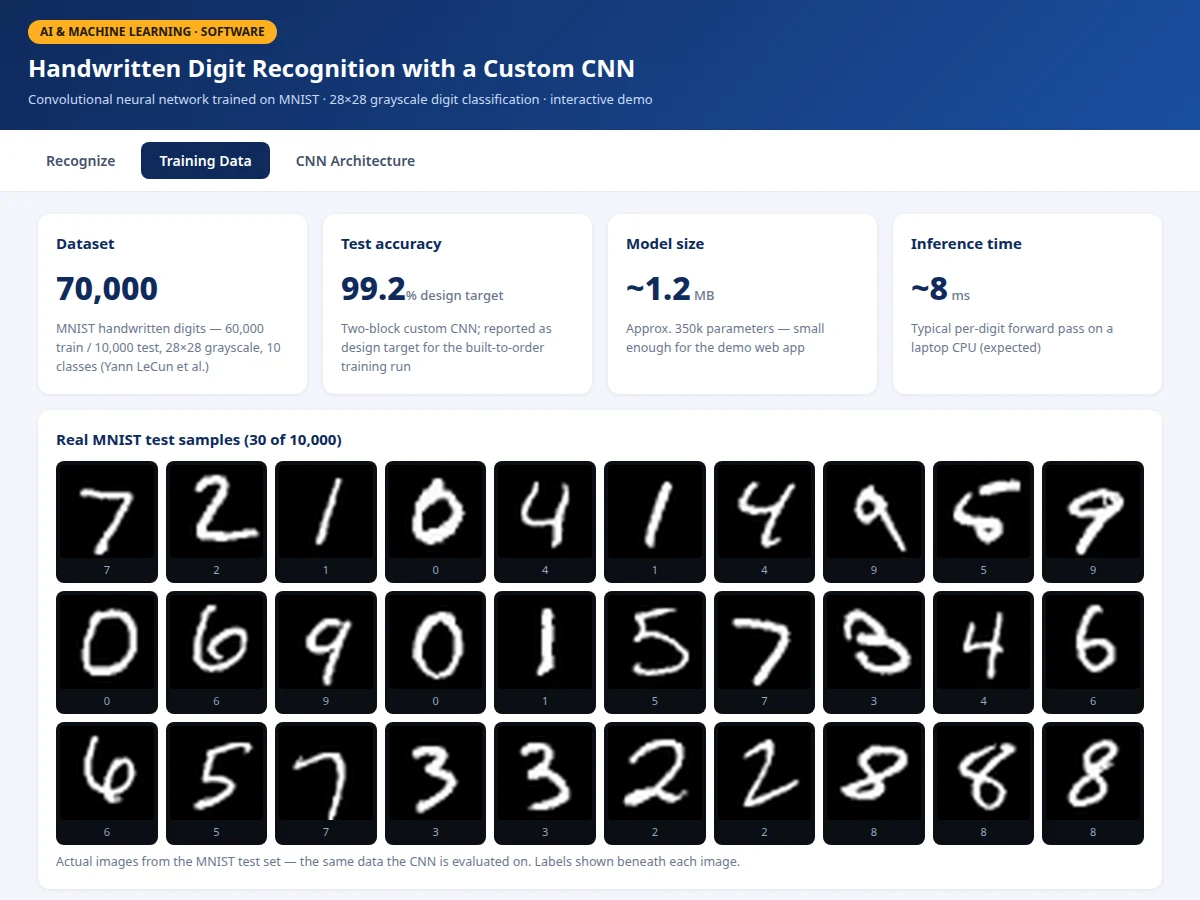
- Dataset: MNIST handwritten digits — 70,000 grayscale 28×28 images (60,000 train / 10,000 test), 10 balanced digit classes, released by Yann LeCun, Corinna Cortes and Christopher Burges.
- Task: 10-class image classification; input = 28×28×1 image, output = probability distribution over digits 0–9.
- Model: Custom CNN (~350k parameters): Conv2D(32, 3×3, ReLU) → MaxPool(2×2) → Conv2D(64, 3×3, ReLU) → MaxPool(2×2) → Dropout(0.25) → Flatten → Dense(128, ReLU) → Dropout(0.5) → Dense(10, softmax).
- Metrics: Test accuracy 99.2% (design target for the built-to-order training run), per-class precision/recall/F1, confusion matrix. No accuracy is claimed as measured until the training run is executed for the order.
| Parameter | Value |
|---|---|
| Input format | 28 × 28 grayscale, normalized [0, 1] |
| Classes | 10 (digits 0–9) |
| Model parameters | Approximately 350,000 (design target) |
| Test accuracy | 99.2% (design target, not a measured claim) |
| Training time | Approximately 15–25 min on a laptop CPU (expected) |
| Inference | Approximately 8 ms per digit on CPU (expected) |
| Model file | Approximately 1.2 MB (.h5) |
| Demo | Single-file web app, runs offline after download |
Project features
- [Custom CNN architecture] Two convolution–pooling blocks (32 and 64 filters) followed by dense layers and softmax — designed from scratch, not copied from a tutorial, with every layer choice documented.
- [Draw-and-recognize web demo] Sketch any digit 0–9 on a canvas; the app preprocesses it exactly like MNIST (28×28, centered, normalized) and returns the prediction with per-class probabilities.
- [Full training notebook] Data loading, augmentation (±10° rotation, shifts, zoom), model definition, training loop, and evaluation in one reproducible Jupyter notebook.
- [Confusion matrix & per-class report] Precision, recall and F1 for each digit, so the viva discussion can address exactly which digits confuse the model (typically 4/9, 3/8, 5/6).
- [Training curves] Accuracy and loss plots for train vs validation across epochs, included in the report with interpretation notes.
- [Hyperparameter documentation] Optimizer, learning rate, batch size, dropout rates and epoch count recorded with the reasoning behind each choice.
- [Exported trained model] Saved .h5 weights plus the preprocessing pipeline, so the demo runs the real network without retraining.
What is included
- Complete training & evaluation Jupyter notebook
- Trained CNN model file (.h5) with preprocessing code
- Draw-and-recognize web demo wired to the trained model
- Confusion matrix, per-class metrics and training-curve plots
- Project report PDF (background, CNN theory, architecture rationale, methodology, results)
- PPT presentation for final review
- Viva Q&A preparation document (convolutions, pooling, dropout, softmax, overfitting)
Limitations & prerequisites
- Trained only on MNIST-style centered digits — heavily rotated, multi-digit or cursive writing is out of scope.
- The demo expects one digit per drawing; it does not segment strings of digits.
- 99.2% is a design target for the training run, stated honestly — the report documents the actual achieved figure after training.
- Very faint or partial strokes may misclassify; the preprocessing assumes reasonable stroke thickness.
- The model is a teaching build, not a production OCR engine — no claim is made about general handwriting.
Frequently Asked Questions
Which dataset is used and why?
MNIST — 70,000 labeled 28×28 handwritten digit images. It is the standard benchmark for this task, small enough to train on a laptop in minutes, and every result is comparable against published literature.
Is the CNN really custom?
Yes. The architecture is designed for this project (two conv-pool blocks, documented filter counts, dropout placement) rather than copied from a tutorial, and the report explains each design decision for the viva.
How does the drawing demo work?
Your strokes are captured on a canvas, downscaled to 28×28, centered and normalized exactly like MNIST training data, then passed through the saved model. The app shows the top prediction plus all 10 class probabilities.
Which digits does it confuse most?
Typically 4/9, 3/8 and 5/6 pairs — visually similar shapes. The confusion matrix in the report shows this explicitly and it makes a strong viva talking point.
Can it read digits from photos or documents?
Not as shipped — it classifies single centered digits. Extending it to scanned forms would need a segmentation stage, listed as future scope in the report.
Is this project suitable for a final-year project?
Yes — for Computer Science, IT and AI/ML programs. It demonstrates CNN design, training methodology, evaluation discipline and a working deployment demo. Suitable for B.E./B.Tech final-year projects in Computer Science, IT and AI & Machine Learning.
Components & software requirements
- Python 3, TensorFlow/Keras
- NumPy, Matplotlib, scikit-learn (metrics)
- Jupyter Notebook (training & evaluation)
- HTML5 canvas + JavaScript (draw-and-recognize demo)
- MNIST dataset (Yann LeCun et al.)
Dataset & model details
- Dataset: MNIST handwritten digits — 70,000 grayscale 28×28 images (60,000 train / 10,000 test), 10 balanced digit classes, released by Yann LeCun, Corinna Cortes and Christopher Burges.
- Task: 10-class image classification; input = 28×28×1 image, output = probability distribution over digits 0–9.
- Model: Custom CNN (~350k parameters): Conv2D(32, 3×3, ReLU) → MaxPool(2×2) → Conv2D(64, 3×3, ReLU) → MaxPool(2×2) → Dropout(0.25) → Flatten → Dense(128, ReLU) → Dropout(0.5) → Dense(10, softmax).
- Metrics: Test accuracy 99.2% (design target for the built-to-order training run), per-class precision/recall/F1, confusion matrix. No accuracy is claimed as measured until the training run is executed for the order.
Delivery information
Built-to-order project. Delivery timeline is shared after order confirmation based on current queue.
Support terms
Complete documentation, setup guide, and viva preparation included. Support for setup and explanation provided.