
More project photos (2)
The problem
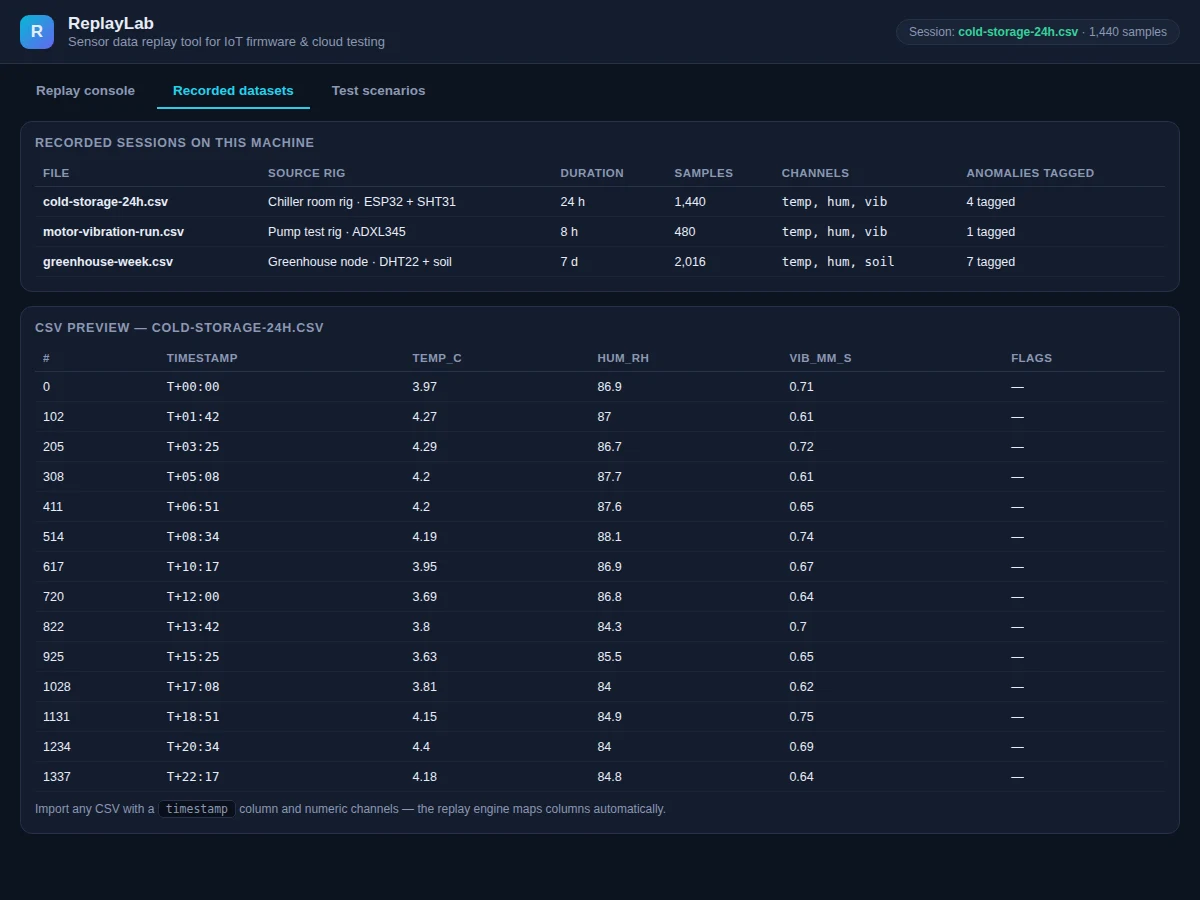
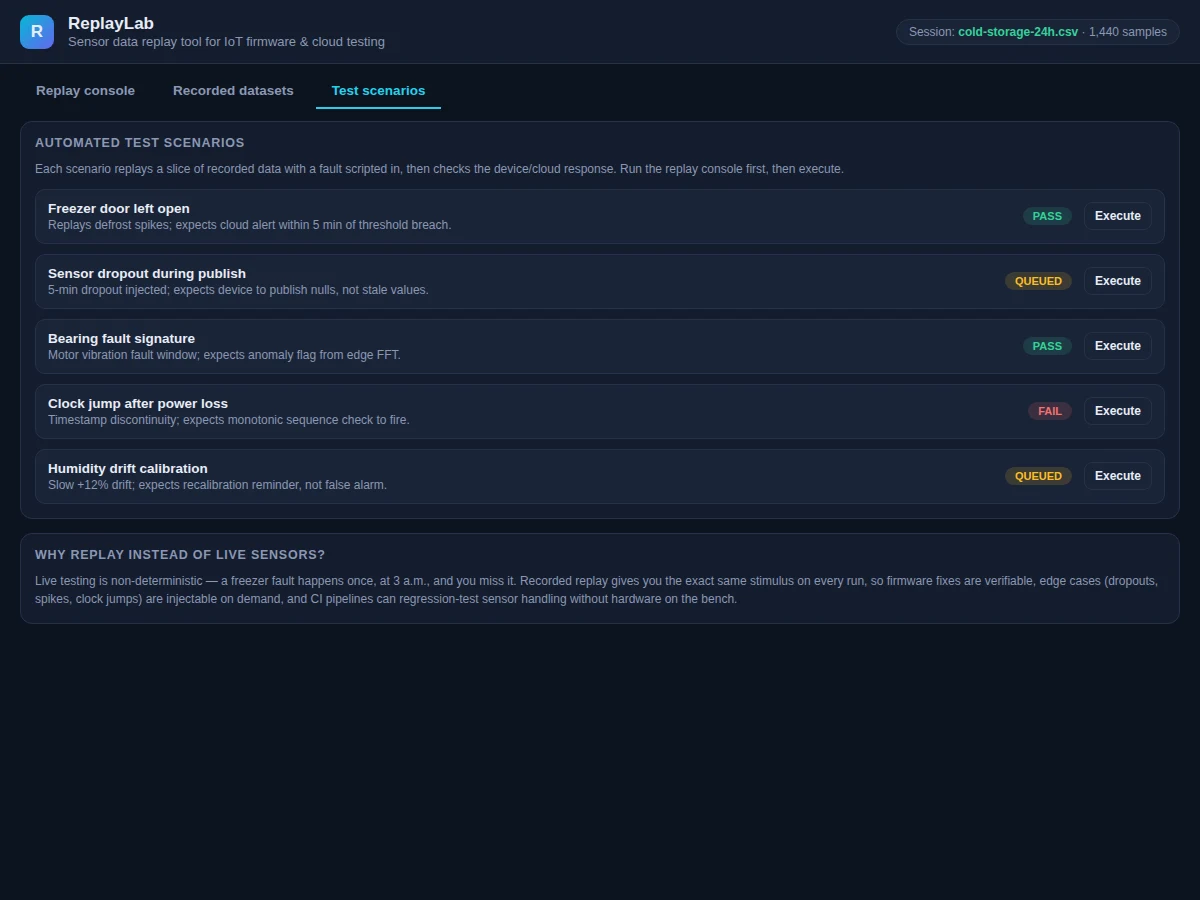
Testing IoT firmware against live sensors is frustratingly non-deterministic: a freezer fault happens once, at 3 a.m., and you miss it. Regression-testing a firmware fix against the same real-world conditions is nearly impossible, and CI pipelines cannot keep hardware on the bench for every commit. This project takes the standard industry approach — record once, replay forever. A replay console streams recorded sensor datasets (CSV with timestamps and numeric channels) exactly as recorded, with sample-accurate timing, so the device under test cannot tell replay from live sensors. Faults are injectable on demand: a +6° temperature spike, a 5-minute sensor dropout, a slow humidity drift. Automated test scenarios script a replay slice with a fault, then check the expected device or cloud response (cloud alert within 5 minutes, nulls instead of stale values, anomaly flags), reporting PASS, QUEUED or FAIL. Three realistic datasets ship with it: a 24-hour cold-storage log (ESP32 + SHT31), a motor vibration run (ADXL345) and a week-long greenhouse log (DHT22 + soil).
How it works
- Recorded datasets (CSV: timestamp + numeric channels) are loaded; the engine maps columns automatically and preserves original timestamps and gaps.
- The replay console streams samples with sample-accurate timing at 1×, or 0.5×–8× for review; loop replay repeats the recording seamlessly.
- The live chart window shows the last 120 minutes of temperature, humidity and vibration while current values update in the sensor cards.
- Fault injection buttons splice a fault into the stream at the current position: a +6° temp spike, a 5-minute dropout (publishes nulls), or a slow humidity drift.
- Every streamed sample is published to MQTT and written to the publish log, so the firmware's and cloud's responses can be observed in real time.
- Automated scenarios replay a scripted slice with a fault injected, then evaluate the expected response — cloud alert within 5 minutes of a threshold breach, monotonic sequence checks after a clock jump — and mark PASS or FAIL.
Tech stack:
- HTML5 + vanilla JavaScript (single-file replay console)
- Canvas 2D live charts
- MQTT (test.mosquitto.org:1883 public broker)
- CSV datasets (1,440 / 480 / 2,016 samples)
- Seeded pseudo-random generators (deterministic replay)
- Git
| Parameter | Value |
|---|---|
| Input | CSV with timestamp column + numeric channels (auto-mapped) |
| Replay fidelity | Sample-accurate timing; timestamps and gaps preserved (design behavior) |
| Speeds | 0.5×, 1×, 2×, 4×, 8×; ±1 min seek; loop replay |
| Built-in datasets | 3 (cold-storage 24 h, motor vibration 8 h, greenhouse 7 d) |
| Faults | Temp spike +6°, 5-min dropout, humidity drift |
| Test scenarios | 5 scripted checks with pass criteria |
| MQTT | Broker test.mosquitto.org:1883, topic replaylab/sensors (configurable) |
| App | Single-file HTML/CSS/JS, runs offline except MQTT publishing |
Project features
- [Deterministic replay engine] CSVs stream sample-by-sample with timestamps and gaps preserved; the device under test cannot distinguish replay from live sensors.
- [Transport controls] Play, pause, restart, ±1-minute seek, and 0.5×–8× speed so long recordings can be reviewed fast.
- [Fault injection] One-click temp spike (+6°), 5-minute sensor dropout, humidity drift — edge cases on demand without waiting for real failures.
- [Automated test scenarios] Five scripted checks (freezer door open, sensor dropout, bearing fault, clock jump, humidity drift calibration), each with pass criteria and PASS/FAIL/QUEUED status.
- [Three realistic datasets] Cold-storage 24 h (1,440 samples, temp/hum/vib), motor vibration 8 h (480 samples), greenhouse 7 d (2,016 samples) — with anomaly tags.
- [MQTT publish log] Live log of every published sample; broker and topic shown (test.mosquitto.org:1883, replaylab/sensors) so cloud ingestion can be verified.
- [CSV auto-mapping] Import any CSV with a timestamp column and numeric channels — the engine maps columns automatically.
What is included
- Complete replay console web app (transport, live charts, publish log)
- Deterministic replay engine with 0.5×–8× speed and fault injection
- Three realistic recorded datasets with anomaly tags (CSV)
- Five automated test scenarios with pass/fail criteria
- MQTT publishing integration (broker + topic configuration)
- User guide (dataset format, scenario authoring, CI integration notes)
- Project report PDF (background, replay theory, methodology, results)
- PPT presentation for final review
- Viva Q&A preparation document (deterministic testing, MQTT, sensor faults)
Limitations & prerequisites
- Replay fidelity is only as good as the recording: the engine cannot invent data between sparse samples, and sensor noise in the CSV is replayed verbatim.
- The demo datasets are recorded from a rig, not from a certified calibration source — treat them as realistic test stimulus, not reference measurements.
- Automated scenarios check protocol-level responses (alerts, nulls, sequence checks); they do not certify firmware correctness on their own.
- MQTT publishing in the demo uses the public test.mosquitto.org broker — production testing should use a private broker for reliability and security.
- 8× speed replays faster than wall-clock; firmware with hard real-time deadlines must also be tested at 1×.
Frequently Asked Questions
Why replay instead of live sensors?
Live testing is non-deterministic — a freezer fault happens once, at 3 a.m., and you miss it. Recorded replay gives the exact same stimulus on every run, so firmware fixes are verifiable and CI pipelines can regression-test sensor handling without hardware on the bench.
What datasets ship with it?
Three: a 24-hour cold-storage log (1,440 samples, temp/humidity/vibration, ESP32 + SHT31), an 8-hour motor vibration run (480 samples, ADXL345), and a week-long greenhouse log (2,016 samples, DHT22 + soil) — each with tagged anomalies.
What faults can be injected?
A +6° temperature spike, a 5-minute sensor dropout (publishes nulls, not stale values), and a slow humidity drift — the edge cases that are hardest to reproduce on demand with live sensors.
How do the test scenarios work?
Each scenario replays a scripted data slice with a fault injected, then checks the expected response — e.g. a cloud alert within 5 minutes of a threshold breach, or an anomaly flag from edge FFT on a bearing-fault window — and reports PASS or FAIL.
Can I use my own recordings?
Yes. Import any CSV with a timestamp column and numeric channels; the replay engine maps columns automatically.
Is this project suitable for a final-year project?
Yes — for IoT & Embedded, Computer Science and Electronics programs. It demonstrates deterministic testing methodology, MQTT telemetry, and automated verification — the testing discipline industry IoT teams actually use. Suitable for B.E./B.Tech final-year projects in IoT & Embedded Systems, Computer Science and Electronics.
Components & software requirements
- HTML5 + vanilla JavaScript (single-file replay console)
- Canvas 2D live charts
- MQTT (test.mosquitto.org:1883 public broker)
- CSV datasets (1,440 / 480 / 2,016 samples)
- Seeded pseudo-random generators (deterministic replay)
- Git
Delivery information
Built-to-order project. Delivery timeline is shared after order confirmation based on current queue.
Support terms
Complete documentation, setup guide, and viva preparation included. Support for setup and explanation provided.