
More project photos (2)
The problem
The School Parent-Teacher Meeting Scheduling Web App with Slot Booking and Reminders is a web application that replaces paper sign-up sheets and phone-call scheduling for school parent-teacher meetings. A teacher publishes a meeting window for a parent-teacher meeting day, the system splits that window into equal meeting slots, and each parent books exactly one slot for one teacher. Booked slots lock immediately so no second parent can take the same slot, and on the meeting day a queue view shows the running order, the meeting in progress, and the parents still waiting. A reminder list, ordered by meeting time, tells each parent the teacher, class, time and room before the meeting. The build covers three roles — teacher, parent and school coordinator — with a working demo that shows slot setup, parent booking, the meeting-day queue and the reminder list using fictional demo data.
This is a built-to-order software project: the web application, database, demo data set, setup guide and documentation are prepared fresh for you.
| Scheduling approach | Booking conflicts | Queue visibility | Reminders |
|---|---|---|---|
| Paper list or phone calls | Conflicts found late by hand | No live order | Manual calls only |
| Shared spreadsheet sign-up | Two parents can claim one row | Order unclear when rows move | None built in |
| This scheduling web app | One booking per slot enforced | Live queue with current and next parent | Ordered reminder list included |
Teacher enters a meeting window.
Follow the working sequence
How it works
The School Parent-Teacher Meeting Scheduling Web App works as one booking pipeline from a teacher's free window to a parent's reminder. A teacher publishes a meeting window, and the system divides that window into equal slots of a fixed length, storing each slot as one row that can hold one booking. A parent then opens the booking view for their child's class, where taken slots appear locked and free slots appear selectable, and booking a free slot writes the parent's name into that slot row. Because the slot row has a single booking field backed by a uniqueness rule, a second booking for the same slot cannot succeed, which is the mechanism that prevents double-booking without manual checking. On the meeting day the queue view reads the bookings in slot order, the teacher marks meetings complete to advance the queue, and the reminder list sends each parent the teacher, class, time and room in meeting-time order.
- The school coordinator creates teacher accounts with a name, a class and a subject, and creates the parent-teacher meeting day with a date.
- Each teacher publishes a meeting window by entering a start time, an end time, a slot length in minutes and an optional break in minutes, and the system generates the bookable slots.
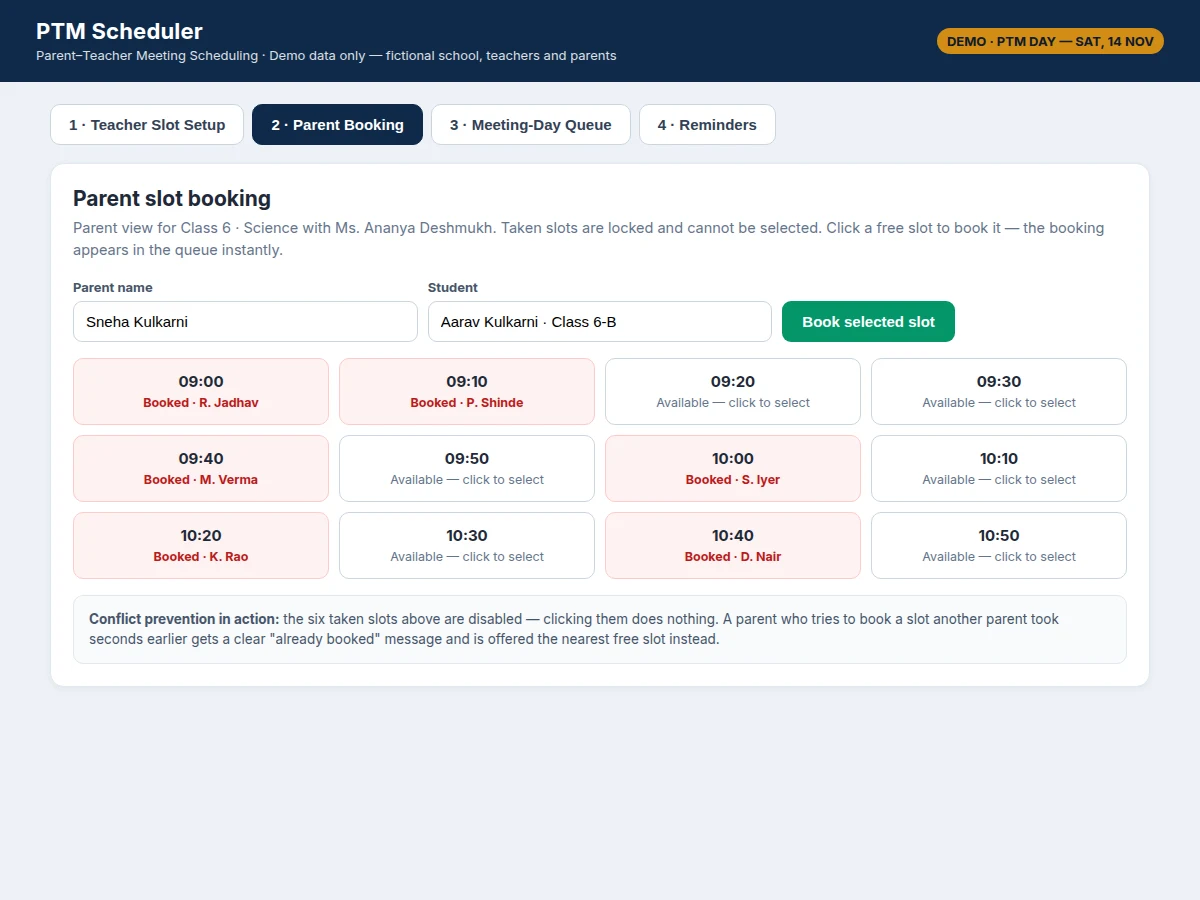
- A parent opens the booking view for their child's class, sees which slots are free and which are already booked, and selects one free slot.
- The system writes the booking into that slot row only when the booking field is empty; a second attempt on the same slot is refused and the nearest free slot is suggested.
- The booking confirmation appears immediately, and the booking joins the reminder list in meeting-time order with the teacher, class, time and room.
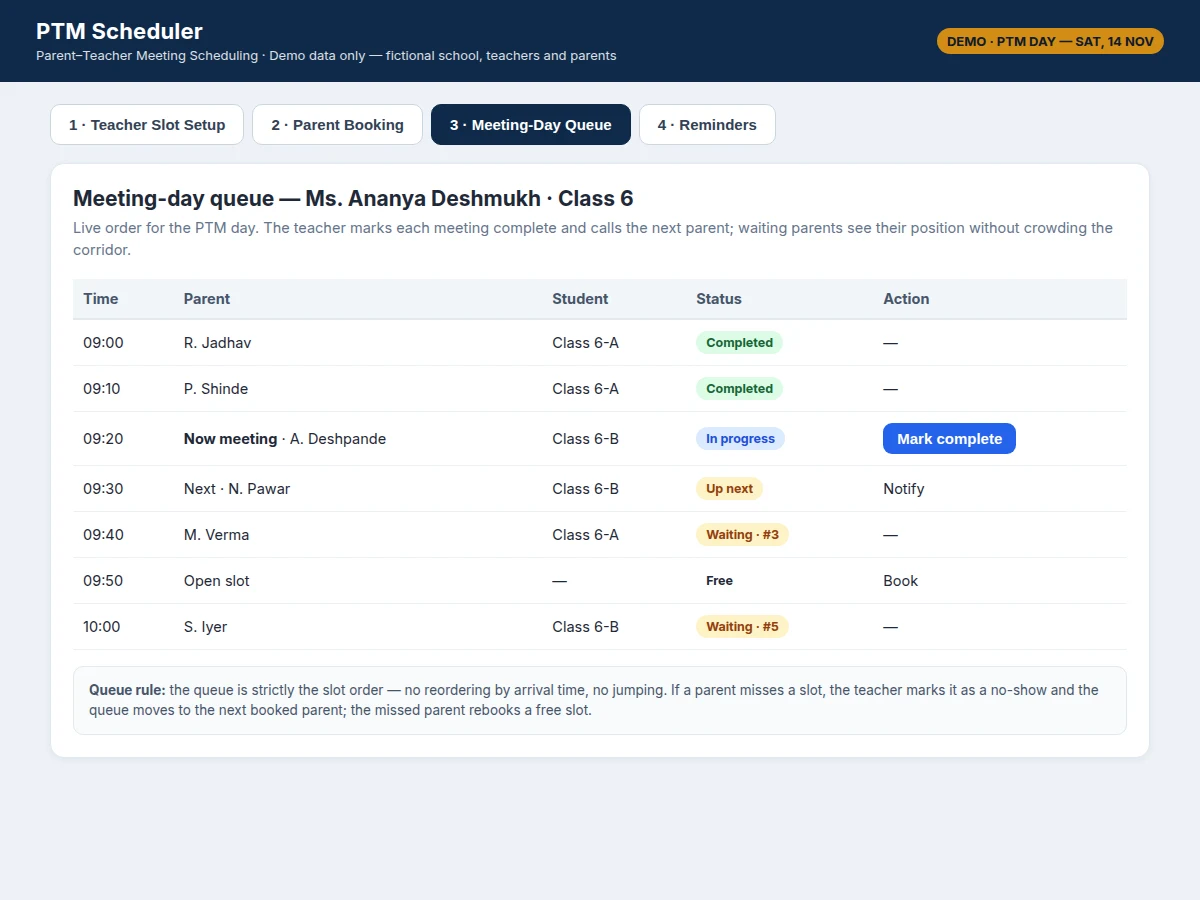
- On the meeting day, the queue view shows completed meetings, the meeting in progress, the next parent and the waiting parents in slot order.
- The teacher marks each meeting complete, or marks a missed slot as a no-show, and the queue advances to the next booked parent.
Tech stack:
- HTML · CSS · JavaScript frontend
- Node.js backend with Express
- SQLite database for teachers · slots · bookings
- REST API for slot and booking operations
- Browser local storage for demo session state
- Nodemailer-style email reminder hook
- WhatsApp message template hook
- Git version control
| Parameter | Value |
|---|---|
| Application type | Web application for desktop and mobile browsers |
| User roles | 3 roles: teacher · parent · school coordinator |
| Slot length | Configurable · design target default 10 minutes per slot |
| Break between slots | Configurable · design target default 0 minutes to 5 minutes |
| Bookings per slot | Maximum 1 booking per slot · enforced by design |
| Demo roster | Demo value: 3 teachers · 24 slots · 15 booked slots |
| Reminder timing | Design target: evening before plus 60 minutes before the slot |
| Reminder ordering | By meeting time · then by teacher name |
| Database tables | 4 tables: teachers · slots · bookings · reminders |
| Hosting requirement | Any Node.js host with approximately 512 MB memory (expected) |
| Browser support | Current versions of Chrome · Firefox · Edge · Safari |
Project features
The School Parent-Teacher Meeting Scheduling Web App brings together four capabilities that solve the whole meeting day rather than one step of it: teacher slot publishing, conflict-free parent booking, a live meeting-day queue, and an ordered reminder list. Slot publishing turns a teacher's free window into bookable meeting slots with a fixed length and an optional break between meetings. Conflict-free booking guarantees that each slot holds at most one parent, so the timetable handed to the teacher on the meeting day has no overlaps to resolve. The meeting-day queue replaces corridor crowding with a visible running order that shows the meeting in progress and who is next. The reminder list works from the same bookings, sorted by meeting time, so every parent receives the teacher name, class, meeting time and room before the meeting starts.
- [Teacher slot publishing] A teacher enters a meeting window with a start time, an end time, a slot length and an optional break, and the system generates the bookable slots for that window. Published slots appear immediately in the parent booking view for the matching class.
- [Conflict-free parent booking] A parent selects a teacher and a class, sees free and booked slots at a glance, and books one free slot. Each slot row carries a single booking field, so a second booking attempt on a taken slot is refused and the nearest free slot is offered instead.
- [Meeting-day queue view] The queue lists bookings in slot order with the completed meetings, the meeting in progress, the next parent and the waiting parents. The teacher marks each meeting complete to advance the queue, and a missed slot is marked as a no-show so the queue moves on.
- [Ordered reminder list] Reminders are queued in meeting-time order, earliest meeting first, and each reminder names the teacher, class, meeting time and room. The design target timing is one reminder on the evening before the meeting day and one reminder 60 minutes before the booked slot.
- [Booking confirmation] Every successful booking shows an immediate confirmation naming the teacher, class and slot time, and the booking joins the reminder queue at the same moment. A parent who books a slot therefore never has to ask whether the booking went through.
- [Class and teacher roster] Teachers are organised by class and subject, so a parent only ever sees the teachers for their own child's class. The demo roster covers 3 teachers, 24 slots in total and 15 booked slots as demo values.
- [Coordinator overview] A school coordinator sees all teachers, all published slots and all bookings for the meeting day in one view. This overview is what lets a coordinator spot an unpublished window or an empty slot before the meeting day begins.
What is included
- Complete source code for the scheduling web application with teacher, parent and coordinator views
- Database schema and setup script for teachers, slots, bookings and reminders
- Working demo with fictional teacher, parent and class data for slot setup, booking, queue and reminders
- Setup and hosting guide with step-by-step installation instructions
- Project report document covering the problem, design, slot-booking rule, queue logic and reminder ordering
- Presentation slides for the final review
- Viva preparation notes covering the booking rule, queue ordering and reminder logic
Request a quotation on WhatsApp for this built-to-order project: share your branch, your college's meeting-day requirements and any changes to the scope, such as extra roles or a different reminder channel, and you will receive a quotation with the price and the delivery plan for your scope. The price is quoted per scope, not fixed, and the delivery timeline is agreed after the scope is confirmed.
Optional additions, developed on request and not part of the base build: SMS gateway integration, a mobile app version, online payment for paid school events, and multi-school support for a school group.
Limitations & prerequisites
- The base build sends reminders through configurable message hooks; a live SMS or WhatsApp provider account is arranged separately and is not included in the base price.
- The demo data set uses fictional teachers, parents and classes; real school, teacher and student records must be entered by the school before use.
- The queue view assumes meetings run in slot order; a teacher who reorders meetings manually must update the queue by marking slots complete or as no-shows.
- Reminder delivery depends on the school's message provider and on parents having a registered phone number or email address.
- The application is a scheduling tool, not a student records system; attendance, grades and report cards are out of scope for the base build.
- Concurrent booking safety in the delivered build relies on the database uniqueness rule; load testing beyond classroom-scale use is a buyer-run procedure, not a measured claim.
Frequently Asked Questions
Is this project suitable for a final-year project?
Yes, it is suitable for Computer Science, IT and Web Development programmes. It demonstrates full-stack web development, database design with a uniqueness rule, role-based views and a real scheduling workflow that is easy to explain confidently and in detail in a review. The slot-booking rule and the queue ordering give the student concrete design decisions to defend.
What is the main technology used?
The application uses HTML, CSS and JavaScript on the frontend, a Node.js backend with Express, and an SQLite database. The frontend shows slot setup, parent booking, the meeting-day queue and the reminder list, while the backend exposes the slot and booking operations through a REST API.
How does the system prevent double-booking?
Each slot is one database row with a single booking field, backed by a uniqueness rule that allows at most one booking per slot. A booking writes into the row only when the field is empty, and any second attempt on the same slot is refused with the nearest free slot suggested instead.
Can parents cancel or change a booking?
Cancellation and rebooking are handled through the coordinator view in the base build, where a booking can be released so the slot becomes free again. A parent self-service cancel button is an optional addition that can be developed on request and is not part of the base build.
Does the project need real school data to run?
No, the delivered demo runs on a fictional data set with demo teachers, parents and classes, so it can be demonstrated immediately. Real teacher, parent and student records are entered by the school through the coordinator view before the system is used for a real meeting day.
Can this project be customised?
Yes, realistic customisations include extra roles, a different reminder channel such as SMS, a mobile app version and multi-school support for a school group. Each customisation is quoted separately, since it changes the scope, the price and the delivery plan.
Components & software requirements
- HTML · CSS · JavaScript frontend
- Node.js backend with Express
- SQLite database for teachers · slots · bookings
- REST API for slot and booking operations
- Browser local storage for demo session state
- Nodemailer-style email reminder hook
- WhatsApp message template hook
- Git version control
Delivery information
Built-to-order project. Delivery timeline is shared after order confirmation based on current queue.
Support terms
Complete documentation, setup guide, and viva preparation included. Support for setup and explanation provided.
Download free synopsis (PDF)
Enter your name and WhatsApp number — the synopsis PDF downloads immediately. We may send occasional project updates on WhatsApp; no spam.