
More project photos (2)
The problem
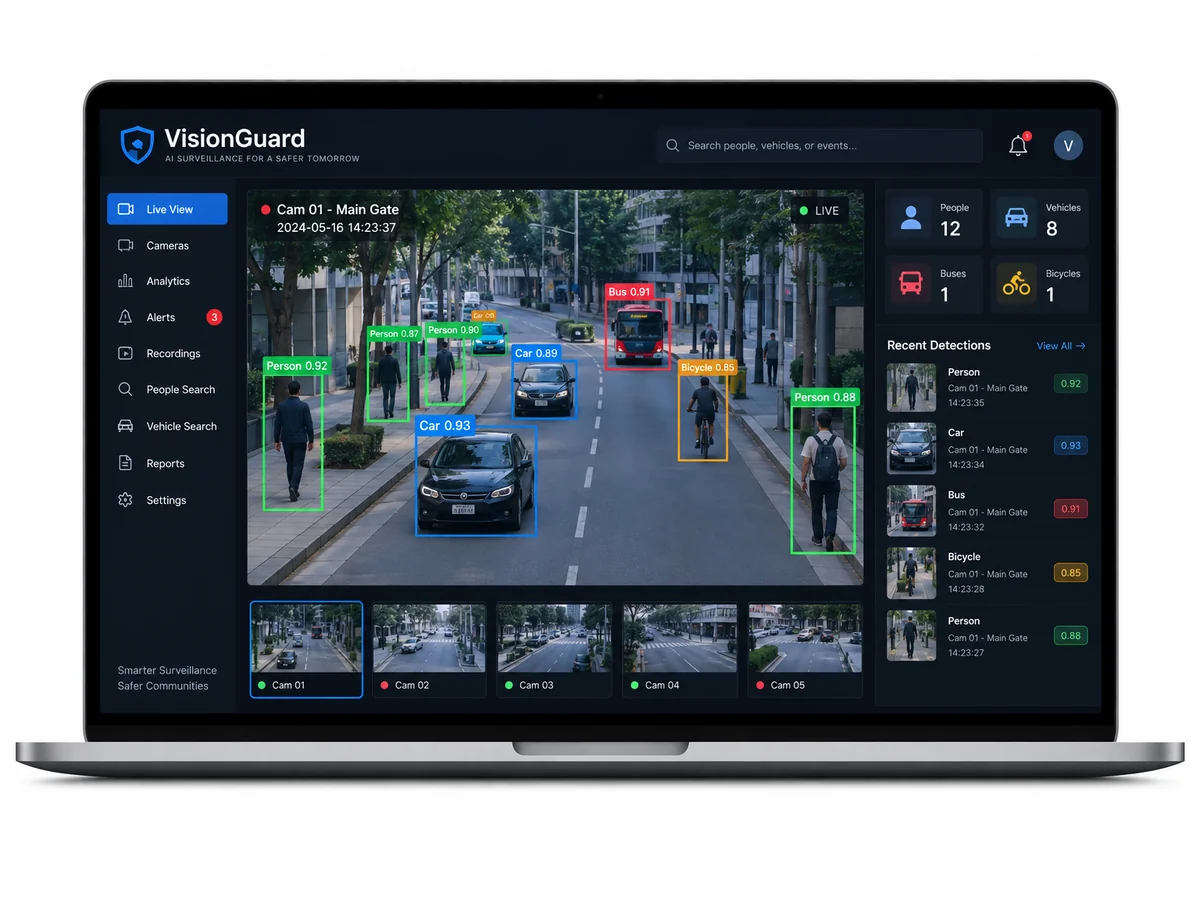
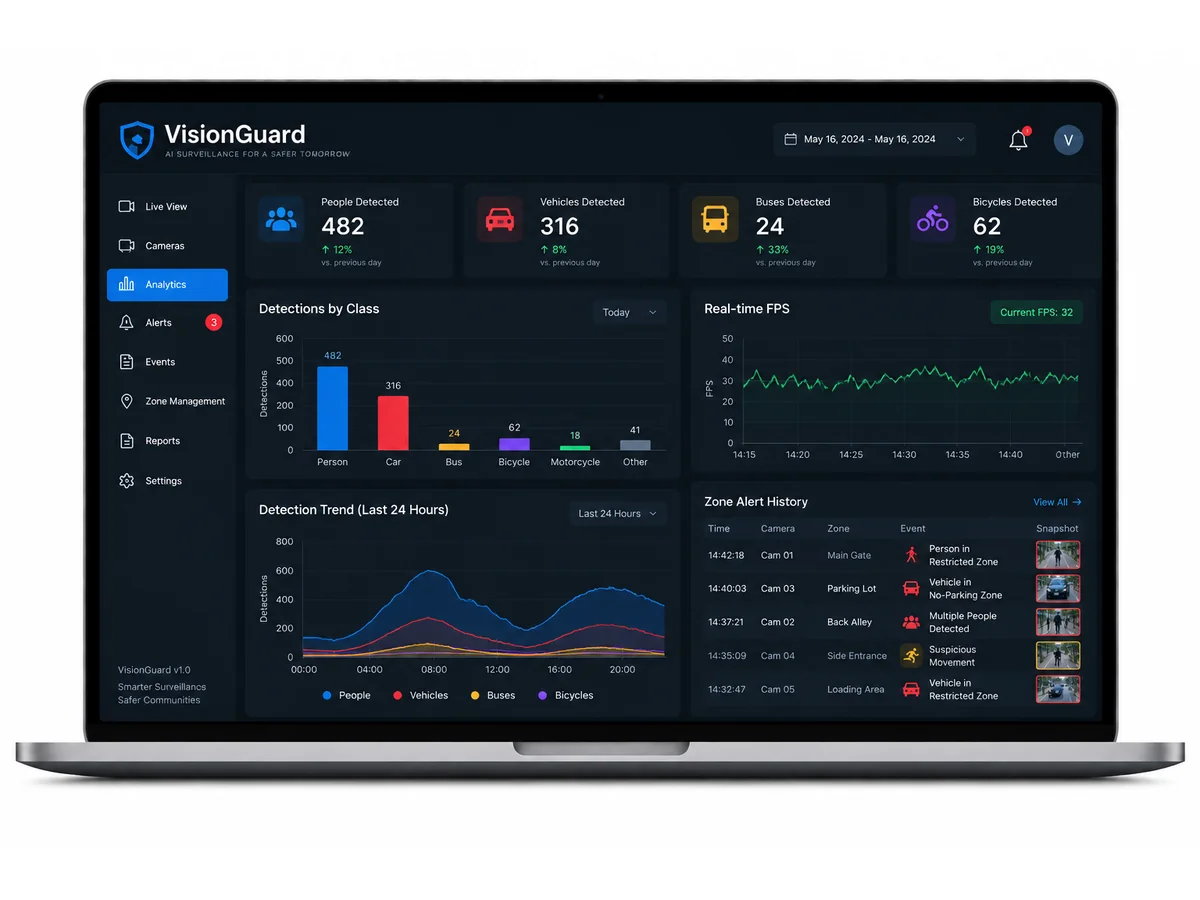
Real-time object detection is one of the most demoable final-year project topics in AI & Machine Learning — the camera feed, the bounding boxes, and the alerts all happen live in front of the examiner. This object detection using YOLO project uses YOLOv8 (Ultralytics) to process webcam or Raspberry Pi camera streams in real time, draw bounding boxes with class labels and confidence scores, and power the VisionGuard smart-surveillance dashboard with user-defined intrusion-zone alerts. It is an ideal YOLOv8 final year project: strong visuals, genuine deep-learning content (architecture, loss functions, NMS, mAP evaluation), and a working edge-AI story with Raspberry Pi deployment.
How it works
- OpenCV captures frames from a USB webcam, Raspberry Pi camera, IP stream, or video file.
- Each frame is resized (default 640×640) and passed through the YOLOv8 model in a single forward pass — YOLO predicts bounding boxes, class probabilities, and confidence scores directly from a grid, with no separate region-proposal step.
- Non-maximum suppression (NMS) removes overlapping duplicate boxes.
- The annotated frame — boxes, labels, confidence scores — is streamed to the VisionGuard dashboard over Flask MJPEG, alongside live counts and FPS.
- Every detection centroid is tested against the user-drawn zone polygons; a zone breach writes an event to the log, captures a snapshot, and triggers the alert.
Project features
- Live YOLOv8 inference on webcam, Raspberry Pi camera, IP stream, or video file — bounding boxes with class labels and confidence scores drawn in real time
- VisionGuard dashboard: live annotated stream, detection feed, per-class counts, FPS overlay, and event history in one clean web UI
- Intrusion-zone alerts: draw zones once on a reference frame in the VisionGuard zone editor; a breach logs an event, captures a snapshot, and fires an alert
- Event logging with snapshots — every detection event is timestamped and reviewable in the VisionGuard dashboard
- Fine-tuning pipeline: retrain YOLOv8 on your own custom classes (helmets, number plates, lab equipment) with pretrained COCO weights included
- Edge-ready: the nano variant (YOLOv8n) runs on a Raspberry Pi 4, so the same codebase demos on a laptop and on embedded hardware
- Adjustable confidence threshold and resolution controls in the VisionGuard dashboard for the latency–accuracy trade-off demo
What is included
- Full Python source code (inference pipeline + VisionGuard Flask dashboard + zone-alert logic)
- Trained/fine-tuned YOLOv8 weights (.pt) plus fine-tuning scripts for custom classes
- Report PDF (synopsis, YOLO architecture, pipeline design, results with mAP numbers)
- Demo PPT
- Viva Q&A bank (YOLO architecture, anchor-free head, NMS, loss functions, latency–accuracy trade-off, edge deployment)
- Setup and fine-tuning guide
Limitations & prerequisites
- Detection accuracy depends on lighting, camera angle, occlusions, and distance — it is a demo/educational system, not a certified security product
- True real-time speeds assume modest resolution (640×640); higher resolutions or CPU-only inference reduce FPS
- Custom-class training needs a labelled dataset — scripts and a labelling guide are included, the dataset itself is not bundled
- Email/buzzer alerts are hook points; the alerting channel is configured during setup, not a managed cloud service
Components & software requirements
Python, Ultralytics YOLOv8, OpenCV, Flask (VisionGuard dashboard), NumPy; optional Raspberry Pi 4 (Pi Camera), email/buzzer alert hooks.