
More project photos (3)
The problem
A final-year student applies to dozens of companies in a placement season, each with its own deadline, test link, interview schedule and portal. Students track this across screenshots, chat messages and memory — and the cost of one missed deadline is a lost opportunity that never returns. Recruiters don't send reminders; the application simply closes. A deadline tracker centralizes the chaos: every application with its countdown, stage in the pipeline, and a calendar where deadlines sit in time context, so nothing closes silently. The design goal is daily-use simplicity — the whole season glanceable in one screen, updating an application taking seconds, not minutes.
Adds applications and reviews urgent deadlines each day.
Follow the working sequence
How it works
- Applications are stored as records: company, role, days-to-deadline, pipeline stage and notes.
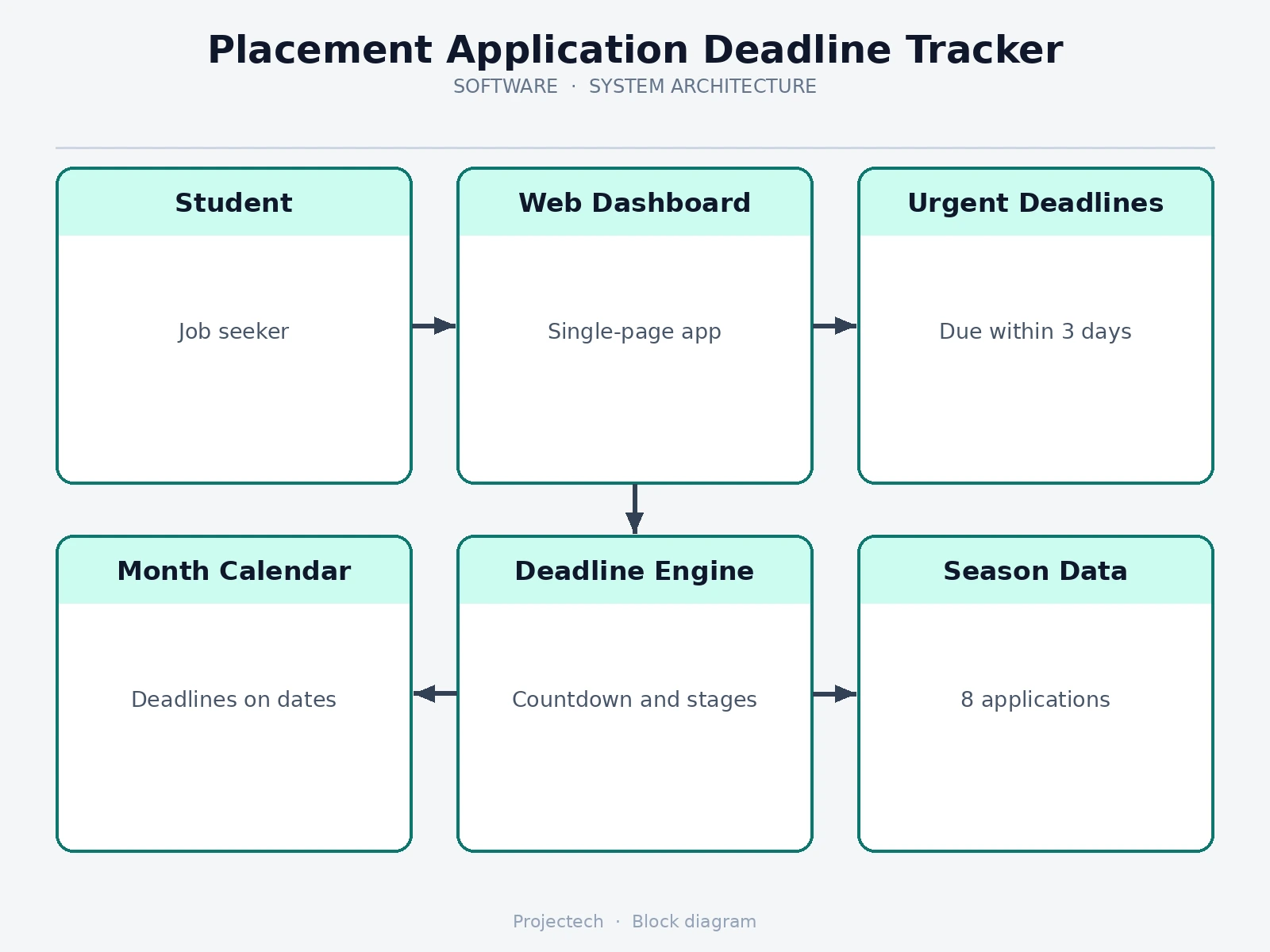
- The dashboard aggregates the records into stat cards and filters deadlines within 3 days into the urgent list, sorted by countdown.
- Each urgent row shows a day-count badge, company logo chip, role, exact closing date and the student's note.
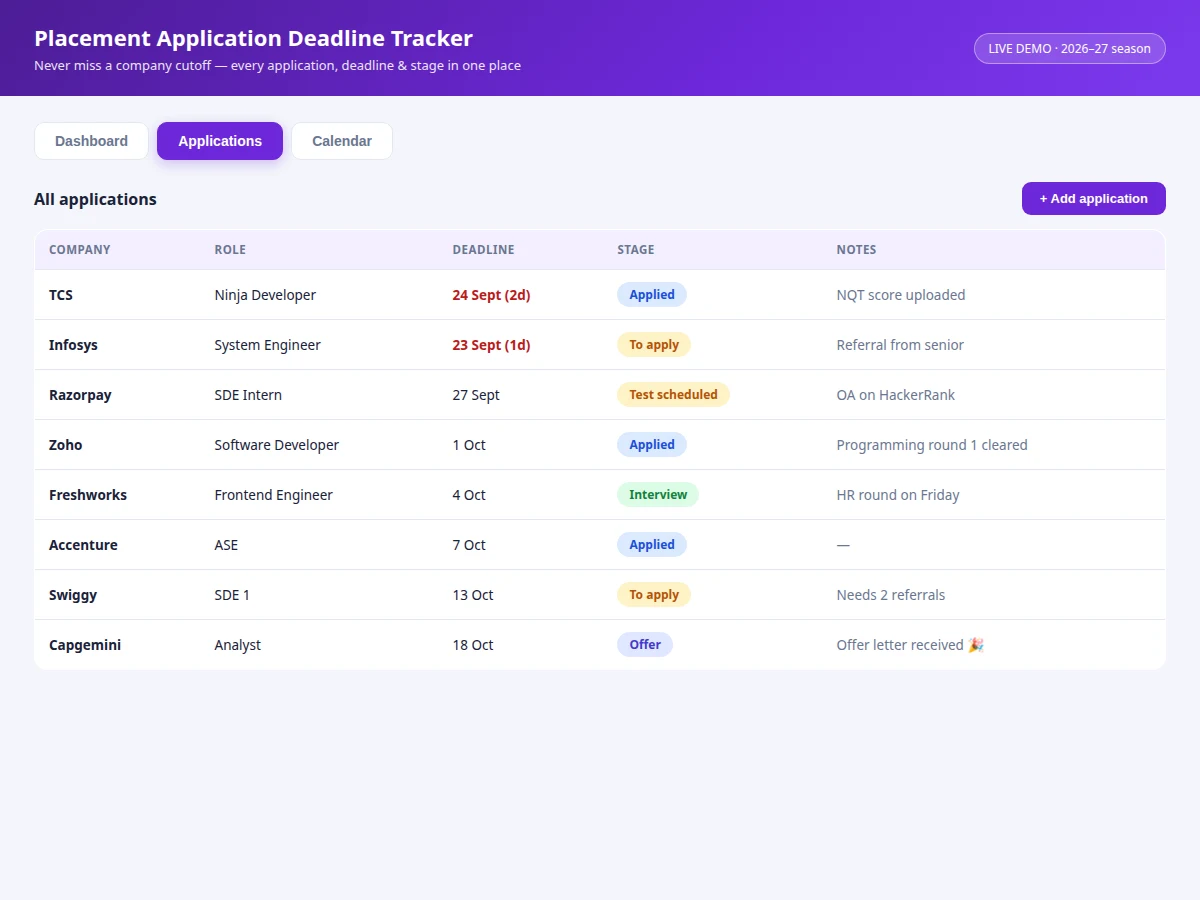
- The applications table renders every record with a stage pill; sub-3-day deadlines render in red.
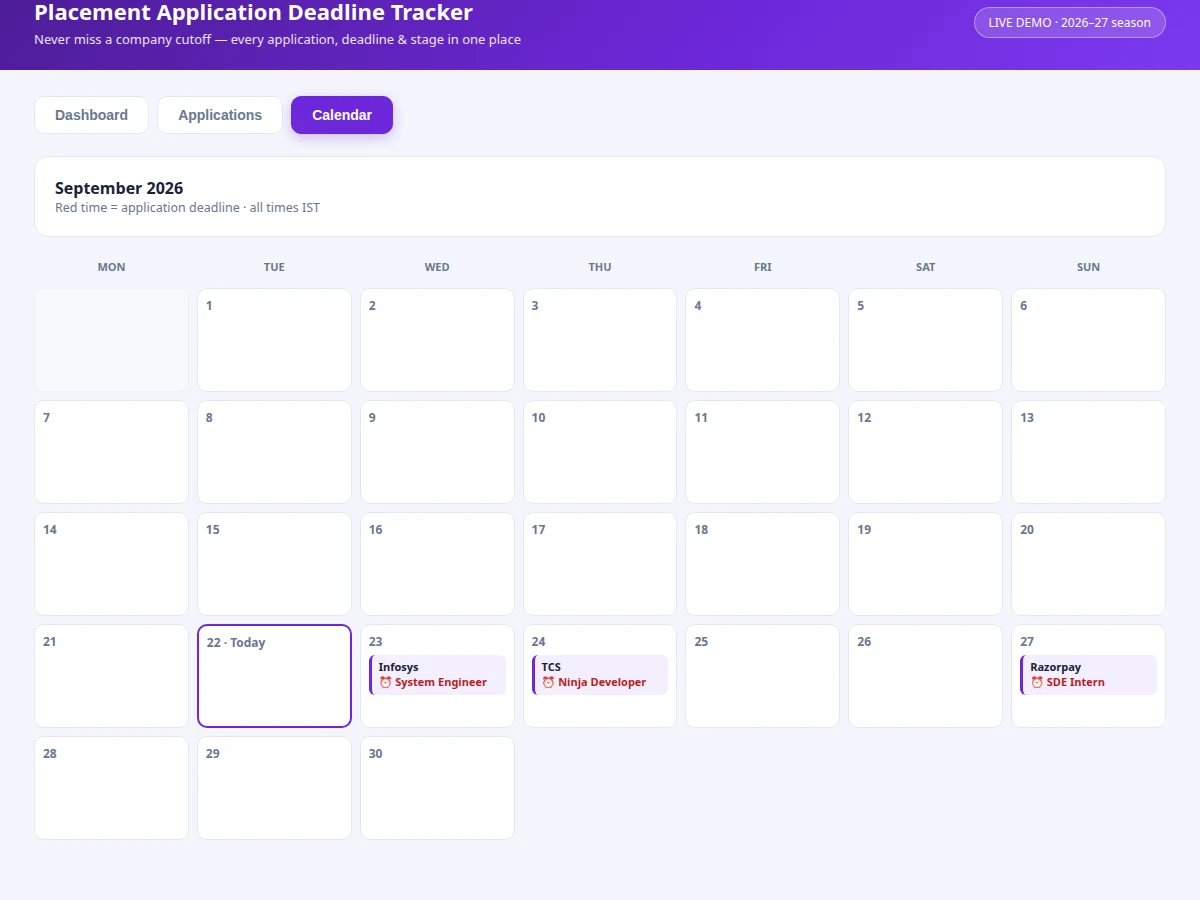
- The calendar view builds the current month's grid and places a deadline marker on each matching date.
- The add-application modal appends a record; dashboard, table and calendar all re-render from the single store.
- Deadlines are computed relative to the current date, so the demo's countdowns are always realistic.
Tech stack:
- HTML5, CSS3, JavaScript (ES6)
- Single-file app — runs fully offline
- CSS grid calendar rendering
- Relative-date countdown logic
- No external libraries, no network calls
| Parameter | Value |
|---|---|
| Application type | Personal dashboard, single-page web app |
| Demo delivery | Single HTML file, runs offline in any modern browser |
| Urgency threshold | Deadlines within 3 days (configurable, design target) |
| Pipeline stages | 5 stages with color-coded badges |
| Calendar | Current month grid, deadlines auto-placed |
| Demo dataset | 8 applications across all pipeline stages |
| Add-application fields | 4 (company, role, deadline, stage) |
Project features
- [Urgent-deadlines view] Deadlines closing within 3 days surface automatically, sorted by countdown with bold day-counts and red highlighting.
- [Dashboard stat cards] Total applications, urgent count, in-interview count and offers received — the season at a glance.
- [Applications table] Every application with company, role, deadline, color-coded pipeline stage pill and free-text notes.
- [Deadline calendar] The current month rendered as a grid with each deadline marked on its date, in Indian time context.
- [One-second adding] A compact modal (company, role, deadline, stage) adds an application and re-renders all views consistently.
- [Pipeline stages] To apply, Applied, Test scheduled, Interview and Offer — each with its own badge color.
- [Recent activity feed] Timeline of season events (tests cleared, links received, offers) for context alongside the numbers.
What is included
- Working placement deadline tracker web app
- Complete source code with comments
- Project report PDF (background, design rationale, data model, screens)
- PPT presentation for final review
- Viva Q&A preparation document (web concepts, date logic, state management)
Limitations & prerequisites
- The demo keeps data in memory; a production version needs localStorage or a backend for persistence across sessions.
- No browser notifications — deadline reminders before closing are listed as future scope.
- Single-user design; counsellor or placement-cell shared views are out of scope.
- Deadlines are entered manually; no automatic import from company portals.
- Time handling assumes Indian Standard Time throughout.
- The calendar shows the current month only; month navigation is future scope.
Frequently Asked Questions
How is this better than a spreadsheet?
It's built for the job: automatic urgency sorting, day-count badges, a visual calendar and one-glance stats — a spreadsheet needs manual formulas and constant upkeep to do the same.
What counts as "urgent"?
Any application whose deadline falls within 3 days. The threshold is a documented design choice and easy to change in the code.
Does it remind me before a deadline?
The demo surfaces urgency visually; push-style browser notifications are designed and listed as future scope in the report.
Can I track internships too?
Yes — the data model is company + role + deadline + stage, which fits internships, off-campus applications and even scholarship deadlines.
Where is my data stored?
In the demo, in memory for the session. The report documents the persistence upgrade path (localStorage, then a backend account).
Is this project suitable for a final-year project?
Yes — for Computer Science, IT and Web Development programs. It demonstrates UI design, date logic, state management and a tool students genuinely use. Suitable for B.E./B.Tech final-year projects in Computer Science, IT and Web Development.
Components & software requirements
- HTML5, CSS3, JavaScript (ES6)
- Single-file app — runs fully offline
- CSS grid calendar rendering
- Relative-date countdown logic
- No external libraries, no network calls
Delivery information
Built-to-order project. Delivery timeline is shared after order confirmation based on current queue.
Support terms
Complete documentation, setup guide, and viva preparation included. Support for setup and explanation provided.
Download free synopsis (PDF)
Enter your name and WhatsApp number — the synopsis PDF downloads immediately. We may send occasional project updates on WhatsApp; no spam.