
More project photos (2)
The problem
Student clubs run on money collected by hand: a treasurer keeps a notebook or spreadsheet of who paid the semester fee, who owes for the event, and who paid partially. Reconciliation happens from memory, receipts are verbal, and disputes about "I already paid" surface at the worst moments. For a club with dozens of members across annual memberships, semester plans and per-event fees, manual tracking doesn't scale and quietly erodes trust. A dues manager gives the treasurer a single source of truth: every member's plan, due, paid and balance with receipts for every payment, and an overview the faculty advisor can read in thirty seconds.
How it works
- Members are onboarded with a name and a fee plan; the plan sets the amount due.
- The overview aggregates the ledger into collected/pending totals, member count and collection rate.
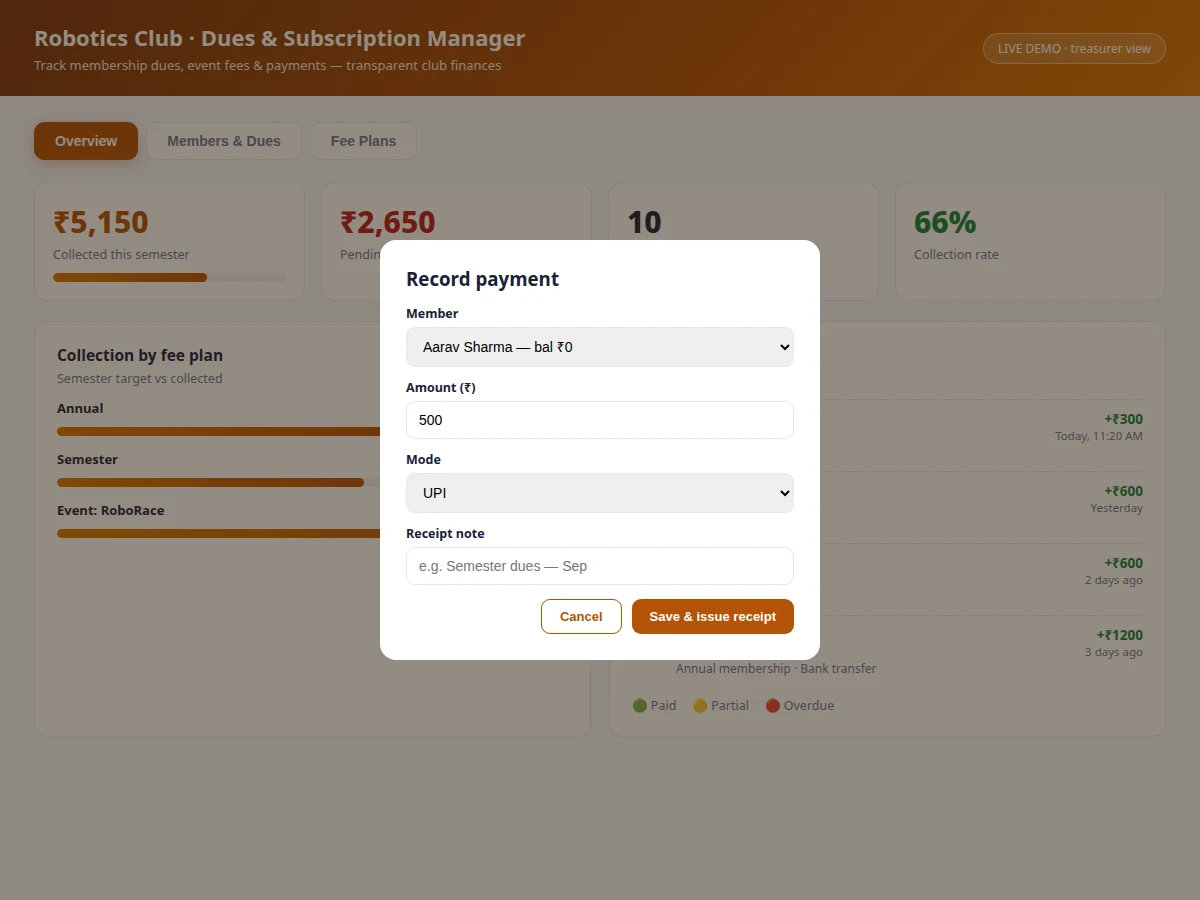
- The treasurer opens Record Payment, picks the member (overdue rows offer a quick-record button prefilled with the balance), enters amount and mode.
- Saving creates a receipt-numbered ledger entry and increases the member's paid amount, capped at the due.
- Balances, status pills (Paid/Partial/Overdue), plan bars and the recent-payments feed all re-render from the updated ledger.
- Fee-plan cards let the treasurer share payment links or open event registrations per plan.
- Overdue members stay flagged until their balance hits zero — no manual follow-up list needed.
Tech stack:
- HTML5, CSS3, JavaScript (ES6)
- Single-file app — runs fully offline
- Ledger-based derived state (no redundant storage)
- Modal form workflows
- Avatar & progress-bar UI components
| Parameter | Value |
|---|---|
| Application type | Treasurer dashboard, single-page web app |
| Demo delivery | Single HTML file, runs offline in any modern browser |
| Fee plans | 4 (annual, semester, event, workshop) |
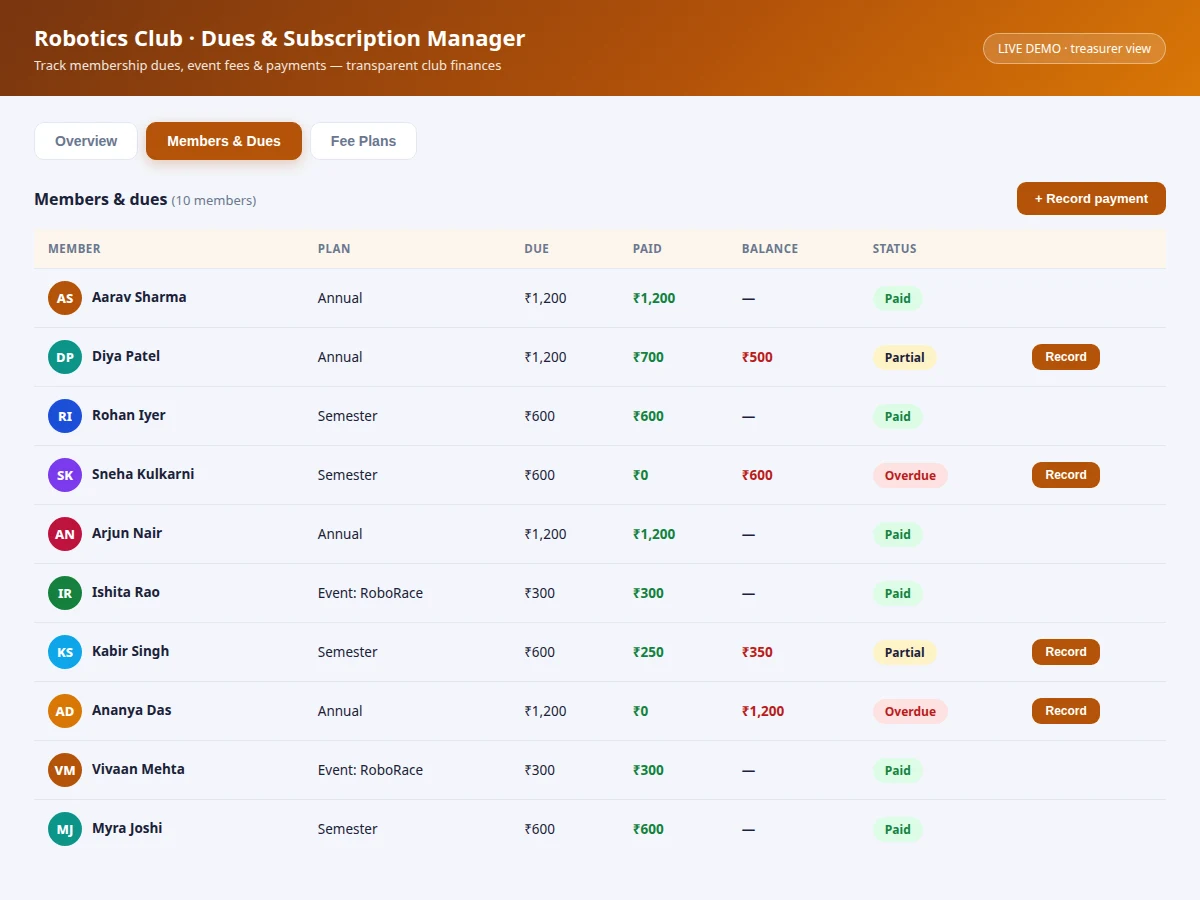
| Member statuses | 3 (Paid, Partial, Overdue) — derived from ledger |
| Payment modes | UPI, cash, bank transfer |
| Receipt format | Numbered receipts (RC-series, design target) |
| Demo dataset | 10 members, 4 plans, realistic payment states |
Project features
- [Members & dues table] Every member with plan, amount due, amount paid, live balance and a status pill — Paid, Partial or Overdue.
- [Multiple fee plans] Annual membership, semester membership, per-event fees and workshop passes, each with its own pricing and description.
- [One-click payment recording] Modal with member, amount, mode (UPI/cash/bank) and note; issues a numbered receipt and updates everything instantly.
- [Collection overview] Stat cards for collected total, pending dues, active members and collection rate with a progress bar.
- [Plan-wise collection bars] Per-plan target vs collected visualization showing which plans need follow-up.
- [Recent payments feed] Latest receipts with member avatars, amounts, modes and timestamps.
- [Derived-state consistency] Balances, statuses and rates are computed from the ledger, never stored redundantly — one update keeps all views in sync.
What is included
- Working club dues & subscription manager web app
- Complete source code with comments
- Project report PDF (background, data model, ledger design, screens)
- PPT presentation for final review
- Viva Q&A preparation document (web concepts, derived state, finance logic)
Limitations & prerequisites
- The demo keeps data in memory; a production deployment needs a backend so records survive sessions and devices.
- No real payment integration — UPI/bank entries are recorded manually, not reconciled automatically.
- Single treasurer role; per-member logins showing only their own dues are future scope.
- No expense tracking — this is the collections side only; full club accounting is future scope.
- Receipts are on-screen records; printable/PDF receipt export is future scope.
- Currency handling assumes INR throughout.
Frequently Asked Questions
How do partial payments work?
A member's paid amount accumulates across entries; the balance is always due minus paid, and the status pill flips from Overdue to Partial to Paid automatically as payments land.
Can one member have two plans?
The demo assigns one plan per member, matching how clubs usually bill. The report documents the multi-plan extension as future scope.
What happens if the treasurer records a wrong amount?
The demo has no edit flow — the report notes an adjustment/correction entry (standard ledger practice: never delete, always offset) as the production approach.
Does it handle event fees differently from memberships?
Yes — event and workshop plans are one-time fees on the same ledger, with their own collection bars, so a fundraiser's collection is visible separately.
Can members see their own dues?
Not in the demo (treasurer view only); per-member logins are the top future-scope item in the report.
Is this project suitable for a final-year project?
Yes — for Computer Science, IT and Web Development programs. It demonstrates data modeling, ledger-based derived state, dashboard UI and a tool real clubs need. Suitable for B.E./B.Tech final-year projects in Computer Science, IT and Web Development.
Components & software requirements
- HTML5, CSS3, JavaScript (ES6)
- Single-file app — runs fully offline
- Ledger-based derived state (no redundant storage)
- Modal form workflows
- Avatar & progress-bar UI components
Delivery information
Built-to-order project. Delivery timeline is shared after order confirmation based on current queue.
Support terms
Complete documentation, setup guide, and viva preparation included. Support for setup and explanation provided.