
More project photos (2)
The problem
A Personal Finance Planner desktop app with SIP calculator and goal tracking is a single-file desktop application that helps one person plan monthly money in three connected parts: a budget tracker for income and expenses, a SIP calculator that projects the future value of a regular monthly investment, and a goal tracker that shows each saving target as a progress bar. The user types in their own numbers — income, spending categories, a monthly SIP amount, an assumed annual return, a duration and goal targets — and the app computes saving rates, SIP projections and goal progress immediately, storing everything in the browser's local storage on the same machine. Because the tool is built for planning and education, every return figure is labelled as an assumption the user entered, and the app states plainly that it is not investment advice and promises no market return.
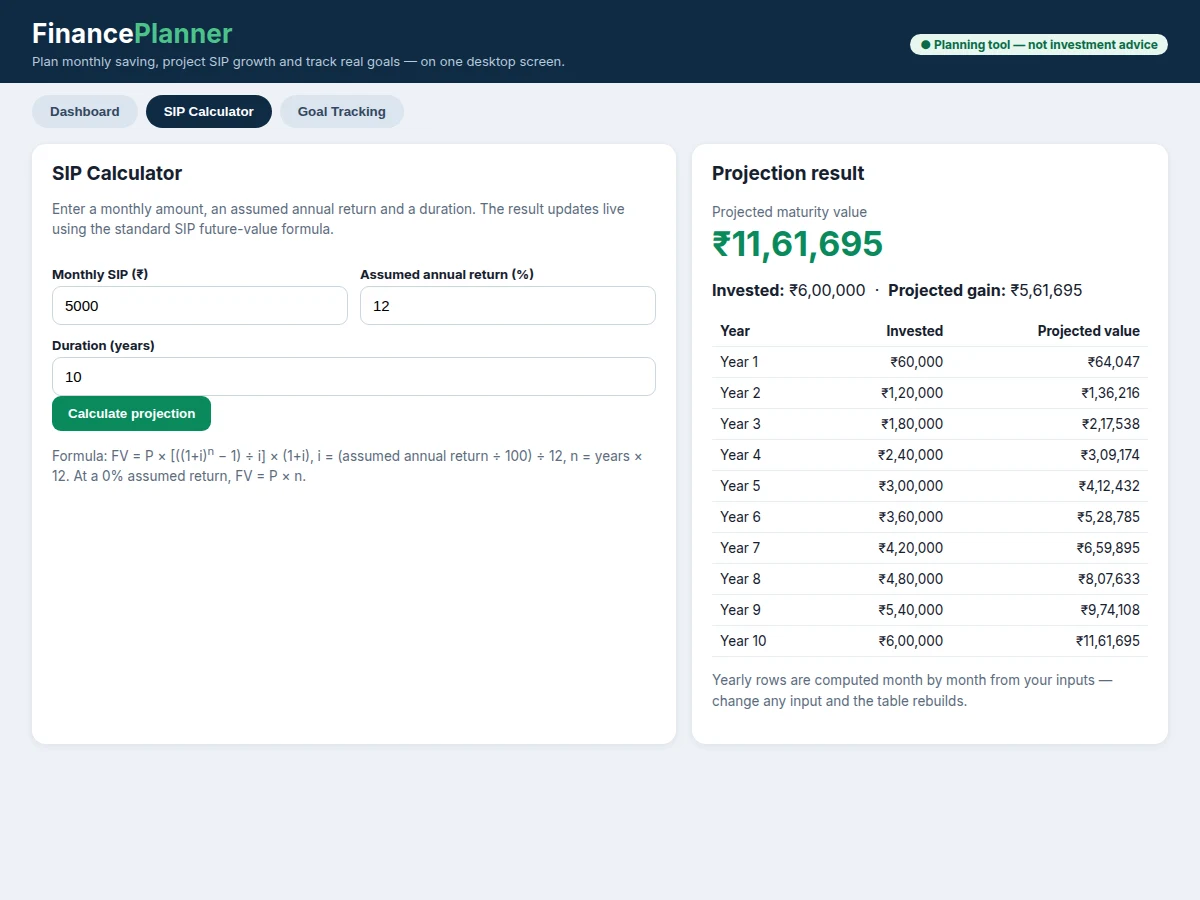
The problem it addresses is fragmentation and false precision. A student managing a stipend, part-time income or family budget typically juggles a notes app for expenses, a separate website for SIP projections and no place at all for goal progress, so the three numbers never meet and a plan made in one tool is contradicted by another. Standalone SIP calculators compound the problem by presenting a single smooth projection as if markets grew at a fixed rate every month, which they do not. This planner keeps budget, projection and goals in one offline place, shows the formula and the assumption behind every projection, and lets the user rerun the same plan at a lower assumed return to see how sensitive the outcome is. Builder note from the demo build: the worked example run through the finished demo — ₹5,000 per month for 120 months at an assumed 12% per year — returned a projected value of ₹11,61,695 on ₹6,00,000 invested, a projected gain of ₹5,61,695, and a first-year projected value of ₹64,047; an early calculator build returned a far larger figure because its monthly rate divided by 120 instead of 1200, and that defect was fixed and re-verified before these images were taken.
Enters income, SIP and goal numbers.
Follow the working sequence
How it works
A Personal Finance Planner session starts with the user's own numbers and ends with three linked answers: what the month's budget allows, what a regular monthly investment could be worth under a stated assumption, and how far each saving goal has progressed. The user first enters income and expenses, and the app derives a saving rate from them. Next the user enters a monthly SIP amount, an assumed annual return and a duration, and the app applies the standard SIP future-value formula to produce a projected value, invested total, gain and yearly table. Finally the user enters or edits goal targets and saved amounts, and the app computes each goal's percentage complete, remaining amount and monthly contribution from the months left. Because every step reads only numbers on screen and stored locally, changing any input recomputes all three answers immediately and shows the trade-off instead of hiding it.
- The user opens the single HTML file in a desktop browser; on first run the dashboard loads an example budget and 3 example goals (count), and afterwards it loads the last saved data from local storage.
- The user enters monthly income and expenses in the budget view, and the app computes the saving rate as planned saving divided by income.
- In the SIP calculator the user enters a monthly amount, an assumed annual return and a duration in years, and the app converts the annual assumption to a monthly rate i by dividing by 100 and then by 12.
- The app applies FV = P × [((1+i)^n − 1) ÷ i] × (1+i) with n equal to years × 12, and shows the projected maturity value, the invested total and the projected gain.
- The same calculation is repeated year by year to build the projection table, so each year's invested amount and projected value can be inspected separately.
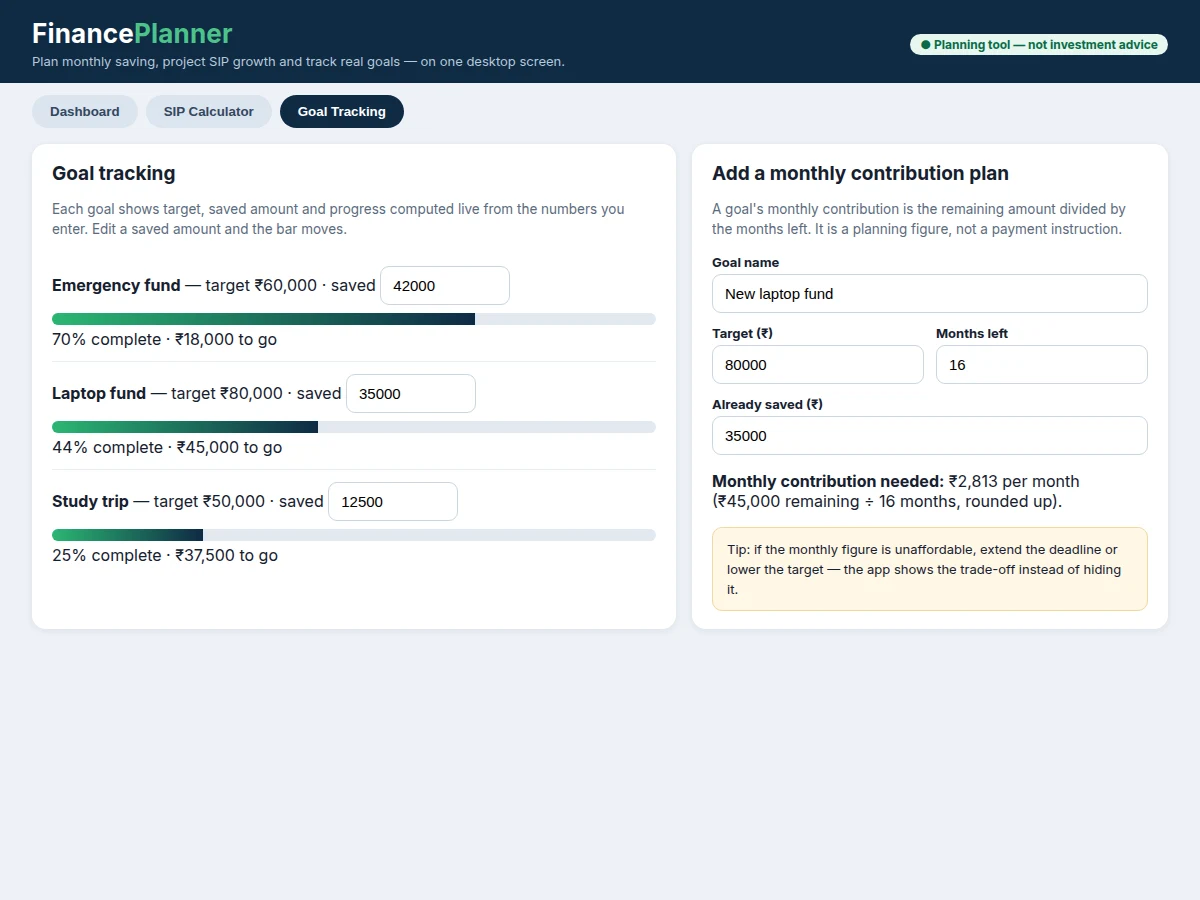
- In the goal view the user enters or edits each goal's target and saved amount, and the app computes percentage complete, remaining amount and the monthly contribution as remaining amount divided by months left.
- Every change is written to the browser's local storage on the same machine, so closing and reopening the app restores the budget, SIP inputs and goals exactly as left.
- The user can rerun any projection at a different assumed return to compare a cautious plan with a more optimistic one, with both results labelled as assumptions, not forecasts.
This project vs a spreadsheet vs a bank app
| Aspect | This planner | Spreadsheet | Bank app |
|---|---|---|---|
| Budget, SIP projection and goals in one place | Yes, one dashboard links all three | Only if the user builds and links the sheets | Budget or goals only, rarely all three together |
| SIP formula | Built in and labelled, with a yearly table | User must write and check the formula | Projection shown, formula usually hidden |
| Assumed return | Typed in by the user and labelled as an assumption | Typed in by the user, labelling up to the user | Often a fixed illustration rate chosen by the provider |
| Works offline with no account | Yes, single file with local storage | Yes, but formulas and sheets must be built first | No, needs an account and usually a connection |
| Best fit | A student learning planning maths and presenting a build | A user comfortable building their own model | A customer of that bank checking an existing account |
Tech stack:
- HTML5 · CSS · JavaScript (single-file app)
- Browser localStorage API (client-side persistence)
- SIP future-value formula (annuity-due calculation)
- Goal progress computation (saved ÷ target)
- Responsive CSS grid layout for desktop screens
- Git (version control for the demo and report sources)
- Report and presentation tooling (PDF and slide exports)
| Parameter | Value |
|---|---|
| Platform | Desktop browsers on Windows, macOS and Linux (design target) |
| Delivery | 1 file (count: single HTML file) |
| SIP formula | FV = P × [((1+i)^n − 1) ÷ i] × (1+i), i = (assumed annual return ÷ 100) ÷ 12 |
| Worked example (demo-measured) | ₹5,000 per month × 120 months at an assumed 12% per year → projected ₹11,61,695; invested ₹6,00,000; projected gain ₹5,61,695 |
| First-year projection (demo-measured) | ₹64,047 projected value on ₹60,000 invested after 12 months at the same assumption |
| Example goals on first run | 3 goals (count: emergency fund, laptop fund, study trip) |
| Storage | Browser local storage, approximately 5 MB per origin (browser quota, approximate) |
| Users per app | Single user only (count: 1) |
| Internet required | None (offline by design) |
| Investment advice | None: planning and education tool only |
Project features
The planner's strongest capabilities are its SIP calculator with the correct future-value formula, its goal tracking with progress bars computed live from entered amounts, its monthly budget view that turns income and expenses into a saving rate, and its fully offline single-file design that stores data locally with no account and no server. Around those four, the app adds a year-by-year projection table so a long SIP can be inspected one year at a time, a monthly-contribution figure for each goal that divides the remaining amount by the months left, and clear assumption labels on every projection so a reviewer can see exactly which number the user typed and which number the app computed. Together these give a complete, testable planning tool whose every result can be reproduced by hand from the stated formula.
- [SIP calculator with the correct formula] The calculator computes FV = P × [((1+i)^n − 1) ÷ i] × (1+i), where i is the assumed annual return divided by 100 and then by 12, and n is the total number of months; at a 0% assumed return it returns P × n.
- [Goal tracking with live progress bars] Each goal carries a target and a saved amount, and its progress bar, percentage complete and remaining amount are recomputed from those two numbers whenever a saved amount is edited.
- [Monthly budget tracker] Income, planned saving and expenses are entered once and shown as a saving rate, so the user can see whether the SIP amount and goal contributions actually fit the month's budget.
- [Year-by-year projection table] The calculator rebuilds a yearly table from the same inputs, showing invested amount and projected value for each year so a projection can be checked in stages rather than trusted as one final number.
- [Monthly contribution per goal] For each goal the app divides the remaining amount by the months left, giving a planning figure that shows the trade-off between target, deadline and monthly effort.
- [Offline single-file app with local storage] The whole app is one HTML file that runs in a desktop browser and stores budgets, SIP inputs and goals in the browser's local storage on the same machine, with no account, no server and no internet connection required.
- [Explicit assumption labelling] Every return field is labelled "assumed annual return" and every result is described as a projection, so no figure in the app can be mistaken for a promised or guaranteed market return.
- [Sample budget and goals on first run] An example budget and 3 example goals (count) ship with the demo so the dashboard, calculator and goal views can be tried immediately before entering real numbers.
What is included
- Working single-file finance planner demo (dashboard, SIP calculator with yearly table, goal tracking with live progress bars, local-storage persistence)
- Project report PDF (background, SIP formula derivation, design, implementation, testing procedure, limitations, future scope)
- Abstract PDF (10-section structure matching the report)
- Presentation slides for the final review
- Viva Q&A preparation document (SIP maths, annuity formula, local storage, assumption labelling, offline design trade-offs)
- Source file of the demo with the example budget and goals, ready to run by opening it in a browser
Limitations & prerequisites
- Projections are estimates, not promises: real market returns vary month to month, so a projection at any assumed return can overstate or understate the actual outcome.
- The app gives no investment advice and names no real funds: it cannot recommend where to invest, and tax, fees and inflation are not deducted from any projection.
- Data lives in one browser's local storage: clearing that browser's site data deletes the budget and goals, and the project ships no backup, export or sync beyond the browser's own storage.
- Single-user only: there is no sharing, no multi-device access and no access control, so anyone who can open the browser profile can open the planner.
- The demo stores at most approximately 5 MB of data per browser origin (browser quota, approximate); very long histories could approach that ceiling.
- The SIP model assumes a fixed monthly amount and a fixed assumed return for the whole duration: step-up contributions, irregular payments and changing returns must be modelled by rerunning the calculator, not by one built-in schedule.
Frequently Asked Questions
How does the SIP calculator compute the projected value?
The calculator applies the standard future-value formula for a monthly SIP, FV = P × [((1+i)^n − 1) ÷ i] × (1+i), where P is the monthly amount, i is the assumed annual return divided by 100 and then by 12, and n is the total number of months. The demo's worked example — ₹5,000 per month for 120 months at an assumed 12% per year — returns ₹11,61,695, and the yearly table shows the same calculation repeated for each year so the result can be checked in stages.
Is the assumed return a guaranteed market return?
No, the assumed return is only a planning input you type in, and the projected value is an estimate that changes if you change that assumption, so it must never be read as a promised or guaranteed market return under any conditions. Markets move unevenly, so the app labels the field "assumed annual return" everywhere and describes every result as a projection; rerunning the same SIP at a lower assumption is the honest way to test a cautious plan.
Does the planner work offline, and where is my data stored?
Yes, the demo runs entirely in the desktop browser from a single file, stores budgets, SIP inputs and goals in the browser's local storage on the same machine, and sends nothing to a server, so it works without an internet connection. That keeps financial plans private to the device, but it also means clearing the browser's site data deletes the planner, so users should treat the browser profile as the planner's home.
Can I add my own goals and change the budget categories?
Yes, goals, categories and the assumed return are all editable inputs, so a student can add a new goal with its own target and deadline, rename budget categories, or rerun a SIP projection at a lower assumed return to test a more cautious plan. The monthly contribution for a goal is recomputed from the remaining amount and the months left, so extending a deadline or lowering a target immediately shows a smaller monthly figure.
Is this project suitable for a final-year project?
Yes, it fits Computer Science and IT programmes because it combines a complete desktop application, real financial maths implemented and tested in code, local data persistence, and an honest limitations discussion that a review panel can probe in depth during a viva. Students can demonstrate the formula by hand, show the demo recomputing live, and discuss why assumption labelling matters more than any single projection figure.
Components & software requirements
- HTML5 · CSS · JavaScript (single-file app)
- Browser localStorage API (client-side persistence)
- SIP future-value formula (annuity-due calculation)
- Goal progress computation (saved ÷ target)
- Responsive CSS grid layout for desktop screens
- Git (version control for the demo and report sources)
- Report and presentation tooling (PDF and slide exports)
Delivery information
Built-to-order project. Delivery timeline is shared after order confirmation based on current queue.
Support terms
Complete documentation, setup guide, and viva preparation included. Support for setup and explanation provided.
Download free synopsis (PDF)
Enter your name and WhatsApp number — the synopsis PDF downloads immediately. We may send occasional project updates on WhatsApp; no spam.