
More project photos (2)

The problem
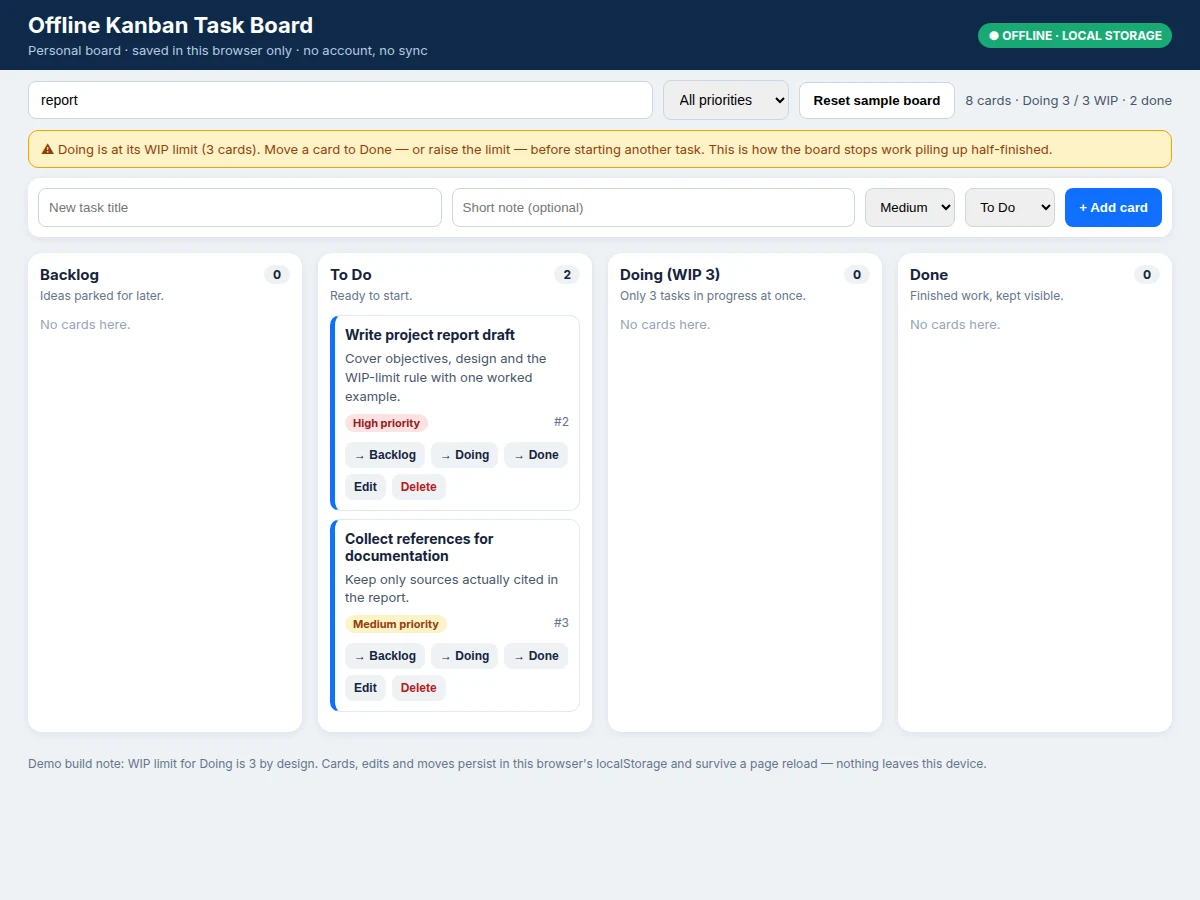
An offline kanban task board desktop software is a personal task manager that runs on one computer, shows work as cards in columns, and saves every card in the browser's local storage instead of an online account. This project builds that board with four columns — Backlog, To Do, Doing and Done — plus a work-in-progress limit of three cards on Doing, so only three tasks can sit in progress at once. Cards carry a title, a short note and a priority of High, Medium or Low, and they can be added, edited, moved between columns, searched and filtered offline. Because all data stays on the user's own machine, the board keeps working during outages, on shared lab computers without sign-in, and for users who do not want their task lists stored on a remote server. It is a single-user tool by design: there are no teams, no shared boards and no notifications to other people.
The real problem is simpler than most task tools admit. A student or solo worker usually has ten half-started tasks and no honest view of what is actually in progress, while team platforms demand an account, an internet connection and a workspace built for groups. Those tools add invitations, permissions and feeds that a single user never needs, and they stop being useful the moment the connection drops. This board removes all of that: one person, four columns, one clear rule about how much work may be in progress, and data that lives on the machine in front of them. Builder note from the demo build: the first screenshot attempt rendered an empty board because of a stray brace in the card-rendering function, and the fix — rebuilding that function with plain string concatenation — is the version shown in the gallery images.
Creates a card with a title, note and priority.
Follow the working sequence
How it works
A task begins as a card created through the add form, where the user types a title, note, priority and starting column. On creation the card is appended to the board's card list and the whole list is written to local storage, so the new task is durable before anything else happens. Rendering reads that list, applies the current search text and priority filter, and draws each column with its cards and move buttons. Moving a card is the only step with a rule attached: if the destination is Doing and Doing already holds three cards, the move is refused with an explanatory message and the card stays where it was. Otherwise the card's column changes, the list is saved again, and the board re-renders with updated counts and the WIP warning shown or hidden accordingly. Editing replaces a card's title and saves immediately, deleting removes the card, and reloading restores the last saved board exactly.
- The user opens the single HTML file in a desktop browser; on first run the board loads eight sample cards, and afterwards it loads the last saved board from local storage.
- A new task is added through the form with a title, an optional note, a priority of High, Medium or Low, and a starting column (Backlog, To Do, Doing or Done).
- The card is appended to the board's list and the full list is written to local storage immediately, so the task survives a reload or browser restart.
- The board renders all four columns, showing each card's title, note, priority tag and buttons for moving, editing and deleting it.
- To start work, the user moves a card into Doing; if Doing already holds three cards, the move is refused with a warning until a card is finished or moved out.
- Finished work is moved to Done, which clears a Doing slot, hides the WIP warning when the count drops below three, and updates the header summary.
- The search box filters cards by title and note text as the user types, and the priority filter narrows the board to one priority level.
- Closing and reopening the page restores the board from local storage unchanged, with no sign-in, sync or server involved at any point.
This project vs team kanban platforms
| Aspect | This project | Team kanban platforms |
|---|---|---|
| Designed for | One person managing their own tasks | Teams sharing boards and assignments |
| Account needed | No account, no sign-in | Account and workspace membership required |
| Internet needed | No, runs fully offline in the browser | Yes, boards sync through a remote server |
| Where tasks are stored | Browser local storage on the user's machine | Remote servers run by the platform provider |
| WIP limit | Enforced on Doing at three cards, with a refusal message | Often optional, paid-tier or plugin-based |
| Collaboration | None by design | Comments, mentions, assignees and activity feeds |
| Best fit | Personal study, assignments and solo work tracking | Coordinating work across a group |
Tech stack:
- HTML5 · CSS · JavaScript (single-file app)
- Browser localStorage API (client-side persistence)
- Kanban board design (four columns with WIP enforcement)
- Priority tagging and live search filtering
- Responsive CSS grid layout for desktop screens
- Git (version control for the demo and report sources)
- Report and presentation tooling (PDF and slide exports)
| Parameter | Value |
|---|---|
| Columns | 4 columns (count: Backlog, To Do, Doing, Done) |
| WIP limit on Doing | 3 cards (design target) |
| Sample cards on first run | 8 cards (sample count) |
| Priorities | 3 levels (count: High, Medium, Low) |
| Storage | Browser local storage, approximately 5 MB per origin (browser quota, approximate) |
| Users per board | Single user only (count: 1) |
| Demo delivery | 1 file (count: single HTML file) |
| Internet required | None (offline by design) |
| Runs on | Windows, macOS and Linux desktop browsers (design target) |
Project features
The board's strongest capabilities are its enforced work-in-progress limit, its local-storage persistence, its plain card workflow and its search and priority filters. The WIP limit is the heart of the project: Doing accepts at most three cards, and any attempt to move a fourth card in is refused with a clear message until a card is finished or moved out. Persistence is equally deliberate — every add, edit, move and delete is written to the browser's local storage immediately, so a reload restores the exact board, including the sample tasks on first run. Cards move with simple buttons rather than drag gestures, which keeps the board usable with a keyboard and mouse on any desktop, and the search box plus priority filter make a long board scannable in seconds, even with dozens of cards.
- [Four-column kanban board] Backlog, To Do, Doing and Done columns hold cards with a title, a short note and a priority, giving one glanceable view of planned, ready, active and finished work.
- [Enforced WIP limit on Doing] Doing accepts a maximum of three cards (design target); moving a fourth card in shows a warning and is refused until a card leaves Doing, so unfinished work cannot pile up silently.
- [Local-storage persistence] Every card change is saved to the browser's local storage on the same machine, so the board survives reloads and works with no account, no server and no internet connection.
- [Add, edit, move and delete cards] Cards are created from a form, edited in place, moved between any two columns with buttons, and deleted individually, covering the full card lifecycle.
- [Search and priority filter] A live search box matches titles and notes, and a priority filter narrows the board to High, Medium or Low cards, which keeps long task lists readable.
- [Live board summary] A header line reports the total card count, the Doing count against its WIP limit, and the finished count, so the state of the whole board is visible without counting columns.
- [Sample board on first run] Eight realistic sample cards (sample count) ship with the demo so the board's behaviour, including the full Doing column, can be tried immediately before adding real tasks.
- [Single-file offline demo] The entire board is one HTML file with embedded styles and scripts, so it runs by opening the file in a browser and can be carried on a USB drive between machines.
What is included
- Working single-file kanban board demo (four columns, WIP enforcement, local-storage persistence, search and priority filters)
- Project report PDF (background, kanban and WIP-limit theory, design, implementation, testing procedure, limitations, future scope)
- Abstract PDF (10-section structure matching the report)
- Presentation slides for the final review
- Viva Q&A preparation document (kanban rules, WIP limits, local storage, offline design trade-offs)
- Source file of the demo with the sample board, ready to run by opening it in a browser
Limitations & prerequisites
- Single-user only: there is no sharing, sync or multi-device access, so a board on one machine is not visible on another.
- Data lives in one browser's local storage: clearing that browser's site data deletes the board, and the project ships no backup or export beyond the browser's own storage.
- No reminders or due-date notifications: cards carry no dates or alerts, so deadlines must be tracked separately.
- The WIP limit is fixed at three cards (design target) in the shipped demo; changing it means editing one value in the source file.
- The demo stores at most approximately 5 MB of card data per browser origin (browser quota, approximate); very large boards with long notes could approach that ceiling.
- No user accounts or access control: anyone who can open the browser profile can open the board, so it is unsuitable for sensitive task data on shared machines without a separate login.
Frequently Asked Questions
How does the WIP limit actually work?
The WIP limit caps Doing at three cards: when Doing already holds three, any move into it is refused with a warning message, and the card stays in its current column. A slot frees up only when a card moves to Done or out of Doing, which forces unfinished work to be completed or consciously parked instead of quietly accumulating.
Where is my data stored, and is it private?
All cards are stored in the browser's local storage on the user's own machine, and nothing is sent to any server, because the demo has no backend and no account system. That keeps task lists private to the device, but it also means clearing the browser's site data deletes the board, so users should treat the browser profile as the board's home.
Does it work without the internet?
Yes, completely: the board is a single HTML file that runs in a desktop browser with no server calls, no sign-in and no sync step. It can be opened from a USB drive on a lab machine, used during an outage, and reloaded later with the board restored from local storage exactly as it was left.
Can I change the WIP limit or add columns?
The shipped demo fixes Doing's limit at three cards, but the limit is a single named value in the source file, so changing it is a one-line edit documented in the report. Adding a column is a larger change: it needs a new column entry, a move-button target and a matching sample card, all of which the report's future-scope section describes step by step.
Is this project suitable for a final-year project?
Yes, for Computer Science and IT programmes: it demonstrates a complete interactive application, a state-management design, a genuinely enforced business rule in the WIP limit, and an honest offline-versus-cloud trade-off. The report documents the mechanism, the storage choice and the testing procedure in enough depth to discuss confidently in a review.
Components & software requirements
- HTML5 · CSS · JavaScript (single-file app)
- Browser localStorage API (client-side persistence)
- Kanban board design (four columns with WIP enforcement)
- Priority tagging and live search filtering
- Responsive CSS grid layout for desktop screens
- Git (version control for the demo and report sources)
- Report and presentation tooling (PDF and slide exports)
Delivery information
Built-to-order project. Delivery timeline is shared after order confirmation based on current queue.
Support terms
Complete documentation, setup guide, and viva preparation included. Support for setup and explanation provided.
Download free synopsis (PDF)
Enter your name and WhatsApp number — the synopsis PDF downloads immediately. We may send occasional project updates on WhatsApp; no spam.