
More project photos (3)

The problem
Parking Management System Project with QR Permit Verification for Campus Vehicles is a web-based parking management system that controls which vehicles may enter a campus and where they may park. A security operator at the gate scans the QR code printed on a vehicle's permit sticker, and the system looks up that permit in a registry holding the holder's name, vehicle number, category (staff, student or visitor), assigned zone and expiry date. If the permit is active, the entry is approved and logged with time, gate and zone; if the permit is expired, the gate screen shows a denial and records the attempt; if the vehicle holds a visitor day pass, entry is approved with a stay limit. Behind the gate screen, an admin dashboard tracks how many marked bays are occupied in each zone, lists permits with their status, and keeps a searchable entry/exit log that replaces the paper register.
Most campuses still run parking on paper registers and visual sticker checks. A register entry takes time at peak hours, stickers can be transferred between vehicles, and nobody can answer basic questions afterwards — how many vehicles are inside, which visitor overstayed, or how often an expired permit was presented. Guards also cannot check expiry dates from a sticker at a glance, so expired permits keep entering until someone notices. This project closes that gap with a single lookup per vehicle: scan, verify against the registry, log the result. The same log that speeds up the gate also becomes the record for overstay checks, denial reports and zone occupancy planning.
Creates permits in the registry with holder, vehicle, category, zone and expiry date.
Follow the working sequence
How it works
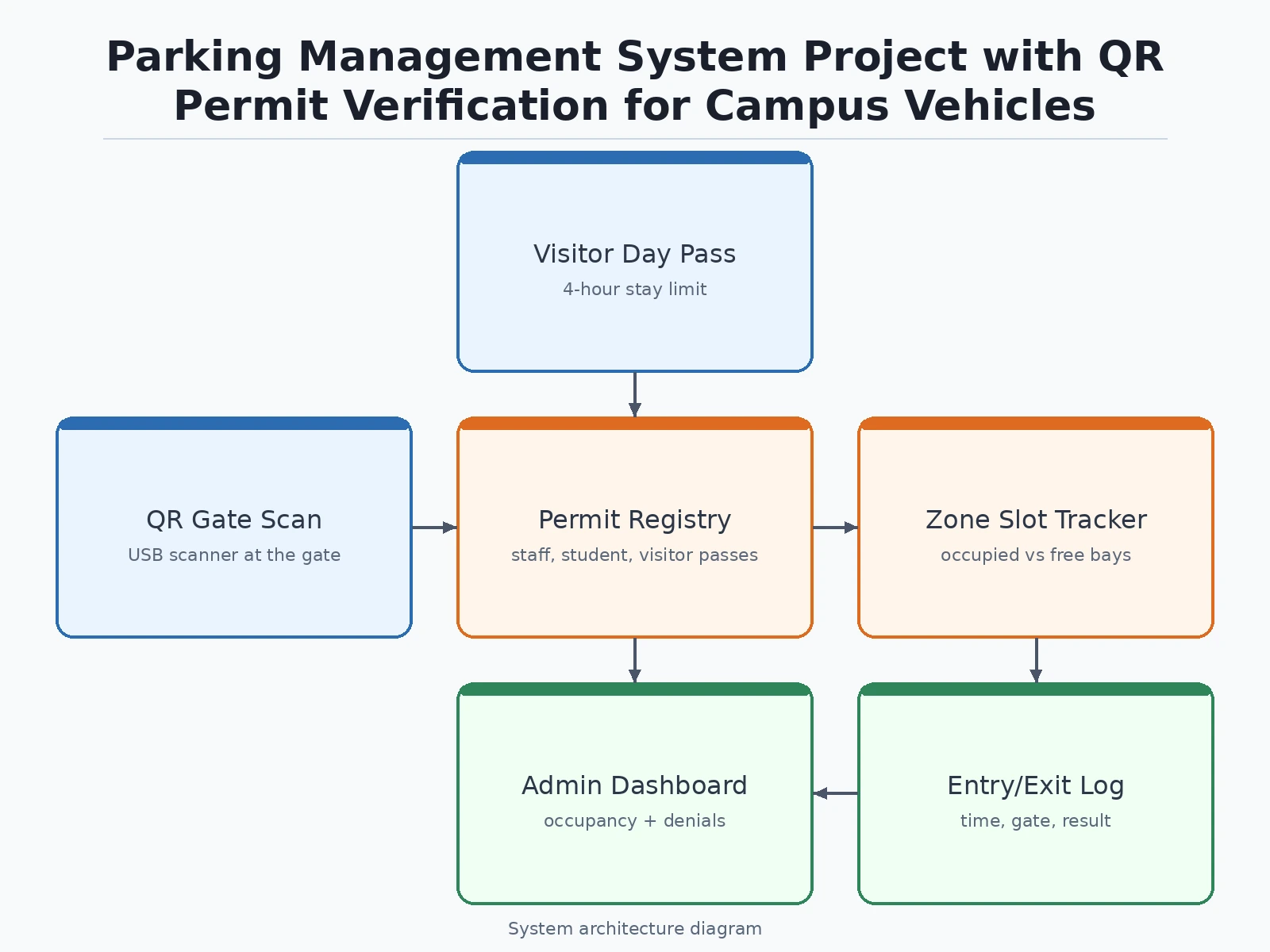
The end-to-end mechanism runs from a printed permit sticker to a logged gate decision in seven stages, all inside one web application. The admin first creates permits in the registry, each with a holder, vehicle, category, assigned zone and expiry date, and the system generates one QR code per permit encoding its permit ID. That code is printed on the vehicle's windscreen sticker and also sent to the holder by email. At the gate, the operator scans the sticker with a USB QR scanner, which feeds the permit ID into the gate screen like keyboard input. The backend looks the ID up in the registry, checks expiry and zone rules, and returns allow, visitor-with-limit or deny; the result is shown on screen and written to the entry/exit log with time, gate and zone. Slot occupancy updates from the same log, so the dashboard always reflects vehicles currently inside.
- The admin creates a permit in the registry with holder name, vehicle number, category (staff, student or visitor), assigned zone and expiry date.
- The system generates one QR code per permit encoding the permit ID, which is printed on the windscreen sticker and emailed to the holder.
- At the gate, the operator scans the sticker with a USB QR scanner; the scanner feeds the permit ID into the gate screen as keyboard input.
- The backend looks up the permit ID in the registry and checks two rules: the permit must be unexpired, and the vehicle's zone must be open to its category.
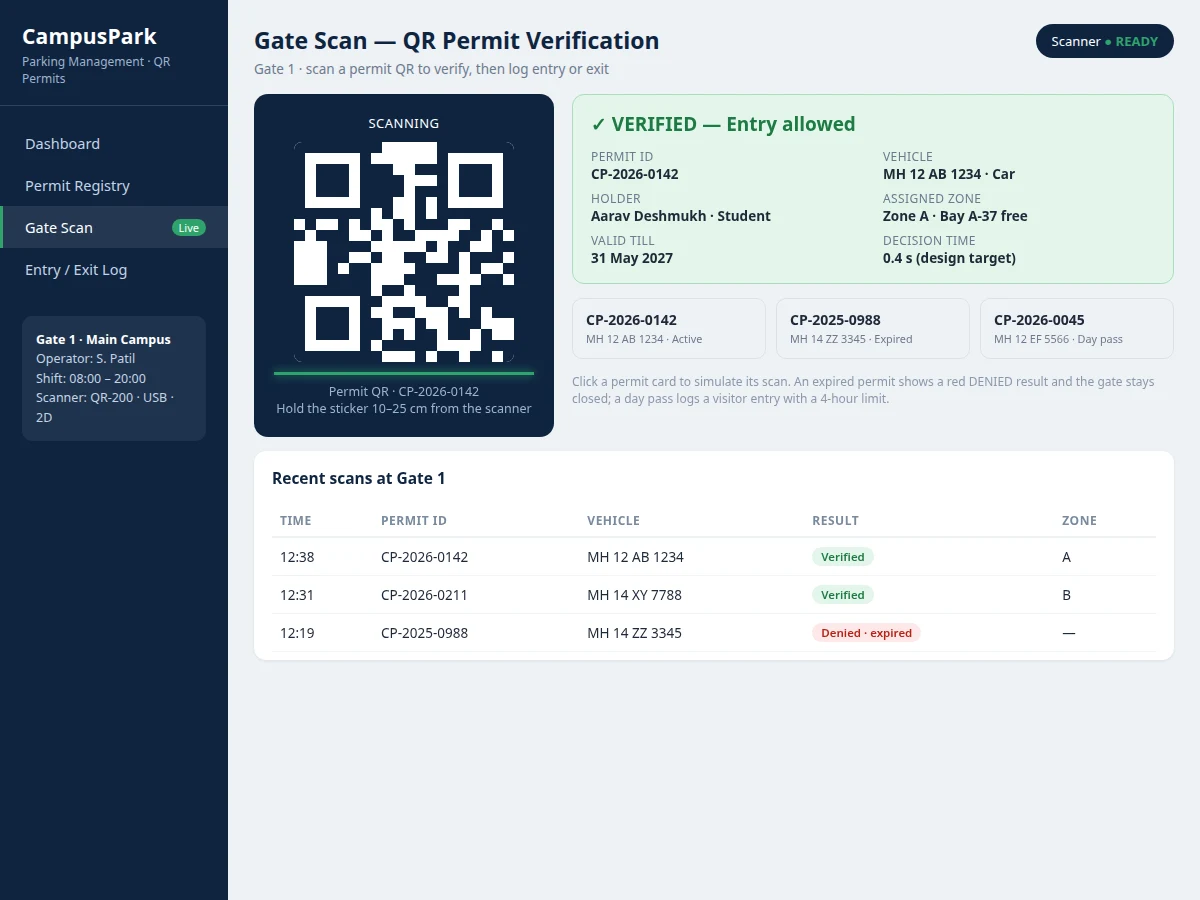
- The gate screen shows the decision — verified entry with the assigned zone, visitor entry with the stay limit, or denied with the reason (expired, no record, or wrong zone).
- Every scan is written to the entry/exit log with time, gate, direction, zone and result, including denied attempts.
- Zone occupancy on the dashboard updates from the log: an entry adds one occupied bay in that zone, and a scan-out frees it.
Tech stack:
- HTML · CSS · JavaScript frontend
- PHP backend
- MySQL database
- QR code generation · permit sticker print
- USB QR scanner · keyboard-wedge input
- Role-based access · admin and gate operator
- Apache · XAMPP local hosting
- CSV export · entry/exit reports
| Parameter | Value |
|---|---|
| Platform | Web application · runs in a browser on the gate PC · no app install required |
| Permit categories | 3 categories: staff · student · visitor |
| QR payload fields | 4 fields: permit ID · vehicle number · category · expiry date |
| Zones in demo data | 3 zones · 240 marked bays in total (demo figures, not a measured campus count) |
| Verification decision | Design target 0.4 s per scan on the local network (not a measured claim) |
| Scan distance | Approximately 10–25 cm from the scanner (guidance · depends on scanner model) |
| Visitor stay limit | 4 hours (configurable in the admin panel) |
| Database tables | 5 tables: permits · vehicles · zones · gate events · users (design) |
| Log retention | Configurable · design target 12 months of gate events |
| Denial reasons recorded | 3 reasons: expired permit · no permit on record · wrong zone for permit |
| Builder note from the demo build | In the demo build, the QR graphic on the Gate Scan screen is a seeded canvas pattern with three finder squares, not a real encoded payload, so the demo's scan simulation keys on the selected permit ID and runs fully offline; in the delivered build the QR encodes the permit ID and is decoded by the scanner before the same registry lookup runs. |
Project features
Parking Management System Project with QR Permit Verification for Campus Vehicles combines four capabilities that make it a complete gate-control system rather than a single QR demo. First, QR gate-scan verification turns a permit sticker into a registry lookup that returns allow, redirect or deny in one step, so the guard never judges a sticker by eye. Second, the permit registry holds every pass with its holder, vehicle, category, assigned zone and expiry date, and makes expiry visible before a vehicle reaches the gate. Third, zone-wise slot tracking shows occupied and free bays per zone on the admin dashboard, so staff, student and visitor parking stay separated as intended. Fourth, the entry/exit log records every scan with time, gate, direction and result, giving the campus a searchable record for overstay and denial reports.
- [QR gate-scan verification] The gate screen accepts a QR scan from a USB scanner, decodes the permit ID, and returns one of three results — verified entry, visitor entry with a stay limit, or denied with the reason shown — so the operator acts on a system decision, not on a visual sticker check.
- [Permit registry with categories and expiry] Staff, student and visitor permits are stored with holder name, vehicle number, category, assigned zone and expiry date, and the registry can be searched by plate, permit ID or holder name.
- [Zone-wise slot occupancy] Each zone carries its marked-bay count, and the dashboard shows occupied versus free bays per zone, updating as vehicles are scanned in and out at any gate.
- [Entry/exit log with denial records] Every scan writes a row with time, gate, direction, zone and result, including denied attempts, so overstay, repeat-denial and peak-hour reports can be generated from the log instead of a paper register.
- [Visitor day passes with stay limits] A visitor pass is issued for one day with a configurable stay limit (4 hours in the demo data), and it stops verifying the moment its expiry time passes.
- [Admin dashboard with denial breakdown] The dashboard summarises occupancy, entries for the day and denials by reason (expired permit, no permit on record), giving the admin a daily picture without counting register lines.
- [Searchable permit and log views] Permit and log tables support search by plate, permit ID, holder, gate and result, so a single vehicle's full entry history can be pulled up during a dispute.
Optional customization (not part of the base build): automatic number-plate recognition camera input, boom-barrier relay control, a holder-facing mobile view for permit status, and paid visitor passes. Future scope: overstay SMS alerts to holders, and a central registry shared across multiple campuses.
What is included
- Complete web application source code (permit registry, gate-scan screen, zone dashboard, entry/exit log, admin panel)
- MySQL database schema with sample permit records (staff, student and visitor entries)
- Setup instructions for XAMPP/Apache hosting and USB scanner connection
- Project report PDF (background, QR verification approach, methodology, results)
- PPT presentation for final review
- Viva Q&A preparation document (QR encoding, registry lookup logic, zone rules, log design, limitations)
Limitations & prerequisites
- The base build verifies permits, it does not physically stop a vehicle: a boom barrier or manual gate check is still needed, and barrier relay control is an optional addition.
- A damaged, faded or torn sticker may fail to scan, in which case the operator must look the permit up by plate number in the registry search.
- Slot counts are derived from gate scans, so a vehicle that enters without being scanned (for example through an unmanned side entrance) makes the occupancy count inaccurate until it is scanned out.
- The QR code only carries the permit ID; holder details are never stored in the code itself, so verification always needs the registry database to be reachable.
- Offline operation is limited to the local network: the gate PC and the database must be on the same network, and a database outage blocks verification until it is restored.
- The system is an academic campus-parking prototype, not a certified access-control product: it offers no biometric check and no integration with campus security hardware in the base build.
Timeline
- Week 1 to week 2: permit registry, QR generation and database setup with the sample records.
- Week 3 to week 4: gate-scan screen, verification rules and entry/exit logging.
- Week 5 to week 6: zone dashboard, reports, documentation handover and demo preparation.
Support
- Support covers setup guidance for XAMPP hosting and USB scanner connection, plus fault-finding for the delivered build during its handover period.
- Changes to zone rules, permit categories or stay limits after handover are scoped as separate customization work.
Frequently Asked Questions
Is this project suitable for a final-year project?
Yes, for Web Development and Computer Science programs, because the project combines database design, QR encoding, a real-time gate workflow, role-based access and reporting in one complete web application that can be demonstrated live during a review with a scanner and printed sample stickers. It also gives a clear viva thread: permit creation, QR generation, scan input, registry lookup, decision rules and log-based reporting, each testable separately.
What is the main technology used?
A PHP backend with a MySQL database is the core of the system, holding the permit registry, zone definitions and gate-event log, while the frontend is HTML, CSS and JavaScript with a dedicated gate-scan screen, and QR codes are generated per permit at creation time. QR codes are generated per permit at creation time, and a USB scanner feeds the decoded permit ID into the gate screen as keyboard input, so no special scanner SDK is required.
Does the gate need internet?
No internet connection is needed at the gate when the application and database run on the campus local network, because verification is a lookup against the local registry and the gate PC only needs network access to that database over the campus LAN. Internet is only needed for optional features such as emailing QR codes to holders or hosting the application on a remote server.
What happens when a permit is expired?
The gate screen shows a red DENIED result with the reason stated as expired, the barrier decision stays closed, and the attempt is written to the entry/exit log with time, gate and plate, so the denial is visible to the operator immediately and to the admin afterwards. The admin can see all expired-permit denials in the dashboard's denial breakdown, which makes it easy to spot vehicles repeatedly presenting an expired pass.
Can it handle more than one gate and more zones?
Yes, gates and zones are database records rather than fixed code, so additional gates can be added by registering them in the admin panel and pointing their gate screens at the same database, and each new gate immediately shares the same permit registry and zone rules. Each gate logs its own events, and zone occupancy is computed across all gates, so a vehicle scanned out at a different gate still frees its bay correctly.
Can it be customised?
Yes, it can be customised with number-plate recognition camera input, boom-barrier relay control, a holder-facing mobile view for permit status, or paid visitor passes, provided each addition is scoped separately, because the base build deliberately keeps one scan, one lookup and one log write so the core gate flow stays testable. These additions are optional customizations, not part of the base build.
Components & software requirements
- HTML · CSS · JavaScript frontend
- PHP backend
- MySQL database
- QR code generation · permit sticker print
- USB QR scanner · keyboard-wedge input
- Role-based access · admin and gate operator
- Apache · XAMPP local hosting
- CSV export · entry/exit reports
Delivery information
Built-to-order project. Delivery timeline is shared after order confirmation based on current queue.
Support terms
Complete documentation, setup guide, and viva preparation included. Support for setup and explanation provided.
Download free synopsis (PDF)
Enter your name and WhatsApp number — the synopsis PDF downloads immediately. We may send occasional project updates on WhatsApp; no spam.