
More project photos (3)
The problem
The Online Rental Agreement Generator Web App with E-Sign and Stamp Duty Calculator solves the slow, error-prone way most Indian rentals are documented today. A landlord and tenant usually draft an agreement in a Word file or pay an agent, guess the stamp duty from hearsay, and sign on paper — a process that takes days, costs a service fee, and often produces an under-stamped deed that a court may refuse as evidence. This project replaces that chain with a single web app: the parties fill in property, landlord, tenant and rent details, pick the clauses they need, and the app generates a formatted agreement, calculates the stamp duty from a state-wise rate table, and captures drawn or typed signatures on the document. The app ships with verified rates for Maharashtra, Karnataka and Delhi, labels every unverified rate as a configurable default, and states plainly that the generated document is a template, not legal advice and not a registered agreement.
Enters property, party and rent details.
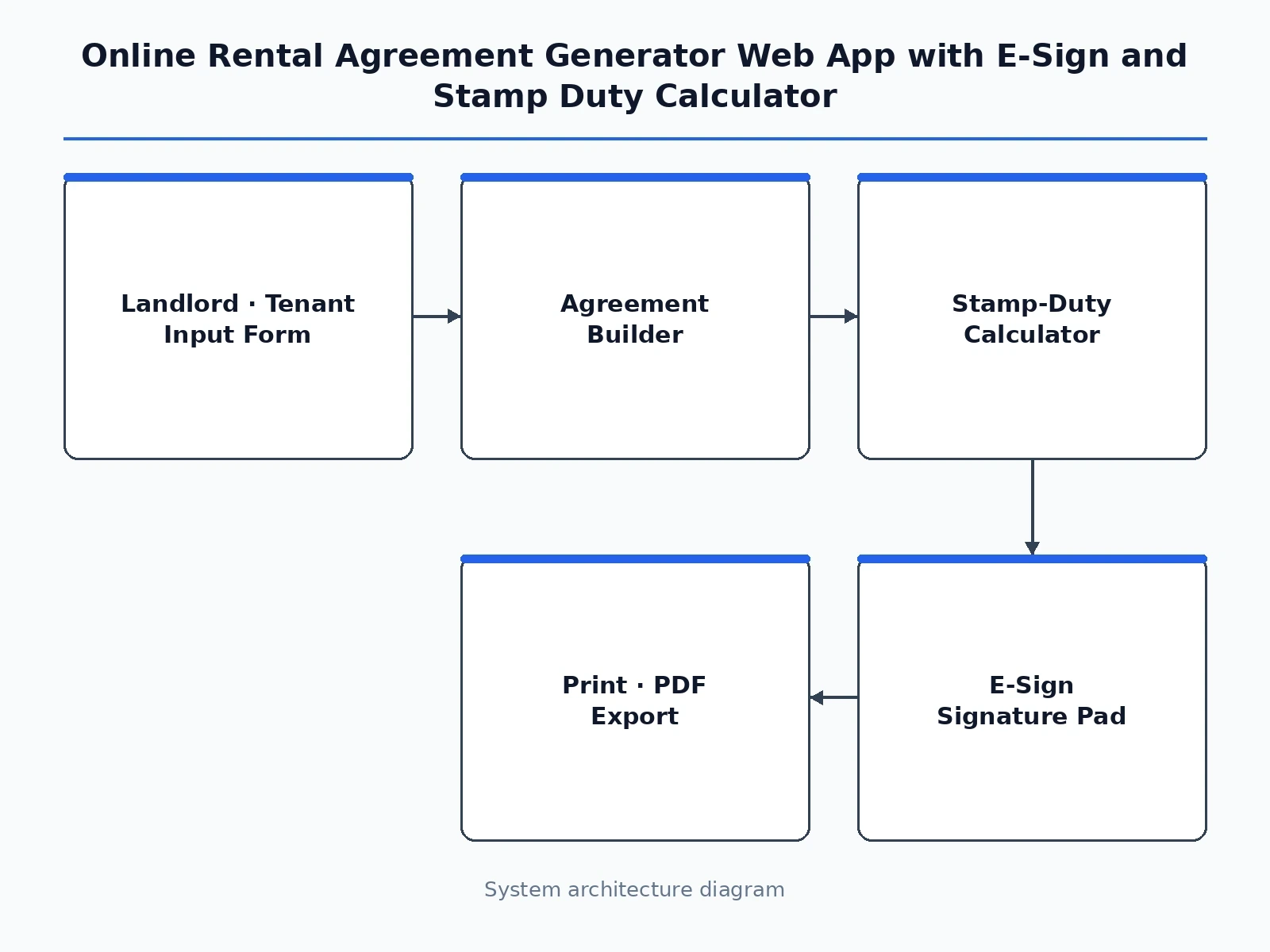
Follow the working sequence
How it works
The Online Rental Agreement Generator Web App with E-Sign and Stamp Duty Calculator takes a landlord and tenant from blank form to signed document in three stages that run entirely in the browser and on the app's server. First the landlord enters property address and type, both parties' names and contacts, monthly rent, refundable deposit, the term and the state, and ticks the clauses the agreement needs. The app then builds the agreement text from its templates, inserts the entered values and the selected clauses, and computes the stamp duty from the state rate table — for the demo example of a 2BHK in Pune at ₹18,000 a month with a ₹54,000 deposit over 11 months in Maharashtra, the base is ₹2,03,400 and the duty is ₹600 after rounding. Finally each party signs on the canvas pad or by typing their name, the signature is placed on the document, and the finished agreement is printed or saved as PDF.
- The landlord enters the property details — address, 2BHK flat type, semi-furnished status, 850 sq ft area and parking — plus landlord and tenant names and contacts.
- The landlord sets the rent terms: ₹18,000 monthly rent, ₹54,000 refundable deposit, an 11-month term starting 15 November 2026, rent due on the 5th of each month, and the state.
- The landlord ticks the clauses the agreement needs from the six-clause picker — maintenance, notice period, lock-in, deposit refund, subletting and pets.
- The app builds the agreement from its templates, inserts the entered values and selected clauses, and renders the formatted document preview in the browser.
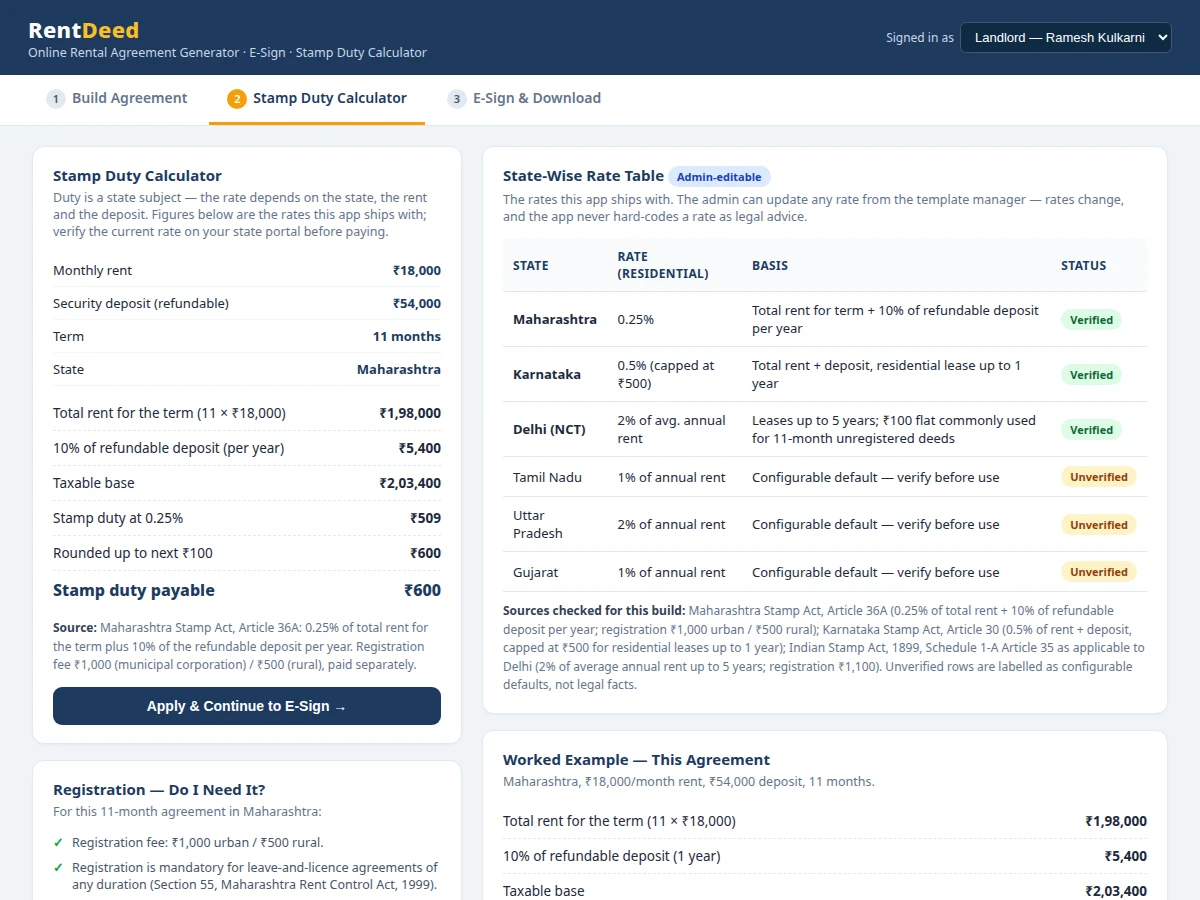
- The stamp-duty calculator applies the selected state's rate — Maharashtra 0.25% of total rent plus 10% of the refundable deposit per year — and shows the taxable base, the duty and the rounding.
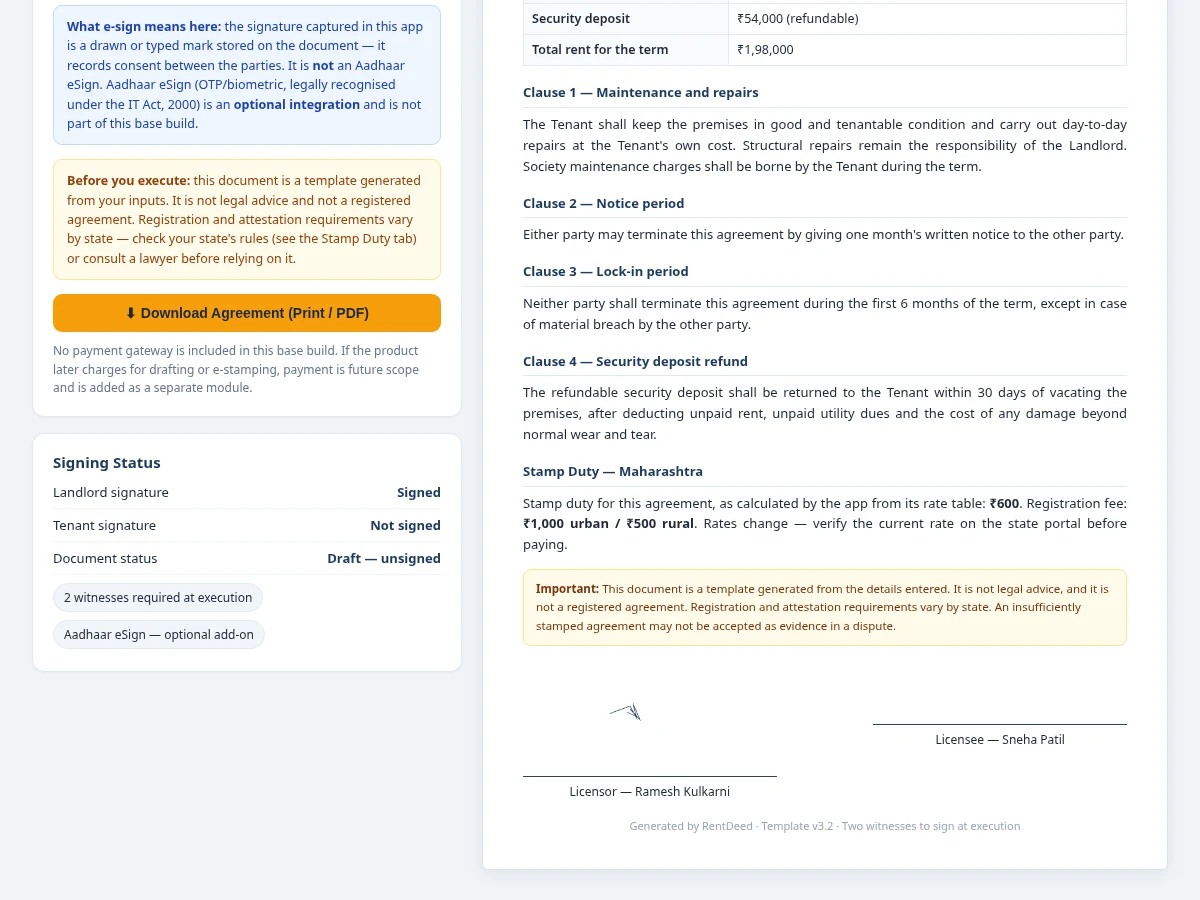
- The landlord and tenant each sign on the canvas pad or by typing their name; the signatures are placed on the document and the signing-status panel updates.
- The finished agreement is printed or saved as PDF through the browser, with the stamp-duty and registration-fee summary attached.
Tech stack:
- HTML5 · CSS3 · JavaScript
- Node.js · Express
- MySQL
- HTML5 canvas signature pad
- Browser print · PDF export
- REST API
- Git
| Parameter | Value |
|---|---|
| Platform | Web app (browser + Node.js server) |
| Roles | 3 (landlord, tenant, admin template manager) |
| Agreement type | Residential leave and licence (template) |
| Clauses available | 6 in the demo build (maintenance, notice, lock-in, deposit refund, no subletting, pets) |
| States in rate table | 6 (Maharashtra, Karnataka, Delhi verified; Tamil Nadu, Uttar Pradesh, Gujarat as configurable defaults) |
| Demo example | 2BHK flat in Pune, 850 sq ft, ₹18,000/month rent, ₹54,000 deposit, 11-month term |
| Maharashtra stamp duty (demo) | ₹600 (0.25% of ₹2,03,400 base, rounded up to the next ₹100) |
| Karnataka stamp duty (same example) | ₹500 (0.5% of ₹2,52,000, capped at ₹500) |
| Delhi stamp duty (same example) | ₹100 flat for an 11-month unregistered deed; 2% of average annual rent (₹4,320) if registered |
| Agreement preview render | 14.5 ms measured in the demo build (repeat runs measured 14–63 ms) |
| Signature capture | Drawn on canvas pad or typed name |
| Output | Print-formatted document, saved as PDF through the browser |
| Payment gateway | Not included in the base build (future scope) |
| Aadhaar eSign | Not included in the base build (optional integration) |
Project features
The Online Rental Agreement Generator Web App with E-Sign and Stamp Duty Calculator is built around four capabilities that work together from the first form field to the signed document. First, the agreement builder turns property, landlord, tenant and rent details into a leave-and-licence document with selected clauses written in, so nothing is typed twice and the preview updates as the form changes. Second, the stamp-duty calculator applies the selected state's rate to the rent and deposit and shows the full working — taxable base, rate, rounding and registration fee — with verified rates for Maharashtra, Karnataka and Delhi and unverified rows labelled as configurable defaults. Third, e-sign captures a drawn signature on a canvas pad or a typed name and places it on the document, with a signing-status panel tracking landlord and tenant separately. Fourth, role-based access gives the landlord the drafting view, the tenant a review-and-sign view, and the admin a template manager for clauses and rates.
- [Agreement builder with live preview] Property, landlord, tenant and rent details flow into a formatted leave-and-licence document that re-renders as the form changes; in the demo build the preview re-rendered in 14.5 ms (measured with the browser timer; repeat runs measured 14–63 ms).
- [State-wise stamp-duty calculator] The calculator applies the selected state's rate and shows the full working — total rent, deposit treatment, taxable base, duty and rounding — for Maharashtra, Karnataka and Delhi, with unverified states labelled as configurable defaults.
- [Clause picker] Six clauses (maintenance and repairs, 1-month notice period, 6-month lock-in, deposit refund terms, no subletting, pets allowed) can be ticked on or off, and only the selected clauses are written into the document.
- [E-sign with drawn or typed signature] A canvas signature pad captures a drawn signature, or the user types their name for a typed signature; the signature is placed on the document and the signing-status panel tracks landlord and tenant separately.
- [Role-based access] Three roles — landlord, tenant and admin template manager — control who drafts, who reviews and signs, and who edits clause templates and the state rate table.
- [Print and PDF-ready output] The generated agreement is a clean, print-formatted document that saves as PDF through the browser's print function, with a stamp-duty and registration summary attached.
- [Admin-editable rate table] Stamp-duty rates live in an editable table, not hard-coded, so the admin updates a rate when a state revises it; the table records which rates are verified and which are configurable defaults.
What is included
- Complete web app source code (frontend form and preview, backend API, MySQL schema)
- Agreement document templates for a residential leave-and-licence agreement
- State-wise stamp-duty rate table with verified rates for Maharashtra, Karnataka and Delhi
- E-sign module with canvas signature pad and typed-signature option
- Role-based access for landlord, tenant and admin template manager
- Print and PDF-ready agreement output with stamp-duty summary
- Setup instructions for running the app locally and hosting it online
- Project report PDF (background, stamp-duty law basis, working, limitations)
- PPT presentation for final review
- Viva Q&A preparation document (leave and licence, stamp duty, e-sign, roles)
Limitations & prerequisites
- The generated agreement is a template document, not legal advice and not a registered agreement; registration and attestation requirements vary by state, and the parties must verify the current rules for their state before relying on it.
- Stamp-duty rates change: only Maharashtra, Karnataka and Delhi rates were verified against their Stamp Acts for this build; the other states in the table are labelled configurable defaults and must be verified on the state portal before any duty is paid.
- The e-sign captured here is a drawn or typed mark stored on the document; it is not an Aadhaar eSign, which is an optional integration and is not part of this base build.
- No payment gateway is included in the base build, so drafting fees, e-stamp purchase and registration fees are handled outside the app; payment is future scope.
- The app drafts residential leave-and-licence agreements only; commercial leases, registered leases over 12 months and state-specific formats need template additions.
- An insufficiently stamped agreement may not be accepted as evidence in a dispute, so the duty figure the app shows must be checked against the current state rate before execution.
Frequently Asked Questions
How is the stamp duty calculated?
The app applies the selected state's rate to the rent and deposit and shows the full working, so the duty figure is never a black box: total rent, deposit treatment, taxable base, rate and rounding are all displayed for the chosen state. For the demo example — a 2BHK in Pune at ₹18,000 a month with a ₹54,000 deposit over 11 months — Maharashtra charges 0.25% of the total rent for the term (₹1,98,000) plus 10% of the refundable deposit (₹5,400), giving a base of ₹2,03,400 and duty of ₹508.50, rounded up to ₹600. Karnataka and Delhi use different bases, and the calculator shows each state's working separately.
Is the generated agreement legally valid and registered?
No — the generated document is a template, not legal advice and not a registered agreement. It is a formatted draft built from the details entered, and it states the stamp duty and registration fee for the selected state, but registration and attestation requirements vary by state: Maharashtra requires registration of leave-and-licence agreements of any duration, while most other states require it only for leases of 12 months or more. The parties must verify the current rules for their state or consult a lawyer before relying on the document.
What does e-sign mean in this project — is it Aadhaar eSign?
No — e-sign here means a drawn signature captured on a canvas pad, or a typed name, placed on the document, with a signing-status panel tracking landlord and tenant separately; it records consent between the parties but it is not an Aadhaar eSign. Aadhaar eSign — OTP or biometric signing recognised under the IT Act, 2000 — is an optional integration that is not part of this base build and can be added later.
Can the clauses and stamp-duty rates be changed?
Yes — both are managed by the admin template manager role, not hard-coded. The admin edits clause wording, adds or removes clauses from the picker, and updates any state's rate in the rate table, and the table records which rates are verified and which are configurable defaults. The landlord only picks from the clauses the admin has published, and the tenant sees the agreement read-only until signing. Rate changes take effect for new agreements immediately; already-generated drafts keep the rate they were built with.
Is a payment gateway included for drafting or e-stamp charges?
No — no payment gateway is included in the base build, and payment is future scope. The app generates the agreement, calculates the duty and captures signatures, but drafting fees, e-stamp purchase and registration fees are handled outside the app. If a payment step is added later it is a separate module, so the core drafting and signing flow stays free of payment dependencies. The demo shows the duty and registration fee as amounts to be paid through the state's own portal.
Is this project suitable for a final-year project?
Yes — for Computer Science, IT and Web Development programs. It demonstrates full-stack web development with form-driven document generation, a state-wise rules engine for stamp duty, canvas-based signature capture, role-based access, and an honest legal-honesty boundary that is itself a strong viva topic. The working demo, the verified stamp-duty figures for three states, and the clearly labelled limits give the student concrete material for the report and the final review.
Components & software requirements
- HTML5 · CSS3 · JavaScript
- Node.js · Express
- MySQL
- HTML5 canvas signature pad
- Browser print · PDF export
- REST API
- Git
Delivery information
Built-to-order project. Delivery timeline is shared after order confirmation based on current queue.
Support terms
Complete documentation, setup guide, and viva preparation included. Support for setup and explanation provided.
Download free synopsis (PDF)
Enter your name and WhatsApp number — the synopsis PDF downloads immediately. We may send occasional project updates on WhatsApp; no spam.