
More project photos (3)
The problem
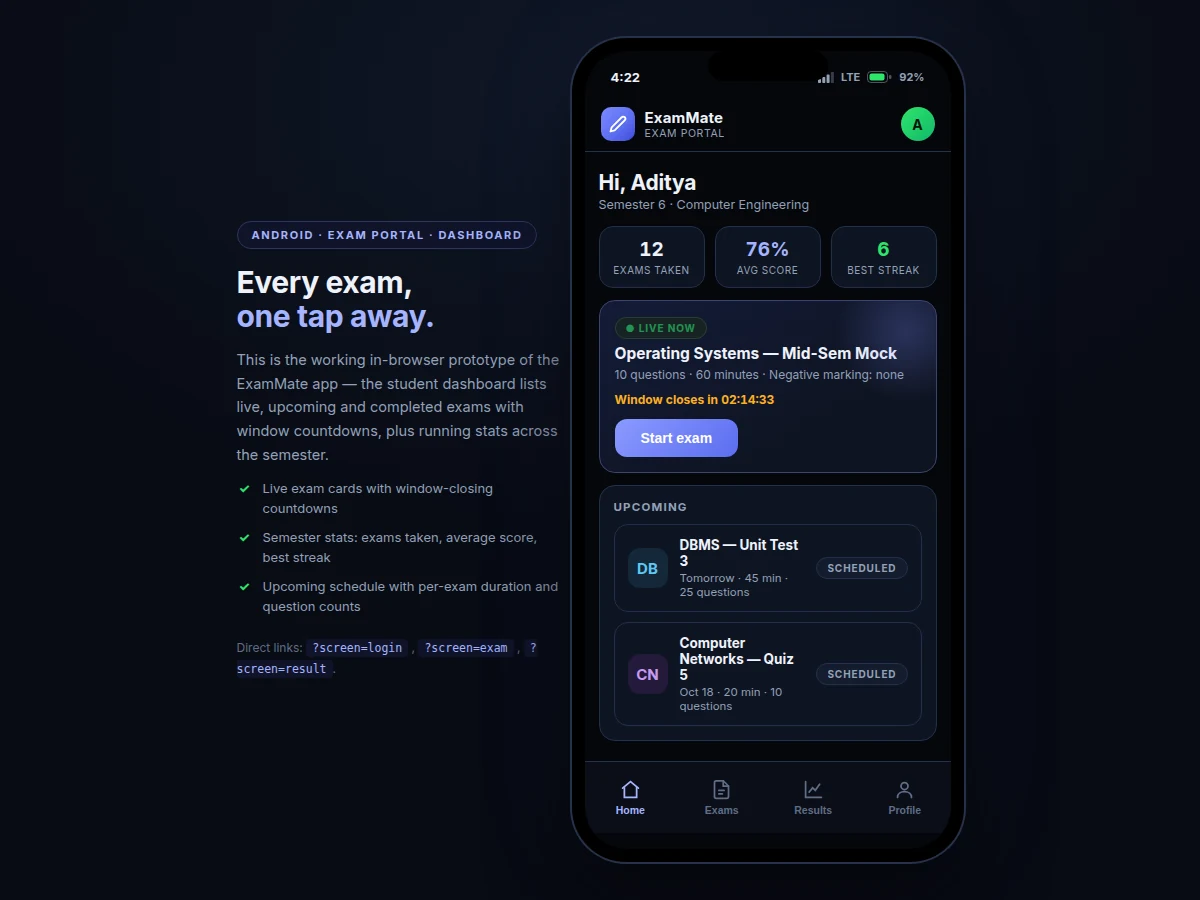
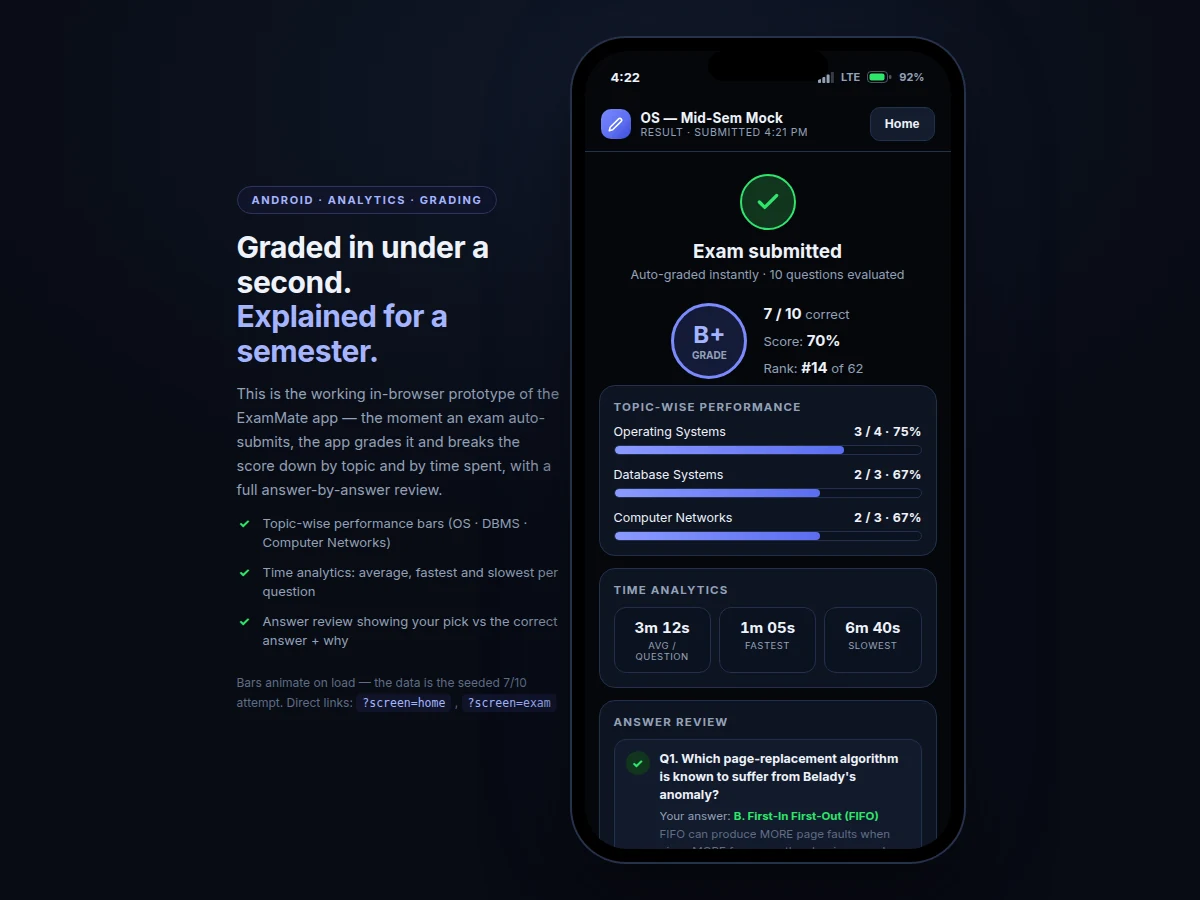
Colleges still run most internal assessments on paper or on web portals that were never designed for phones, and students attempting this topic usually build a static quiz with hard-coded questions and no real exam discipline. The gap is an examination system that behaves like an actual exam hall on a mobile device: a timer that keeps ticking even when the screen sleeps, a question palette that shows exactly where you stand, and results that explain more than a bare score. This project builds that system as a 100% native Android app in Kotlin. Students sign in with their college email, pick from live and upcoming exams on a dashboard, and attempt timed papers where every answer is stored locally, the palette tracks answered, marked, current and unvisited questions, and submission happens automatically at zero. Grading is instant and on-device, producing per-topic performance bars, per-question time analytics and a full review of every answer against the key.
Signs in with a college email and opens an exam.
Follow the working sequence
How it works
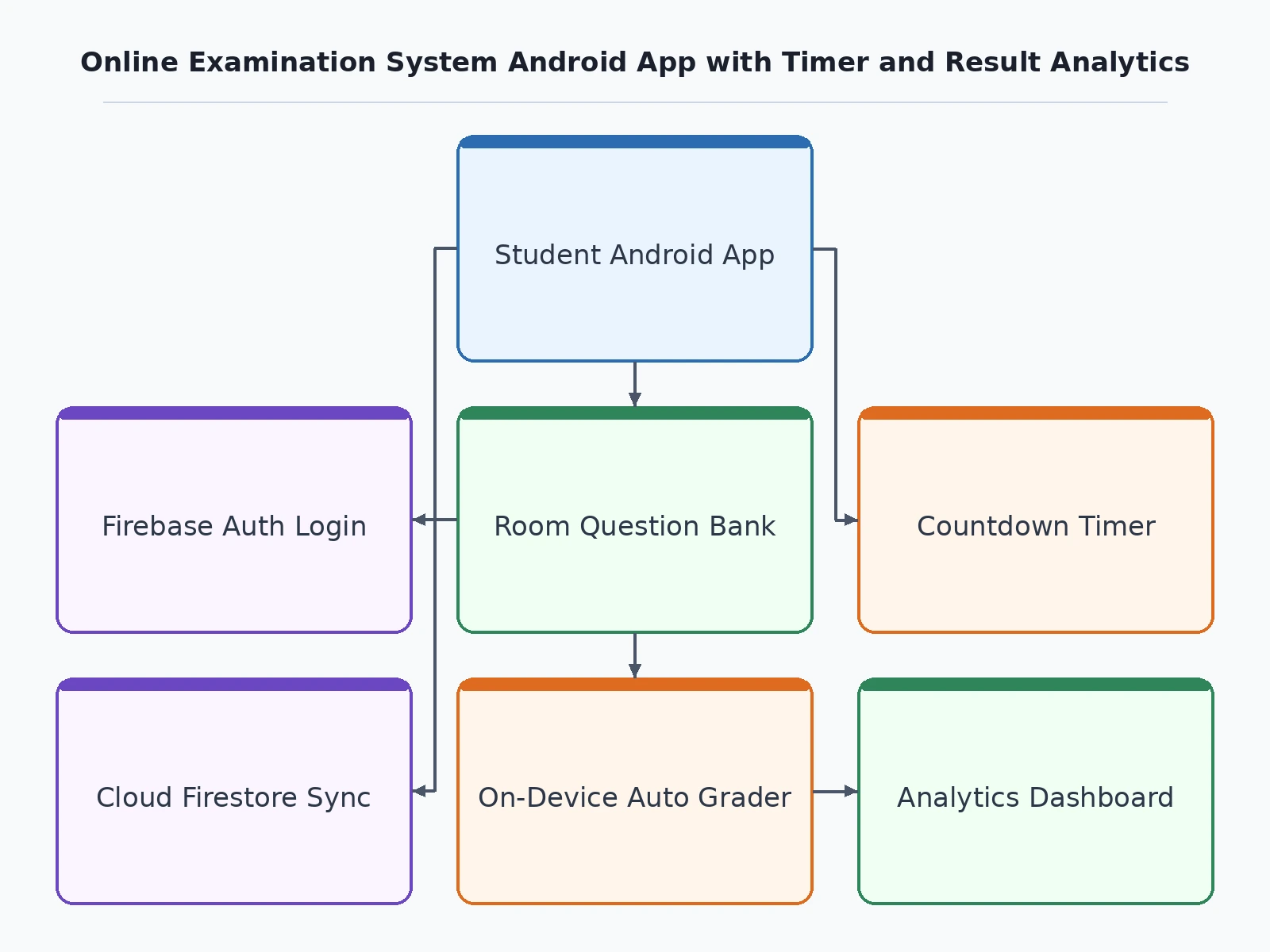
- The student signs in with a college email through Firebase Authentication; exam schedules and the question bank sync into the on-device Room database.
- Opening a live exam starts the timer engine as a foreground service ticking once per second, and the question palette initialises with every question marked unvisited.
- Answers are saved locally per question; tapping a palette cell jumps straight to it, and the mark-for-review flag toggles independently of the answer.
- Manual Submit opens a confirmation showing the answered count; if the clock reaches 00:00 first, the service submits the paper automatically.
- The grading module compares each response against the answer key, computes per-topic percentages and per-question timings from the attempt record.
- The results screen renders the score, grade, topic bars, time statistics and the full answer review; the attempt then syncs to Firestore for leaderboards.
Tech stack:
- Kotlin, Android SDK
- AndroidX · Material 3
- Room persistence library
- Firebase Authentication
- Cloud Firestore
- Foreground services (timer engine)
- Gradle · Android Studio
| Parameter | Value |
|---|---|
| App size | Approximately 14 MB installed (design target) |
| Minimum Android version | 7.0 (API 24) |
| Target Android version | 14 (API 34) |
| Timer resolution | 1 second |
| Palette states | 4 (answered, marked, current, unvisited) |
| Question bank capacity | 1,000+ questions per exam set (design target) |
| Offline support | Full paper attempt offline; syncs on reconnect (expected) |
| Grading | Instant, on-device (expected) |
Project features
- [Live countdown timer with auto-submit] A foreground-service timer ticks once per second, warns as time runs low, and submits the paper automatically at 00:00 even if the app is backgrounded.
- [Question palette] All questions visible in one grid with four states — answered, marked for review, current and unvisited — with one-tap jump navigation.
- [Instant on-device grading] Papers are evaluated the moment they are submitted; no waiting for a server round-trip.
- [Per-topic result analytics] Performance bars break the score down by subject (e.g. Operating Systems, DBMS, Networks) so weak areas are obvious.
- [Time analytics and answer review] Average, fastest and slowest time per question, plus an answer-by-answer review showing your pick against the correct answer with an explanation.
- [Offline-first question bank] Exams, questions and attempts live in a Room database; results sync to Firestore when the network returns.
- [Exam dashboard] Live exams with window-closing countdowns, upcoming schedule with durations and question counts, and running semester stats.
What is included
- Complete Kotlin source code (single-activity, MVVM structure)
- Timer engine module (foreground service with auto-submit)
- Question palette and exam-screen UI components
- Grading and analytics modules (topic bars, time stats, answer review)
- Sample question bank (100 MCQs across 3 subjects)
- Firebase project setup and Firestore schema guide
- Build and APK signing guide
- Project report PDF (architecture, timer design, grading logic, testing)
- PPT presentation for final review
- Viva Q&A preparation document (services, Room, Firebase, exam-domain logic)
Limitations & prerequisites
- Objective (MCQ) papers only — subjective or descriptive answer evaluation is future scope, not v1.
- No camera-based proctoring in v1; exam integrity rests on the timer, single-attempt rules and window scheduling.
- Leaderboards and cross-device sync need internet; offline attempts queue locally until the network returns.
- On phones with aggressive OEM battery savers, background timer ticks can lag by a few seconds — documented as expected behavior, with the foreground-service notification keeping it minimal.
- The sample bank ships 100 MCQs; a full college question bank must be authored by the buyer (CSV/JSON import format included).
- Firebase free tier covers the expected student volume; very large cohorts may need a paid plan, which is a buyer-side cost.
Frequently Asked Questions
How is this different from a web-based examination portal?
This is a 100% native Android build, not a web-view wrapper: the timer runs as a foreground service, the question bank lives in an on-device Room database for offline attempts, and grading happens on the phone. (Projectech also lists a legacy web-based Online Examination System — this is a separate native mobile project with a different stack.)
What happens if the app is closed or the phone sleeps mid-exam?
The timer engine runs as a foreground service, so the countdown continues and the paper auto-submits at 00:00. Answers already saved are never lost because every response is written to the local database immediately.
Does it work without internet?
Attempting a paper does — questions, answers and the timer are all local. Sign-in, fetching new exams and syncing results need connectivity, and pending attempts upload automatically on reconnect.
Can teachers add their own questions?
Yes, through the bundled CSV/JSON import format documented in the setup guide. A dedicated faculty authoring console is planned as future scope, not part of v1.
Is this project suitable for a final-year project?
Yes — for Computer Science, IT and mobile-application programs. It demonstrates background services, offline-first data with Room, Firebase integration, and a complete exam-domain workflow from timer to analytics, all defensible in a viva.
Components & software requirements
- Kotlin, Android SDK
- AndroidX · Material 3
- Room persistence library
- Firebase Authentication
- Cloud Firestore
- Foreground services (timer engine)
- Gradle · Android Studio
Delivery information
Built-to-order project. Delivery timeline is shared after order confirmation based on current queue.
Support terms
Complete documentation, setup guide, and viva preparation included. Support for setup and explanation provided.
Download free synopsis (PDF)
Enter your name and WhatsApp number — the synopsis PDF downloads immediately. We may send occasional project updates on WhatsApp; no spam.