
More project photos (2)

The problem
An online doctor consultation platform with video calls is a web application that lets a patient find a doctor, book a video appointment, consult over video, and receive a digital prescription without visiting a clinic. Patients today usually phone a clinic, wait for a callback, and travel for a short consultation, which costs time and is difficult for people in smaller towns or with limited mobility. Most student builds are appointment forms with no real consultation room, so this project teaches the harder part: real-time video, signalling and slot management. This project implements that full flow: doctor search, slot booking, a WebRTC video consultation room with chat, and a digital prescription after the call. The demo renders 8 doctor profiles across 8 specialities and completes the booking-to-prescription flow in 4 screens, so every feature can be exercised end to end. It is an academic prototype, not a certified telemedicine service, and it does not replace licensed medical consultation.
Searches doctors, books a slot and joins the video consultation.
Follow the working sequence
How it works
The platform works end to end as a single journey: a patient searches for a doctor, books a slot, joins a video consultation at the booked time, and leaves with a digital prescription. Doctors set their speciality, fee and weekly availability, from which the system derives bookable 30-minute slots. When a patient searches, the server filters doctors by speciality and language, sorts by fee or rating, and shows only slots that are still free. Booking reserves the chosen slot and creates a consultation record with a unique booking ID. At the booked time, the consultation room opens a WebRTC peer connection — camera and microphone captured with getUserMedia, media exchanged over RTCPeerConnection, and the connection negotiated through a Socket.IO signalling server — with chat and shared notes over the same socket connection. After the call, the doctor completes the prescription pad and the platform generates the digital prescription, which the patient can download or print.
- The patient registers and logs in, then searches doctors by speciality, symptom or name and filters by language, fee and availability.
- The patient compares doctor cards — qualifications, experience, rating, fee and next available slot — and picks a doctor.
- The patient selects a free 30-minute slot, enters the reason for the visit, and confirms the booking; the slot is reserved and a unique booking ID is issued.
- At the booked time, both sides join the consultation room, which opens a WebRTC video call negotiated through the Socket.IO signalling server.
- During the call, the patient and doctor talk over video, exchange chat messages, and refer to the consultation notes shared with the doctor.
- After the call, the doctor fills the prescription pad with medicines, dosage, duration and advice, and the platform generates the printable digital prescription for the patient.
Tech stack:
- Node.js 22 (LTS), Express 5
- React (frontend)
- Socket.IO 4 (signalling and chat)
- WebRTC (RTCPeerConnection, getUserMedia)
- MongoDB with Mongoose
- JWT authentication
- Razorpay payment integration
- HTML5, CSS3, JavaScript (demo frontend)
| Parameter | Value |
|---|---|
| Consultation slot length | 30 minutes (design target) |
| Doctors in demo catalogue | 8 doctors across 8 specialities (measured in demo build) |
| Demo screens | 4 screens: search, booking, consultation room, prescription (measured in demo build) |
| Video mechanism | WebRTC RTCPeerConnection with getUserMedia (MDN-documented API) |
| Signalling | Socket.IO 4 over WebSocket (design) |
| Prescription generation | After consultation only, with doctor registration number (design) |
| Rooms per booking | 1 consultation room per booking (design) |
| Booking confirmation | Unique booking ID per consultation (design) |
| Video room open time | Under 5 seconds on a typical broadband connection (design target) |
| User roles | 2 roles: patient and doctor (design) |
Project features
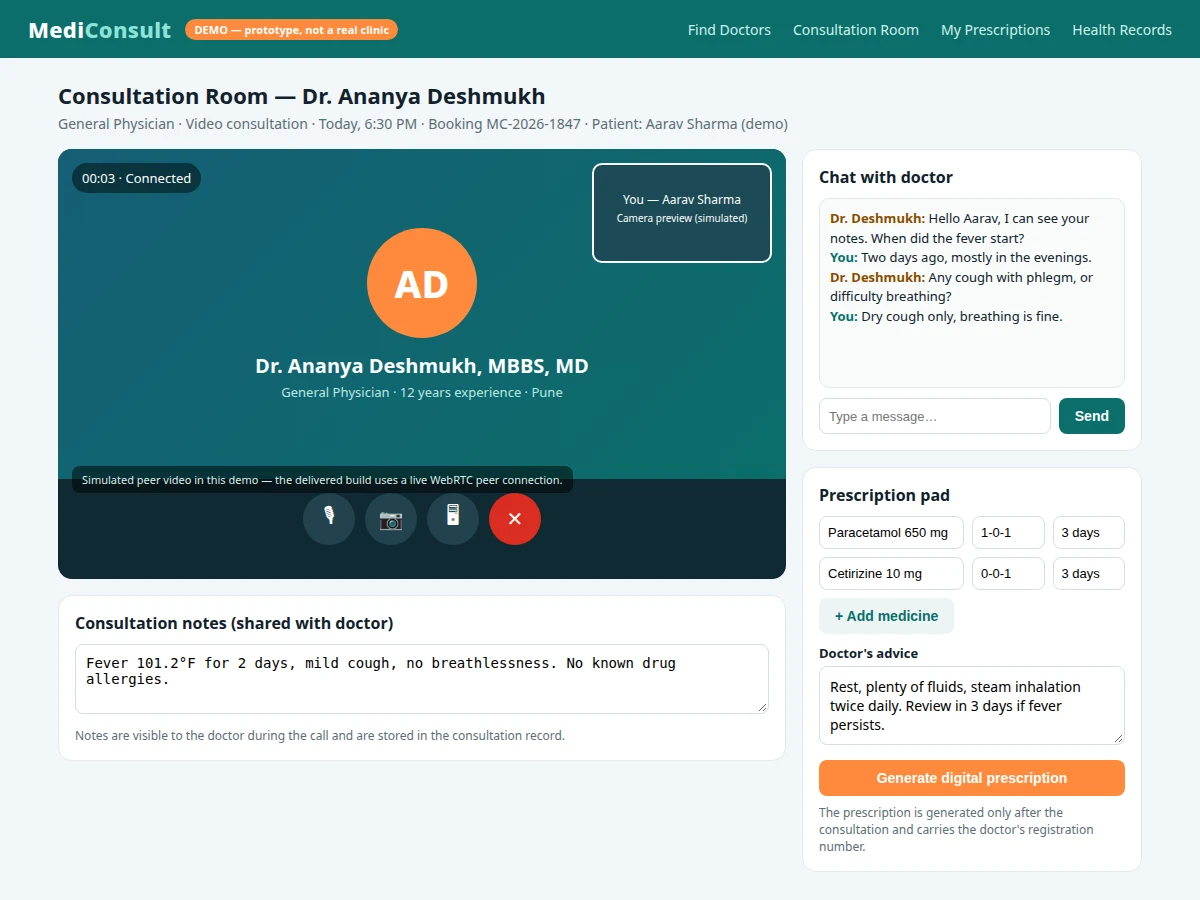
The platform's strongest capabilities are its doctor search and filtering, its live consultation room, and its digital prescription workflow — the three parts that make it a complete consultation product rather than an appointment form. Doctor search lets patients filter by speciality, compare consultation fees and ratings, and see the next available slot before booking, so the choice is informed rather than blind. The consultation room is the centre of the product: a WebRTC video call with mute and camera controls, a live call timer, in-call chat, and consultation notes shared with the doctor during the call. After the call, the doctor fills a prescription pad with medicines, dosage and duration, and the platform generates a printable digital prescription carrying the doctor's registration number. Around these three sit the supporting capabilities — patient and doctor accounts, slot management, consultation history and health records — which together cover the whole journey from finding a doctor to holding a prescription.
- [Doctor search and filtering] Patients search by speciality, symptom or doctor name, filter by language and availability, and sort by fee or rating, with each doctor card showing qualifications, experience, consultation fee and the next available slot.
- [Slot booking with confirmation] Patients pick a free 30-minute slot, enter the reason for the visit, and receive a booking confirmation with a unique booking ID; booked slots are removed from availability so double-booking cannot happen.
- [WebRTC video consultation room] The consultation opens as a live video call using WebRTC (RTCPeerConnection with getUserMedia for camera and microphone), with mute and camera controls, a live call timer and a self-view preview.
- [In-call chat and shared notes] Patient and doctor can exchange text messages during the call, and the patient's consultation notes are visible to the doctor throughout, so symptoms and history do not have to be repeated aloud.
- [Digital prescription pad] After the consultation, the doctor adds medicines with dosage and duration plus written advice, and the platform generates a printable digital prescription carrying the doctor's name, qualifications and registration number.
- [Patient and doctor accounts] Separate logins for patients and doctors, with role-based access: patients see their bookings and prescriptions, doctors manage availability, consultations and their prescription history.
- [Consultation history and health records] Every completed consultation, its notes and its prescription are stored in the patient's record, so follow-up visits start from the previous consultation instead of from scratch.
What is included
- Complete source code for the web application (frontend and backend)
- Working single-file demo of the full booking-to-prescription flow
- MongoDB database schema with seed data for 8 sample doctors
- Project report PDF (background, WebRTC and signalling design, methodology, architecture)
- PPT presentation for final review
- Viva Q&A preparation document (WebRTC, signalling, RTCPeerConnection, getUserMedia, JWT, slot management)
- Setup and hosting instructions
Limitations & prerequisites
- This is an academic prototype, not a certified telemedicine service: it must not be used for real diagnosis or treatment and it carries no clinical certification.
- The doctors, fees, slots and prescriptions in the demo are sample data; real use requires verified doctor registration and credentials.
- Video calls need a stable internet connection and a browser with camera and microphone permission; poor connectivity degrades call quality.
- WebRTC peer connections need HTTPS in production, plus STUN/TURN servers for patients behind restrictive networks — these are configuration steps, not included hosting.
- Payment gateway integration needs production Razorpay keys and approval, which are the buyer's responsibility.
- The platform does not store or verify medical licences; doctor verification is an administrative process outside the software.
Frequently Asked Questions
Is this project suitable for a final-year project?
Yes — for Computer Science, IT and Web Development programs. It demonstrates full-stack web development, real-time video with WebRTC, Socket.IO signalling, slot and booking management, authentication and a complete multi-screen product flow, all of which make strong viva material. The demo implements the full flow end to end, so the student can demonstrate every feature live.
How does the video consultation work?
The consultation room opens a WebRTC peer connection between the patient and the doctor. The browser captures camera and microphone with getUserMedia, media flows over RTCPeerConnection, and a Socket.IO signalling server exchanges the connection offers and answers. In-call chat and shared notes run over the same socket connection.
Does the platform diagnose illnesses or replace a doctor?
No. The platform only connects a patient with a doctor over video and records the prescription the doctor writes. It makes no diagnosis, offers no treatment advice of its own, and is an academic prototype — it is not a certified telemedicine service and never replaces licensed medical consultation.
Can the project be hosted online?
Yes. The backend is a Node.js and Express application with a MongoDB database, and the frontend is a React app, so it can be hosted on any Node.js host with HTTPS enabled. HTTPS is required in production because browsers only allow camera and microphone access on secure origins.
What will I receive with the project?
The complete source code for the frontend and backend, the MongoDB schema with sample doctor data, the working demo, setup and hosting instructions, the project report, a PPT for the final review, and a viva Q&A document covering WebRTC, signalling and the booking workflow.
Can more specialities or features be added?
Yes. New specialities are added as doctor-profile data without code changes, and the design supports follow-up reminders, lab-test booking, medicine delivery and a doctor admin panel as optional additions, developed separately on request. The database keeps doctors, specialities and slots as separate records, so adding a speciality needs no code change.
Components & software requirements
- Node.js 22 (LTS), Express 5
- React (frontend)
- Socket.IO 4 (signalling and chat)
- WebRTC (RTCPeerConnection, getUserMedia)
- MongoDB with Mongoose
- JWT authentication
- Razorpay payment integration
- HTML5, CSS3, JavaScript (demo frontend)
Delivery information
Built-to-order project. Delivery timeline is shared after order confirmation based on current queue.
Support terms
Complete documentation, setup guide, and viva preparation included. Support for setup and explanation provided.
Download free synopsis (PDF)
Enter your name and WhatsApp number — the synopsis PDF downloads immediately. We may send occasional project updates on WhatsApp; no spam.