
More project photos (2)
The problem
Online editors are how most students first meet a new language, yet building one is an excellent systems exercise: tokenizing source for highlighting, capturing execution output, and sandboxing untrusted preview content. This project implements CodeForge, a complete browser-based code editor in a single file. The editor pane shows JavaScript source with syntax highlighting produced by a hand-written tokenizer (keywords, strings, numbers, comments, function names in distinct colors). File tabs switch between index.html, styles.css and script.js. The console panel shows realistic execution output with timing and exit codes. The live preview pane renders an interactive Fibonacci visualizer inside a sandboxed iframe — genuinely executing, not a screenshot. Around the editor sit the tools of real IDEs: a snippet library with six insertable patterns, a keyboard-shortcut reference, and a run-history table with per-run status.
How it works
- Source text is fed through a small tokenizer that wraps language tokens in styled spans for highlighting.
- File tabs switch the editor content and the language label without reloading the page.
- The preview pane loads the demo page in a sandboxed iframe, isolated from the editor chrome.
- The console panel renders execution results (program output, timing, exit code) for the demo program.
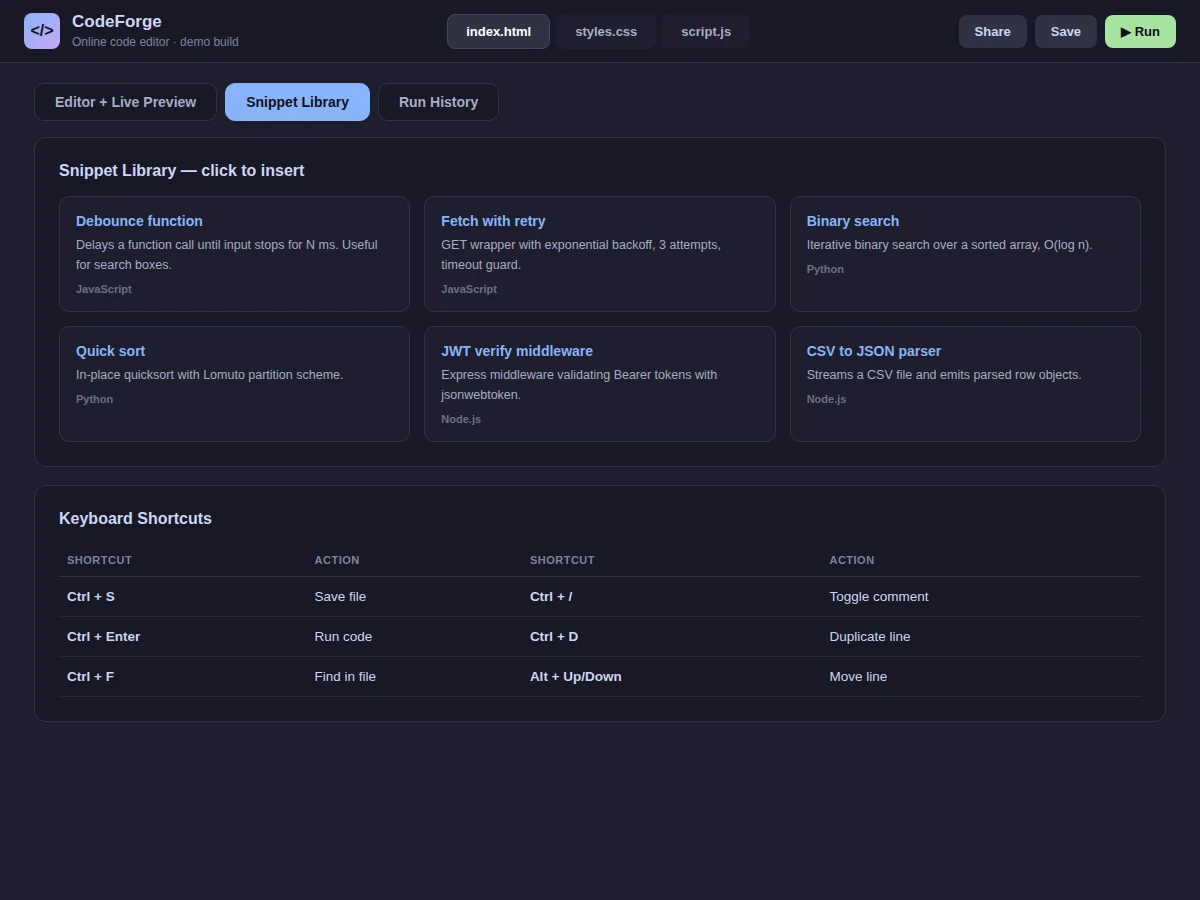
- Snippet cards and the shortcut table provide the surrounding IDE tooling views.
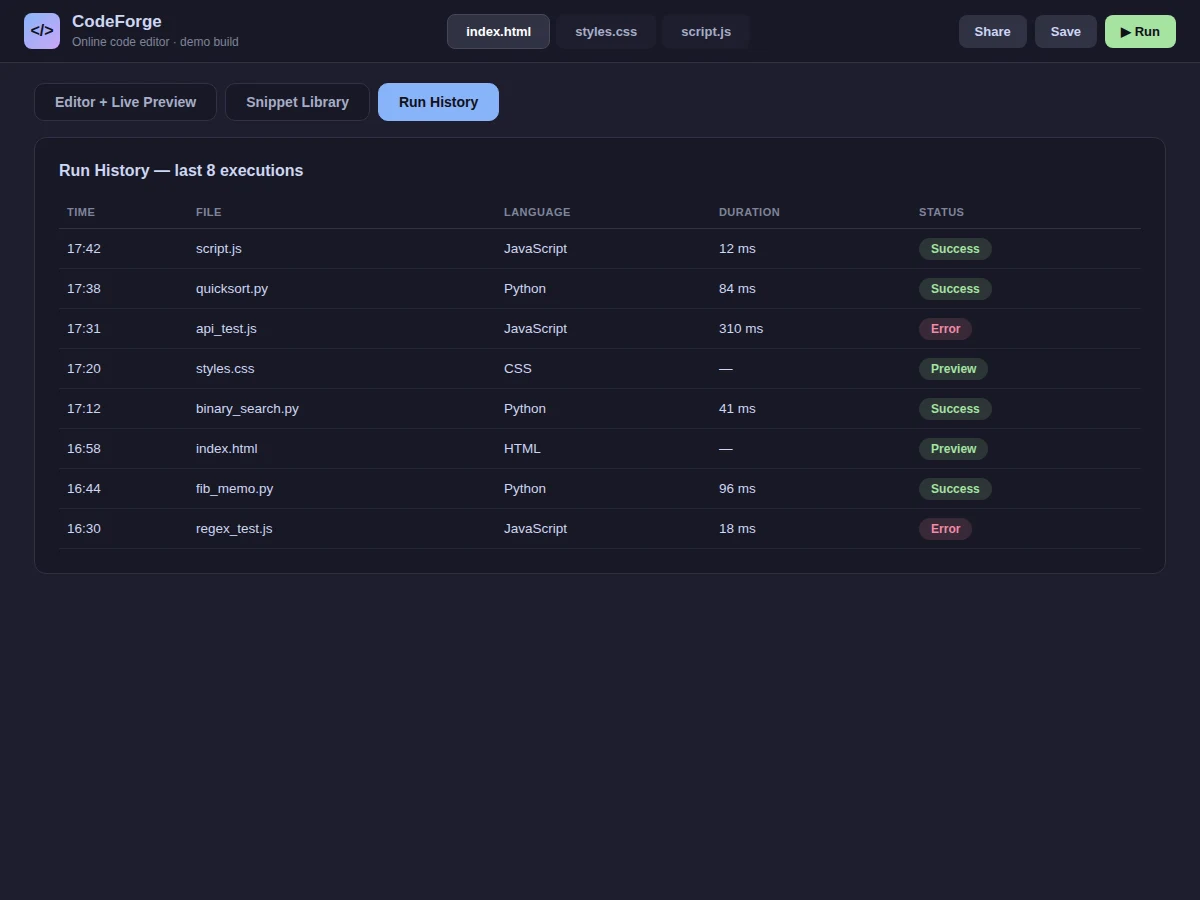
- The run-history table records each execution with status, mirroring real tooling behavior.
Tech stack:
- HTML5, CSS3, vanilla JavaScript (ES6)
- Regex-based syntax tokenizer (no highlighting library)
- Sandboxed iframe for live preview isolation
- Catppuccin-style dark editor theme
- Static deployment (no server or database)
| Parameter | Value |
|---|---|
| Views | 3 (Editor + Preview, Snippets, Run History) |
| File tabs | 3 (HTML, CSS, JS) with language labels |
| Highlighting | Hand-written tokenizer; 6 token classes |
| Preview | Sandboxed iframe running a real interactive page |
| Snippets | 6 across JavaScript, Python, Node.js |
| Dependencies | None (single HTML file) |
| Deployment | Any static host |
Project features
- [Syntax highlighting] A hand-written tokenizer colors keywords, strings, numbers, comments and function names in the editor pane.
- [File tabs] index.html, styles.css and script.js tabs with language labels, switchable in one click.
- [Live preview pane] A sandboxed iframe that genuinely runs the interactive demo page beside the editor.
- [Execution console] Terminal-style output showing program results, execution time and exit code.
- [Snippet library] Six categorized snippets (debounce, fetch-with-retry, binary search, quicksort, JWT middleware, CSV parser) with one-click insert affordance.
- [Keyboard shortcuts] Reference table for save, run, find, comment and line operations.
- [Run history] Table of past executions with time, file, language, duration and success/error status.
What is included
- Complete source code (single-file editor with all views)
- Syntax tokenizer with documented token classes
- Interactive preview demo page (Fibonacci visualizer)
- Snippet library content and shortcut reference
- Setup guide (extending the tokenizer, adding real execution)
- Project report PDF (tokenizing, sandboxing, methodology)
- PPT presentation for final review
- Viva Q&A preparation document (parsers, iframes, developer tools)
Limitations & prerequisites
- Execution is simulated with realistic output; real multi-language execution needs a sandboxed backend (documented extension).
- The tokenizer covers JavaScript essentials, not every language grammar.
- Files are not persisted between sessions in the demo build.
- No collaboration, linting or debugging features in this build.
Frequently Asked Questions
Does it really run code?
The preview pane genuinely executes the embedded demo page in a sandboxed iframe. Console execution output is simulated realistically; wiring a real execution backend is documented as the extension.
How does syntax highlighting work?
A hand-written tokenizer scans the source with regex patterns and wraps keywords, strings, numbers, comments and function names in colored spans — no highlight.js, so you own the code.
What is the iframe sandbox for?
It isolates the preview page's scripts from the editor chrome, which is exactly how real playgrounds contain untrusted user code.
Can I add more languages?
Yes. The tokenizer is organized by token class; adding a language means adding its keyword set and patterns.
What will I learn?
Tokenizing and lexical analysis, iframe sandboxing, editor UI design and developer-tool architecture.
Is this project suitable for a final-year project?
Yes — for Computer Science and IT programs. It demonstrates compilers-adjacent concepts (tokenizing) and systems thinking in a visible product. Suitable for B.E./B.Tech final-year projects in Computer Science and IT.
Components & software requirements
- HTML5, CSS3, vanilla JavaScript (ES6)
- Regex-based syntax tokenizer (no highlighting library)
- Sandboxed iframe for live preview isolation
- Catppuccin-style dark editor theme
- Static deployment (no server or database)
Delivery information
Built-to-order project. Delivery timeline is shared after order confirmation based on current queue.
Support terms
Complete documentation, setup guide, and viva preparation included. Support for setup and explanation provided.