
More project photos (2)
The problem
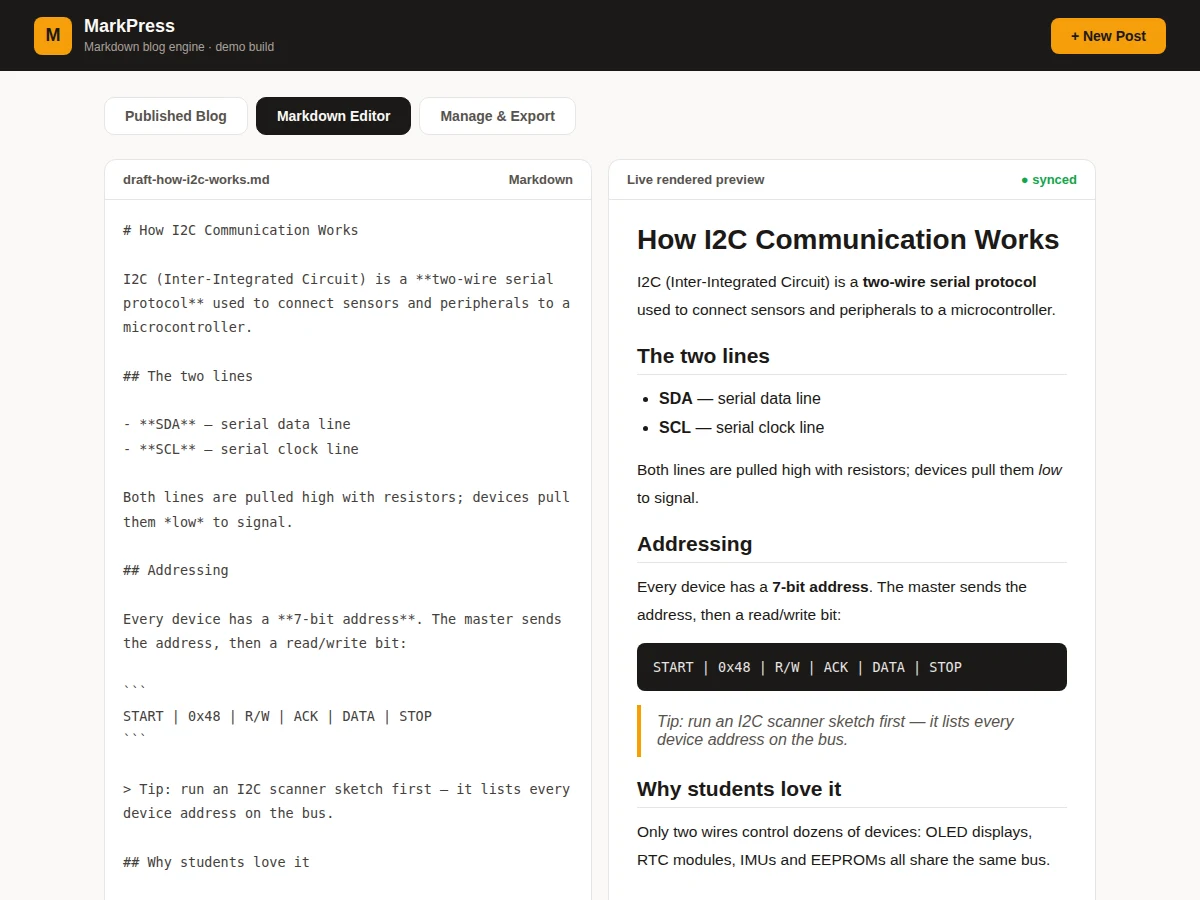
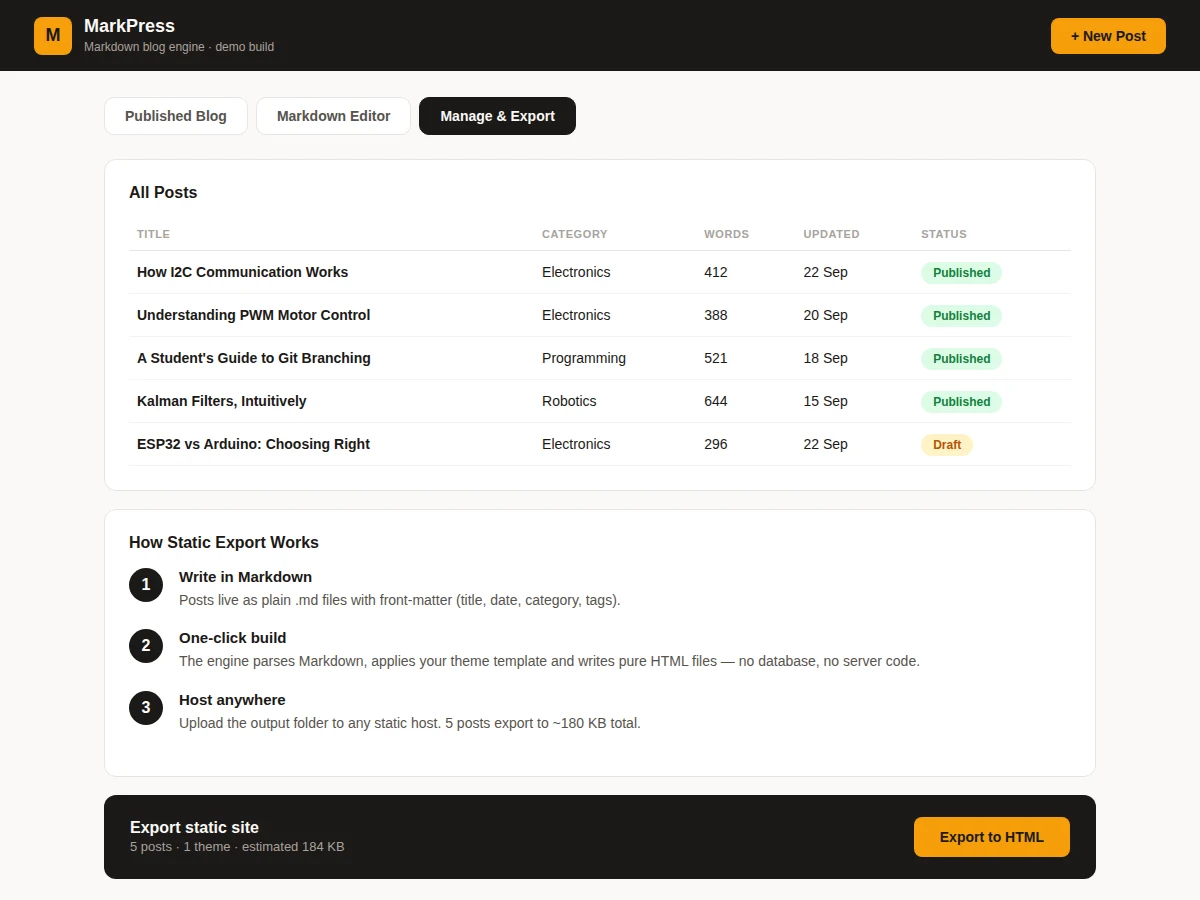
Developers love writing in Markdown and readers love fast static pages; a Markdown blog engine connects the two without a database or a CMS. This project builds MarkPress, a complete authoring loop in one web app. The editor view pairs raw Markdown source with its rendered output side by side — headings, bold/italic, lists, code spans, fenced code blocks and blockquotes all render faithfully, demonstrated with a realistic I2C electronics tutorial as the draft. The published blog front end shows four technical articles as cards with categories, authors, dates and read times. The management view lists every post with word counts, update dates and published/draft status. Finally, the export panel walks through the three-step static build: Markdown plus theme templates compile to pure HTML files that can be hosted anywhere, with no server code at runtime.
How it works
- Posts are modelled as objects with title, category, excerpt, author, date, read time and Markdown body.
- The editor view shows the draft Markdown source beside its rendered HTML output.
- The blog front end renders published posts as cards from the same post objects.
- The management view lists all posts with computed word counts and publish/draft states.
- The export panel describes the static build: Markdown plus theme templates compile to standalone HTML.
- Exported output needs only a static host — no database or server code at runtime.
Tech stack:
- HTML5, CSS3, vanilla JavaScript (ES6)
- Markdown-to-HTML rendering pipeline
- Editorial serif typography system
- Static-site generation concept (no backend)
- Static deployment (the product is static hosting)
| Parameter | Value |
|---|---|
| Views | 3 (Published Blog, Editor, Manage & Export) |
| Demo posts | 4 full technical articles |
| Markdown features | Headings, bold/italic, lists, code, quotes |
| Post states | Published and draft |
| Export size | ~184 KB for 5 posts (design estimate) |
| Dependencies | None (single HTML file) |
| Deployment | Any static host |
Project features
- [Split-pane Markdown editor] Raw source on the left, live rendered HTML on the right, covering headings, lists, code and quotes.
- [Faithful rendering] Bold, italic, inline code, fenced blocks, blockquotes and lists render with editorial styling.
- [Published blog front end] Four realistic technical posts as cards with categories, authors, dates and read times.
- [Post management] Table with titles, categories, word counts, update dates and published/draft status pills.
- [Static export pipeline] Three-step explainer (write, build, host) with a one-click export affordance and size estimate.
- [Category system] Electronics, Programming and Robotics categories with distinct card styling.
- [Real demo content] Full-length technical articles, not lorem ipsum, so every view is believable.
What is included
- Complete source code (single-file blog engine with all views)
- Four realistic technical articles as demo content
- Markdown rendering pipeline with editorial styles
- Setup guide (adding posts, theming, real static export)
- Project report PDF (parsing, templating, methodology)
- PPT presentation for final review
- Viva Q&A preparation document (Markdown, static sites, templating)
Limitations & prerequisites
- Rendering is demonstrated with faithful static output; a fully dynamic parser rebuild is a documented extension.
- Export is presented as the pipeline with an affordance; generating physical files needs the build-script extension.
- No comments, search or RSS in the demo build.
- Single-author model; no multi-user or role management.
Frequently Asked Questions
How does Markdown become HTML?
The engine maps Markdown constructs (headings, emphasis, lists, code spans, fenced blocks, blockquotes) to styled HTML elements — the editor view shows source and output side by side so the mapping is visible.
What does static export mean?
Posts plus theme templates compile to plain HTML files. The result needs no database or server code — it can be hosted on any static host, which is why the export stays tiny.
Can I write my own posts?
Yes. A post is one object with metadata and a Markdown body; add it and it appears in the blog grid, the management table and the export count.
How is this different from WordPress?
No database, no PHP, no admin login — content is plain Markdown files compiled to static HTML, which is faster, cheaper to host and easier to version with Git.
What will I learn?
Text parsing and rendering, templating, static-site architecture and editorial UI design.
Is this project suitable for a final-year project?
Yes — for Computer Science, IT and Web Development programs. It demonstrates parsing, content pipelines and a complete authoring product. Suitable for B.E./B.Tech final-year projects in Computer Science, IT and Web Development.
Components & software requirements
- HTML5, CSS3, vanilla JavaScript (ES6)
- Markdown-to-HTML rendering pipeline
- Editorial serif typography system
- Static-site generation concept (no backend)
- Static deployment (the product is static hosting)
Delivery information
Built-to-order project. Delivery timeline is shared after order confirmation based on current queue.
Support terms
Complete documentation, setup guide, and viva preparation included. Support for setup and explanation provided.