
More project photos (2)
The problem
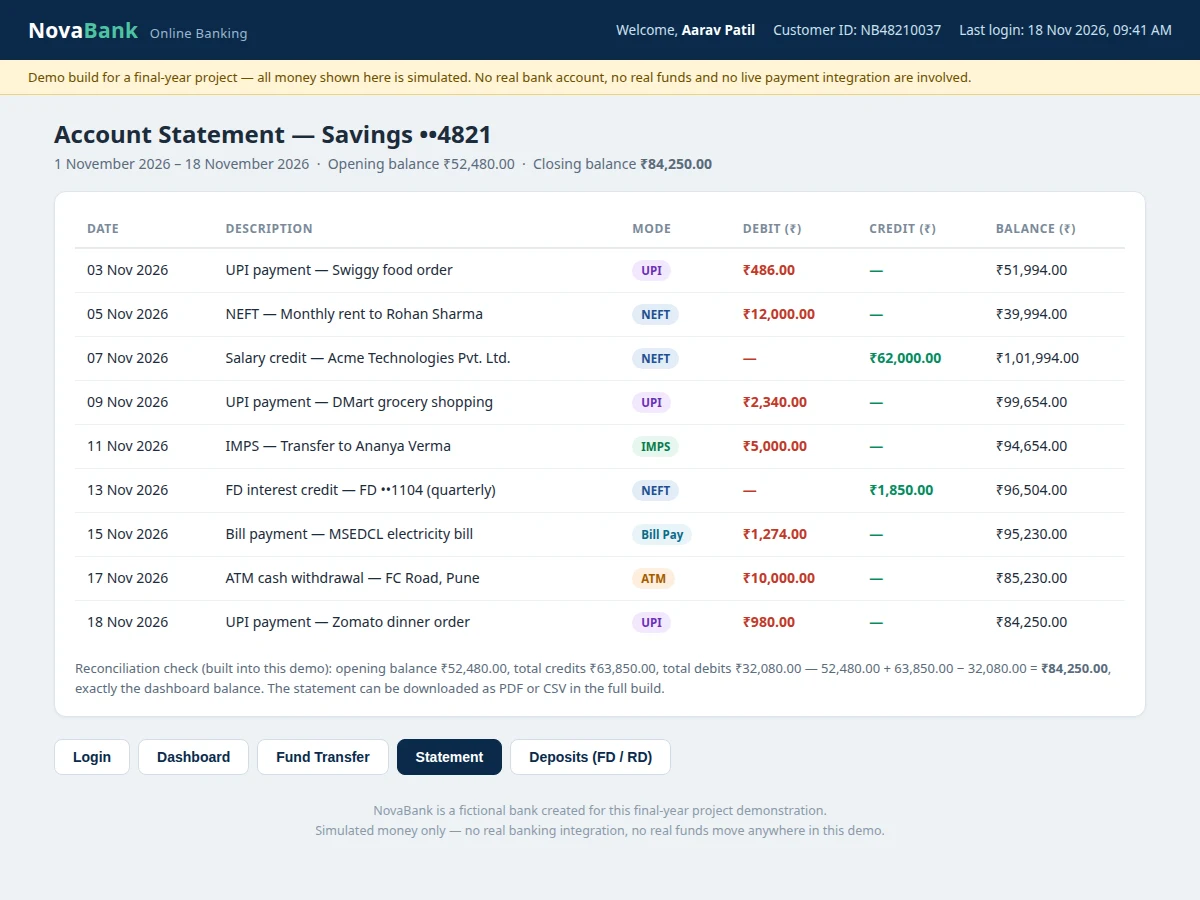
An Online Banking Portal is a web application that lets a customer sign in and manage banking: check balances, move money to saved beneficiaries, read a statement with a running balance, and open fixed or recurring deposits. Most student attempts stop at a login page and a static dashboard — the hard parts are left as screenshots: a transfer that actually changes the balance, a statement that reconciles to the last rupee, and deposit maths that matches the rate table. This project builds those parts as working logic, with 2 accounts, 4 beneficiaries, 3 transfer modes (NEFT, IMPS and UPI), a 9-transaction statement and 2 active deposits. During the build, the statement was reconciled transaction by transaction: from an opening balance of ₹52,480.00 on 1 November 2026, total credits of ₹63,850.00 minus total debits of ₹32,080.00 close exactly at ₹84,250.00 on 18 November 2026. All money in the demo is simulated; there is no real banking integration.
Signs in with a customer ID and password; the session gates every page.
Follow the working sequence
How it works
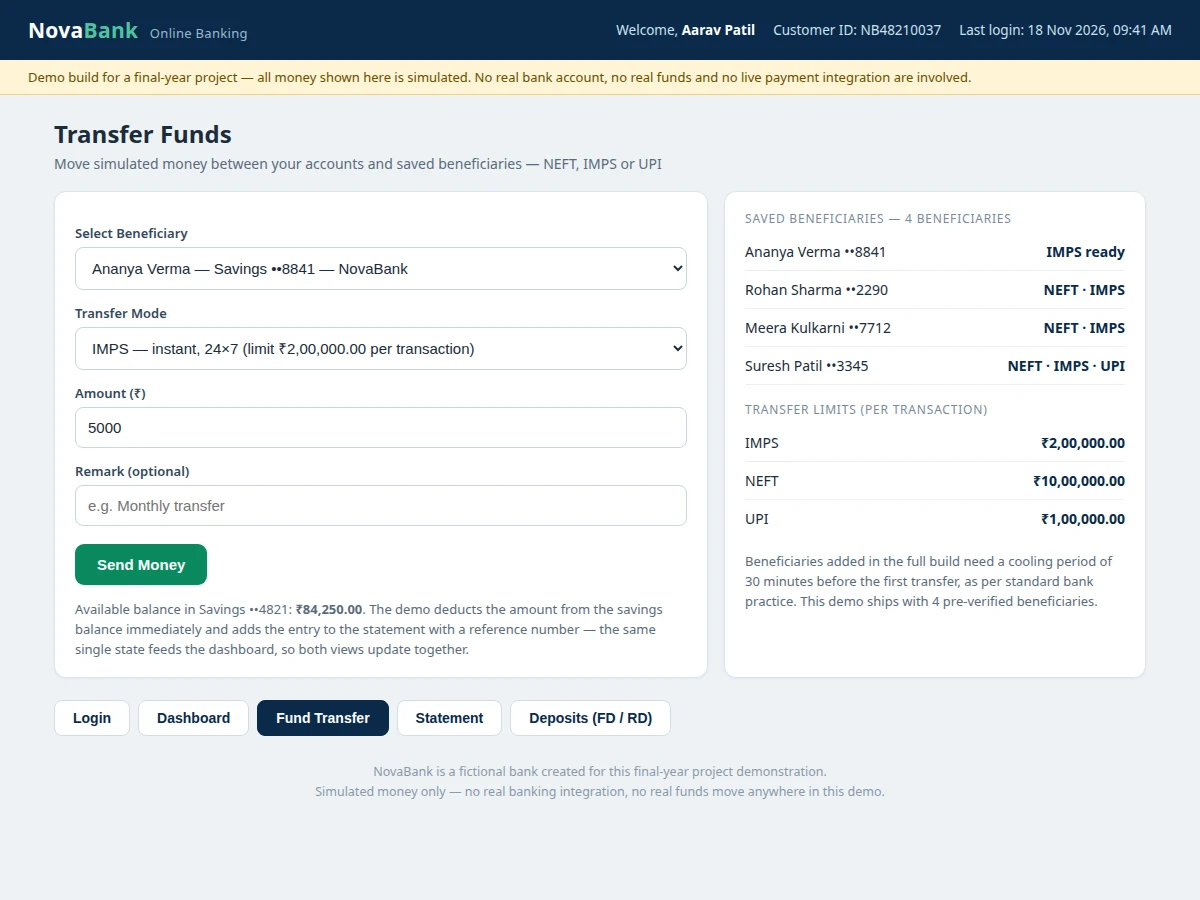
A customer signs in with a customer ID and password, and the session opens the dashboard, which reads the 2 accounts and the 5 most recent transactions from one shared state object in the demo (a MySQL database in the full build). To move money, the customer picks 1 of 4 saved beneficiaries, chooses NEFT, IMPS or UPI, and enters an amount; the app checks the amount against the savings balance of ₹84,250.00 and the per-mode limit, then deducts it, writes a statement entry with a reference number, and updates the dashboard from the same state, so no view can disagree with another. The statement view lists all 9 transactions with a running balance, and the deposits view computes fixed-deposit maturity from amount, tenure and rate. In India, NEFT settles in 48 half-hourly batches a day, round the clock (Reserve Bank of India), which is why the demo labels NEFT as batch-settled and IMPS/UPI as instant.
- The customer signs in with a customer ID and password; the session is created and the last-login stamp is recorded.
- The dashboard loads the savings and current account balances and the 5 most recent transactions from the database (one shared state object in the demo).
- The customer opens Fund Transfer, selects 1 of 4 saved beneficiaries, picks NEFT, IMPS or UPI, and enters the amount and an optional remark.
- The app validates the amount: it must be above ₹0.00, within the per-mode limit, and no larger than the available balance of ₹84,250.00.
- On success, the amount is deducted from the savings balance, a statement entry with a reference number is written, and the dashboard and statement update from the same state.
- The statement view shows all 9 transactions with debit, credit and running-balance columns for 1–18 November 2026.
- In Deposits, the customer enters an amount and tenure; the app computes the maturity value from the rate table (6.50–7.40% p.a.) and books the deposit.
Tech stack:
- HTML5 · CSS3 · JavaScript
- PHP 8 (backend, full build)
- MySQL (6 tables)
- Apache / XAMPP (local hosting)
- Session-based authentication
- Responsive layout (desktop + mobile)
- Chart-free tabular statements
- Git
| Parameter | Value |
|---|---|
| Application type | Web application (single-page demo + PHP/MySQL full build) |
| User roles | 2 roles (Customer, Admin) |
| Demo accounts | 2 accounts (Savings ••4821, Current ••9073) |
| Seeded transactions | 9 transactions (1–18 November 2026) |
| Transfer modes | 3 modes (NEFT, IMPS, UPI) |
| Saved beneficiaries | 4 pre-verified beneficiaries |
| FD tenures | 3 tenures (6, 12 and 24 months) |
| FD interest rates | 6.50–7.40% p.a. (indicative demo rates) |
| NEFT settlement | 48 half-hourly batches per day (Reserve Bank of India) |
| Transfer response | Approximately under 2 seconds (design target, local demo) |
| Statement period | 18 days (1–18 November 2026) |
| Database tables | 6 tables (users, accounts, beneficiaries, transactions, deposits, bills) |
Project features
The portal's strongest capabilities are its working fund transfer, its reconciling statement, and its deposit booking. A transfer is not a form that goes nowhere: the amount is validated against the balance and the per-mode limit, deducted from the savings account, and written into the statement with a reference number, while the dashboard updates from the same state. The statement carries a running balance on all 9 transactions, and the dashboard total of ₹2,36,650.00 is the exact sum of the 2 account balances. Fixed-deposit booking computes the maturity value live from the amount, tenure and rate, so a ₹50,000.00 deposit for 12 months at 7.10% p.a. shows ₹53,550.00 before it is booked. Together these make the demo behave like a small bank rather than a set of screens — every rupee on screen can be traced to a ledger entry.
- [Secure login & sessions] Customer sign-in with a customer ID and password, a session that gates every page, and a visible last-login stamp (18 November 2026, 09:41 AM in the demo). (Implemented)
- [Accounts dashboard] Savings account ••4821 at ₹84,250.00 and current account ••9073 at ₹1,52,400.00, with a combined total balance of ₹2,36,650.00 and the 5 most recent transactions. (Implemented)
- [Fund transfer — NEFT / IMPS / UPI] Transfer to 4 saved beneficiaries with per-mode limits (IMPS ₹2,00,000.00, NEFT ₹10,00,000.00, UPI ₹1,00,000.00 per transaction), balance and limit validation, and a reference number on success. (Implemented)
- [Statement with running balance] A 9-transaction statement for 1–18 November 2026 with debit, credit and running-balance columns that reconcile exactly to the dashboard balance of ₹84,250.00. (Implemented)
- [Fixed & recurring deposits] An existing fixed deposit of ₹2,00,000.00 at 7.10% p.a. for 12 months (maturity ₹2,14,200.00) and a recurring deposit of ₹5,000.00 per month, plus a booking form that computes maturity live. (Implemented)
- [Bill payment entries] Electricity-bill payment appears as a real statement entry (MSEDCL bill of ₹1,274.00 on 15 November 2026), showing how billers plug into the same transaction ledger. (Implemented)
- [OTP two-factor authentication] Shown as a configurable sign-in step in the demo; full SMS-OTP delivery is an optional addition on request. (Optional customization)
- [Live payment gateway / real UPI integration] Connecting a real bank API or payment gateway is future scope — the base build deliberately uses simulated money only. (Future scope)
What is included
- Complete PHP + MySQL source code with setup instructions
- MySQL database (6 tables) with seeded demo data (2 accounts, 4 beneficiaries, 9 transactions, 2 deposits)
- Working single-file HTML demo (login, dashboard, transfer, statement, FD/RD booking)
- Project report PDF (background, system design, database schema, methodology, screenshots, limitations)
- PPT presentation for final review
- Viva Q&A preparation document (sessions, transactions, NEFT/IMPS/UPI differences, reconciliation)
Limitations & prerequisites
- All money in the demo is simulated — no real bank account, funds or payment gateway are connected.
- OTP two-factor authentication is shown as a configurable step, not wired to a live SMS provider in the base build.
- The demo ships with 1 demo user and fixed seed data; multi-user registration is part of the full PHP/MySQL build, not the single-file demo.
- Fixed-deposit maturity in the demo uses simple interest; the full build computes it with quarterly compounding as per bank deposit rules.
- The statement covers a fixed 18-day window (1–18 November 2026) in the demo; the full build generates statements for any date range.
- Bill payment covers billers as ledger entries; live biller APIs (electricity, mobile recharge) need credentials and are optional additions.
- This is an academic prototype, not a production banking system — it must not be used with real customer funds.
- Hosting and domain costs are separate from the project build.
Frequently Asked Questions
What banking workflows does this project model?
It models the core retail-banking workflows a customer uses every day: secure login, checking savings and current account balances, managing 4 saved beneficiaries, transferring funds by NEFT, IMPS or UPI, reading a statement with a running balance, booking fixed and recurring deposits, and recording bill payments. All money is simulated and there is no real banking integration.
How does a fund transfer work in the demo?
You pick a beneficiary, a transfer mode and an amount, then press Send Money. The app checks the amount against your savings balance of ₹84,250.00 and the per-mode limit (IMPS ₹2,00,000.00, NEFT ₹10,00,000.00, UPI ₹1,00,000.00), deducts it, and adds a statement entry with a reference number. The dashboard and statement share one state, so both update together.
Does the statement really reconcile with the dashboard?
Yes. The 9-transaction statement for 1–18 November 2026 starts at an opening balance of ₹52,480.00, adds total credits of ₹63,850.00 and subtracts total debits of ₹32,080.00, closing at exactly ₹84,250.00 — the same figure the dashboard shows for the savings account. The reconciliation line is printed under the statement itself.
Is a real payment gateway or bank API integrated?
No. The demo and the base build use simulated money only, with no real bank account, funds or live payment integration — a deliberate design choice for a student project, since a real payment-gateway integration needs the student's own merchant credentials and production approval. A real payment-gateway integration can be added as an optional customization once those credentials are in place.
Can this project be customized?
Yes. Realistic additions include an admin panel for managing users and deposits, more account types (salary, joint, NRI), additional billers, OTP delivery through a live SMS provider, quarterly-compounded FD maths, statement download as PDF or CSV, and deployment on a live hosting account. Each addition is scoped separately before the build starts.
Is this project suitable for a final-year project?
Yes — for Computer Science, IT and Web Development programmes. It demonstrates session-based authentication, relational database design across 6 tables, transaction validation and double-entry-style ledgers, form validation, and reporting — all concepts a guide can examine through working screens rather than slides.
Components & software requirements
- HTML5 · CSS3 · JavaScript
- PHP 8 (backend, full build)
- MySQL (6 tables)
- Apache / XAMPP (local hosting)
- Session-based authentication
- Responsive layout (desktop + mobile)
- Chart-free tabular statements
- Git
Delivery information
Built-to-order project. Delivery timeline is shared after order confirmation based on current queue.
Support terms
Complete documentation, setup guide, and viva preparation included. Support for setup and explanation provided.
Download free synopsis (PDF)
Enter your name and WhatsApp number — the synopsis PDF downloads immediately. We may send occasional project updates on WhatsApp; no spam.