
More project photos (2)
The problem
College hostel messes still run on paper registers, a whiteboard menu and a WhatsApp group. The manager writes the week's menu on a board, students complain about dishes they never chose, and at month end the bill is worked out by hand from attendance scribbles, with mess-off days argued over from memory. Nobody can prove how many meals a student actually ate, so disputes over a few hundred rupees eat up the manager's time, and students pay for meals they never took or miss refunds they were owed. A mess management portal replaces this with one shared record: the week's dishes are proposed online, students vote each dish up or down, the manager publishes the winning menu, and every meal taken is logged against the student's account. Approved mess-off days are deducted before the bill is generated, so the monthly statement shows meals taken, the per-meal rate and the balance due, and the same page collects the payment.
This is a built-to-order software project: the portal, database, billing logic and the complete viva kit (report, PPT, Q&A) are prepared fresh for you.
How it compares
| Approach | Menu decided by | Billing | Mess-off handling |
|---|---|---|---|
| Online mess management portal | Student votes, manager publishes the winners | Automatic, from meals actually taken | Requested in advance, deducted automatically |
| Spreadsheets + WhatsApp group | Manager's guess, complaints in the chat | Hand-calculated, often disputed | Argued over from memory |
| Plain billing app | No menu feature at all | Amounts typed in by hand | Not tracked |
Student votes on the week's dishes from a phone.
Follow the working sequence
How it works
An online mess management portal runs on a simple weekly cycle that ties the menu, attendance and billing together in one database. On Sunday the manager posts the proposed menu for the coming week — three meals a day for six days — and students vote each dish up or down from their phones. Voting closes on Sunday evening, the dishes with the most net votes become the final menu, and the kitchen receives the locked list. During the week, each meal served is marked against the students who take it, while approved mess-off requests automatically exclude those meals from the student's count. At month end the portal multiplies meals taken by the per-meal rate, subtracts any advance already paid, and produces an itemised bill with a UPI payment link, so the student sees exactly what is charged and why.
- The manager creates the mess, adds students with their room numbers and veg or non-veg preference, and sets the per-meal rate.
- Each Sunday the manager posts the proposed menu — 18 dishes for the week, three meals a day for six days.
- Students vote every dish up or down from their phones; each student gets one vote per dish and can change it until voting closes.
- Voting closes on Sunday evening and the manager publishes the final menu from the top-ranked dishes; the kitchen works from the locked list.
- During the week, meals taken are marked against each student, and approved mess-off days are excluded from the count automatically.
- At month end the portal generates each bill as meals taken multiplied by the per-meal rate, minus any advance paid, and shows the week-by-week statement.
- The student pays the balance through a UPI link on the same page, the status changes to Paid in full, and the receipt is shared on WhatsApp.
Tech stack:
- HTML5 · CSS3 · JavaScript (frontend)
- PHP 8 (backend)
- MySQL (database)
- Apache · XAMPP (local server)
- UPI payment link
- WhatsApp share link for receipts
- Git
| Parameter | Value |
|---|---|
| User roles | 3 roles: student, manager, admin (design target) |
| Students in the demo data | 120 students (design example) |
| Menu cycle | 18 dishes per week (6 days × 3 meals) |
| Voting window | Sunday, closes Sunday 9 PM before the week starts (configurable) |
| Per-meal rate | ₹55 per meal (example rate, configurable) |
| Meals per month | 90 meals (30 days × 3 meals) |
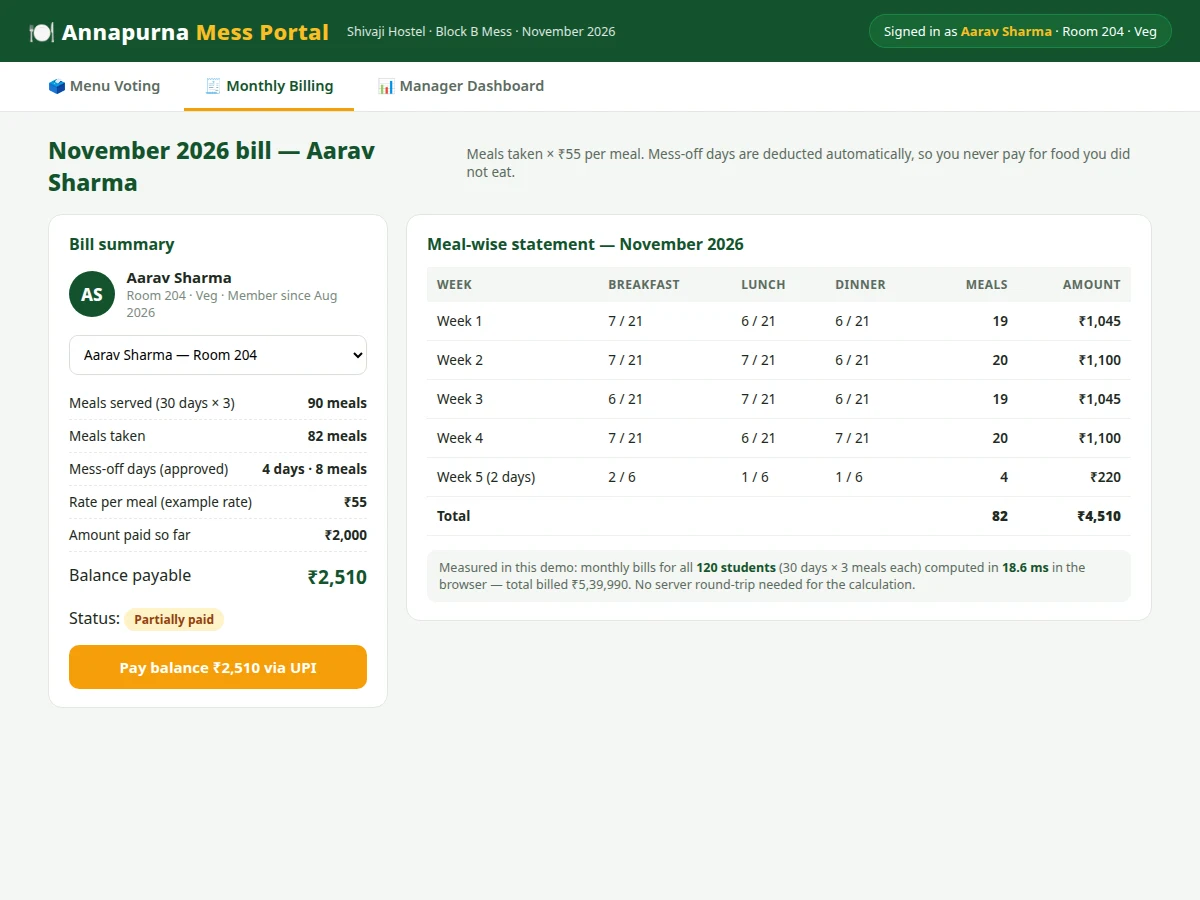
| Example bill | 82 meals × ₹55 = ₹4,510 (worked example from the demo) |
| Bill computation | Under 20 ms for 120 students in the browser (measured in the demo build: 0.9 ms and 18.6 ms across two runs) |
| Payment | UPI payment link with receipt on WhatsApp |
| Hosting | Apache · XAMPP locally, or shared hosting (design target) |
Project features
The portal's strongest capabilities are menu voting, automatic monthly billing, mess-off management and the manager dashboard. Menu voting lets all 120 students in the demo mess rank the week's dishes before anything is cooked, so the final menu reflects what students actually want instead of one person's guess. Automatic billing turns attendance into money without a spreadsheet: meals taken multiplied by the per-meal rate, mess-off days deducted first, and a balance that updates the moment a payment is recorded. Mess-off management lets a student declare leave days in advance and have them approved in one click, and the manager dashboard shows votes, collections and pending requests together, so the whole month's mess runs from a single screen. Together these four capabilities cover the whole life of a mess month, from Sunday's menu vote to the last rupee collected, without a paper register anywhere in the chain.
- [Menu voting with net scores] Every proposed dish carries Like and Skip buttons, and dishes are ranked by net votes with the percentage of students who liked them, so the popular dishes are visible at a glance.
- [Final menu publishing] The manager locks the winning dishes with one click; the published menu appears on the voting board and doubles as the kitchen's cooking list for the week.
- [Automatic monthly billing] The bill is meals taken multiplied by the per-meal rate, with approved mess-off meals removed before the total is calculated — no hand-written registers and no spreadsheet.
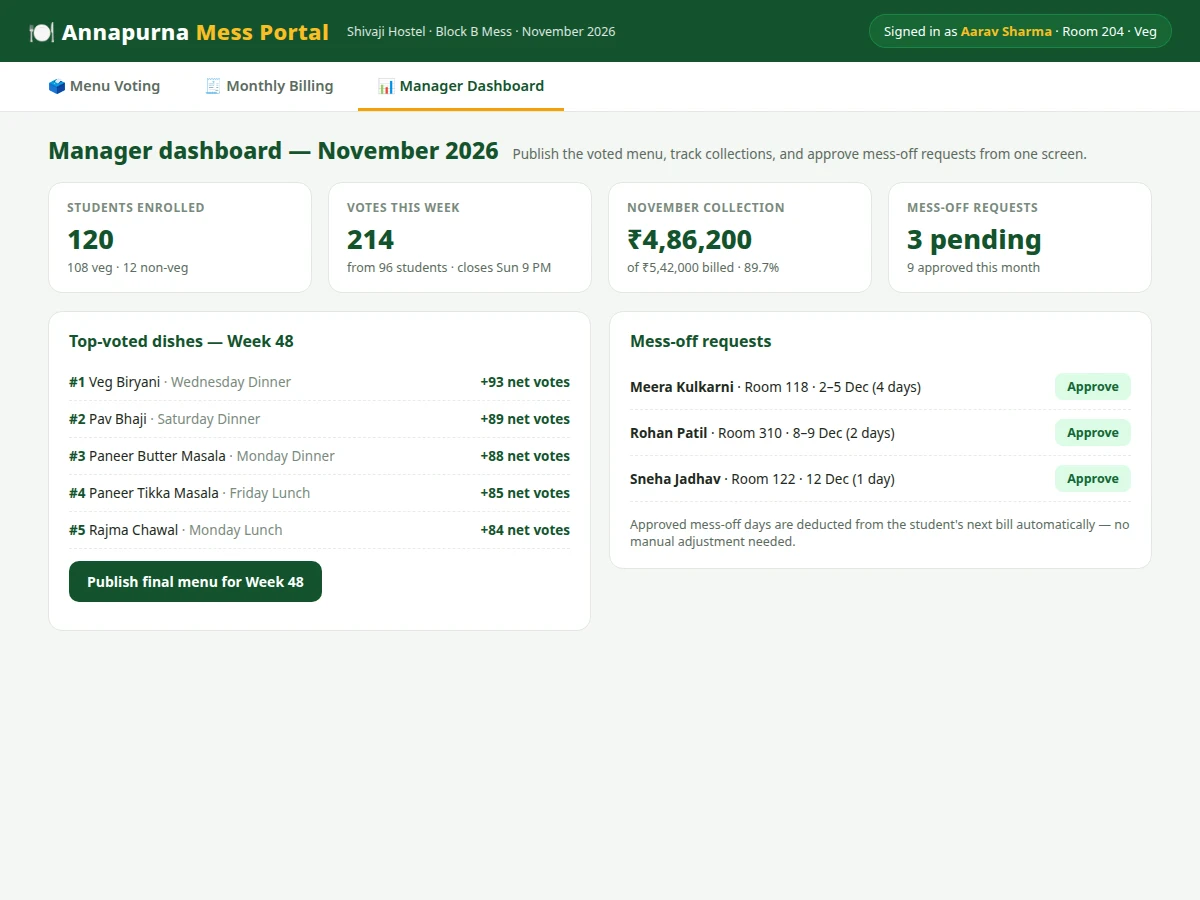
- [Mess-off requests and approval] A student requests leave days in advance from the portal, the manager approves in one click, and those days are excluded from the next bill automatically.
- [Itemised bill statement and UPI payment] Each student sees a week-by-week statement of meals taken with amounts, the balance due, and a UPI payment button; paying updates the status to Paid in full at once.
- [Manager dashboard] One screen shows students enrolled, votes cast, the month's collection against the amount billed, and pending mess-off requests, so the manager sees the whole mess at a glance.
- [Role-based views] Students see voting and their own bill, while the manager sees the dashboard, vote rankings and approvals; the demo shows all three views, and the PHP build enforces the separation with login sessions.
What is included
- Complete portal source code (PHP backend, MySQL database, HTML/CSS/JS frontend)
- Working demo data: 120 students, a full voting week and three sample monthly bills
- Menu voting, final-menu publishing, mess-off approval and automatic billing modules
- Itemised bill statement with UPI payment flow
- Manager dashboard with vote rankings and collection tracking
- Project report PDF (background, design, database schema, billing logic, testing)
- PPT presentation for final review
- Viva Q&A preparation document (sessions, SQL billing queries, vote counting, UPI flow)
Limitations & prerequisites
- The demo data uses an example per-meal rate of ₹55; the real rate must be set by the mess committee for each order.
- Attendance marking is manual in the base build — automatic biometric or QR-based marking is an optional addition, not included.
- The UPI payment link opens the student's UPI app; automatic payment confirmation from the bank is not part of the base build.
- The demo runs entirely in the browser with sample data; the delivered PHP/MySQL build needs hosting and a database setup, covered in the setup guide.
- Menu voting assumes one vote per dish per student; duplicate-vote prevention depends on the login system in the delivered build.
- The portal is a mess-management tool, not an accounting package — it does not file tax returns or handle GST.
Frequently Asked Questions
Is this project suitable for a final-year project?
Yes, it fits Computer Science, IT and Web Development programs well because it combines the full web stack in one working system: login and roles, a voting workflow, a relational database, a billing calculation with real business rules, and a payment flow. The viva can be defended from the demo alone, since every feature is visible on screen.
How is the monthly bill calculated?
The bill is simply the number of meals the student actually took, multiplied by the per-meal rate, minus any advance already paid. Approved mess-off days are removed from the meal count before the multiplication, so a student never pays for food not eaten. The demo shows a worked example: 82 meals at ₹55 gives ₹4,510, less ₹2,000 paid, leaving a ₹2,510 balance.
What happens when a student goes on mess-off?
The student submits the leave dates in advance through the portal, the manager approves the request in one click, and those days are excluded from the student's meal count automatically. The deduction appears in the next bill without any manual adjustment, and the manager can see all approved mess-off days on the dashboard.
Can the manager change the menu after voting closes?
Yes, the manager can replace a dish in the published menu, for example when an ingredient is unavailable, and the change is shown to students immediately. The original vote counts are kept on record, so the change is visible and accountable rather than silent. The kitchen works from the locked list, so a change after publishing should be rare.
How is payment collected?
Each bill carries a UPI payment button, and paying through it marks the bill as paid in full and shares the receipt on WhatsApp. The manager's dashboard tracks the month's collection against the total billed, so unpaid balances are visible without chasing students in person. Partial payments are recorded too, and the balance updates at once.
Can it be customised for non-veg messes or multiple hostels?
Yes, the veg/non-veg preference is already a field on every student record, so separate menus can be proposed and voted on per preference. Multiple hostels or messes can be added as separate mess records with their own students, rates and menus, and the admin role manages them all from one login.
Components & software requirements
- HTML5 · CSS3 · JavaScript (frontend)
- PHP 8 (backend)
- MySQL (database)
- Apache · XAMPP (local server)
- UPI payment link
- WhatsApp share link for receipts
- Git
Delivery information
Built-to-order project. Delivery timeline is shared after order confirmation based on current queue.
Support terms
Complete documentation, setup guide, and viva preparation included. Support for setup and explanation provided.
Download free synopsis (PDF)
Enter your name and WhatsApp number — the synopsis PDF downloads immediately. We may send occasional project updates on WhatsApp; no spam.