
More project photos (2)
The problem
College health centres typically run their OPD on paper registers and first-come-first-served queues. Students lose hours between lectures standing in a crowded waiting room, reception staff juggle a paper token book during rush hours, and no-shows silently waste doctor slots that other students could have used. General hospital-management packages are overbuilt for a campus clinic and too expensive to customize, while a plain Google Form cannot manage slots, tokens or a live queue. This project builds exactly the middle layer a college health centre needs: a web app where students book OPD appointments against real doctor schedules, receive token numbers instantly, and watch a live display board to know exactly when to walk in. The reception desk gets a simple console to advance the queue, mark no-shows and add walk-ins. The design target is one calm, readable system — book, token, board, desk — that a student team can genuinely explain, demo and extend in a viva.
Student who books a slot and watches the token board.
Follow the working sequence
How it works
- The student opens the booking portal and picks an OPD department; the app lists the department's doctors with qualifications and OPD days.
- After selecting a doctor, the student chooses a date from the 7-day strip; the frontend requests that day's slot availability from the backend API.
- The backend computes 15-minute slots from the doctor's configured session and marks already-booked slots as unavailable; the grid renders booked slots disabled.
- The student enters name, student ID, mobile number and reason for visit, then confirms — the server inserts the appointment and generates the token number atomically.
- The confirmation screen shows the token (e.g. GM-042) with doctor, date, slot and counter details; the appointment is stored in MySQL with status "waiting".
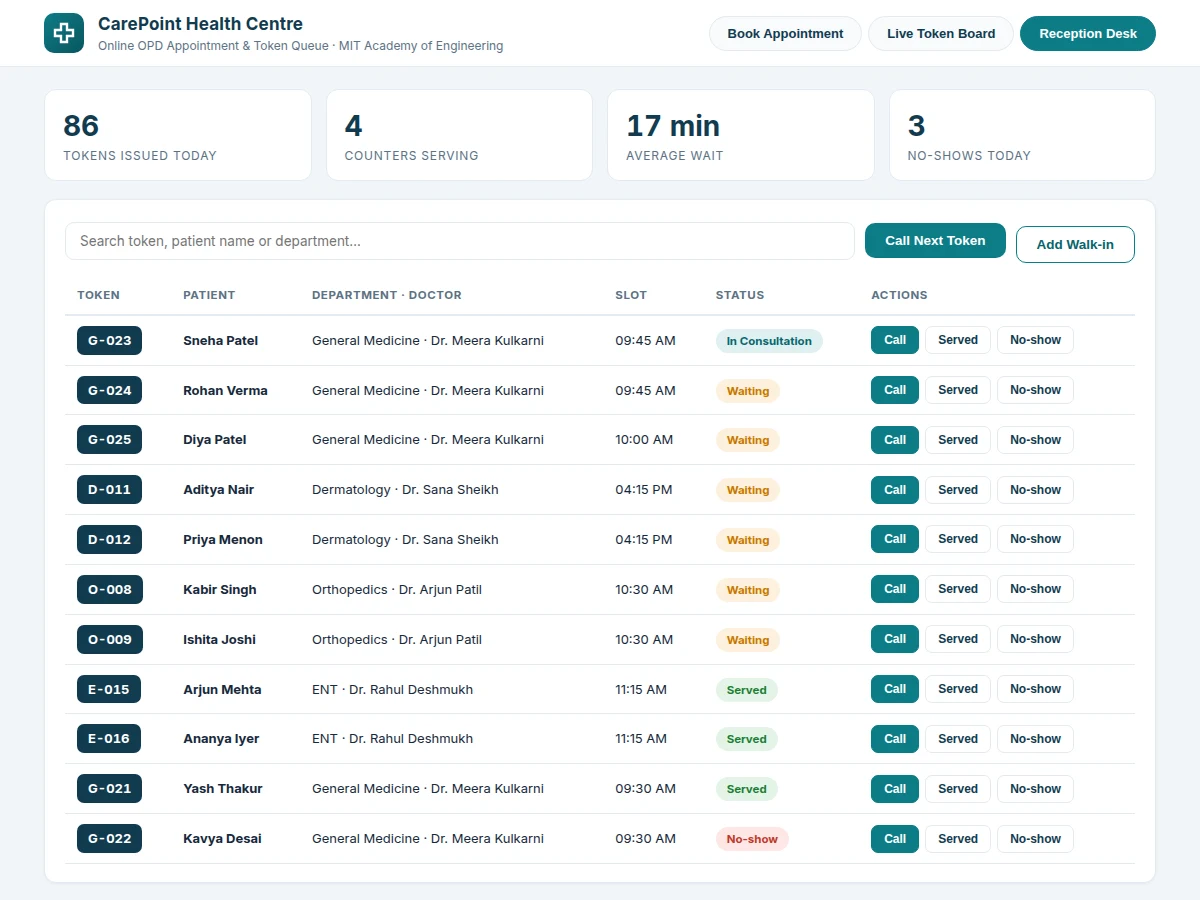
- The reception-desk console lists the day's queue; staff call the next token, mark served or no-show, or add walk-ins — each action updates the appointment row.
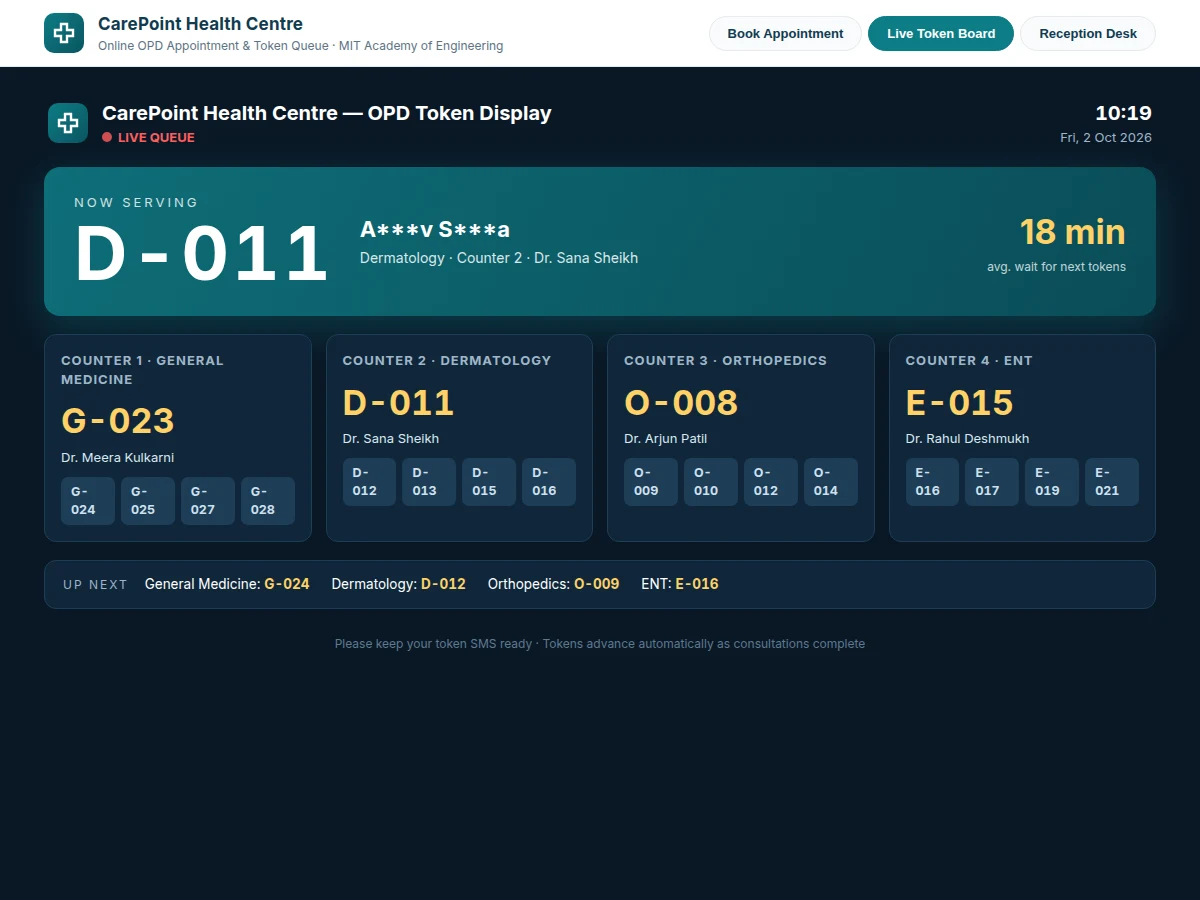
- The live token board polls the queue endpoint on a short interval and re-renders the now-serving number, per-counter queues and the average-wait estimate automatically.
Tech stack:
- HTML5, CSS3, JavaScript (responsive frontend)
- PHP 8 with a lightweight MVC structure (backend)
- MySQL (appointments, doctors, schedules, users)
- REST-style JSON API between frontend and backend
- Session-based authentication with role checks
- Polling-based live queue updates (WebSocket-ready design)
- Printable token-slip view
- Deployable on standard shared hosting (LAMP)
| Parameter | Value |
|---|---|
| Application type | Full-stack web application (booking portal + display board + desk console) |
| Frontend | HTML5, CSS3, vanilla JavaScript; responsive down to tablet widths (design target) |
| Backend | PHP 8, MVC structure, REST-style JSON endpoints |
| Database | MySQL — appointments, doctors, departments, schedules, users, audit of status changes |
| User roles | Student, reception staff, admin (implemented, session-based) |
| Slot granularity | 15 minutes per consultation (configurable) |
| Booking window | Rolling 7 days (configurable) |
| Token format | Department prefix + sequential number, e.g. GM-042 (server-generated, unique per day) |
| Live board refresh | Short-interval polling (design target: under 10 seconds) |
| Deployment | Standard LAMP shared hosting; no special extensions required (expected) |
Project features
- [Department and doctor directory] Browsable OPD departments with doctor profiles showing qualification, OPD days and session timings, so students book the right doctor first time.
- [Date-wise slot grid] Fifteen-minute consultation slots per doctor session across a rolling 7-day window; booked slots are visibly disabled so double-booking cannot happen from the UI.
- [Instant token generation] Every confirmed booking issues a unique token (e.g. GM-042) with a booking summary, generated atomically on the server so two students can never receive the same token.
- [Live token display board] A dark, display-optimized board showing the now-serving number, masked patient name, per-counter queues and average wait, refreshing on a short poll so waiting students know exactly when to walk in.
- [Reception-desk console] Staff can call the next token, mark patients served or no-show, add walk-in tokens and search the day's queue by token, name or department.
- [Role-based views] Separate interfaces for students (booking), reception staff (queue console) and admins (doctor schedules, departments, OPD timings).
- [Configurable doctor schedules] Session days, timings and slot length are editable from the admin side — no code changes needed when a doctor's OPD hours change.
- [Booking summary and token slip] A printable confirmation with token number, doctor, date, slot and counter details for students to show at the OPD counter.
What is included
- Complete frontend source (booking portal, live board, reception console)
- Complete backend source (PHP, MVC) with REST-style API
- MySQL schema with seed data (departments, doctors, sample schedules)
- Setup and deployment guide (local + shared hosting)
- Project report PDF (background, ER design, methodology, queue logic, testing)
- PPT presentation for final review
- Viva Q&A preparation document (full-stack concepts, DB design, queue concurrency)
Limitations & prerequisites
- No-show handling is procedural: staff mark no-shows on the console; the base build does not auto-penalize or auto-release slots.
- SMS or WhatsApp reminders are NOT in the base build — they need a gateway account and credentials, listed as an optional customization.
- Doctor availability is configured manually by the admin; the app does not sync with any external hospital or calendar system.
- The live board uses short-interval polling in the base build; true push (WebSocket) is an optional upgrade.
- Built for a single health centre — multi-branch or multi-campus support needs customization.
- The average-wait figure is a design-target heuristic based on slot length and queue position, not a measured prediction.
- This is an academic prototype, not a certified hospital information system; real deployment needs the college's data-privacy and consent handling.
Frequently Asked Questions
Is the database included?
Yes. The project ships a complete MySQL schema — appointments, doctors, departments, schedules, users and status-change audit — plus seed data for all 8 OPD departments and 9 doctors, so the demo runs with realistic content from the first page load.
Does the project contain an admin panel?
Yes. There are three role-based views: the student booking portal, the reception-desk queue console (call next, serve, no-show, walk-ins, search) and an admin side for managing doctors, departments, session days and slot length without touching code.
Can it be hosted online?
Yes. The build targets standard LAMP shared hosting with no special PHP extensions. The setup guide covers local installation and shared-hosting deployment step by step, including the database import.
Is SMS or WhatsApp notification included?
Not in the base build. Reminders are an optional customization: it needs a gateway account (e.g. an SMS provider) whose credentials the college supplies, and the integration is quoted separately.
Can more departments, doctors or roles be added?
Yes. Departments, doctors and OPD schedules are data, not code — the admin side adds them in minutes. New roles or modules (pharmacy, lab reports, feedback) can be developed as customizations.
Is this project suitable for a final-year project?
Yes — for Computer Science, IT and Web Development programs. It demonstrates full-stack development, relational database design, session-based authentication, queue and concurrency logic, and role-based access control, all in one coherent, demoable system. Suitable for B.E./B.Tech final-year projects in Computer Science, Information Technology and Web Development.
Components & software requirements
- HTML5, CSS3, JavaScript (responsive frontend)
- PHP 8 with a lightweight MVC structure (backend)
- MySQL (appointments, doctors, schedules, users)
- REST-style JSON API between frontend and backend
- Session-based authentication with role checks
- Polling-based live queue updates (WebSocket-ready design)
- Printable token-slip view
- Deployable on standard shared hosting (LAMP)
Delivery information
Built-to-order project. Delivery timeline is shared after order confirmation based on current queue.
Support terms
Complete documentation, setup guide, and viva preparation included. Support for setup and explanation provided.
Download free synopsis (PDF)
Enter your name and email — the synopsis PDF downloads immediately. We may send occasional project updates; no spam, unsubscribe anytime.