
More project photos (2)
The problem
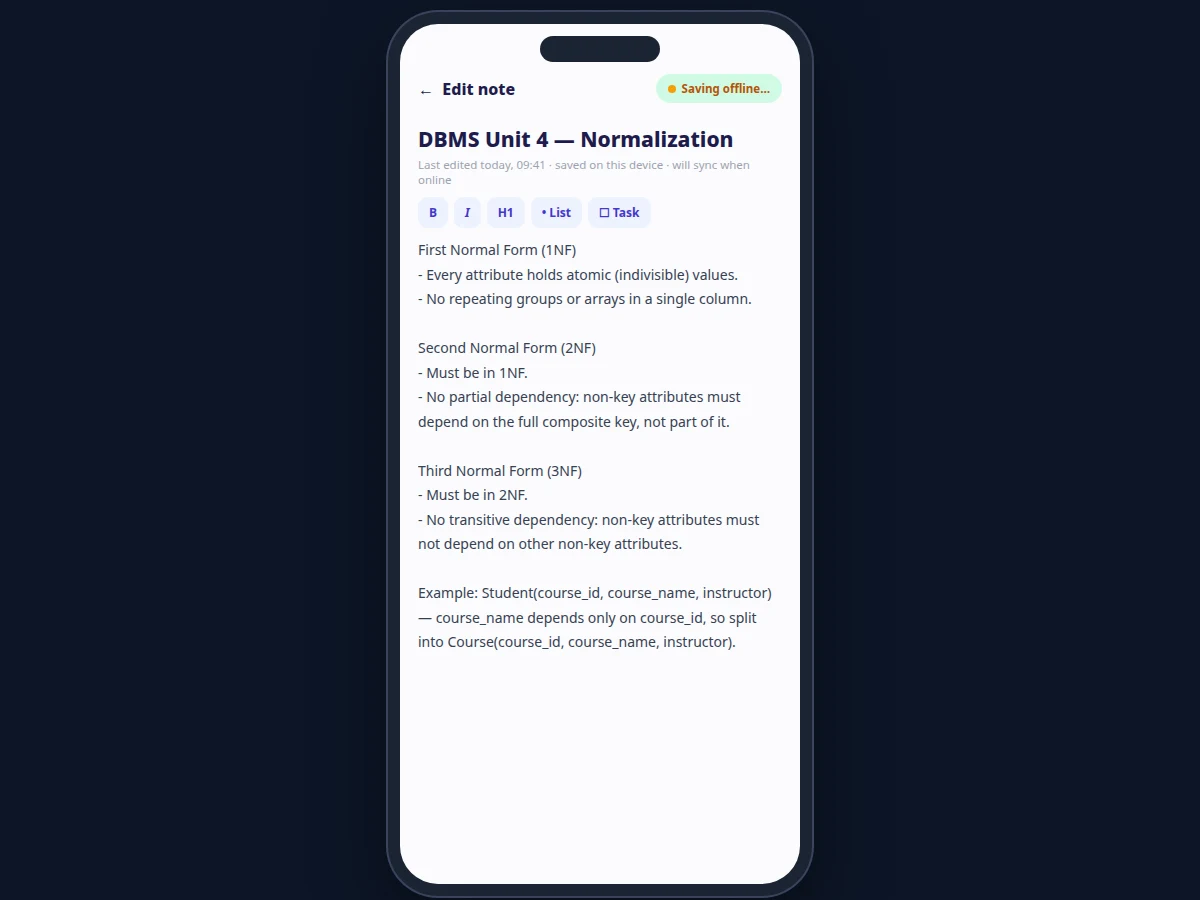
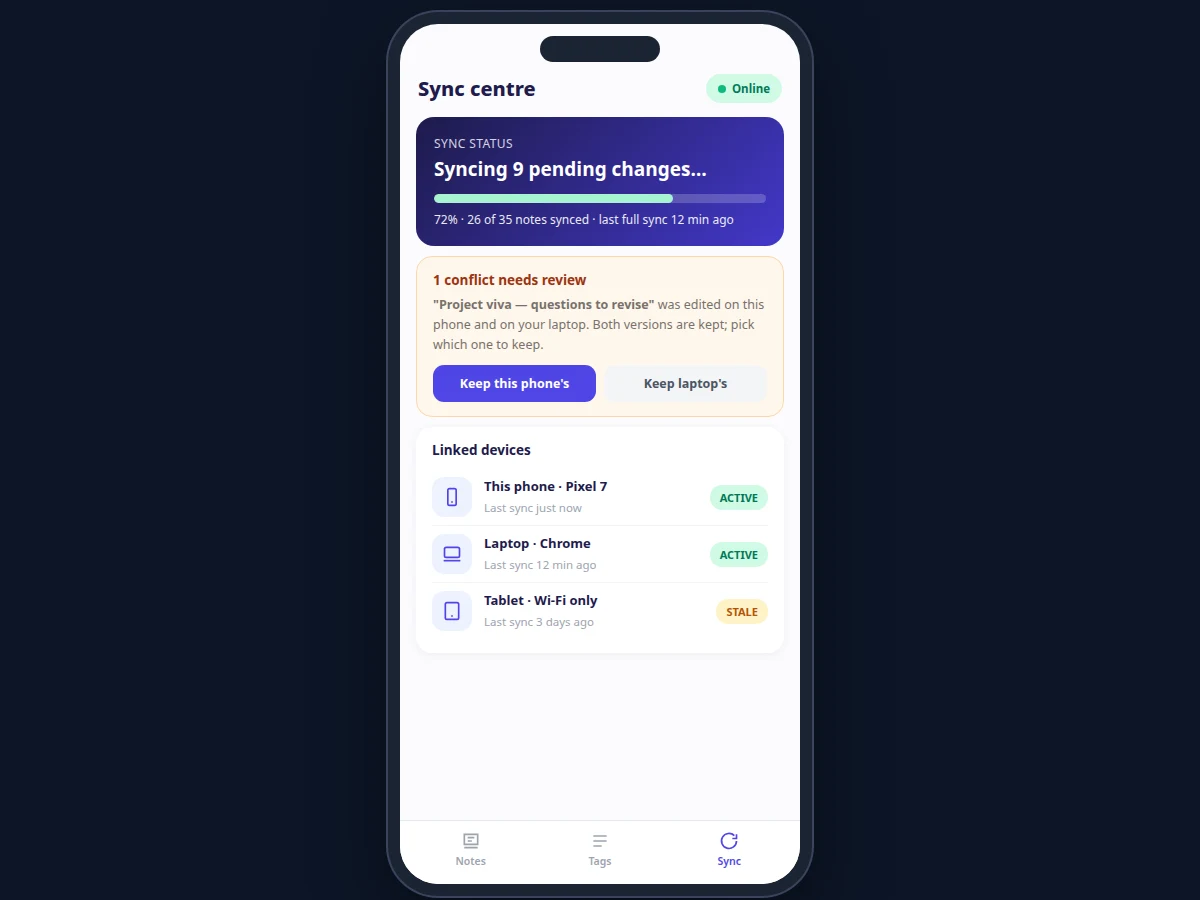
Students take notes in lectures with patchy Wi-Fi, in metros, in libraries — and the notes that matter are captured in the moment. Cloud-only note apps fail exactly there: no network means no capture, or worse, silently lost edits. This project is built offline-first from the ground up: the editor writes to the local database on every change, a sync queue records each mutation with a sequence number, and when the network returns the queue replays in order against the server. The sync centre makes the invisible visible — pending-change counts, sync progress, last-sync time per linked device — and a conflict-review screen handles the hard case: the same note edited on two devices before either synced. Both versions are kept and the user chooses, instead of silent last-writer-wins data loss.
How it works
- The user writes a note; the editor saves it to the local database immediately, with or without network.
- Each change is appended to the sync queue with a sequence number and the device ID.
- When connectivity is available, the queue replays in order; server acknowledgements advance the high-water mark.
- The sync centre shows live progress: how many changes are pending, what percentage has synced, and each linked device's last-sync time.
- If a note was edited on two devices since the last sync, both versions are kept and flagged in the conflict-review screen.
- The user picks the winning version per conflict; the choice syncs and the dashboard returns to a clean state.
Tech stack:
- Android (Kotlin or Java) with Android SDK
- SQLite via Room for local storage
- WorkManager for background sync replay
- REST sync API (version vectors per note)
- Full-text search index (FTS)
| Parameter | Value |
|---|---|
| Save model | Local write on every change (debounced); no network dependency |
| Sync model | Ordered mutation queue with sequence numbers and server acknowledgements |
| Conflict policy | Both versions preserved; explicit user review (no silent overwrite) |
| Devices | Phone, laptop and tablet linkable to one account (design target) |
| Search | Full-text index over titles and bodies |
| Storage | Local SQLite; approximately a few MB per thousand notes (expected) |
| Platform | Android 8.0 and above (expected) |
Project features
- [Rich-text note editor] Bold, italic, headings, bullet lists and checklists with instant local save on every change — no save button, no lost text.
- [Tags and full-text search] Organize notes with tags and find anything instantly through indexed search across titles and bodies.
- [Offline-first sync queue] Every mutation is queued with a monotonically increasing sequence number and replayed in order when the network returns.
- [Sync centre dashboard] Pending-change counts, sync progress bar, last-sync timestamps per linked device and an honest online/offline indicator.
- [Conflict detection and review] Notes edited on two devices before syncing are both preserved and shown in a review screen where the user picks which version to keep.
- [Multi-device linking] Link a phone, laptop and tablet to one account; each device's sync state is tracked independently.
- [Pending-change badges] Notes with unsynced edits are badged in the list so the user always knows what hasn't reached the server yet.
What is included
- Complete Android app source code (editor, sync engine, sync centre UI)
- Sync-protocol documentation (queue format, version vectors, conflict rules)
- Sample note dataset for demonstration
- Setup guide (build, install, configure sync server)
- Project report PDF (background, offline-first design, methodology)
- PPT presentation for final review
- Viva Q&A preparation document (Android, SQLite, sync and conflict resolution)
Limitations & prerequisites
- Multi-device sync needs the companion server endpoint; without it, the app works as a single-device offline notes app.
- Conflict review is manual — the app never auto-merges note bodies, so heavy multi-device editors will see review prompts.
- Attachments are limited to text notes in this build; image and file attachments are future scope.
- Real-time collaborative editing (two cursors in one note) is not implemented; sync is asynchronous.
- Full-text search covers note content only, not attachment contents.
Frequently Asked Questions
What happens if I edit the same note on two devices offline?
Both versions are preserved. On the next sync the server detects the divergence via version vectors and both copies appear in the conflict-review screen, where you pick which to keep. Nothing is silently overwritten.
Does it work with no internet at all?
Yes — capturing, editing, tagging and searching notes are fully offline. Sync simply waits: the queue holds every change and replays it when connectivity returns.
How is this different from Google Keep?
Keep is a closed product. This is an original, explainable implementation of offline-first sync — queue, sequence numbers, version vectors, conflict review — designed so a student can defend every design decision in a viva.
Can I see what hasn't synced yet?
Yes. The sync centre shows the pending-change count and progress, and individual notes with unsynced edits carry a badge in the notes list.
Is my data encrypted?
Local storage uses the platform database; end-to-end encryption of note content before sync is listed as future scope, and the report states the current security posture honestly.
Is this project suitable for a final-year project?
Yes — for Computer Science, Information Technology and related branches. It demonstrates Android development, local databases, background sync design and the genuinely hard problem of conflict resolution. Suitable for B.E./B.Tech final-year projects in Computer Science, Information Technology and related branches.
Components & software requirements
- Android (Kotlin or Java) with Android SDK
- SQLite via Room for local storage
- WorkManager for background sync replay
- REST sync API (version vectors per note)
- Full-text search index (FTS)
Delivery information
Built-to-order project. Delivery timeline is shared after order confirmation based on current queue.
Support terms
Complete documentation, setup guide, and viva preparation included. Support for setup and explanation provided.