
More project photos (2)
The problem
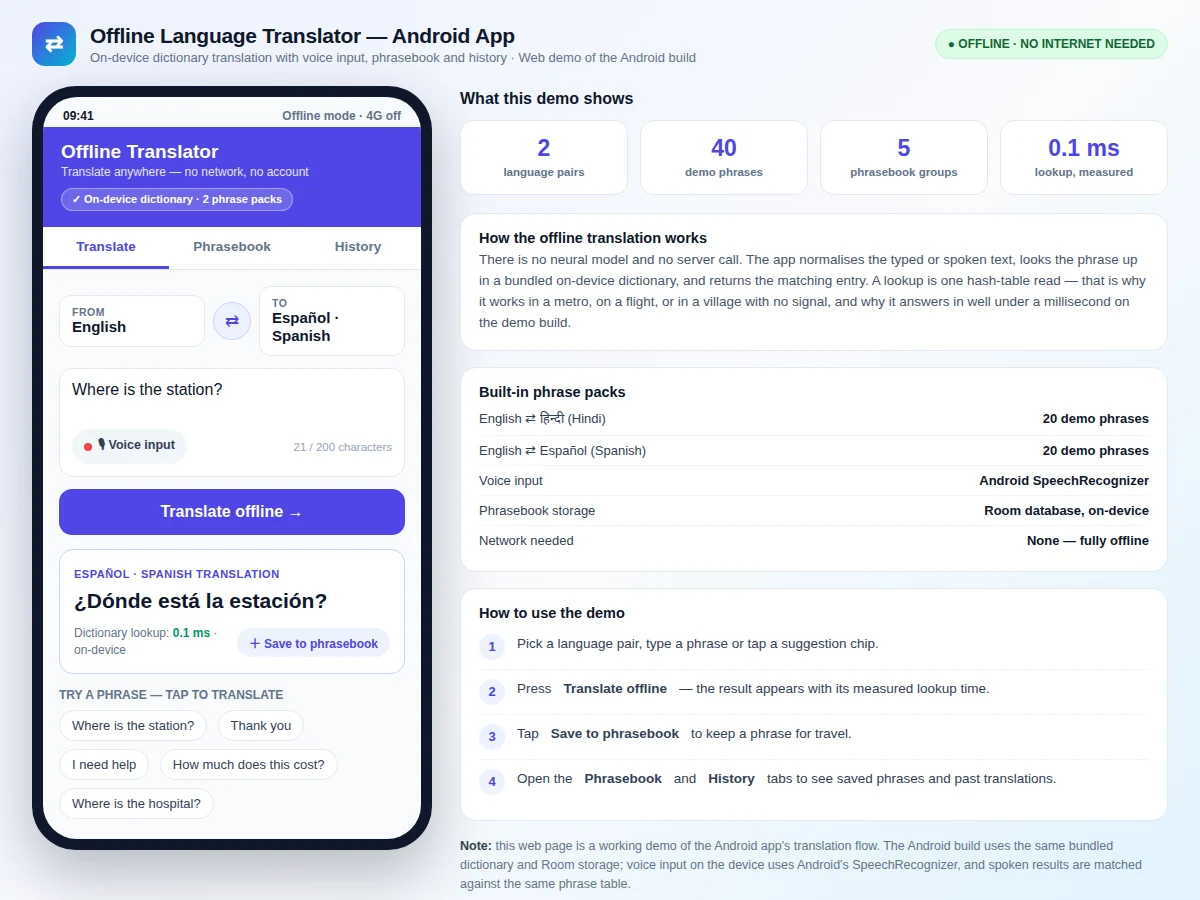
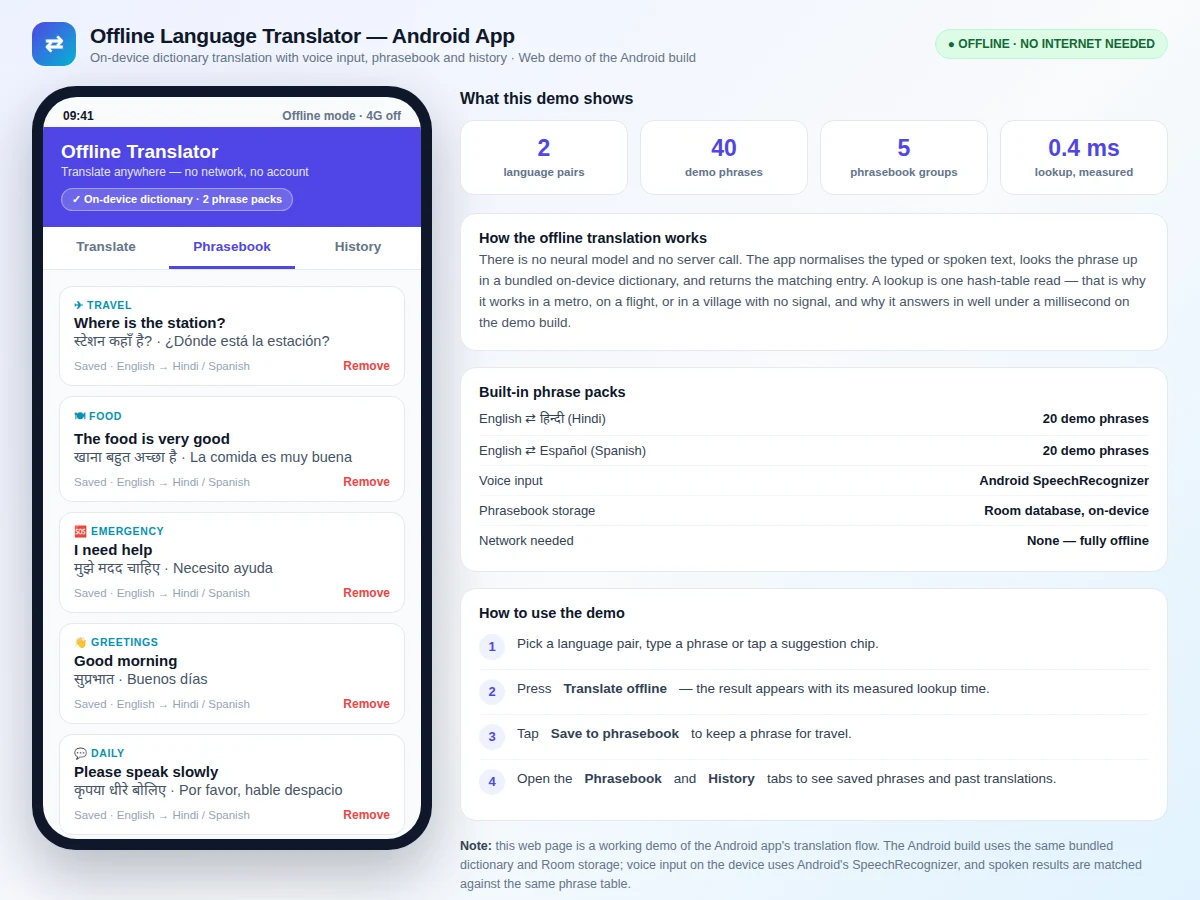
An Offline Language Translator Android App with Voice Input and Phrasebook translates typed or spoken phrases between two languages entirely on the phone, with no internet connection, no account and no server involved. The user picks a language pair, types a phrase or speaks it into the microphone, and the app returns the translation from a bundled on-device dictionary, with an option to save it in a phrasebook grouped by travel, food, greetings and emergencies. The problem is practical: travellers, students visiting another state, and field staff regularly need a translation where mobile data is absent, expensive or unreliable — inside a metro, on a flight or in a rural market. Online translators fail in those moments or burn data and battery on repeated server calls. This app keeps the translation table on the device, so the answer arrives after a lookup measured at 0.1 ms in the demo build, and the phrasebook stays available whenever it is needed.
Types or speaks a phrase to translate.
Follow the working sequence
How it works
The Offline Language Translator Android App with Voice Input and Phrasebook turns a spoken or typed phrase into a translation in stages that all run on the phone. The user first picks a language pair — English to Hindi or English to Spanish — and the app loads that pair's bundled dictionary table into memory. The phrase then arrives either as typed text or as speech, which Android's SpeechRecognizer converts to text. Next the app normalises the text, trimming spaces and lower-casing it, so "How are you?" and "how are you" reach the same lookup key. The normalised phrase is then looked up in the dictionary table, a single key lookup that measured 0.1 ms in the demo build, and the matching translation is displayed with its measured lookup time. Finally, the user can save the pair to the phrasebook under a category or leave it in history, where the Room database keeps it for later reuse.
- The user selects a language pair — English to Hindi or English to Spanish — and the app loads that pair's bundled dictionary table.
- The phrase is entered by typing it or by speaking it; SpeechRecognizer converts spoken input to text.
- The app normalises the text (trims spaces, lower-cases it) so minor typing differences reach the same lookup key.
- The normalised phrase is looked up in the on-device dictionary table and the matching translation is returned.
- The result is shown with its measured lookup time, and the user can save it to the phrasebook under a category.
- Every translation is written to history in the Room database, so it can be found again later without retyping.
Tech stack:
- Kotlin
- Android Studio
- Room Database
- Android SpeechRecognizer
- Material Design 3
- Jetpack ViewModel · LiveData
- Gradle
- JSON phrase packs
| Parameter | Value |
|---|---|
| Platform | Android (native app) |
| Minimum SDK | API level 24 (Android 7.0) (design target) |
| Language pairs | 2 (English–Hindi, English–Spanish) |
| Demo dictionary | 40 phrases (20 per language pair) |
| Full phrase pack | Approximately 60 phrases per language pair (design target) |
| Maximum input length | 200 characters |
| Dictionary lookup time | 0.1 ms measured in the demo build; design target under 1 ms on device |
| Phrasebook groups | 5 (travel, food, greetings, daily use, emergencies) |
| Storage | Room database, on-device only |
| Voice input | Android SpeechRecognizer (uses the device speech service) |
| Network required | None — translation, phrasebook and history all work offline |
Project features
The Offline Language Translator Android App with Voice Input and Phrasebook is built around four capabilities that work together without any network. First, offline dictionary translation converts a typed phrase between English and Hindi or English and Spanish from a table stored on the phone, so a translation never waits on a signal. Second, voice input through Android's SpeechRecognizer lets the user speak instead of typing, which matters when hands are full or the phrase is hard to spell. Third, a grouped phrasebook saves useful translations under travel, food, greetings, daily use and emergencies, so the phrases a traveller actually needs are one tap away. Fourth, a translation history records every lookup with its language pair and time, so a phrase translated once can be reused without retyping. Around these sit language-pair switching, quick-phrase suggestion chips, and fully on-device storage, so nothing the user translates ever leaves the phone.
- [Offline dictionary translation] The app translates phrases from a bundled on-device dictionary table for English–Hindi and English–Spanish, with no server call, no account and no data usage.
- [Voice input with SpeechRecognizer] The user speaks a phrase and Android's SpeechRecognizer converts it to text, which is then matched against the same dictionary table as typed input.
- [Grouped phrasebook] Saved translations are organised under travel, food, greetings, daily use and emergencies, and any saved phrase can be removed with one tap.
- [Translation history] Every translation is recorded with its language pair and time, so a phrase used at a station or market can be found again without retyping it.
- [Language-pair switching] A single swap control flips the translation direction between the two bundled pairs, and the input field, result label and suggestion chips follow the new pair.
- [Quick-phrase suggestion chips] Common phrases such as "Where is the station?" and "I need help" sit one tap away, so the most-needed translations need no typing at all.
- [Fully on-device storage] The dictionary ships inside the app and the phrasebook and history live in a Room database on the phone, so nothing is uploaded or synced anywhere.
What is included
- Complete Android source code in Kotlin with the translation, voice-input, phrasebook and history screens
- Bundled dictionary phrase packs for English–Hindi and English–Spanish as JSON assets
- Room database schema for the phrasebook and translation history
- Build instructions for generating the APK in Android Studio
- Project report PDF (background, dictionary design, working, limitations)
- PPT presentation for final review
- Viva Q&A preparation document (offline storage, SpeechRecognizer, Room, dictionary lookup)
Limitations & prerequisites
- Only phrases present in the bundled dictionary translate; a sentence outside the pack returns no match instead of a guessed translation.
- Translation is a rule-based dictionary lookup, not a neural model, so idioms, slang and grammatical variations are not handled.
- Voice recognition quality depends on the device speech service, microphone quality and ambient noise; no offline speech engine is bundled.
- The bundled packs cover 2 language pairs; adding a language needs a new phrase pack built and shipped with the app.
- Translations are fixed phrase equivalents, so a phrase with two meanings in different contexts has one stored translation.
- The app is a student-built academic project, not a certified translation tool, and its translations should be checked for formal or legal use.
Frequently Asked Questions
How does it translate without the internet?
The translation never leaves the phone. The app ships with a dictionary table for each language pair stored inside the app, and translating is a single lookup in that table — the typed or spoken phrase is normalised and matched against a stored key, and the matching translation is returned. In the demo build that lookup measured 0.1 ms, and because no server is involved the app works in a metro, on a flight, or anywhere with no signal.
Does it use AI or a neural translation model?
No — translation here is a rule-based dictionary lookup, not a neural model: the app normalises the input phrase and returns the matching entry from a bundled phrase table, with no training, no inference and no dataset behind it in this app. That is a deliberate design choice for offline use — a lookup is fast, predictable and works with no network. The honest trade-off is coverage: only phrases in the table translate, unlike a cloud neural translator that attempts any sentence.
How does voice input work?
The user taps the microphone button and speaks, and Android's SpeechRecognizer converts the speech to text, which the app then looks up in the same dictionary table as typed input. Voice input uses the device's speech service, so its quality depends on the microphone and background noise, and it needs the speech service the phone already provides. In the web demo the microphone falls back to typing, because a browser page cannot use Android's SpeechRecognizer.
What happens if a phrase is not in the dictionary?
The app says so plainly instead of guessing. When a lookup finds no matching entry, the result area shows that the phrase is not in the bundled dictionary yet, and the user can rephrase it with simpler words or tap a suggestion chip. New phrases can be added to the phrase pack in the source and shipped with the next build, which is listed as a customisation option.
Can more languages or phrases be added?
Yes. Each language pair is a separate JSON phrase pack bundled with the app, so a new pair is added by creating a new pack file and registering it in the pair selector — no change to the translation logic is needed. The same applies to growing a pack: new entries are added to the JSON file and the app picks them up on the next build. Phrase counts and pack sizes in the specifications are design targets for the delivered build.
Is this project suitable for a final-year project?
Yes — for Computer Science, IT and Electronics & Telecommunication programs. It demonstrates full native Android development in Kotlin, on-device Room storage, Android's SpeechRecognizer, and a deliberate rule-based offline design that is easy to explain and defend in a viva. The working demo, dictionary design and honest limitations give the student concrete material for the report and the final review.
Components & software requirements
- Kotlin
- Android Studio
- Room Database
- Android SpeechRecognizer
- Material Design 3
- Jetpack ViewModel · LiveData
- Gradle
- JSON phrase packs
Delivery information
Built-to-order project. Delivery timeline is shared after order confirmation based on current queue.
Support terms
Complete documentation, setup guide, and viva preparation included. Support for setup and explanation provided.
Download free synopsis (PDF)
Enter your name and WhatsApp number — the synopsis PDF downloads immediately. We may send occasional project updates on WhatsApp; no spam.