
More project photos (2)
The problem
A beginner who needs to type in Hindi usually starts at a disadvantage. School and office work increasingly ask for Hindi documents, forms and messages, yet most beginners have only ever typed in English, so the Devanagari keyboard feels unfamiliar from the first keystroke. The real difficulty is not the alphabet itself but the way Hindi is assembled: a consonant changes shape when a matra joins it, and combined characters like ksha and gya are typed as a sequence of keys rather than a single letter. Without guided practice, learners guess at these sequences, repeat the same mistakes, and never learn which characters actually slow them down.
This is a built-to-order software project: the Android app, lesson packs, progress tracking, report, abstract and presentation slides are built fresh for each order.
The Offline Hindi Typing Practice App for Android Beginners answers that gap with structured practice that works without mobile data. The learner opens a lesson pack on Devanagari vowels, consonants, matras or combined characters, studies the on-screen keyboard layout for that lesson, and then types guided exercises while the app colours each character correct or wrong as it is typed. Every session ends with a speed and accuracy score, and every error is recorded against the exact character that caused it, so the progress screen can show whether the learner struggles with matras, combined characters or a handful of specific letters. Because all lesson packs and progress live on the device, practice continues on a bus, in a classroom or at home with no connection, and the learner always practises the next lesson the progress screen recommends rather than repeating exercises at random.
| Comparison | This offline practice app | Online typing websites | Physical typing tutor or book |
|---|---|---|---|
| What it needs | An Android phone with the lesson packs installed | A browser, mobile data and a stable connection throughout practice | A tutor's schedule or a printed book, and no device at all for the book |
| When it works offline | Yes, all lessons, exercises and progress are on the device | No, pages and tests stop loading without data | The book works anywhere, but a tutor only works at class time |
| Feedback on mistakes | Instant per-character colouring plus per-character error counts | Usually a final score only, with no record of which letters failed | A tutor can correct mistakes, but only during the class and from memory |
| What it teaches | Devanagari layout, matras and combined characters as separate skills | Mostly English typing or generic Hindi text with no lesson structure | Letter shapes and rules, but no live typing speed or accuracy measurement |
The learner picks a lesson pack, from vowels through combined characters.
Follow the working sequence
How it works
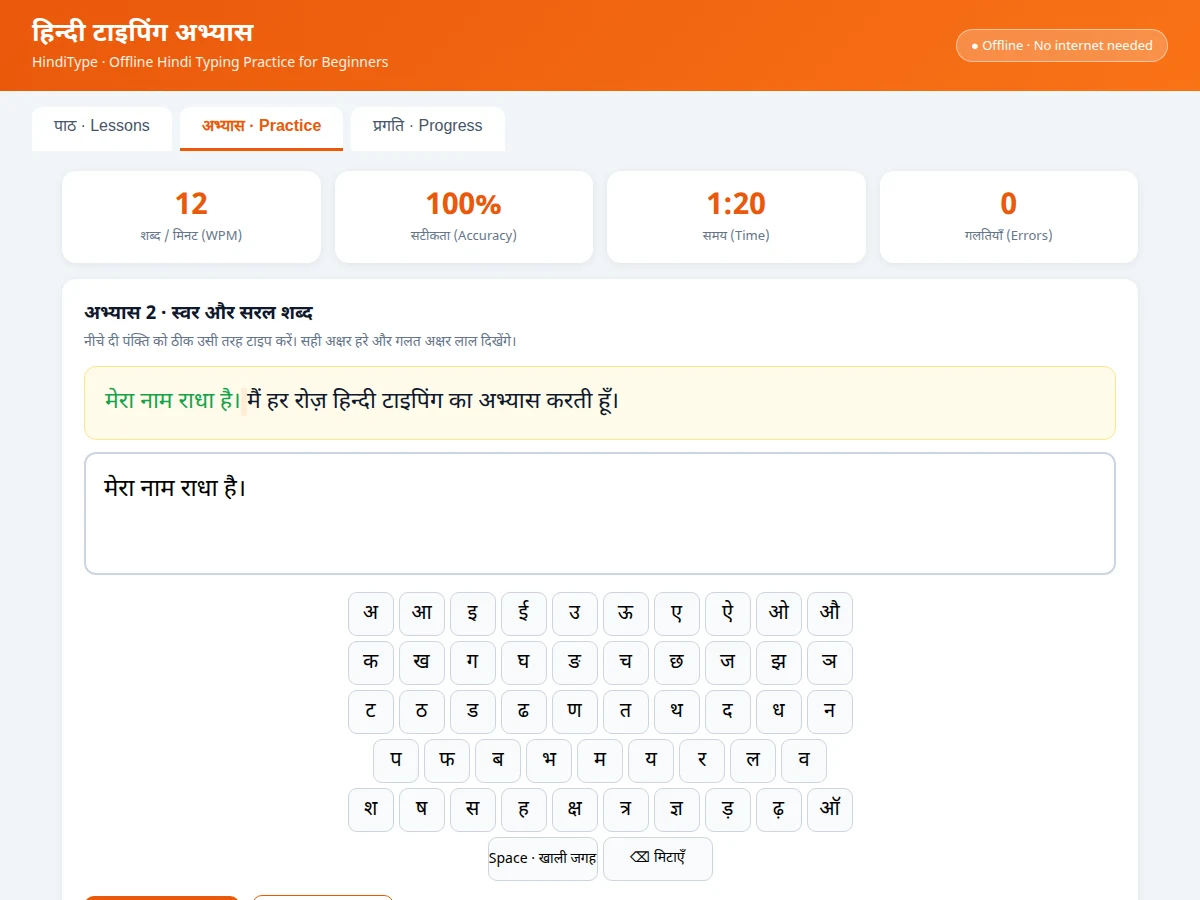
The Offline Hindi Typing Practice App for Android Beginners runs as one short loop from lesson to progress check. The learner first opens the lesson screen and picks a pack, starting with vowels and moving through consonants, words, matras, combined characters and sentences in order. Each lesson begins with the on-screen keyboard for that group, showing where every character sits on the Inscript layout, and then presents a guided exercise line. As the learner types, each character is coloured correct or wrong immediately, and the top of the screen shows live speed, accuracy, elapsed time and error count. When the exercise line is complete, the app records the score and every per-character error on the device, updates the lesson's completion bar, and points the learner at the next lesson their weakest characters suggest, so the next session starts from evidence rather than guesswork.
- The learner opens the lesson screen and picks a lesson pack, starting with vowels and progressing through consonants, words, matras, combined characters and sentences.
- The lesson shows the on-screen Devanagari keyboard for that group, with each character's position on the Inscript layout visible before typing begins.
- The learner types the guided exercise line, either on the on-screen keyboard or the device keyboard, while each character is coloured correct or wrong as it is typed.
- The screen shows live words per minute, accuracy, elapsed time and error count during the exercise, so the learner can watch speed and correctness together.
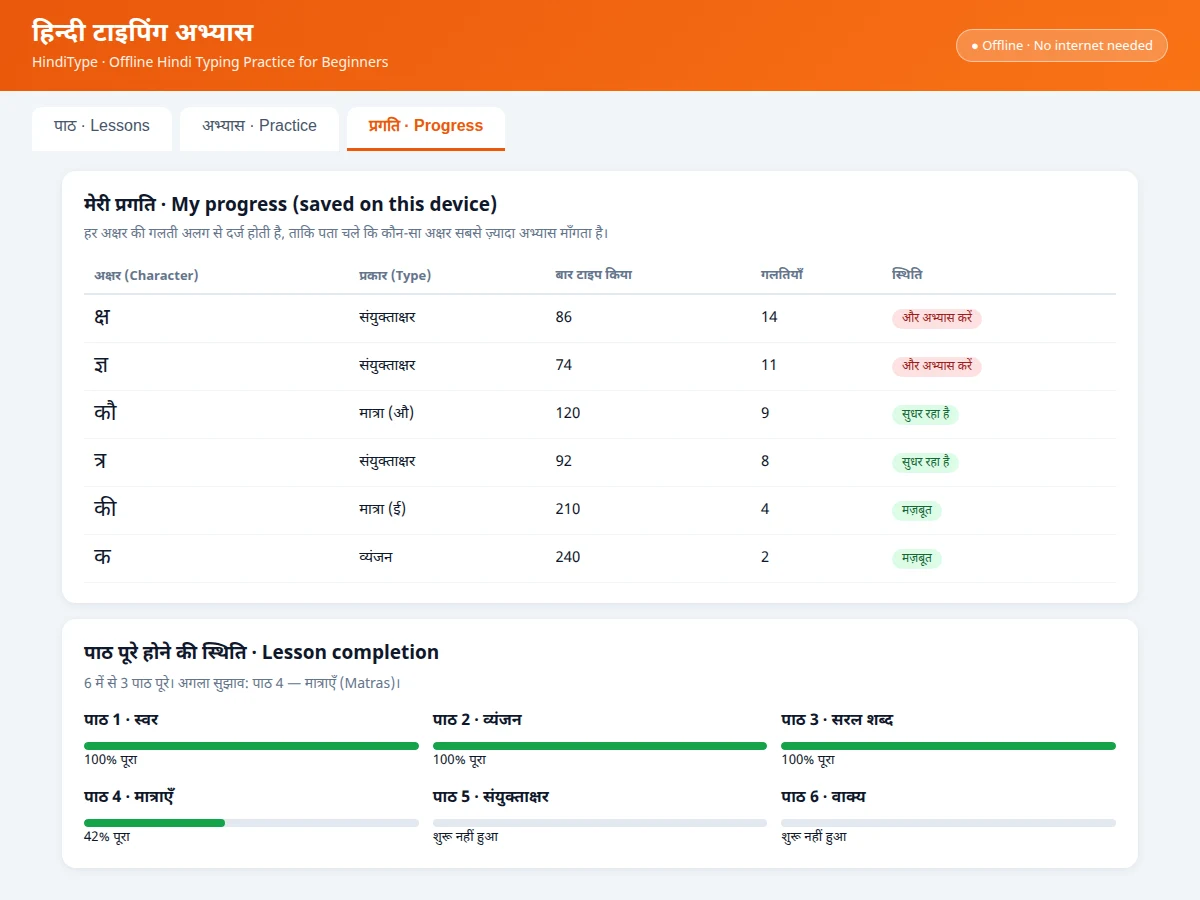
- When the exercise line is complete, the app records the score and logs every error against the exact character that caused it, with matra errors logged under the matra.
- The lesson's completion bar updates on the device, and the progress screen re-ranks characters by error count for the learner to review.
- The app recommends the next lesson from the learner's weakest characters, so the following session targets the letters that actually need more practice.
Tech stack:
- Kotlin · Android app development
- Android Studio · app build and layout editor
- Jetpack Compose · declarative Android UI
- Room database · on-device lesson progress storage
- SharedPreferences · saved lesson packs and settings
- Material Design 3 · app theme and components
- JUnit · unit tests for scoring and error tracking
- Git · source version control
| Parameter | Value |
|---|---|
| Platform | Android app (design target) · Android 8.0 and above (design target) |
| Keyboard layout taught | Inscript Devanagari layout (design target) |
| Lesson packs in demo | 8 lesson packs (demo count) · from vowels to sentences |
| Exercises in demo | 42 guided exercises (demo count) |
| Exercise types | Vowels · consonants · words · matras · combined characters · sentences (design target) |
| Feedback | Per-character colouring during typing (design target) · words per minute and accuracy after each exercise (design target) |
| Error tracking | Per character, stored on device (design target) · matra errors logged separately from base letters (design target) |
| Session length | Approximately 5 minutes to 15 minutes per exercise set (design target) |
| Storage | On-device only (design target) · no account and no server upload |
| Offline use | Fully offline once lesson packs are installed (design target) |
Project features
The Offline Hindi Typing Practice App for Android Beginners is built around four capabilities that carry the whole learning experience. Devanagari keyboard lessons introduce the Inscript layout one group at a time, so a beginner learns where each vowel and consonant sits before being asked to type words. Matra and combined-character drills then isolate the two skills that cause most beginner errors, practising them as their own exercises instead of burying them inside long passages. Live typing feedback colours every character as it is typed and reports speed and accuracy at the end of each exercise, so mistakes are visible in the moment rather than discovered later. Offline progress tracking ties the whole app together: errors are stored per character on the device, and the progress screen turns those counts into the next lesson recommendation, so practice follows the learner's actual weak points.
- [Devanagari keyboard layout lessons] Lessons introduce the Inscript layout group by group, vowels first, then consonants, with the on-screen keyboard highlighting each key, so a beginner builds a mental map of the layout before typing full words. Implemented in the base build.
- [Matra exercises] Dedicated drills practise vowel signs such as aa, i, ee, u and au attached to consonants, so the learner types the full keystroke sequence for a matra character instead of guessing how it is assembled. Implemented in the base build.
- [Combined-character exercises] Separate exercises cover combined characters such as ksha, tra and gya, which are typed as multi-key sequences, so the learner practises the exact sequence rather than treating them as single keys. Implemented in the base build.
- [Typing exercises with live feedback] Each exercise colours characters correct or wrong as they are typed and reports words per minute and accuracy at the end, so the learner sees speed and correctness together after every attempt. Implemented in the base build.
- [Offline lesson packs] All 8 lesson packs and 42 exercises in the demo are stored on the device (demo counts), so lessons, exercises and progress all work with no mobile data and no account. Implemented in the base build.
- [Per-character error tracking] Every typing error is recorded against the exact character that caused it, and the progress screen lists characters by error count, so the learner can see whether matras, combined characters or a few specific letters need more practice. Implemented in the base build.
- [Beginner pacing with next-lesson guidance] Lessons unlock in order from vowels to sentences, and the progress screen recommends the next lesson from the learner's weakest characters, so a beginner is never dropped into a full passage before the building blocks are practised. Builder note from the demo build: matra keystrokes need separate error tracking because a matra error looks identical to a base-letter error in a final score, yet the fix is different — the learner must relearn the keystroke sequence, not the letter — so the demo logs matra errors under the matra, never under the consonant it attaches to. Implemented in the base build.
Optional and future scope (not in the base build): voice-guided lessons, a timed exam-style test mode, custom lesson creation by teachers, multi-user profiles on one device, and handwriting-style input practice. These can be developed on request and are not claimed as included.
What is included
- Working Android app with lesson packs, on-screen Devanagari keyboard, typing exercises, live feedback and offline progress tracking
- Complete Kotlin source code with the lesson structure, scoring logic and per-character error tracking
- 8 lesson packs with 42 guided exercises covering vowels, consonants, words, matras, combined characters and sentences
- Setup guide covering Android Studio build, install on a device and first lesson
- Project report covering background, layout design, lesson structure, limitations and testing
- Project abstract PDF with 10 labelled sections matching this page
- Presentation slides for final review
- Viva Q&A preparation document covering Devanagari layout, matra handling and offline storage
Limitations & prerequisites
- The app teaches typing practice only; it does not teach Hindi reading, grammar or vocabulary beyond the exercise sentences.
- The Inscript layout is the layout taught in the base build; learners who need a different layout, such as Remington, would need a separate lesson set.
- Speed and accuracy scores measure practice performance in the app, not performance on any official typing test or examination.
- The app is not an official typing-test certification and carries no government-exam recognition; it must not be presented as either.
- Progress is stored only on the device, so it is lost if the app is uninstalled without a backup.
- The on-screen keyboard suits practice on a phone screen; it does not replace practice on a physical keyboard for learners preparing for desktop typing.
- Exercise sentences are fixed lesson content in the base build; learners cannot add their own passages without the custom-lesson future scope.
- The base build is an Android app only; no iOS version is included.
Frequently Asked Questions
Is this project suitable for a final-year project?
Yes, it fits Bachelor of Engineering and Bachelor of Technology programmes in Computer Science and Engineering, because it combines Android UI development, on-device database storage, lesson progression logic and a scoring system in one complete app that reviewers can install, open and test with their own typing. The demonstration story is easy to follow: pick a lesson, type an exercise, watch the live feedback, and find the errors listed per character on the progress screen.
Does the app work without internet?
Yes, the app works fully offline once the lesson packs are installed, because every lesson, exercise and progress record is stored on the device itself, and no part of learning, scoring or progress tracking ever needs a mobile data connection or an account. A learner can practise on a bus, in a classroom or at home with no mobile data, and nothing about the lesson flow changes when the connection is absent.
Which keyboard layout does the app teach?
The app teaches the Inscript Devanagari layout, which is the standardised Indian government layout for typing Indian scripts on a computer keyboard, and every lesson introduces its key positions group by group so a beginner learns the layout systematically instead of memorising scattered key positions. Lessons start with vowels and move to consonants, matras and combined characters, so the full layout is covered in order.
Why do matras get their own exercises?
Matras get their own exercises because a matra changes how a consonant is typed and displayed, and that keystroke sequence is the most common source of beginner errors, so practising matras inside long passages hides exactly which sequence failed for the learner. A dedicated drill shows the exact sequence, and the app logs matra errors separately so the progress screen can point the learner back to the right drill.
Does this app give a typing certificate or exam recognition?
No, the app gives practice scores only and carries no typing-test certification and no government-exam recognition, because its speed and accuracy figures measure only how the learner performed inside the app's own exercises, and no result screen in the app claims otherwise. Its figures must not be presented to any employer or examination body as an official result or qualification.
What does a learner need to start using the app?
A learner needs only an Android phone running Android 8.0 or above, with the app installed and its lesson packs on the device, and no account, no mobile data and no extra hardware are needed to open the first lesson. The first lesson starts with vowels, so a complete beginner can open the app and begin typing within a minute of installing it.
Components & software requirements
- Kotlin · Android app development
- Android Studio · app build and layout editor
- Jetpack Compose · declarative Android UI
- Room database · on-device lesson progress storage
- SharedPreferences · saved lesson packs and settings
- Material Design 3 · app theme and components
- JUnit · unit tests for scoring and error tracking
- Git · source version control
Delivery information
Built-to-order project. Delivery timeline is shared after order confirmation based on current queue.
Support terms
Complete documentation, setup guide, and viva preparation included. Support for setup and explanation provided.
Download free synopsis (PDF)
Enter your name and WhatsApp number — the synopsis PDF downloads immediately. We may send occasional project updates on WhatsApp; no spam.