
More project photos (2)

The problem
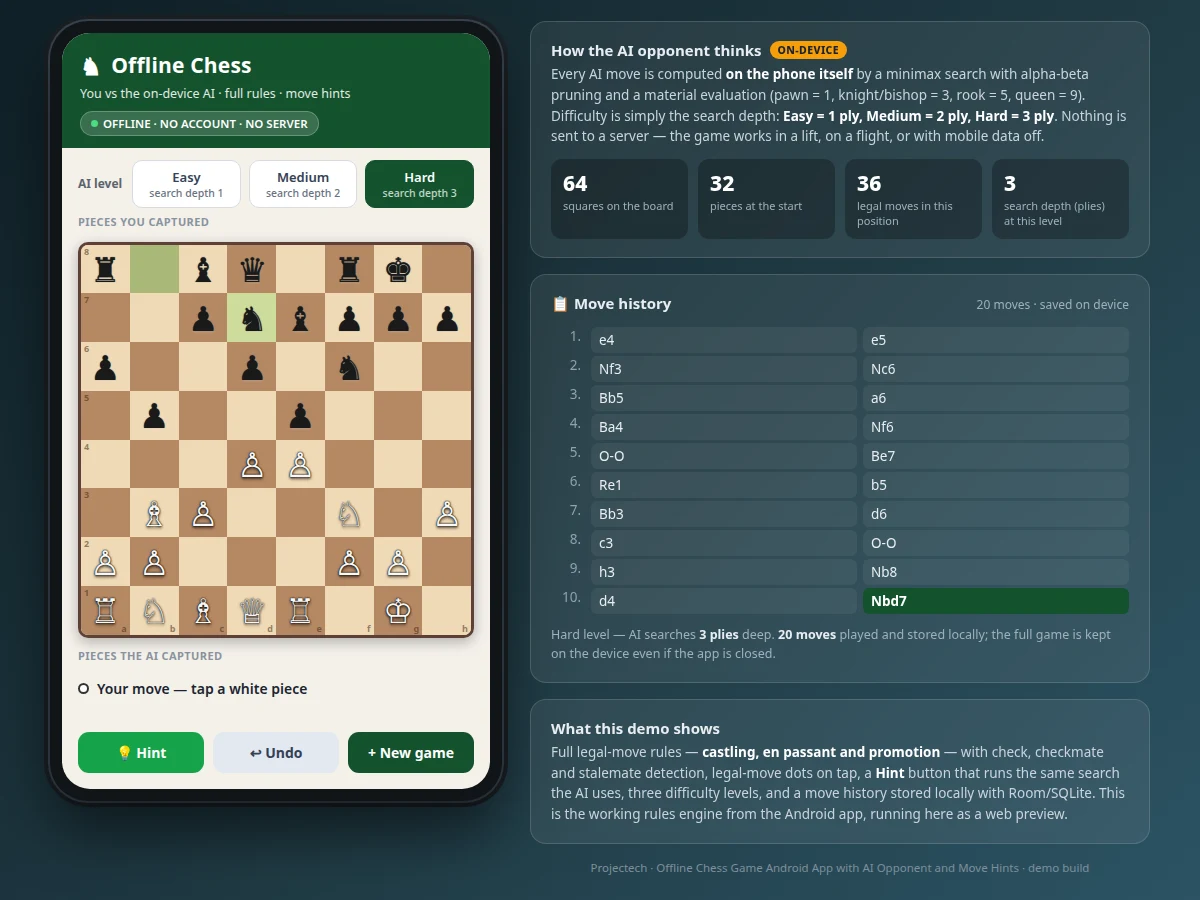
An offline chess game Android app with an AI opponent and move hints gives a single player a complete game of chess on a phone needing no internet. Most phone chess apps are online multiplayer clients that stop working without a connection, or single-player games whose computer opponent picks moves from a shallow script and offers no help to a stuck player. A student learning chess, practising on a commute, or playing with weak signal is left with a game that is either unusable offline or unchallenging and unhelpful. This project closes that gap with an on-device rules engine enforcing every legal move — castling, en passant and promotion included — and a minimax AI opponent that searches real candidate moves instead of guessing. A hint button runs the same search and suggests the strongest move, so the app teaches while it competes. With no account, server or connection, the game works anywhere and every game is stored locally.
Taps a white piece to start a move.
Follow the working sequence
How it works
Playing a move starts a short loop that runs entirely on the phone. The player taps a piece and the rules engine lists every legal destination, shown as dots on the board; tapping a highlighted square plays the move, updates the board, records the move in standard notation, and stores it locally. The AI then takes its turn: it generates all its legal replies, searches them with minimax and alpha-beta pruning to the depth set by the difficulty level, scores each resulting position by material, and plays the best move it found. Check, checkmate and stalemate are detected after every move, captured pieces are shown on screen, and the full move history stays available for review. Pressing Hint runs the same search for the player's side and highlights the recommended move. Nothing in this loop touches a network — the rules engine, the search and the storage all live in the app.
- The player taps one of their pieces; the rules engine generates its legal moves and marks them with dots on the board, with captures marked by a ring.
- Tapping a highlighted square plays the move; a pawn reaching the last rank opens a promotion choice of queen, rook, bishop or knight.
- The move is written to the history in standard notation and saved locally with Room/SQLite.
- The AI generates its legal replies and searches them with minimax and alpha-beta pruning at the selected depth (1, 2 or 3 plies), scoring each resulting position by material value.
- The AI plays its best move, the board updates, captured pieces are shown, and check, checkmate or stalemate is announced.
- The player can press Hint at any point to see the engine's recommended move, Undo to take back a full round, or start a New Game.
Tech stack:
- Kotlin
- Android SDK · Jetpack
- Room · SQLite local storage
- Minimax search · alpha-beta pruning
- Material evaluation (pawn 1 · knight/bishop 3 · rook 5 · queen 9)
- Android Studio
- Git
| Parameter | Value |
|---|---|
| Platform | Android (design target: API level 26 and above) |
| Language | Kotlin |
| Board | 64 squares · 32 pieces at the start |
| Legal moves | 20 from the start position (counted by the demo engine) |
| AI search | Minimax with alpha-beta pruning · depth 1–3 plies |
| Difficulty levels | 3 (Easy depth 1 · Medium depth 2 · Hard depth 3) |
| AI response time | Approximately 300–750 ms at depth 3 (measured in the demo build; varies with device load) |
| Positions searched | 1,230 positions at depth 3 from the start (measured in the demo build) |
| Storage | Room/SQLite on device · no server |
| Game history | Full move list stored locally per game |
| Internet | Not required — fully offline |
| App size | Approximately 10–20 MB installed (design target) |
Project features
The app is built around four capabilities that work together: a complete chess rules engine, an on-device minimax AI opponent, a move-hint system, and local game storage. The rules engine generates only legal moves — castling, en passant, promotion, check, checkmate and stalemate are all handled — so an illegal move is impossible and every game follows the real rules of chess. The AI opponent searches candidate moves with minimax and alpha-beta pruning, scoring positions by material, and its strength is set by search depth rather than by random blunders. The hint button runs the same search at full depth and highlights the strongest move, which turns a lost position into a lesson instead of a dead end. Three difficulty levels, a move history stored on the device with Room/SQLite, and legal-move dots on every tap round out an app that is complete offline, with no account and no server involved at any point.
- [Complete chess rules engine] Generates only legal moves, with castling on both sides, en passant captures, pawn promotion with a choice of piece, and check, checkmate and stalemate detection after every move.
- [On-device minimax AI opponent] Every AI move is computed on the phone by minimax search with alpha-beta pruning and a material evaluation (pawn 1, knight and bishop 3, rook 5, queen 9). No server, no randomness, no machine-learning model.
- [Move hints] The Hint button runs the same search at full depth for the player's side and highlights the recommended move on the board, so a stuck player gets a genuine lesson instead of a guess.
- [Three difficulty levels] Easy searches 1 ply, Medium 2 plies and Hard 3 plies deep, so the same opponent can suit a beginner learning the game and a stronger player who wants a real fight.
- [Local game history] Every move is recorded in standard notation and stored on the device with Room/SQLite, so the full game survives closing the app and can be reviewed move by move.
- [Legal-move highlighting and captured pieces] Tapping a piece shows its legal destinations as dots on the board, with captures marked by a ring, and captured pieces are shown on screen throughout the game.
- [Offline-first, no account] The game needs no login, no server and no internet connection at any point — it plays with mobile data off or in aeroplane mode.
What is included
- Complete Kotlin source code (rules engine, minimax AI, Android UI)
- Working demo build of the app
- Project report PDF (background, rules-engine design, minimax explanation, methodology, measured search figures)
- Project abstract PDF
- PPT presentation for final review
- Viva Q&A preparation document (minimax, alpha-beta pruning, chess rules, Android storage)
Limitations & prerequisites
- AI strength is bounded by search depth 1–3 — it plays a solid beginner-to-club game, not a master; there is no opening book or endgame tablebase in the base build.
- No online multiplayer, no ratings and no accounts — offline single-player only, by design.
- The AI's response time grows with depth; Hard (depth 3) takes approximately 300–750 ms per move in the demo build and longer on slower phones.
- Games are stored only on the device; there is no cloud backup or cross-device sync.
- No timed or blitz clock modes in the base build; standard untimed play only.
- The AI evaluates by material only, so it does not understand long-term positional plans the way a stronger engine would.
Frequently Asked Questions
Is this project suitable for a final-year project?
Yes — for Computer Science, IT and Android application development programmes. It demonstrates a complete rules engine, a deterministic search algorithm, local storage and a polished mobile UI, all in one offline app that a student can genuinely explain move by move in a viva. The minimax search with alpha-beta pruning is a classic algorithms topic, the chess rules engine is a demanding state-and-validation exercise, and the report documents the engine design, the evaluation function and the measured search figures from the demo build.
How does the AI opponent actually work?
The opponent is a deterministic minimax search with alpha-beta pruning and a material evaluation — pawn 1, knight and bishop 3, rook 5, queen 9 — not a machine-learning model and not a random move picker. Difficulty is the search depth: Easy searches 1 ply, Medium 2 plies and Hard 3 plies. At each turn the engine generates every legal reply, searches the resulting positions, and plays the move leading to the best material outcome it can see. Because the search is deterministic, the same position always produces the same move at the same difficulty, which makes the AI's behaviour easy to test and explain.
Does the game work without internet?
Yes — the game is fully offline. The rules engine, the AI search and the game storage all run on the phone, so the app works with mobile data off, in aeroplane mode, or in places with no signal at all. There is no account, no login, no server and no download of moves or puzzles. The only thing an internet connection is ever needed for is installing the app itself.
What chess rules does the app enforce?
The full rules of chess: every move the app allows is a legal move. That includes castling on both sides, en passant captures, pawn promotion with a choice of piece, and check, checkmate and stalemate detection after every move in the app. The engine was verified against the standard move counts for the game — 20 legal moves from the starting position, 400 after two plies and 8,902 after three — so the rules implementation matches official move generation exactly at the depths checked.
Can the app be customized?
Yes — the app is built so new features can be added without rewriting the board logic. Realistic additions include an online multiplayer mode, a chess clock with blitz and rapid time controls, new board and piece themes, move sounds, a puzzle mode, and an opening book to strengthen the AI's early play. The rules engine and the AI are separate modules. Any addition is scoped and quoted separately from the base project.
Components & software requirements
- Kotlin
- Android SDK · Jetpack
- Room · SQLite local storage
- Minimax search · alpha-beta pruning
- Material evaluation (pawn 1 · knight/bishop 3 · rook 5 · queen 9)
- Android Studio
- Git
Delivery information
Built-to-order project. Delivery timeline is shared after order confirmation based on current queue.
Support terms
Complete documentation, setup guide, and viva preparation included. Support for setup and explanation provided.
Download free synopsis (PDF)
Enter your name and WhatsApp number — the synopsis PDF downloads immediately. We may send occasional project updates on WhatsApp; no spam.