
More project photos (2)

The problem
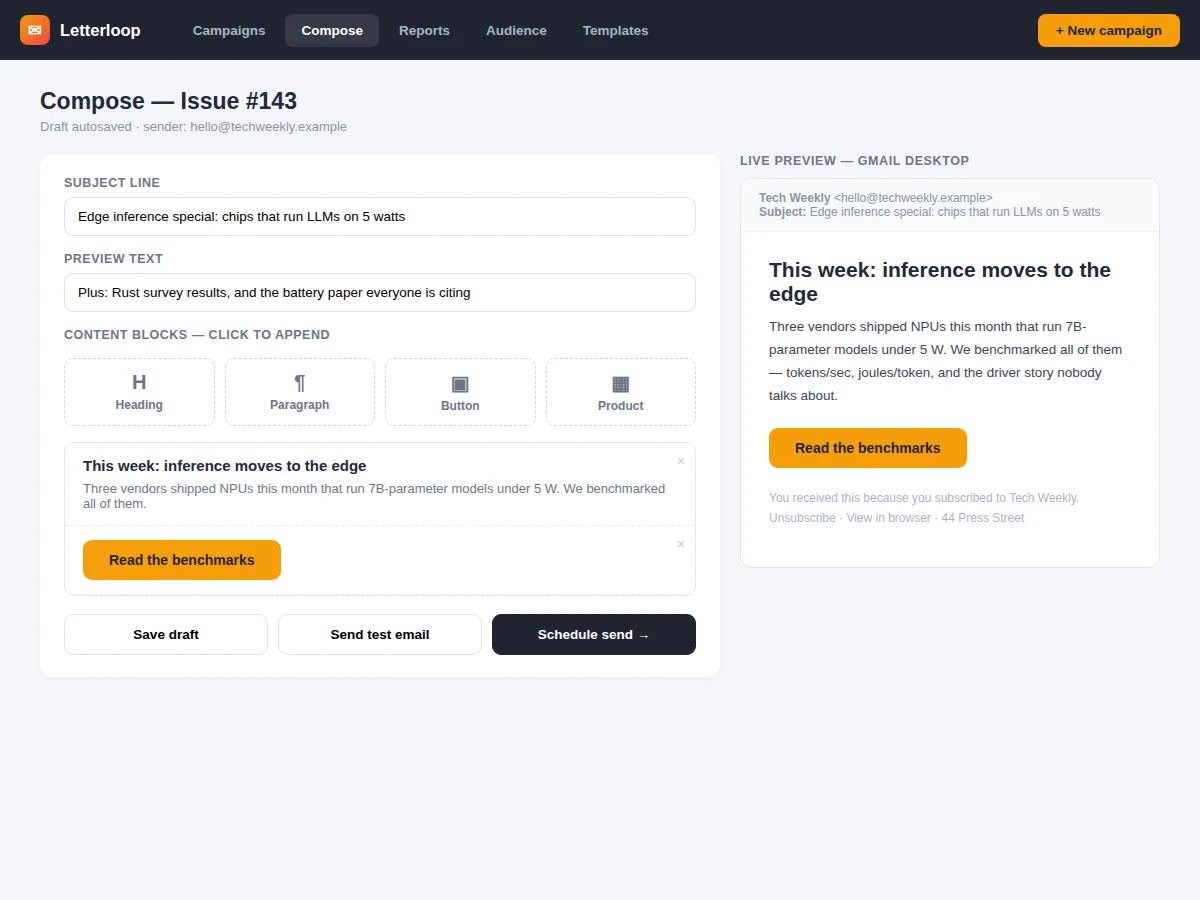
College clubs, startups and creators all run newsletters, but the free tiers of commercial tools cap subscribers and hide the interesting machinery. The genuinely educational parts are the tracking itself — how a 1-pixel image records an open, how link wrapping attributes clicks, how bounces and unsubscribes keep a sender reputable — plus the sending pipeline that delivers thousands of emails without blocking the app. This project builds that end to end: a block-based email composer with live inbox preview, list and segment management, a queued sending worker, open/click tracking with per-campaign dashboards, and compliance handling (unsubscribe links, bounce processing). Reports show opens over time, hourly heatmaps and top-clicked links.
How it works
- The author assembles the email from content blocks; the composer renders a live preview matching major email clients' constraints (table-safe, inline styles).
- On send, the campaign is fanned out into per-subscriber jobs on a queue, each job personalizing the HTML (name, unsubscribe link, tracking pixel, wrapped links).
- Workers send through the configured SMTP provider at the provider's rate limit, retrying soft bounces with backoff.
- When a subscriber opens the email, their client fetches the 1-pixel beacon; the tracking endpoint logs subscriber, campaign and timestamp.
- Clicked links hit the redirect endpoint first, which logs the click and forwards to the destination URL.
- Unsubscribe clicks instantly mark the subscriber opted-out; hard-bounce webhooks suppress the address from future sends.
- The dashboard aggregates events into campaign reports: opens over time, hourly heatmaps, top links and client breakdowns.
Tech stack:
- Node.js + Express (app + tracking endpoints)
- PostgreSQL (subscribers, campaigns, events)
- BullMQ + Redis (send queue)
- Nodemailer / SMTP (delivery)
- Block-based email composer
- SVG charts (analytics)
- Docker + docker-compose
| Parameter | Value |
|---|---|
| Sending throughput | Approximately 5–10 emails/second per worker (design target) |
| Subscribers | Approximately 100,000 per installation (expected) |
| Tracking pixel | 1×1 transparent beacon per subscriber (design target) |
| Event storage | One row per open/click; aggregation queries indexed (expected) |
| Bounce handling | Hard-bounce auto-suppress via webhook (design target) |
| Scheduling | Timezone-aware, minute granularity (design target) |
| Compliance | Unsubscribe link + postal footer on every send (design target) |
| Deployment | Docker compose: app + workers + PostgreSQL + Redis (design target) |
Project features
- [Block email composer] Headings, paragraphs, buttons and product blocks assembled visually, with a live Gmail-style inbox preview.
- [Subscriber lists and segments] Multiple lists with custom fields; segments by engagement or field values for targeted sends.
- [Open tracking] A 1-pixel tracking beacon records opens per subscriber, aggregated into opens-over-time charts.
- [Click tracking] Every link is wrapped in a redirect that logs the click before forwarding, powering top-links tables.
- [Scheduling] Campaigns send immediately or at a scheduled time with timezone-aware delivery.
- [Campaign reports] Opens, clicks, forwards estimate, unsubscribes, hourly open heatmap and email-client breakdown per campaign.
- [Unsubscribe and bounce handling] One-click unsubscribe honoured instantly; hard bounces automatically suppress the address.
- [Queued sending] A background job queue throttles sends to the SMTP provider's rate limits so the app never blocks.
What is included
- Campaign composer with block editor and live inbox preview
- Subscriber list/segment manager with import
- Queued sending pipeline with retry and throttling
- Open/click tracking endpoints and analytics dashboards
- Unsubscribe and bounce-handling flows
- Project report PDF (tracking design, queue architecture, deliverability, methodology, results)
- PPT presentation for final review
- Viva Q&A preparation document (tracking pixels, link wrapping, queues, spam compliance)
Limitations & prerequisites
- Open rates are approximate by nature: Apple Mail Privacy Protection pre-loads tracking pixels, inflating opens, while image-blocking clients undercount them — the report documents this honestly.
- The demo sends through a configurable SMTP provider; the deployer supplies credentials and warms up the sending domain — deliverability depends on DNS (SPF/DKIM) the project documents but cannot guarantee.
- Click tracking wraps links, so the visible URL differs from the destination until redirect — standard practice, disclosed in the report.
- Template design targets the lowest common denominator of email clients (table layouts, inline CSS); pixel-perfect rendering in every client is not claimed.
- A/B subject-line testing is future scope; the build ships single-variant campaigns.
- List import validates format, not address existence — verification services are an optional integration.
Frequently Asked Questions
How does open tracking actually work?
Each personalized email embeds a unique 1×1 transparent image. When the subscriber's email client loads images, it requests that URL; the tracking endpoint logs who opened which campaign and when. Clients that block images simply don't register — which is why open rates are treated as directional, not exact.
And click tracking?
At send time every link is rewritten to pass through a redirect endpoint carrying the subscriber and campaign IDs. The endpoint records the click, then issues an HTTP redirect to the real destination — the subscriber notices nothing.
Won't this get flagged as spam?
The project implements the compliance basics (one-click unsubscribe, physical footer address, bounce suppression, throttled sends) and documents SPF/DKIM/DMARC setup. Reputation ultimately depends on the sender's domain and list hygiene, which the report covers.
How do thousands of emails send without freezing the app?
Sends are queue jobs: the web request only enqueues, and background workers deliver at the SMTP provider's rate limit with retries. The dashboard polls job progress independently.
Can I import an existing subscriber list?
Yes — CSV import with column mapping, duplicate detection and automatic suppression of previously unsubscribed or bounced addresses.
Is this project suitable for a final-year project?
Yes — for Computer Science, IT and Web Development programs. It demonstrates event tracking design, queue-based architecture, email deliverability engineering and data visualization. Suitable for B.E./B.Tech final-year projects in Computer Science, IT and Web Development.
Components & software requirements
- Node.js + Express (app + tracking endpoints)
- PostgreSQL (subscribers, campaigns, events)
- BullMQ + Redis (send queue)
- Nodemailer / SMTP (delivery)
- Block-based email composer
- SVG charts (analytics)
- Docker + docker-compose
Delivery information
Built-to-order project. Delivery timeline is shared after order confirmation based on current queue.
Support terms
Complete documentation, setup guide, and viva preparation included. Support for setup and explanation provided.