
More project photos (2)
The problem
College hackathons are usually managed across a form tool, a spreadsheet of scores and a chat group — judges score in isolation, nobody trusts the final ranking, and results take hours to compile. The fix is a single system where submissions, rubrics and scores live together: judges score against weighted criteria, the leaderboard recomputes on every submission, and every score is attributable. This project builds that portal: a public event site (tracks, prizes, schedule, countdown), team registration with invite codes, project submission with repo and demo links, a judge console with per-criterion sliders, a live leaderboard with track filters, and an organizer dashboard for announcements and score audits.
How it works
- Organizers configure the event: tracks, prize pool, schedule, judging rubric weights and registration window.
- Teams register with invite codes; the roster view shows team size, track and members to organizers.
- Before the deadline, teams submit their project: repository URL, demo link, write-up and track; submissions lock automatically at the cutoff.
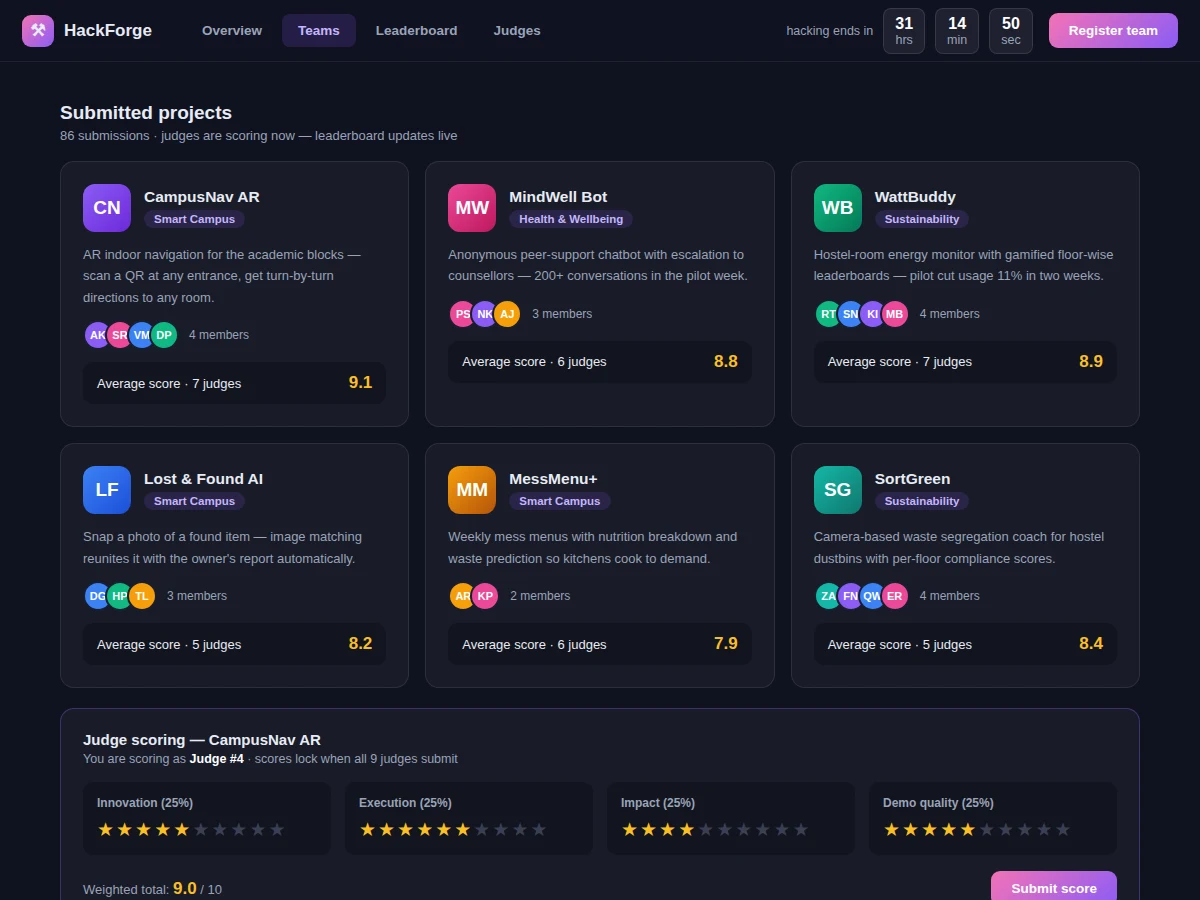
- Judges open the scoring console, which assigns them a queue of submissions; each criterion gets a 1–10 score plus optional comments.
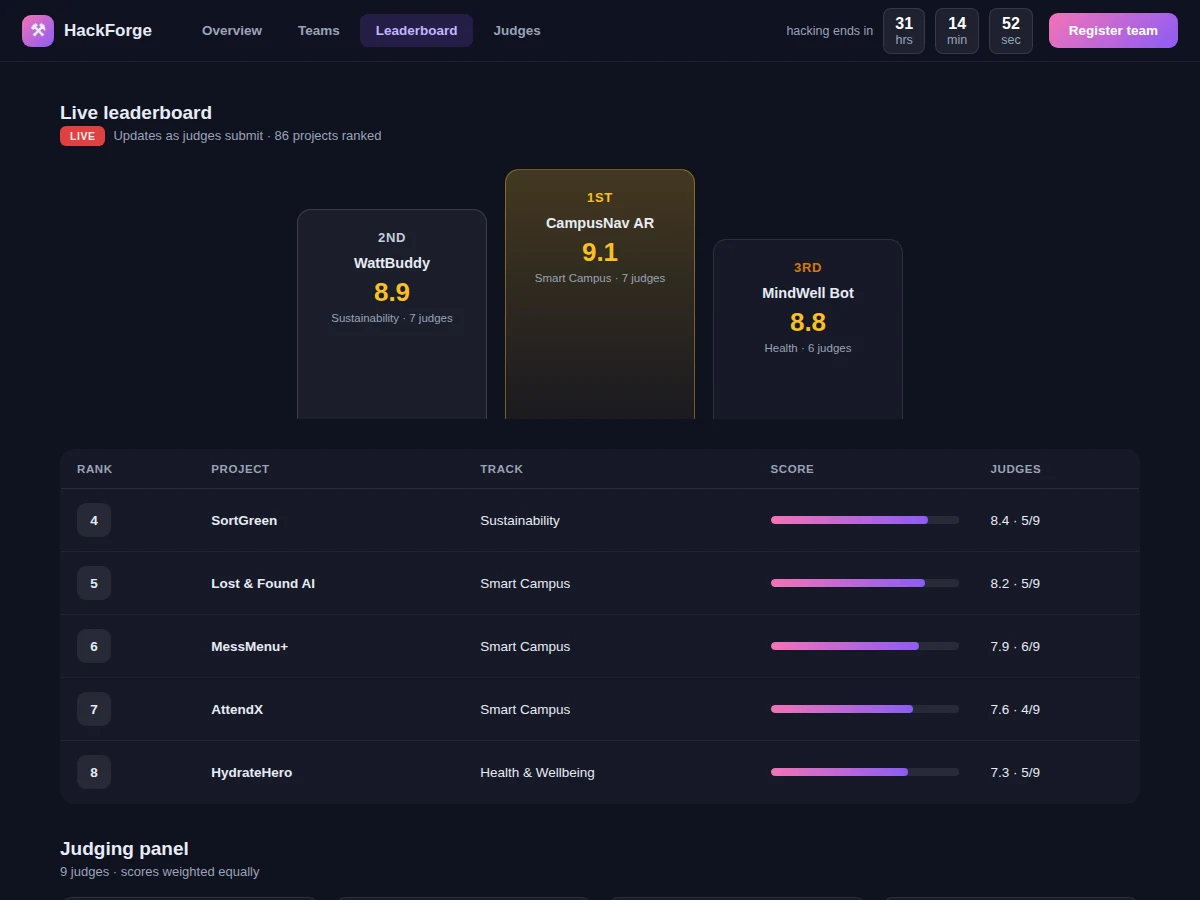
- On submit, the scoring engine stores the judge's scores, recomputes the team's weighted average, and pushes the new ranking to all leaderboard viewers over WebSocket.
- The audit view flags outlier scores (e.g. one judge far from the panel mean) for organizer review before results finalize.
- Organizers lock the leaderboard, publish winners per track, and the system generates certificates for teams.
Tech stack:
- Node.js + Express (portal + scoring engine)
- PostgreSQL (events, teams, submissions, scores)
- WebSocket push (live leaderboard)
- JWT (organizer/judge/team roles)
- Nodemailer (invites, announcements)
- PDF certificate generator
- Docker + docker-compose
| Parameter | Value |
|---|---|
| Teams per event | Approximately 500 (expected) |
| Judges per event | Approximately 30 with assignment queues (expected) |
| Rubric criteria | 4 weighted, configurable (design target) |
| Leaderboard update | Push on every score submit, approximately under 1 s (design target) |
| Submission lock | Automatic at deadline, timezone-aware (design target) |
| Score audit | Per-judge-per-team view with outlier flags (design target) |
| Certificates | PDF generation per team (design target) |
| Deployment | Docker compose: app + PostgreSQL (design target) |
Project features
- [Event site] Tracks, prize pool, schedule, mentors, judges and a live countdown — the public face of the hackathon.
- [Team registration] Create or join teams with invite codes, capped team sizes and per-track registration.
- [Project submissions] Submit with repo link, demo video, write-up and track selection; editing locked after the deadline.
- [Rubric-based judging] Weighted criteria (innovation, execution, impact, demo quality) with per-criterion scoring and comments.
- [Live leaderboard] Rankings recompute on every submitted score via WebSocket push, with track filters and judge-progress indicators.
- [Score audit] Organizers see every score per judge per team, with outlier flagging for suspicious spreads.
- [Announcements] Broadcast updates to all teams with read receipts on the dashboard.
- [Certificates] Auto-generated participation and winner certificates after results are finalized.
What is included
- Public event site with tracks, schedule and countdown
- Team registration and roster management
- Project submission flow with deadline locking
- Judge scoring console with weighted rubrics
- Live leaderboard with track filters and audit view
- Announcements and certificate generation
- Project report PDF (scoring model, live-update design, fairness measures, methodology, results)
- PPT presentation for final review
- Viva Q&A preparation document (weighted scoring, WebSocket push, RBAC, outlier detection)
Limitations & prerequisites
- Judging fairness tooling flags statistical outliers; it cannot detect off-platform collusion — the report states this boundary honestly.
- The leaderboard reflects submitted scores only; teams see judge progress but not individual judges' scores until results are published.
- Team sizes and track caps are enforced at registration; mid-event team merges need organizer action.
- Video demos are linked (YouTube/unlisted), not hosted — the portal stores metadata, not video files.
- Certificates are generated from a fixed template set; fully custom designs are future scope.
- The demo runs a single event at a time; multi-event tenancy is future scope.
Frequently Asked Questions
How is the final score computed?
Each judge scores the four criteria 1–10; the criteria weights (e.g. 25% each) produce the judge's weighted score, and the team's score is the mean across judges who scored it. The report documents the exact formula with a worked example.
How does the leaderboard update live?
When a judge submits, the server recomputes the affected team's average inside a transaction and broadcasts the new ranking over WebSocket to every open leaderboard — typically visible in under a second.
What stops a judge from tanking a rival team?
Every score is attributable in the audit view, and the engine flags outliers (a judge's score far from the panel mean) for organizer review before results are finalized. The system makes bias visible rather than claiming to prevent it.
Can judges change a score after submitting?
Yes, until the organizer locks results — every change is versioned in the audit log, so the history of a score is itself reviewable.
How are ties broken?
By configurable tiebreak order (default: higher innovation score, then earlier submission time), documented in the event rules page the portal generates.
Is this project suitable for a final-year project?
Yes — for Computer Science, IT and Web Development programs. It demonstrates real-time data flow, role-based access design, fair-scoring algorithms and event-scale web engineering. Suitable for B.E./B.Tech final-year projects in Computer Science, IT and Web Development.
Components & software requirements
- Node.js + Express (portal + scoring engine)
- PostgreSQL (events, teams, submissions, scores)
- WebSocket push (live leaderboard)
- JWT (organizer/judge/team roles)
- Nodemailer (invites, announcements)
- PDF certificate generator
- Docker + docker-compose
Delivery information
Built-to-order project. Delivery timeline is shared after order confirmation based on current queue.
Support terms
Complete documentation, setup guide, and viva preparation included. Support for setup and explanation provided.