
More project photos (2)

The problem
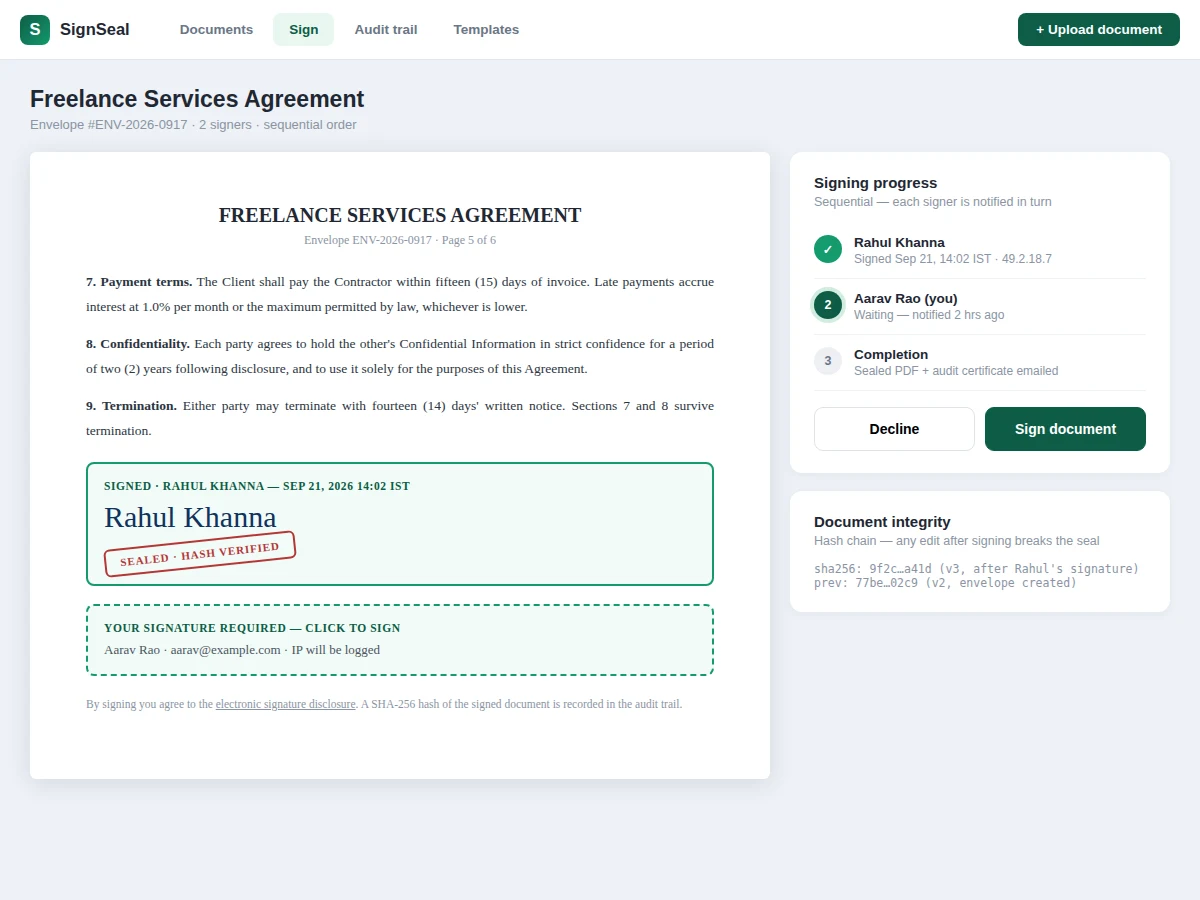
Internships, freelance agreements and vendor NDAs all need signatures, but emailing PDFs back and forth is slow, untraceable and trivially forgeable — anyone can paste a signature image onto a page. Real e-signature platforms solve this with two mechanisms students rarely implement: an ordered signing ceremony (each signer is notified in turn, with identity checks) and a tamper-evident audit trail where every event is hash-chained to the last. This project builds both: upload a PDF, drag signature and date fields onto pages, invite signers in sequence, let them draw or type signatures, and download a sealed PDF plus an audit certificate. The audit log records IPs, timestamps, user agents and per-version document hashes.
How it works
- The sender uploads a PDF; the server stores the original and records its SHA-256 as the envelope's genesis hash.
- Signature fields are placed on pages via drag-and-drop; each field is assigned to a signer with coordinates, page and type.
- The sender defines the signing order and sends the envelope; signer 1 receives a secure link (JWT, single-use token per signer).
- The signer opens the document, clicks their field, and draws or types a signature, which is rasterized and composited onto the PDF page.
- On signing, the server hashes the new document version, chains it to the previous hash, and appends a signed event to the audit log with IP, timestamp and user agent.
- The next signer is notified automatically; reminders fire on the configured schedule until they sign or decline.
- When all signers complete, the sealed PDF and audit certificate are generated and emailed to all parties.
Tech stack:
- Node.js + Express (portal + signing API)
- pdf-lib (PDF field compositing)
- PostgreSQL (envelopes, events, hash chain)
- SHA-256 hash-chained audit log
- Nodemailer (invites, reminders, certificates)
- JWT single-use signer tokens
- Docker + docker-compose
| Parameter | Value |
|---|---|
| Signers per envelope | Approximately 20 (design target) |
| Audit events | Immutable, hash-chained, exportable (design target) |
| Hash algorithm | SHA-256 per document version + per event (design target) |
| Signature capture | Draw (pointer) or typed script rendering (design target) |
| Reminder schedule | Configurable, default 24 h nudge (design target) |
| Sealed PDF | Signatures embedded + verification page (design target) |
| Token security | Single-use JWT signer links, expiring (design target) |
| Deployment | Docker compose: app + PostgreSQL (design target) |
Project features
- [PDF upload and field placement] Upload a PDF and drag signature, initial, date and text fields onto any page with pixel positioning.
- [Sequential signing order] Signers are invited in a defined order; each is notified only when their turn arrives, with automatic reminders.
- [Draw or type signatures] Signers draw with mouse/touch or type a name rendered in script typeface — embedded as tamper-evident images.
- [Hash-chained audit trail] Every event (view, sign, reminder, download) is logged with a SHA-256 hash chained to the previous event's hash.
- [Sealed PDF] The completed document embeds all signatures plus a verification summary page; any later edit invalidates the recorded hash.
- [Audit certificate] One-click PDF certificate listing the full event timeline, signer identities, IPs and hashes.
- [Decline and void flows] Signers can decline with a reason; senders can void an in-flight envelope, all recorded in the trail.
- [Verification view] Anyone can re-check a sealed document: hash chain intact, signatures valid, document unaltered.
What is included
- Signing portal (upload, field placement, envelope dashboard)
- Signer ceremony pages with draw/type signature pad
- Hash-chained audit trail with certificate export
- Sealed-PDF generator with verification summary
- Email flows: invites, reminders, completion, decline/void
- Project report PDF (hash-chain design, ceremony workflow, threat model, methodology, results)
- PPT presentation for final review
- Viva Q&A preparation document (hash chains, PDF signing, token security, legal context)
Limitations & prerequisites
- This is an educational implementation, not legal advice: e-signature validity varies by jurisdiction (in India, the IT Act 2000 recognizes electronic signatures with conditions the report outlines).
- Integrity uses SHA-256 hash chaining, not certificates from a licensed Certifying Authority — the report explains the difference honestly.
- Identity verification is email-link plus optional OTP; there is no government-ID or video-KYC check.
- Very large PDFs (hundreds of pages) slow the field-placement UI; the demo targets documents under ~50 pages.
- The demo stores documents on local disk; production deployments need encrypted object storage, documented as a configuration step.
- Bulk-send (one document to many independent signers) is future scope; envelopes are one signing ceremony each.
Frequently Asked Questions
How does the audit trail prove nobody tampered with the document?
Every event and every signed document version is hashed with SHA-256, and each hash includes the previous hash — a chain. Change one byte of an old version and its hash changes, which breaks every later link. The verification view recomputes the chain to prove integrity.
Is a drawn signature on screen legally valid?
It depends on jurisdiction and document type. The project documents the Indian IT Act 2000 context honestly: the build demonstrates the technical ceremony and integrity mechanisms; it does not claim to replace licensed digital-signature certificates.
What stops someone from signing with another person's link?
Signer links are single-use JWTs bound to the invited email, with expiry; the audit log records IP, device and timestamp per signature, and a new-device view triggers an OTP check before signing is allowed.
What happens if a signer declines?
The envelope moves to declined with the recorded reason, all parties are notified, and the full history stays in the audit trail — nothing is silently deleted.
Can I see who viewed but didn't sign?
Yes — document views are audit events too, so the sender sees exactly when each signer opened the envelope.
Is this project suitable for a final-year project?
Yes — for Computer Science, IT and Web Development programs. It demonstrates applied cryptography concepts, state-machine workflow design, PDF manipulation and security-aware engineering. Suitable for B.E./B.Tech final-year projects in Computer Science, IT and Web Development.
Components & software requirements
- Node.js + Express (portal + signing API)
- pdf-lib (PDF field compositing)
- PostgreSQL (envelopes, events, hash chain)
- SHA-256 hash-chained audit log
- Nodemailer (invites, reminders, certificates)
- JWT single-use signer tokens
- Docker + docker-compose
Delivery information
Built-to-order project. Delivery timeline is shared after order confirmation based on current queue.
Support terms
Complete documentation, setup guide, and viva preparation included. Support for setup and explanation provided.