
More project photos (2)
The problem
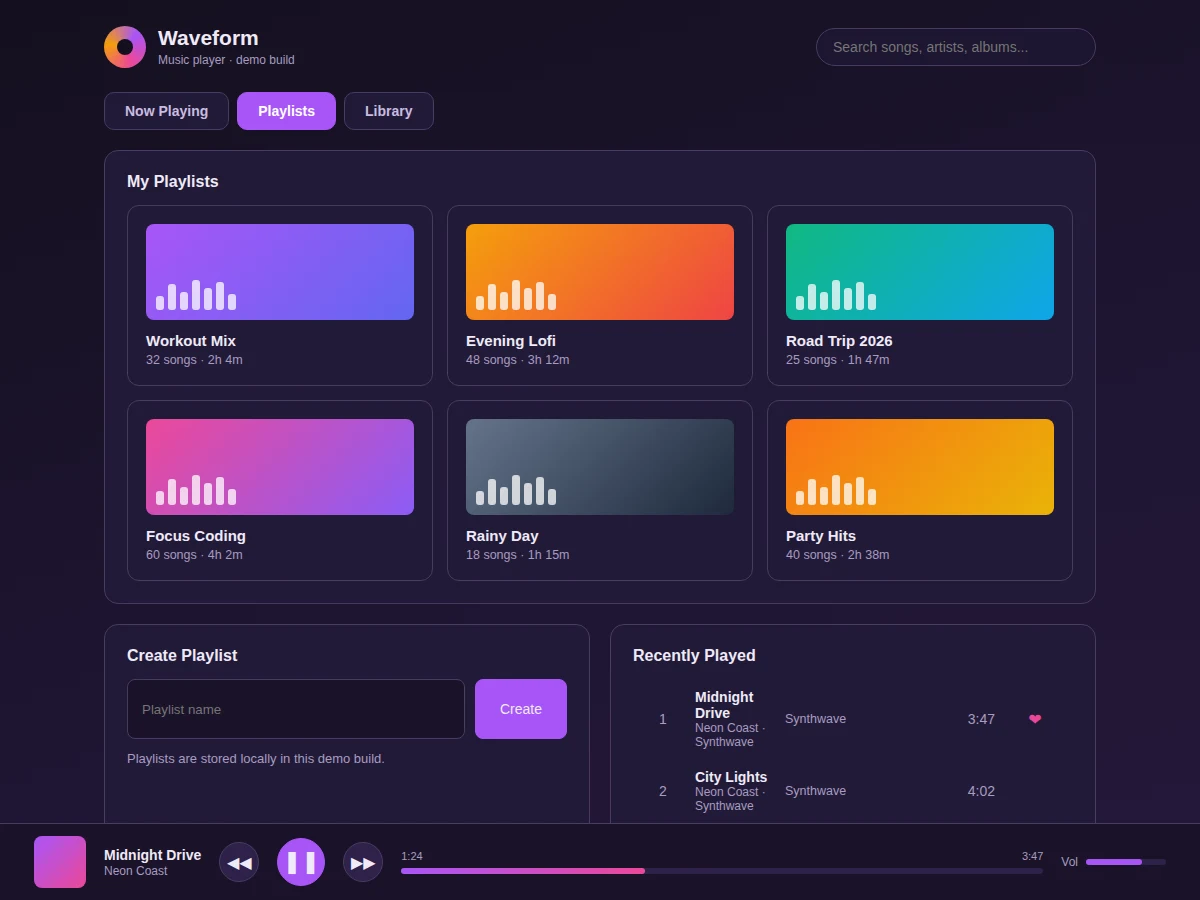
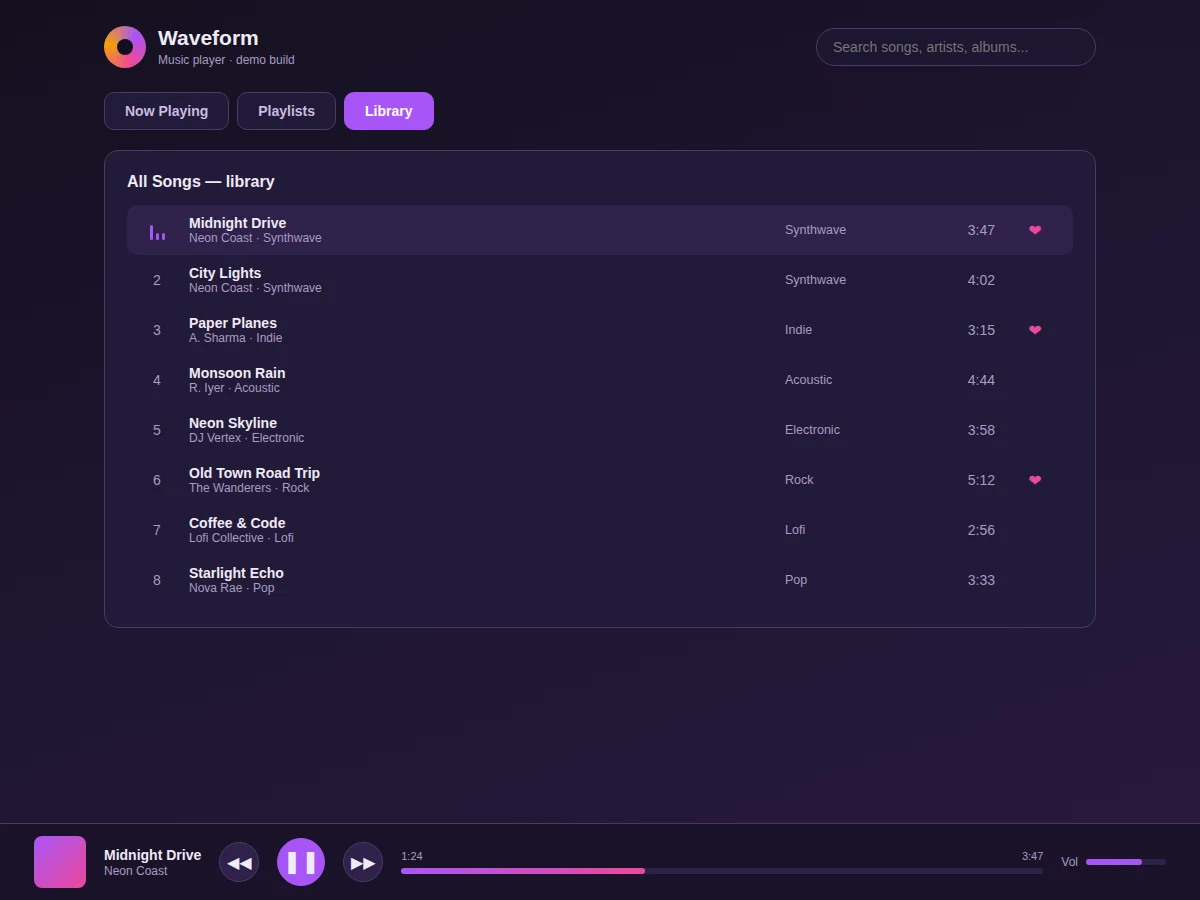
Streaming apps set a high bar for media UI: now-playing screens, queues, playlists and mini-players that survive navigation. This project builds Waveform, a web music player that meets that bar in a single file. The Now Playing view pairs gradient album art with track metadata, an animated visualizer canvas, a progress bar with timestamps, and transport controls including a working play/pause toggle, plus an up-next queue. The Playlists view shows six curated playlists (Workout Mix, Evening Lofi, Road Trip 2026 and more) as cover-art cards, a playlist creation form and a recently-played list. The Library view lists all eight tracks with genre and duration metadata and like states. A fixed bottom player bar with mini art, controls and progress persists across every view — the hallmark of real player architecture.
How it works
- The app loads a catalog: tracks with title, artist, genre, duration and liked state, plus playlists with covers.
- A playback state machine (current track, playing/paused, progress) drives the UI.
- The Now Playing view renders art, metadata, the visualizer canvas and transport controls from that state.
- The visualizer animation loop runs only while playing, freezing on pause.
- The Playlists view renders cover cards and appends newly created playlists to the grid.
- The bottom player bar mirrors the same playback state, so it stays in sync on every view.
Tech stack:
- HTML5, CSS3, vanilla JavaScript (ES6)
- Canvas 2D API for the audio visualizer
- Playback state machine (no audio library)
- Gradient album-art system
- Static deployment (no server or database)
| Parameter | Value |
|---|---|
| Views | 3 (Now Playing, Playlists, Library) plus persistent player bar |
| Demo tracks | 8 with artists, genres, durations |
| Playlists | 6 curated plus user-created |
| Visualizer | 64-bar canvas animation tied to play state |
| Dependencies | None (single HTML file) |
| Audio | UI-complete; MP3 wiring via HTML5 audio documented |
| Deployment | Any static host |
Project features
- [Now-playing view] Album art, track metadata, animated visualizer, progress bar and transport controls.
- [Animated visualizer] Canvas bars that animate while playing and freeze on pause, driven by play state.
- [Up-next queue] Ordered queue of upcoming tracks rendered from the catalog.
- [Playlist management] Six curated playlists with cover art plus a working playlist-creation form.
- [Song library] Full track table with artists, genres, durations and like states.
- [Persistent player bar] Fixed bottom bar with mini art, controls and progress across all views.
- [Realistic catalog] Eight tracks with believable artists, genres and durations throughout.
What is included
- Complete source code (single-file player with all views)
- Realistic 8-track catalog and 6 playlists
- Visualizer and playback-state implementation
- Setup guide (wiring real audio files, Web Audio API analyzers)
- Project report PDF (media UI architecture, state design, methodology)
- PPT presentation for final review
- Viva Q&A preparation document (media apps, canvas animation, state machines)
Limitations & prerequisites
- Playback state is fully modelled but audio output needs real files wired via the HTML5 audio element (documented extension).
- Progress is demonstrative; real timeupdate binding comes with audio wiring.
- No search backend, streaming or offline caching in this build.
- Single local catalog; no user accounts or synced libraries.
Frequently Asked Questions
Does it play real audio?
The player architecture — state machine, queue, progress, visualizer hook — is complete and working. Wiring MP3 files through the HTML5 audio element (and real analyzer data into the visualizer) is documented as the extension.
How does the visualizer work?
A canvas animation loop draws 64 bars each frame while the state machine reports "playing"; pausing freezes the frame, so the visual always matches the transport state.
How do playlists work?
Each playlist is an object with cover, name and song list; the creation form appends a new one to the grid instantly.
Why a persistent bottom bar?
Real players keep transport controls visible during navigation; the fixed bar mirrors the same playback state as the Now Playing view.
What will I learn?
Media-app state machines, canvas animation loops, and the UI architecture of streaming products.
Is this project suitable for a final-year project?
Yes — for Computer Science, IT and Web Development programs. It demonstrates state-driven interactive UI at streaming-app fidelity. Suitable for B.E./B.Tech final-year projects in Computer Science, IT and Web Development.
Components & software requirements
- HTML5, CSS3, vanilla JavaScript (ES6)
- Canvas 2D API for the audio visualizer
- Playback state machine (no audio library)
- Gradient album-art system
- Static deployment (no server or database)
Delivery information
Built-to-order project. Delivery timeline is shared after order confirmation based on current queue.
Support terms
Complete documentation, setup guide, and viva preparation included. Support for setup and explanation provided.