
More project photos (3)

The problem
Medicine Expiry Tracker is an Android app that stops families from consuming expired medicines. In most Indian households, strips of tablets accumulate in drawers and kitchen shelves, and nobody remembers which strip expires when — especially when one person manages medicines for parents or grandparents. Existing reminder apps track doses but ignore expiry dates entirely, and none of them separate one family member's stock from another's, so a parent's insulin sits in the same list as a child's vitamins. This project solves exactly that: each family member gets a private profile, every medicine is stored with its batch number and expiry date in a local Room database, and a WorkManager background worker scans for approaching expiries on a 15-minute cadence and raises local notifications — red for expired, amber for due within 30 days. The dashboard sorts everything by days-to-expiry, so the most dangerous strip is always at the top.
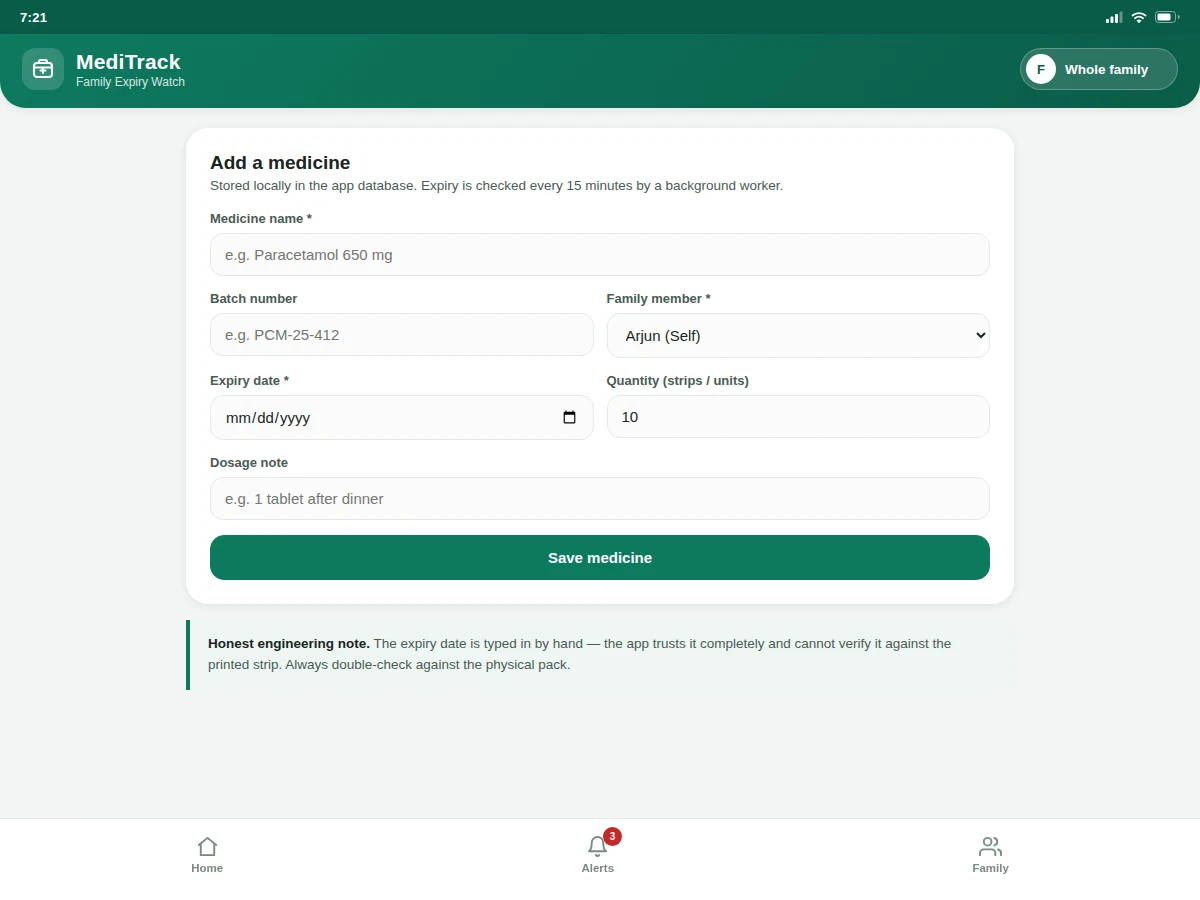
Adds a medicine: name, batch, expiry date
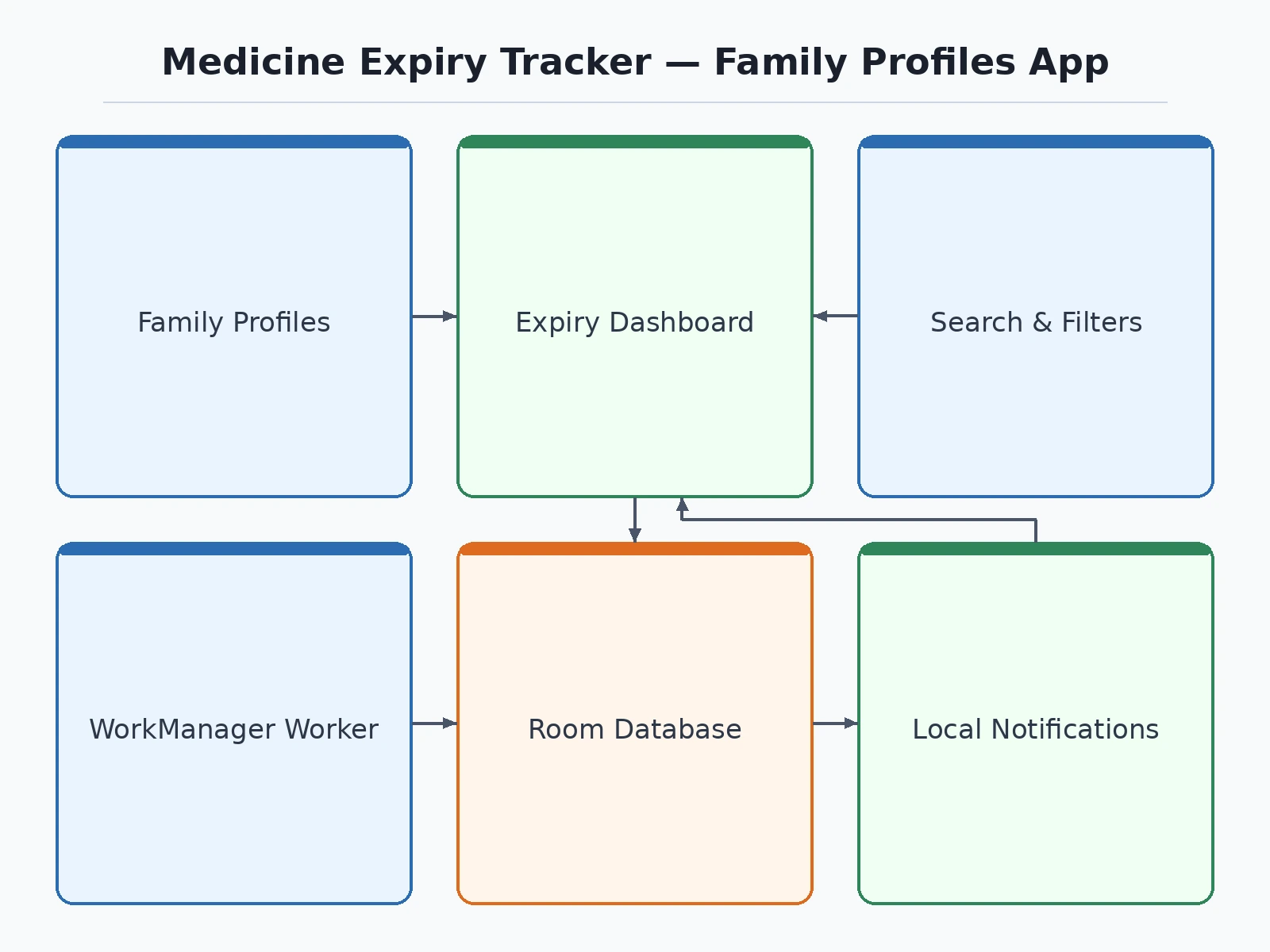
Follow the working sequence
How it works
End to end, the app works like this. When a strip is bought, the user opens the add-medicine form, types the name, batch number and the expiry date printed on the strip, picks which family member it belongs to, and saves — the entry lands in that member's table in the local Room database. Independently of the UI, Android's WorkManager fires a periodic worker on its minimum 15-minute interval; the worker queries the database for medicines that expired or will expire within the alert windows, and hands any hits to the NotificationManager, which posts them through the expiry-critical or expiry-watch channel. Opening the app shows the dashboard, which reads the same database, computes days-to-expiry from today's date, sorts the list with the most urgent first, and color-codes each row. Tapping "use one" decrements quantity in the database; deleting a finished strip removes it. No network call happens at any step — the phone is the entire backend.
- The user adds a medicine — name, batch number, expiry date from the strip, family member, quantity and dosage note — saved to that member's table in the Room database.
- The dashboard loads the active profile's medicines, computes days-to-expiry against today's date, and sorts the list with expired and nearest-expiry items first.
- Each row is color-coded — red for expired or ≤7 days, amber for ≤30 days, green beyond — with an explicit "Expired 12d ago" or "5 days left" label.
- Independently, a WorkManager periodic worker wakes on Android's 15-minute minimum interval and scans the database for newly expired or newly due medicines.
- Hits are posted as local notifications through two channels — expiry-critical (expired, ≤7 days) and expiry-watch (≤30 days) — even if the app is closed.
- The user acts: "use one" decrements quantity, delete removes finished strips, and the alerts screen keeps a history of every check the worker ran.
Tech stack:
- Kotlin (primary app language)
- Room · SQLite local database
- WorkManager background checks
- Material 3 UI components
- MVVM · ViewModel + StateFlow
- DataStore preferences
- Android Notification Manager
- Gradle build system
| Parameter | Value |
|---|---|
| Background check interval | 15 minutes (WorkManager platform minimum — official Android value) |
| Data storage | 100% on-device Room/SQLite; zero network calls (design) |
| Demo sample data | 8 sample medicines across 3 family profiles (as shipped in the demo) |
| Notification channels | 2 — expiry-critical and expiry-watch (design target) |
| Release APK size | Approximately 8–12 MB (expected) |
| Minimum Android version | API 26 — Android 8.0 and above (design target) |
| Urgency thresholds | Expired / ≤7 days / ≤30 days / safe (design) |
| Offline capability | Full functionality without internet (design) |
Project features
Four capabilities carry this project. First, family profiles: every member — self, parents, grandparents — gets an isolated medicine list with their own urgency counts, so one person's stock never pollutes another's. Second, expiry-first sorting: the dashboard orders every strip by days-to-expiry with a red-amber-green urgency code, putting expired and nearly-expired medicines at the top where they cannot be missed. Third, honest background checks: a WorkManager periodic worker re-scans the local database on Android's own 15-minute minimum cadence — the app never pretends to watch to the second — and posts local notifications through dedicated alert channels. Fourth, batch-level tracking: each entry records batch number, quantity and dosage note, and a one-tap "use one" action decrements stock so refills can be planned before a strip runs out. Together these four make the app genuinely useful in a real household, not just a demo.
- [Family profiles] Each family member gets a separate medicine list with independent urgency counts and a one-tap profile switcher in the app bar — one phone can manage medicines for the whole household.
- [Expiry-first dashboard] Every medicine is sorted by days-to-expiry with red (expired or ≤7 days), amber (≤30 days) and green (>30 days) urgency coding, so the riskiest strip is always at the top.
- [WorkManager background checks] A periodic worker re-scans the Room database on Android's 15-minute minimum interval and posts local notifications — no server, no account, works fully offline.
- [Batch and stock tracking] Each entry stores batch number, quantity and a dosage note; the "use one" action decrements stock and warns when a strip runs out.
- [Smart alerts screen] Expired, due-this-week and due-this-month items are grouped with plain-language guidance ("discard, do not consume"), plus a manual "run check now" option.
- [Search and filters] Instant search across medicine names and batch numbers, with filter chips for expired, due-in-7-days, due-in-30-days and safe stock.
- [Private by design] All data lives in the on-device Room database; nothing is uploaded, synced or tracked, which the report documents as an explicit privacy guarantee.
What is included
- Complete Kotlin source code with MVVM structure
- Room database schema and DAO layer
- WorkManager expiry-check worker implementation
- Signed-APK build guidance document
- Project report PDF (problem, design, implementation, testing)
- PPT presentation for final review
- Viva Q&A preparation document
- The working HTML demo used for the screenshots, as a clickable reference
Limitations & prerequisites
- Expiry dates are typed in by hand — the app trusts them completely and cannot verify them against the printed strip.
- WorkManager's 15-minute minimum interval means checks run on a 15-minute cadence, never to the second; a medicine expiring at 10:01 may only be flagged at the next worker run.
- Aggressive battery optimization on some phone brands can delay WorkManager jobs further — the report documents this as a known Android behavior.
- The app has no barcode or OCR scanning in the base build — batch and expiry entry is manual.
- Notifications are local only; there is no server, no cross-device sync, and no caregiver alerting to another phone.
- This is a household organizer, not a medical device — it gives no dosage advice and must not be relied on for critical medication decisions.
Frequently Asked Questions
How does the app know when a medicine expires?
You enter the expiry date printed on the strip when you add the medicine. The app computes days-to-expiry from today's date and a WorkManager background worker re-checks the local database on Android's 15-minute minimum interval, posting a local notification when something expires or enters the 7-day or 30-day window. It never guesses — it only works with dates you typed.
Does it need the internet or an account?
No. Everything — the medicine database, the background checks and the notifications — runs on the phone itself using Room and WorkManager. There is no sign-up, no server and no data leaving the device, which also makes the privacy story simple to defend in a viva.
Why family profiles instead of one list?
Because one phone usually manages medicines for parents and grandparents too. Each profile keeps its own list, urgency counts and alert history, so a father's insulin never gets buried under someone else's vitamins — and the dashboard can switch between members with one tap.
Can it scan the barcode on the strip?
Not in the base build — batch number and expiry date are entered manually. The report lists OCR/barcode capture as future scope, along with refill reminders and cross-device caregiver alerts. Adding ML Kit barcode scanning is a natural extension if you want to grow the project.
Is this project suitable for a final-year project?
Yes — for Computer Engineering programs. It demonstrates Android app architecture (MVVM), local persistence with Room, background processing with WorkManager, notification channels and Material 3 UI, all in a genuinely useful household application. The offline-first design and honest 15-minute check cadence also give strong viva talking points.
Components & software requirements
- Kotlin (primary app language)
- Room · SQLite local database
- WorkManager background checks
- Material 3 UI components
- MVVM · ViewModel + StateFlow
- DataStore preferences
- Android Notification Manager
- Gradle build system
Delivery information
Built-to-order project. Delivery timeline is shared after order confirmation based on current queue.
Support terms
Complete documentation, setup guide, and viva preparation included. Support for setup and explanation provided.
Download free synopsis (PDF)
Enter your name and WhatsApp number — the synopsis PDF downloads immediately. We may send occasional project updates on WhatsApp; no spam.