
More project photos (2)

The problem
Markdown Blogging Platform for Students with Drafts and Tag Search is a web application that lets students write study notes and project diaries in Markdown and publish them as readable posts. Many students already keep notes in plain text, yet plain text loses headings, lists, code blocks and tables when it is shared, so notes become hard to scan and harder to revisit. Copying notes into a slide deck or a document editor fixes formatting but hides the original text and makes small edits slow. This platform keeps the plain-text source as the single version of the work: the author writes Markdown, the platform renders it into a clean reading page, and the same source can be edited again at any time. Drafts protect unfinished writing, tags organise posts by topic, and tag search returns only the posts that carry a chosen tag, so a reader can move from a collection to one relevant post without scrolling through everything.
Concept: one plain-text source, rendered two ways. The editor view shows the Markdown source beside its rendered preview, and the reading view shows the same rendered post without editing controls, so writing, reviewing and reading never require three separate copies of the same post.
Student writes study notes or a project diary in Markdown.
Follow the working sequence
How it works
The Markdown blogging platform turns plain-text writing into a published post through a short, repeatable sequence. An author opens the editor, enters a title and a few tags, and writes the post body in Markdown, using headings for structure, lists for steps, code blocks for commands or snippets, and tables where a comparison helps. As the author types, the preview pane renders the same text, so headings, bold text, inline code, code blocks, lists, blockquotes, links and tables can be checked immediately. Saving stores the post as a draft, which stays private and editable. Publishing changes its status so it appears as a published post in the list and in tag search results. A reader then types a tag, opens a matching post, and reads it in the reading view, where the reading time is shown beside the post tags.
- The author opens the editor and enters a post title and comma-separated tags that describe the post topic.
- The author writes the post body in Markdown, using headings for structure, lists for steps, code blocks for commands or snippets, and tables where a comparison helps.
- The preview pane renders the same text beside the editor, so headings, bold text, inline code, code blocks, lists, blockquotes, links and tables can be checked before anything is published.
- The author saves the post as a draft, which keeps it private, editable and clearly labelled as a draft in the post list.
- When the post is ready, the author publishes it, changing its status so it appears as a published post in the list and in tag search results.
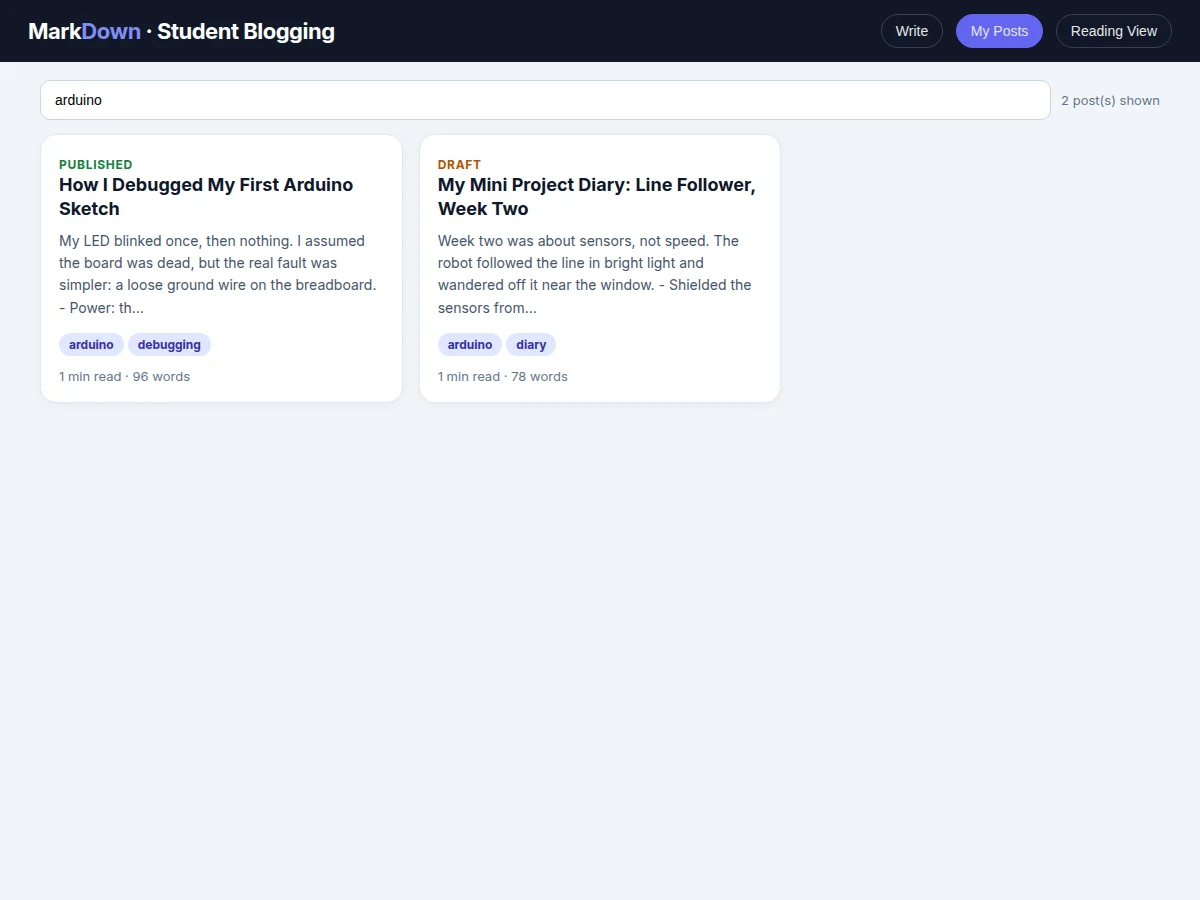
- A reader types a tag in the search box, and the post list filters at once to the posts that carry that tag.
- The reader opens a matching post in the reading view, which shows its title, tags and estimated reading time above the rendered body, and the author can edit or delete the post from that view.
Builder note from the demo build: a table row containing a pipe character inside inline code broke the first version of the table parser, which split every row on every pipe character. The shipped parser splits table rows only on pipe characters outside backtick code spans, and fenced code blocks are kept as raw text so Markdown inside a code block is never rendered as formatting. In first-principles terms, Markdown-to-HTML rendering here is a text-to-text transformation: the parser classifies lines, escapes raw HTML, then applies inline rules, so post content stays inert text until it is rendered.
Tech stack:
- HTML · CSS · JavaScript (editor, preview and reading views)
- Node.js · Express (web server and post API in the delivered build)
- SQLite (post, tag and status storage in the delivered build)
- Markdown parser (line-based block parsing with inline formatting)
- Git (version control)
| Parameter | Value |
|---|---|
| Platform | Web application, runs in a modern browser |
| Reading-time basis | Approximately 200 words per minute (reading assumption, not a measured reading speed) |
| Sample posts in demo | 3 sample student posts (starter content) |
| Markdown block types supported | Headings, lists, code blocks, tables, blockquotes and links (demo parser) |
| Storage (delivered build) | SQLite, 1 database file for posts, tags and status |
| Post statuses | Draft and published (2 statuses) |
| Tag entry | Comma-separated tags typed by the author |
| Demo file | Single HTML file, runs offline in the browser after download |
Project features
The platform centres on four capabilities that work together: a Markdown editor with live preview, a draft and publish workflow, tagging with tag search, and a reading view with reading time. The editor shows the rendered post beside the source text, so formatting mistakes are visible before anything is published. Drafts let an author save unfinished work privately and publish only when it is ready, while the post list keeps drafts and published posts visibly separate. Tags describe each post in a few words, and typing a tag in the search box filters the list to matching posts at once. The reading view presents the published post without editing controls, with its tags and an estimated reading time, so a reader knows what the post covers and how long it will take before starting it.
- [Markdown editor with live preview] The author writes headings, lists, bold and italic text, inline code, fenced code blocks, blockquotes, links and tables in Markdown, and the rendered post updates beside the source as each line is typed. Implemented in the base build.
- [Drafts and publishing workflow] A post can be saved as a draft, edited again later, and published only when the author is ready, with drafts and published posts shown with different status labels in the post list. Implemented in the base build.
- [Tagging and tag search] Each post carries comma-separated tags, and typing a tag in the search box filters the post list to the posts that carry that tag, so a reader can narrow a collection by topic in one step. Implemented in the base build.
- [Reading time and word count] Every post shows an estimated reading time beside its word count, computed from the post body at a stated reading assumption, so a reader can judge the length of a post before opening it. Implemented in the base build.
- [Post management] The author can open any post for editing, change its title, tags or body, save it again as a draft, publish it, or delete it from the post list. Implemented in the base build.
- [Clean reading view] A published post opens in a focused reading page that shows its title, status, tags and reading time above the rendered body, without editor controls distracting from the text. Implemented in the base build.
- [Sample student posts] The demo ships with sample student posts covering debugging notes, a study explanation and a project diary, so the editor, tag search and reading view can be demonstrated immediately after setup. Implemented in the base build.
Optional customizations (not in the base build): user accounts with login, comments on posts, image uploads inside posts, and scheduled publishing. Future scope (not implemented): full-text search across post bodies, post series that group related posts, and export of a post to a printable document.
What is included
- Complete web application source code (editor, preview, post list and reading view)
- Markdown parser with headings, lists, code blocks, tables, blockquotes, links and inline formatting
- Draft and publish workflow with tag search and reading time
- Sample student posts as starter content
- Setup guide for running the application locally
- Project report PDF (background, design, parser working, methodology, limitations)
- PPT presentation for final review
- Viva Q&A preparation document (Markdown parsing, rendering pipeline, draft workflow, storage design)
Timeline
- Week 1: requirements, editor layout, live preview and the Markdown parser core.
- Week 2: draft and publish workflow, SQLite storage, and post management (edit and delete).
- Week 3: tagging, tag search, reading view with reading time, and sample student posts.
- Week 4: testing across posts and edge cases, setup guide, report, PPT and viva Q&A.
Support
- Setup guidance for running the application locally, a walkthrough of the editor, preview, draft workflow and tag search, and fixes for defects found in the shipped build during the handover review.
Requirements
- A modern web browser for the editor, preview and reading views
- A Node.js runtime for the delivered server build
- SQLite for post, tag and status storage in the delivered build
- No paid service, external account or cloud subscription is required for the base build
Limitations & prerequisites
- The base build is a single-author blogging platform; multi-author accounts and logins are optional customizations, not included.
- The parser covers common Markdown (headings, lists, code, tables, blockquotes, links and inline formatting) and does not aim to cover every Markdown extension.
- Tag search matches post tags and titles; it does not search inside post bodies in the base build.
- Reading time is an estimate from a stated reading assumption, not a measured reading speed for any individual reader.
- Posts are stored in a local database in the delivered build; hosted deployment and a public domain are separate setup steps.
- Image uploads are not included in the base build; posts are text and code based.
Frequently Asked Questions
Is this project suitable for a final-year project?
Yes, this project fits Web Development and Computer Science programmes because it combines a real editor, a parser, persistent storage and search in one working web application. It demonstrates frontend design, text processing, database use and a complete draft-to-publish workflow, which gives a student concrete work to explain in a review. The report walks through each part in turn: how the editor and preview stay in sync, how the parser classifies lines and applies inline formatting, how drafts and published posts are stored by status, and how tag search filters the list, so review questions can be answered from the built system rather than from generic descriptions.
What Markdown features does the editor support?
The editor supports headings, lists, bold and italic text, inline code, fenced code blocks, blockquotes, links and tables, with the rendered post updating beside the source as the author types. That coverage matches the writing a student actually does: structured notes, step lists, commands or code snippets, quoted passages, links to references, and small comparison tables. Features outside that set, such as footnotes or embedded media, are not in the base parser, and the report states that boundary plainly so the scope is never overstated in a review.
Do drafts stay private until published?
Yes, a draft stays private, editable and clearly labelled as a draft in the post list, and it does not appear as a published post to readers until the author publishes it. The status is stored with the post itself, so saving, closing and reopening the application does not accidentally change a draft into a published post. Only the publish action changes that status, and the author can return a published post to editing, save it again, or delete it, which keeps unfinished writing under the author's control at every step.
Can this project be customized?
Yes, realistic customizations include user accounts with login, comments on posts, image uploads inside posts, scheduled publishing, and hosted deployment, each developed as a separate addition to the base build. The base build itself stays deliberately single-author and text focused, so a customization is quoted and built on top of a working system rather than promised inside it. A student can also extend the parser with an additional block type or add a new filter to the post list, and the report documents where such an extension would attach.
What do I need to run this project?
You need a modern web browser, a Node.js runtime and SQLite, with no paid service or cloud subscription required for the base build. The browser covers the editor, preview and reading views, while the server build adds persistence across sessions. The demo version runs as a single HTML file offline in the browser after download, which is useful for a quick demonstration, while the delivered build adds the server and database so posts persist across sessions. The setup guide covers both routes step by step, including how to confirm the server is running and where posts are stored.
Components & software requirements
- HTML · CSS · JavaScript (editor, preview and reading views)
- Node.js · Express (web server and post API in the delivered build)
- SQLite (post, tag and status storage in the delivered build)
- Markdown parser (line-based block parsing with inline formatting)
- Git (version control)
Delivery information
Built-to-order project. Delivery timeline is shared after order confirmation based on current queue.
Support terms
Complete documentation, setup guide, and viva preparation included. Support for setup and explanation provided.
Download free synopsis (PDF)
Enter your name and WhatsApp number — the synopsis PDF downloads immediately. We may send occasional project updates on WhatsApp; no spam.