
More project photos (2)
The problem
JSON is the lingua franca of web APIs, and JSON Schema is how teams contract what a payload must look like — required fields, types, ranges, formats. Students usually hand-validate payloads by eye and discover violations only when an API rejects them. Worse, the schema that validates data can also generate the form that collects it, a connection rarely taught: validation is presented as an abstract spec while forms are hand-built, so learners never see one schema doing both jobs. SchemaForge makes that connection concrete in a single page: write a schema once, validate documents against it with exact error locations, and watch the same schema render as a working form whose submission serializes back to JSON — the full round trip, running entirely in the browser.
How it works
- Both panes are JSON-parsed on demand; parse failures report the engine's own error message.
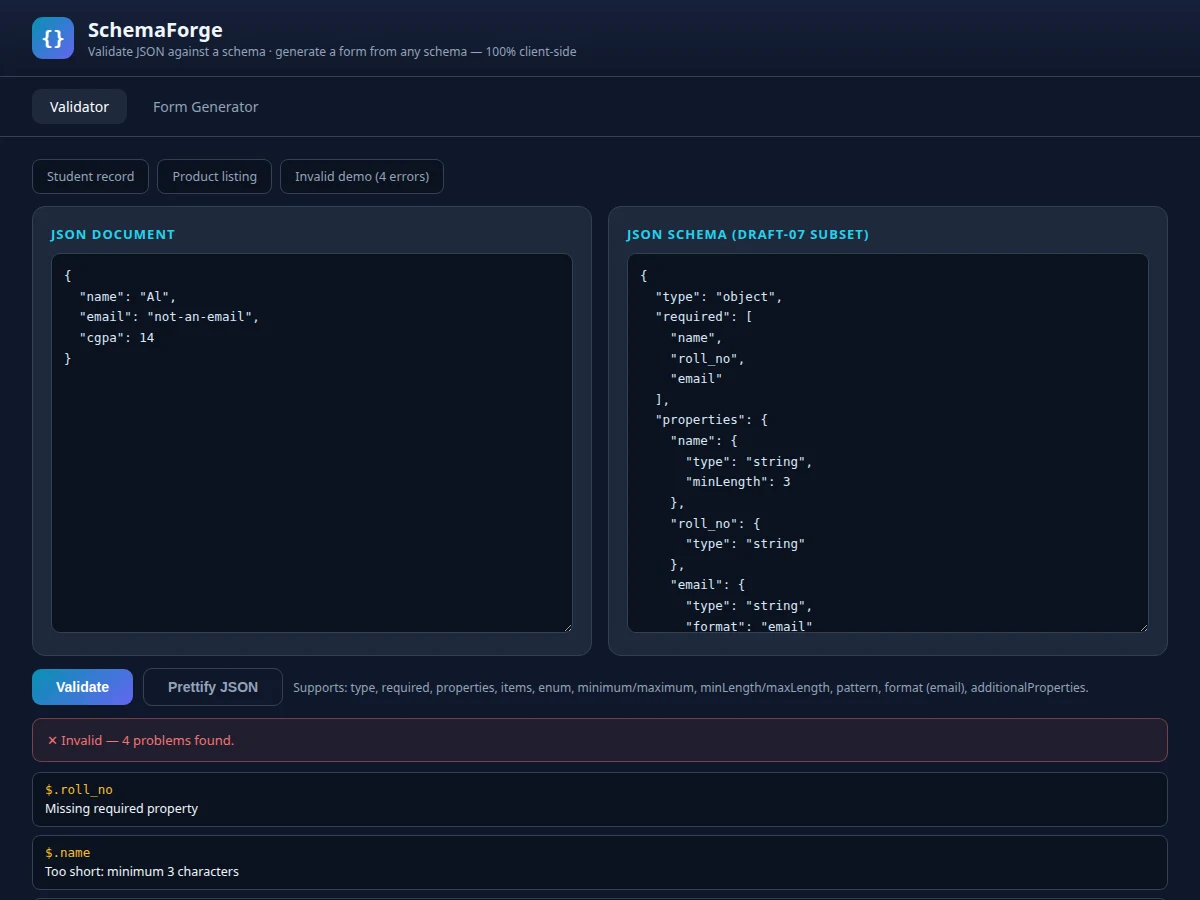
- The recursive validator walks the document and schema in parallel, accumulating {path, message} errors for type mismatches, missing required keys, range/length violations, pattern and email checks, enum membership and forbidden extra properties.
- A green banner means full conformance; a red banner lists one error card per violation with its path.
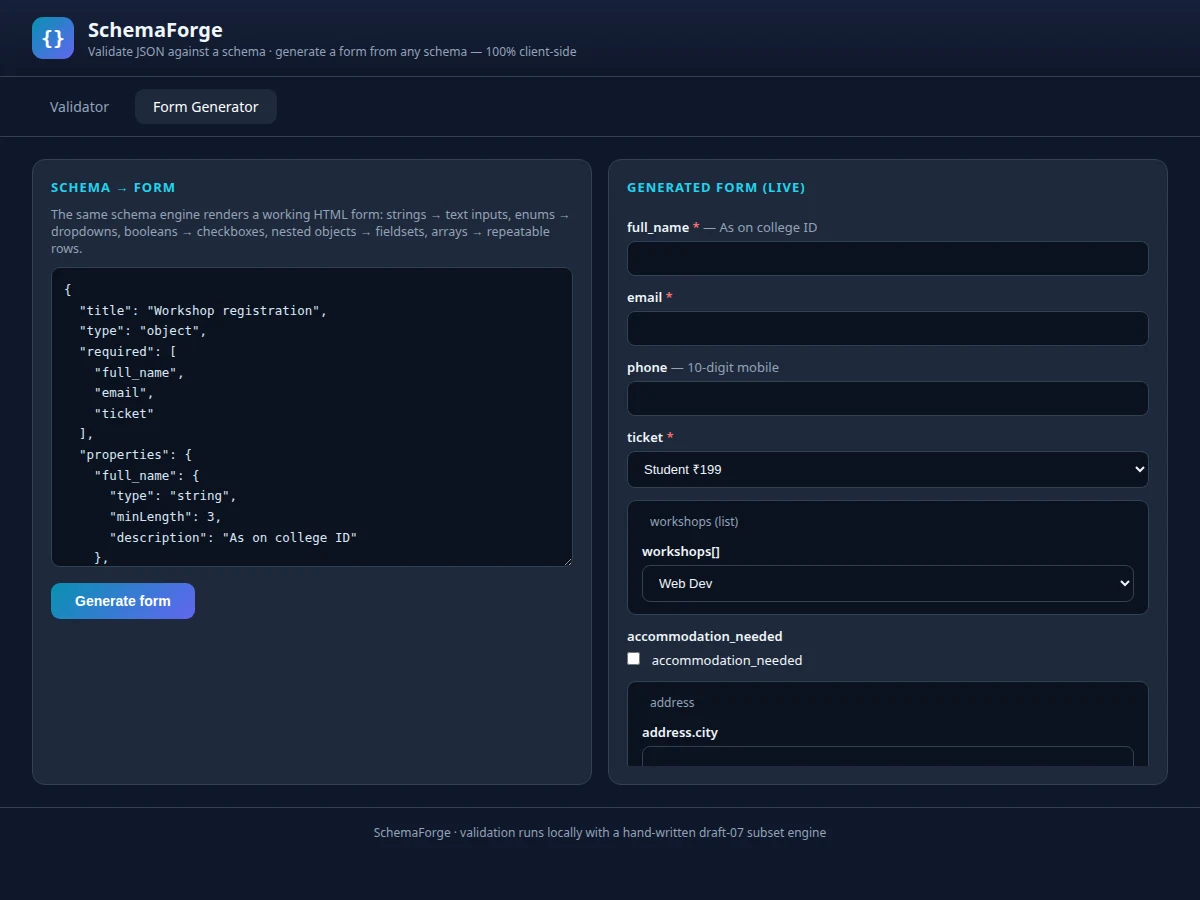
- The form generator recursively maps schema types to inputs, marking required fields and wiring native HTML validation attributes (minlength, pattern, min, max) from the schema constraints.
- On submit, named inputs are gathered back into a JSON object — numbers coerced, checkboxes as booleans — and shown pretty-printed, completing the round trip.
- Views switch via URL hash between the validator and the form generator.
Tech stack:
- HTML5, CSS3 (dark developer theme)
- Vanilla JavaScript (no frameworks)
- Hand-written recursive schema validator (draft-07 subset)
- Recursive schema-to-form renderer
- No backend, no dependencies — runs offline
| Parameter | Value |
|---|---|
| Schema keywords supported | 12 (type, required, properties, items, enum, minimum, maximum, minLength, maxLength, pattern, format, additionalProperties) (as shipped) |
| Form input types generated | Text, number, select, checkbox, fieldset, array row (6 kinds) (as shipped) |
| Sample pairs | 3 (valid, valid, intentionally-invalid) (as shipped) |
| Validation | Recursive, collects all errors in one pass (as shipped) |
| Dependencies | None — zero npm packages (as shipped) |
| File size | Single HTML file, approximately 17 KB (expected) |
| Browser support | Chrome, Edge, Firefox, Safari (current versions, expected) |
Project features
- [Schema validator] A hand-written draft-07 subset engine: type, required, properties, items, enum, minimum/maximum, minLength/maxLength, pattern, email format and additionalProperties.
- [Path-precise errors] Every violation reported with its JSON path and a readable message (e.g.
$.cgpa: above maximum 10), not a bare pass/fail. - [Dynamic form generator] The same schema renders a live form: strings to text inputs (with minlength/pattern attributes), numbers with min/max, enums to dropdowns, booleans to checkboxes, nested objects to fieldsets, arrays to repeatable rows.
- [Submit-to-JSON] Generated forms serialize back to pretty-printed JSON on submit, demonstrating the schema → form → data round trip.
- [Sample library] Three one-click pairs: a valid student record, a product listing, and an intentionally-invalid document showing four simultaneous errors.
- [Prettify helper] One-click JSON formatting for the document pane.
- [Zero-setup delivery] One HTML file, no libraries, no server — runs offline from a pen drive.
What is included
- Complete single-file web app (validator + form generator views)
- Documented validator and renderer code
- Project report PDF (background, JSON Schema theory, methodology, screenshots)
- PPT presentation for final review
- Viva Q&A preparation document (schema keywords, validation vs parsing, schema-driven UI)
- User guide for running and demonstrating the toolkit
Limitations & prerequisites
- Implements a practical draft-07 subset, not the full spec: no $ref, oneOf/anyOf/allOf or if/then (listed as future scope).
format: emailuses a pragmatic regex, not full RFC 5322 validation.- Generated forms are single-page; multi-step wizards are not supported.
- No schema persistence beyond the session — save/export is listed as future scope.
Frequently Asked Questions
Is this a full JSON Schema implementation?
It implements the practical draft-07 subset used in most real APIs (12 keywords). Advanced composition keywords ($ref, oneOf) are documented as future scope rather than half-implemented.
How are errors reported?
Every violation gets its JSON path and a plain message — $.email: not a valid email address — so you know exactly which field failed and why, unlike a bare valid/invalid flag.
How does the form generator decide which input to render?
By schema type and constraints: enum becomes a dropdown, boolean a checkbox, nested object a fieldset, array a repeatable row, and string/number constraints become native HTML validation attributes.
Does the submitted form data actually validate?
That is the point of the round trip: submit serializes the form to JSON, which you can paste back into the validator — a strong live demo.
Is this project suitable for a final-year project?
Yes — for Computer Science, IT and Web Development programs. It demonstrates recursive algorithms, API contract design, and schema-driven UI generation. Suitable for B.E./B.Tech final-year projects in Computer Science, IT and Web Development.
Components & software requirements
- HTML5, CSS3 (dark developer theme)
- Vanilla JavaScript (no frameworks)
- Hand-written recursive schema validator (draft-07 subset)
- Recursive schema-to-form renderer
- No backend, no dependencies — runs offline
Delivery information
Built-to-order project. Delivery timeline is shared after order confirmation based on current queue.
Support terms
Complete documentation, setup guide, and viva preparation included. Support for setup and explanation provided.