
More project photos (2)
The problem
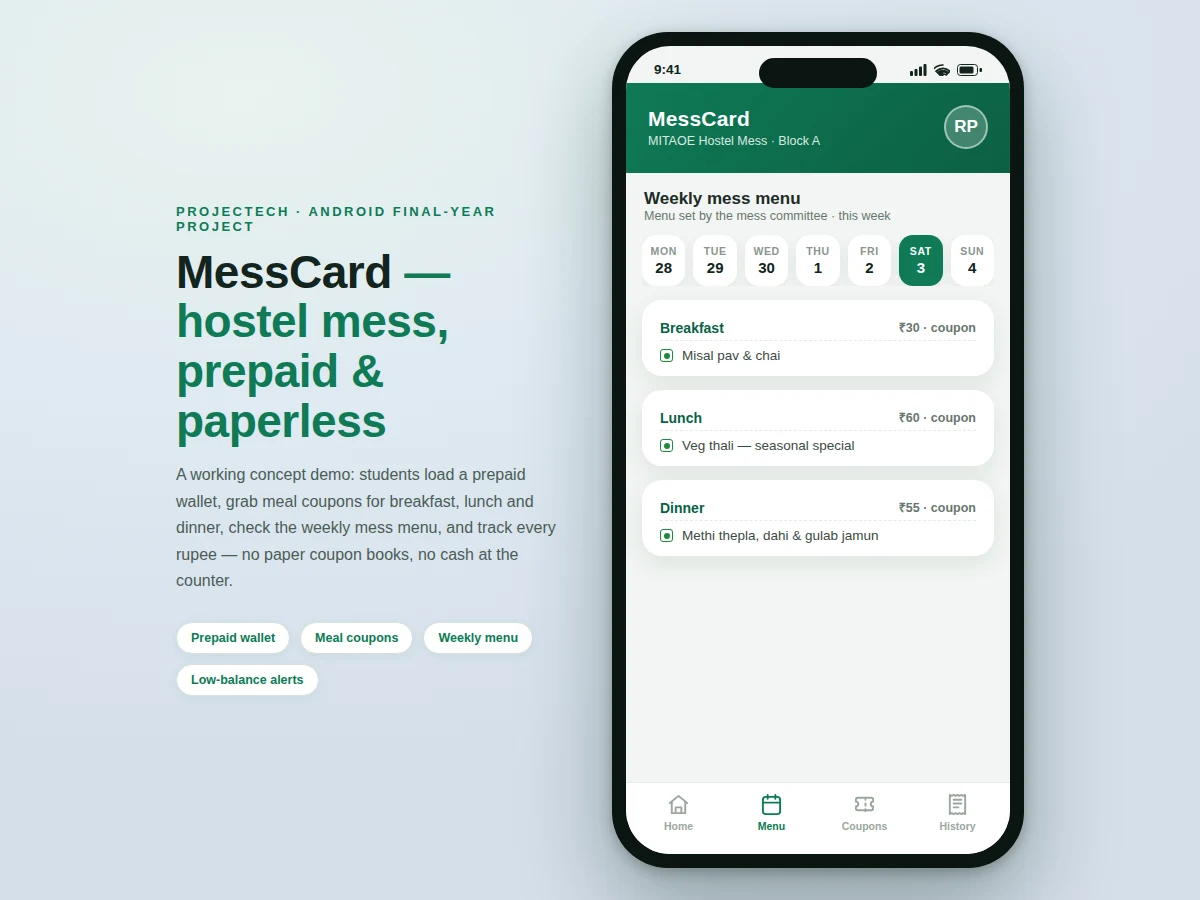
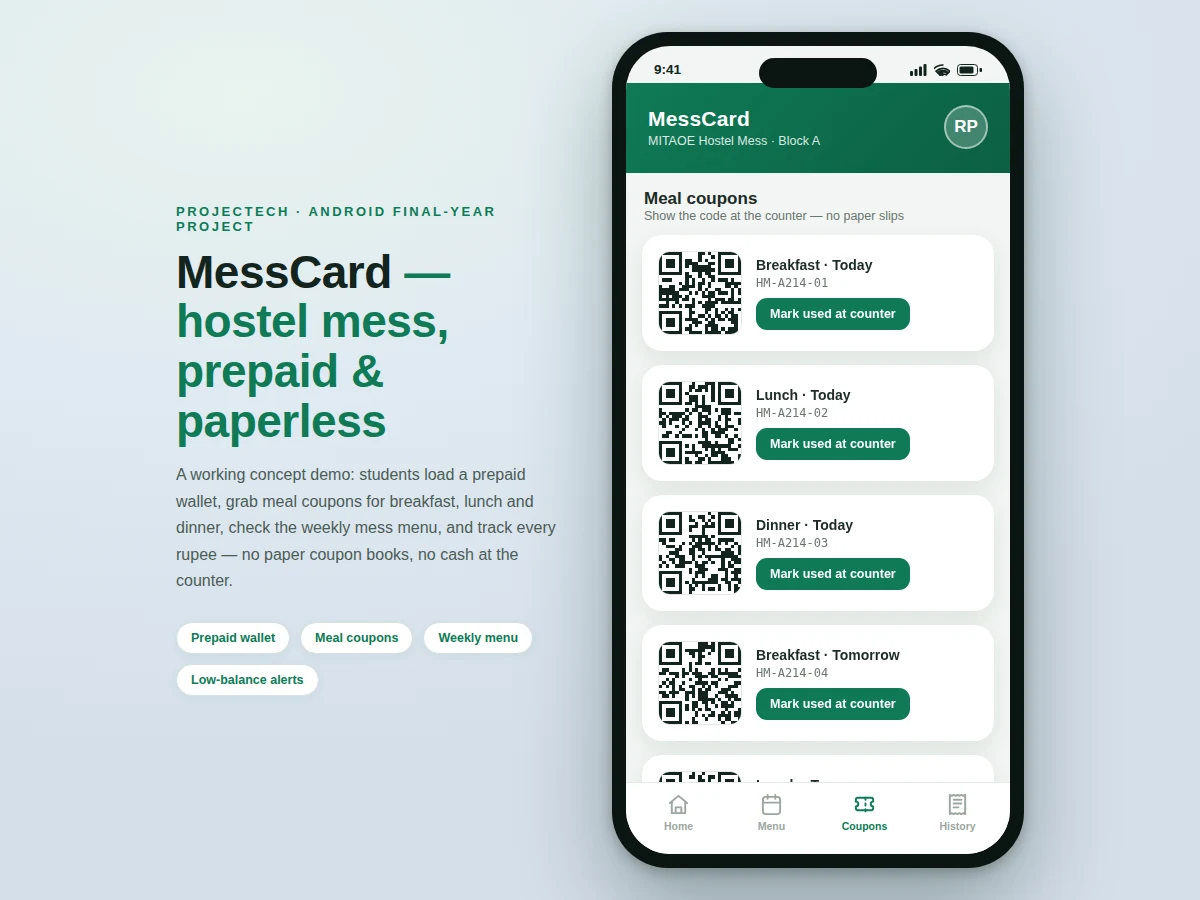
Most college hostels still run the mess on paper coupon books or cash registers: students buy a booklet, tear out one slip per meal, and the mess staff reconciles stacks of paper at month end. Slips get lost, balances are never visible, and nobody can see the week's menu without walking to the notice board. MessCard moves that entire loop into an Android app. A prepaid wallet holds the student's mess balance; dated meal coupons for breakfast, lunch and dinner are issued as QR codes inside the app; the counter scans (or visually verifies) the code and the amount is debited instantly. A transaction history shows every recharge and redemption, a low-balance alert warns before the wallet runs dry, and the weekly menu — published by the mess admin — is always one tap away. The design is offline-first for coupon display, since hostel Wi-Fi is unreliable exactly when students queue for food.
Registers with roll number, recharges the wallet and shows QR coupons at the counter.
Follow the working sequence
How it works
- The student registers with their roll number and room details; Firebase Authentication creates the account and links it to a mess member ID.
- A wallet recharge adds balance (the demo build simulates a ₹500 UPI recharge; a live payment gateway is an optional add-on).
- The mess admin publishes the weekly menu and per-meal prices (breakfast ₹30, lunch ₹60, dinner ₹55 in the demo) to Cloud Firestore.
- The app issues dated coupon tokens for each meal slot, renders each as a QR code, and caches them in the Room database for offline display.
- At the counter the student shows the meal's QR code; the staff app marks the token redeemed, the wallet is debited the meal price, and a transaction record is written.
- The home screen refreshes the balance, the low-balance check runs against the configured threshold, and the transaction history gains a new itemised entry.
Tech stack:
- Kotlin
- Jetpack Compose · Navigation
- Room (offline coupon cache)
- Firebase Authentication
- Cloud Firestore (menu, prices, redemptions)
- ZXing (QR code generation)
- Android SDK (min SDK 26)
| Parameter | Value |
|---|---|
| Platform | Android 8.0 (API 26) and above (design target) |
| Language | Kotlin |
| UI framework | Jetpack Compose with Navigation component |
| Local storage | Room database for cached coupons (offline-first design) |
| Backend | Firebase Authentication + Cloud Firestore |
| Coupon format | QR code with unique token ID (ZXing), one-time use per meal slot |
| Demo meal prices | Breakfast ₹30, lunch ₹60, dinner ₹55 (configurable by mess admin) |
| Low-balance threshold | ₹400 default, configurable (design target) |
| Demo build | Single-file HTML concept demo included for UI review |
Project features
- [Prepaid wallet] Students top up a mess wallet inside the app; every meal debit and recharge updates the balance immediately, and the ledger keeps a running total the student can check any time.
- [QR meal coupons] Dated coupons for breakfast, lunch and dinner are generated as QR codes with unique token IDs (e.g. HM-A214-01), valid only for their meal slot, and marked redeemed on use so a code cannot be reused.
- [Weekly mess menu] The mess admin publishes a 7-day, 3-meal menu with per-meal prices; students browse it by day and see exactly what each coupon covers.
- [Transaction history] Every recharge and redemption is recorded with meal name, amount and timestamp, so month-end mess accounting becomes a simple export instead of a paper count.
- [Low-balance alerts] The app warns when the wallet drops below a configurable threshold (₹400 in the demo build), so a student tops up before a dinner coupon goes invalid.
- [Student and mess-admin roles] Students get the wallet and coupons; a separate admin login lets mess staff publish the menu, set meal prices and view redemption records.
- [Offline-first coupon display] Issued coupons are cached in the on-device Room database, so the QR code shows at the counter even when hostel Wi-Fi drops; redemptions sync to the cloud when connectivity returns.
What is included
- Complete Android source code (Kotlin + Jetpack Compose) for student and mess-admin roles
- Firebase backend setup guide (Authentication + Firestore schema and security rules)
- Working demo concept app (the HTML demo used for the listing screenshots)
- Project report PDF (background, system design, database schema, methodology)
- PPT presentation for final review
- Viva Q&A preparation document (Compose, Room, Firebase, QR lifecycle, offline sync)
Limitations & prerequisites
- The base build simulates wallet recharge — no live payment gateway is integrated; Razorpay/UPI integration is an optional add-on, not part of the base price.
- Counter-side verification in the base build is staff-visual plus a manual "mark redeemed" action; a dedicated scanner module for mess staff is an optional add-on.
- Menu, prices and cloud backup need internet; only already-issued coupons display offline — first-time login and recharge always need connectivity.
- Coupon validity windows and the low-balance threshold are configurable per mess, so exact behaviour depends on the admin's settings, not fixed values.
- This is an academic prototype, not a certified payment instrument — it demonstrates wallet and coupon engineering and is not a replacement for regulated payment systems.
- Supports Android 8.0 and above; older devices and iOS are out of scope for the base build.
Frequently Asked Questions
Is this project suitable for a final-year project?
Yes — for Computer Engineering, IT and Android development programs. It covers mobile UI engineering with Jetpack Compose, local persistence with Room, cloud sync with Firebase, QR-code generation and a real two-role (student/admin) system, which gives plenty of material for implementation chapters and viva questions.
What is the main technology used?
Kotlin with Jetpack Compose for the UI, Room for offline coupon storage, and Firebase (Authentication + Cloud Firestore) for accounts, the weekly menu and redemption records. QR codes are generated on-device with the ZXing library.
Does it need internet to work?
Partly. Login, recharge, menu sync and cloud backup need internet, but already-issued coupons are cached in the Room database and display offline — deliberately, since hostel Wi-Fi is unreliable at meal times. Redemptions sync when connectivity returns.
Can it accept real payments for recharge?
Not in the base build — recharge is simulated so the wallet logic can be demonstrated and tested without merchant credentials. Live Razorpay or UPI collect integration can be added as a customization, since it needs the buyer's own merchant account.
Can the mess staff change the menu?
Yes. The build includes a mess-admin role that publishes the 7-day menu, sets per-meal prices and reviews redemption records, while students see only the wallet, coupons and menu views.
What will I receive with the project?
The complete Kotlin/Compose source for both roles, the Firebase setup guide with schema and security rules, the concept demo app, project report PDF, review PPT and a viva Q&A document. Suitable for B.E./B.Tech final-year projects in Computer Engineering, Information Technology and Android application development.
Components & software requirements
- Kotlin
- Jetpack Compose · Navigation
- Room (offline coupon cache)
- Firebase Authentication
- Cloud Firestore (menu, prices, redemptions)
- ZXing (QR code generation)
- Android SDK (min SDK 26)
Delivery information
Built-to-order project. Delivery timeline is shared after order confirmation based on current queue.
Support terms
Complete documentation, setup guide, and viva preparation included. Support for setup and explanation provided.
Download free synopsis (PDF)
Enter your name and email — the synopsis PDF downloads immediately. We may send occasional project updates; no spam, unsubscribe anytime.