
More project photos (2)
The problem
The Home Workout Planner App for Android with Exercise Library and Progress Charts is an Android app that helps people train at home without equipment by turning a loose collection of exercises into a structured weekly routine. Most beginners who try home workouts face the same failure mode: they save random videos, train hard for a few days, lose track of what they did, and quietly stop. Without a plan, there is nothing to follow; without a record, there is nothing to look back on; and without a visible streak, there is no small daily reason to keep going. This app closes all three gaps in one place. Users browse a searchable exercise library, build a daily plan with sets and reps, check off exercises as they finish them, and see their week as minutes trained, sessions logged and current streak. Everything runs on the phone itself, so the routine survives a dead Wi-Fi connection and a shared family phone.
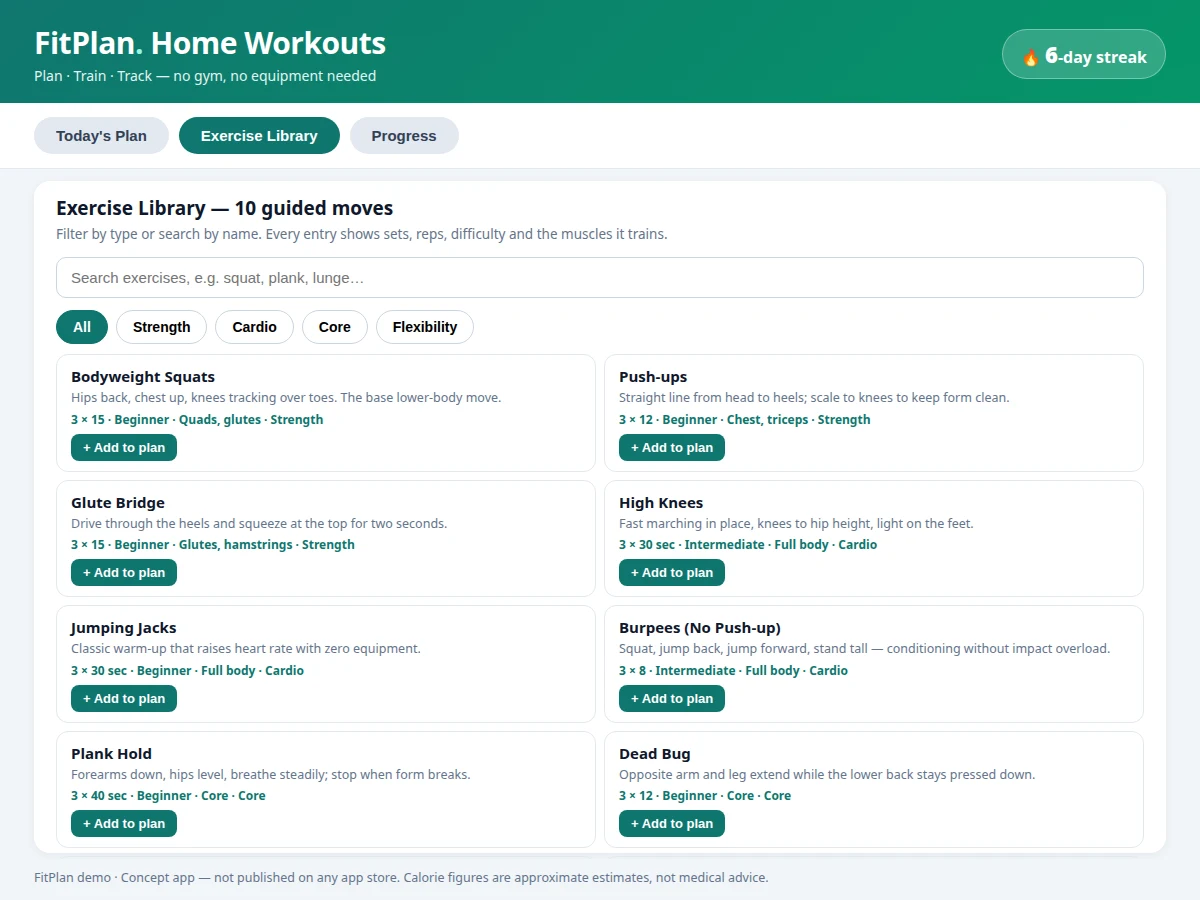
Ten bodyweight moves with descriptions, sets, reps and difficulty levels.
Follow the working sequence
How it works
The Home Workout Planner App for Android works as a closed loop that starts with choosing and ends with seeing progress. The user opens the exercise library, filters by type or searches by name, and adds chosen moves to the day's plan with their sets and reps. During the session, each exercise is checked off as it is finished, and the plan screen keeps a live count of completed exercises. When the session ends, the user logs it: the app records the duration, updates the day's bar on the progress chart, refreshes the weekly total and goal comparison, and extends the streak if a session has been logged on consecutive days. All of this state lives in the local Room database on the phone, so plans, logs, charts and streaks are available offline and survive the app being closed. The loop repeats daily: plan, train, check off, log, and watch the week fill in.
- The user opens the exercise library and filters by Strength, Cardio, Core or Flexibility, or searches by exercise name.
- Chosen exercises are added to the day's plan, each carrying its sets, reps or hold duration and difficulty level.
- During the session, the user taps each exercise's circle to mark it complete; the plan screen shows the live completed count.
- The user logs the finished session with its duration; the app records it in the local Room database.
- The progress chart adds the session's minutes to that day's bar and refreshes the weekly total against the weekly goal.
- The streak counter extends when sessions are logged on consecutive days, and the longest streak is updated if beaten.
- The next day starts from a fresh plan, while the full week's bars, totals and streaks remain visible for review.
Tech stack:
- Kotlin (Android app language)
- Android Jetpack · Room database
- Android Studio (development environment)
- Material Design components
- Canvas chart drawing (custom bar chart)
- Gradle build system
Software requirements
- Android Studio (current stable release, design target)
- Android SDK with minimum API level 26 (Android 8.0, design target)
- A physical Android phone or emulator for the demo build
- JDK bundled with Android Studio (no separate install step)
| Parameter | Value |
|---|---|
| Platform | Android 8.0 and above (minimum API level 26, design target) |
| Language | Kotlin (100% of app code, design target) |
| Local database | Room (on-device, no server) |
| Library entries | 10 entries in the reference demo build (expandable by the student) |
| Default session length | 30 minutes (configurable) |
| Default weekly goal | 180 minutes (configurable) |
| Chart window | 7 days (1 week view) |
| Streak rule | 1 logged session per training day (counted from logged sessions) |
| Demo week total | 214 minutes across 5 sessions (demo figure, labeled in the app) |
| Calorie figures | Approximate estimates only (never medical advice) |
| Internet required | None (fully offline by design) |
| Store listing | None (concept app, not published on any app store) |
Project features
The Home Workout Planner App for Android stands on four capabilities that work as one loop: a daily plan builder that turns exercises into a checkable session, a searchable exercise library that explains every move before it is added, progress charts that turn logged sessions into weekly minutes and trends, and streak tracking that rewards showing up day after day. Around that loop sit the supporting pieces: local offline storage so no account or connection is needed, a weekly minute goal the user can adjust, and approximate calorie estimates that are always labeled as estimates. Together these give a student a complete, demonstrable Android app: data entry, local persistence, list filtering, chart drawing and state management, all visible in a single working build. The plan builder, library, charts and streaks are the pieces a reviewer will actually tap during a demo.
- [Daily plan builder] (Implemented) Pick exercises, set the sets and reps for each, and check exercises off one by one as the session progresses; a live counter shows how many of the day's exercises are complete.
- [Searchable exercise library] (Implemented) 10 fully written entries in the reference demo build, each with a plain-language description, sets and reps, difficulty level and the muscles trained; filter by Strength, Cardio, Core or Flexibility, or search by name.
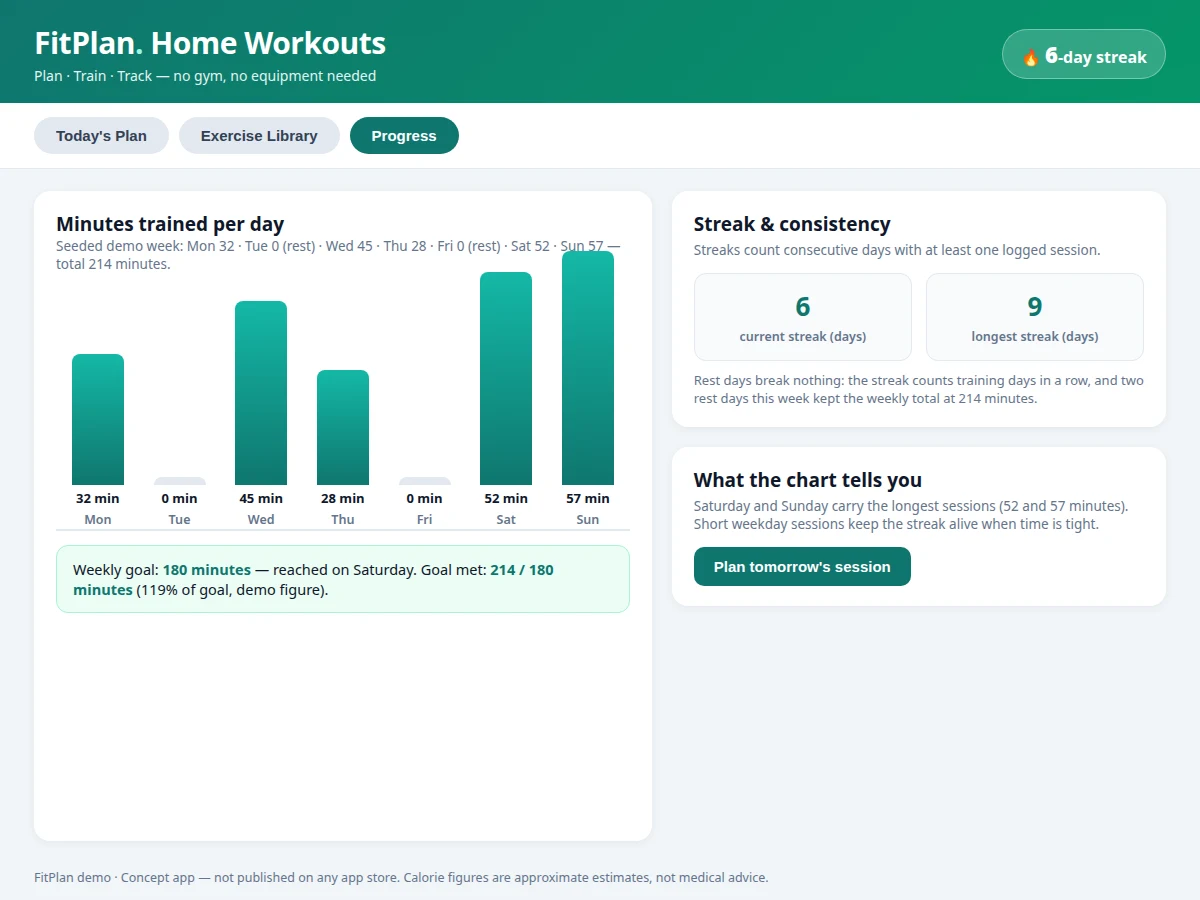
- [Progress charts] (Implemented) A 7-day bar chart of minutes trained per day, with rest days shown as zero, plus a weekly-goal comparison (for example, 214 minutes against a 180-minute goal in the demo week).
- [Streak tracking] (Implemented) Consecutive training days are counted automatically from logged sessions, with the current streak shown on the home screen and the longest streak kept alongside it.
- [Offline local storage] (Implemented) Plans, logs and streaks are stored on the device with Room; the app needs no account, no server and no internet connection to plan, train or review progress.
- [Adjustable weekly goal] (Configurable) The default weekly goal is 180 minutes and can be changed in settings; the chart comparison and the goal-reached message follow the new value.
- [Approximate calorie estimates] (Implemented) Each logged session shows an approximate calorie figure, always labeled as an estimate and never presented as medical advice or a measured value.
What is included
- Complete Android source code (Kotlin, Jetpack, Room)
- Working demo build with the plan builder, exercise library and progress charts
- Setup guide (Android Studio import, SDK setup, running on phone or emulator)
- Project report PDF (background, problem, methodology, architecture, outcomes)
- PPT presentation for final review
- Viva Q&A preparation document (activities, fragments, Room, state handling)
Limitations & prerequisites
- The app is a concept build for academic demonstration; it is not published on any app store and carries no store listing, ratings or user base.
- Exercise guidance is general fitness information for healthy adults; it is not medical advice, diagnosis or a training prescription, and users with health conditions should consult a professional first.
- Calorie figures are approximate estimates only, not measured values, and vary with body weight, intensity and exercise form.
- The 10-entry starter library covers common bodyweight moves only; equipment-based or sport-specific programmes are not included in the base build.
- Streaks and charts depend on the user logging sessions honestly; the app cannot verify that a logged session was actually performed.
- There is no cloud backup, account sync or social sharing in the base build; data lives on one device and is lost if the app's data is cleared without a backup.
- Progress charts show minutes and sessions only; they do not measure heart rate, strength gains or body composition.
Timeline
- Typical built-to-order delivery: 2–3 weeks from confirmed requirements (expected, depends on customisation scope).
- Week 1: requirements freeze, library content and plan-builder screens delivered as a first build.
- Week 2: progress charts, streak logic and local storage completed; demo build shared for review.
- Week 3: report, PPT and viva Q&A delivered; one round of review fixes included.
Support
- Setup help over chat until the demo build runs on the student's phone or emulator.
- One round of review fixes after delivery (layout issues, library edits, goal defaults).
- Customisation available separately: more library entries, reminder notifications, cloud backup, or a dark theme.
Frequently Asked Questions
What does the app actually do?
The app lets a user build a daily home workout plan from a searchable exercise library, check off exercises during the session, and log the session so weekly minutes, session counts and streaks update on progress charts shown on the home screen. Everything is stored locally on the phone with Room, so it works fully offline with no account and no server.
Do I need a gym or equipment to demo it?
No. The app is built around bodyweight exercises that need no equipment and no gym, which is exactly why it demos well anywhere: a phone, a small patch of floor and the demo build are enough for a complete review. The library entries describe form cues in plain language so a reviewer can follow along without prior training knowledge.
How are streaks and progress charts calculated?
Streaks count consecutive days on which at least one session was logged, and the chart plots minutes trained per day over a 7-day window with a weekly-goal comparison, so a missed day is visible as a zero bar rather than a gap. The demo week in the reference build totals 214 minutes across 5 sessions against a 180-minute goal, and both the goal and the session length are configurable.
Are the calorie figures accurate?
No, and they are never presented as if they were. Calorie figures in the app are approximate estimates that vary with body weight, intensity and exercise form, and they are labeled as estimates in the app itself on every screen where they appear. The project makes no medical claim and the app is not a substitute for professional health advice.
Can this project be customized?
Yes, within realistic scope. Common customisations are more library entries, reminder notifications, a dark theme, or cloud backup of logs. Each option is quoted separately and scoped before work starts, so the base build and its price stay unchanged unless you ask for an addition. Future-scope items such as wearable sync or social sharing are not claimed as included features.
Is this project suitable for a final-year project?
Yes, for Computer Science, IT and Android app development programmes. It demonstrates activity and fragment navigation, local persistence with Room, list filtering, custom chart drawing and state management, all inside one working app that a student can install and demo on a real phone. The report, PPT and viva Q&A cover the same architecture the demo build implements.
Components & software requirements
- Kotlin (Android app language)
- Android Jetpack · Room database
- Android Studio (development environment)
- Material Design components
- Canvas chart drawing (custom bar chart)
- Gradle build system
Software requirements
- Android Studio (current stable release, design target)
- Android SDK with minimum API level 26 (Android 8.0, design target)
- A physical Android phone or emulator for the demo build
- JDK bundled with Android Studio (no separate install step)
Delivery information
Built-to-order project. Delivery timeline is shared after order confirmation based on current queue.
Support terms
Complete documentation, setup guide, and viva preparation included. Support for setup and explanation provided.
Download free synopsis (PDF)
Enter your name and WhatsApp number — the synopsis PDF downloads immediately. We may send occasional project updates on WhatsApp; no spam.