
More project photos (2)

The problem
Most gym-goers who try to train with a plan carry it in their head, on a loose sheet of paper, or across three different apps: one for the plan, one for a timer, and the phone gallery for progress photos. The plan gets forgotten between sessions, the paper log gets lost or stays blank when the set felt hard, and the gallery photos have no link to what was actually lifted that week, so nobody can tell whether a change in appearance lines up with heavier training or just a different camera angle. Paid gym apps solve the organisation but charge a subscription and usually need an account and a connection, which is a poor fit for a student who trains in a basement gym with weak signal and wants one simple record of their own training.
This is a built-to-order software project: the Android app source code, the local database, the demo build, report, abstract and presentation slides are built fresh for each order.
The Gym Workout Plan Android App with Progress Photos and Rest Timer solves scattered gym records by putting the plan, the log, the timer and the photos into one Android app. The user builds a weekly plan from named days such as Push Day and Leg Day, adds exercises with set, rep, weight and rest targets, then opens the day's plan and logs each set as it is finished, with the rest timer starting after every logged set. Progress photos are saved with a date stamp in their own section, separate from the set logs, so a Week 1 photo sits beside a Week 6 photo with weekly training volume alongside. Everything is stored on the phone itself, so the app works with no account, no subscription and no connection, and the user keeps their training data.
| Training record | Cost to the user | Works without internet | Plan, log, timer and photos in one place | Who holds the data |
|---|---|---|---|---|
| Gym Workout Plan Android App (this build) | No subscription; built-to-order student project | Yes, all core features work offline on the phone | Yes: weekly plan, per-set log, rest timer and dated photos | The user, on their own phone |
| Paper workout diary | Price of a notebook (design target: under ₹200) | Yes, but pages tear, get lost and cannot be searched | No: plan and log share one page, timer and photos live elsewhere | The user, on paper only |
| Commercial subscription gym app | Monthly or yearly subscription (typical commercial model) | Core logging often needs an account and a connection | Usually yes, but behind a paywall and an account | The app company, on its servers |
The user names training days and adds exercises with set, rep, weight and rest targets.
How it works
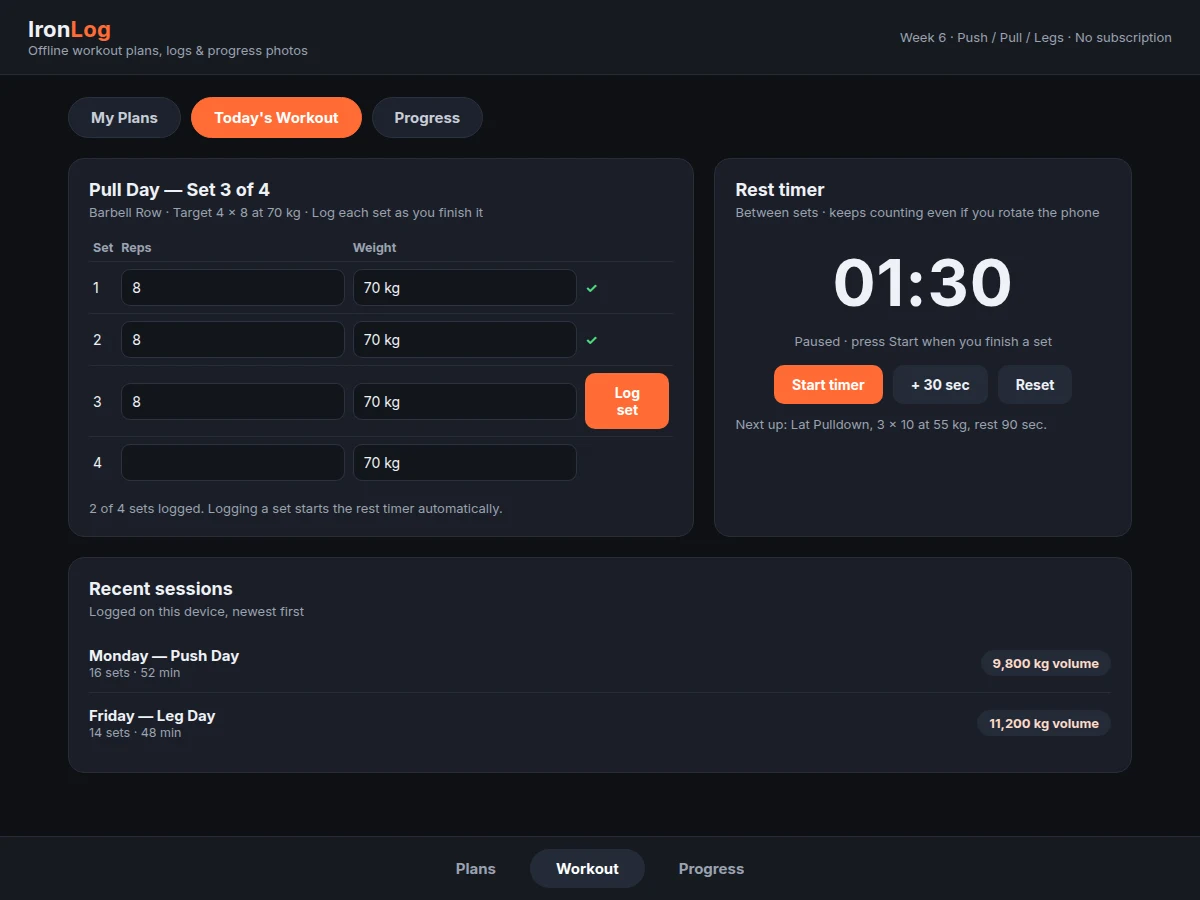
The Gym Workout Plan Android App with Progress Photos and Rest Timer runs as one loop from plan to proof. The user first builds a weekly plan: named days, exercises per day, and targets for sets, reps, weight and rest, all saved to the local database. In the gym the user opens the day's plan, works through its exercises, and logs each set with its actual reps and weight as it is finished; logging a set starts the rest timer, which counts down the planned rest and survives a screen rotation because the timer state lives in a ViewModel, not in the screen itself. When the session ends, its totals are stored as history, and the weekly volume chart updates from logged sets only. Separately, the user adds a progress photo whenever they want a visual record, stored with its date stamp so it can sit beside the training volume of the same week.
- The user creates a weekly plan: named training days such as Push Day, Pull Day and Leg Day, with exercises added to each day.
- For each exercise the user sets target sets, reps, weight in kilograms and rest time in seconds, and the plan is saved to the local database.
- In the gym the user opens the day's plan and starts the first exercise, with its target sets, reps and weight shown on screen.
- After each set the user logs the actual reps and weight lifted, and the rest timer starts automatically at the planned rest time.
- The user rests while the timer counts down, extending it by 30 seconds if needed, then starts the next set when the timer finishes.
- When all exercises are done, the session is saved to history with its set count, duration and total volume in kilograms.
- The weekly volume chart updates from logged sets only, showing total weight lifted per week as a bar chart.
- The user adds a progress photo with a date stamp at any point, and compares it against the training volume of the same week.
Tech stack:
- Kotlin · Android app language
- Android Jetpack · ViewModel and UI components
- Room database · local storage over SQLite
- SQLite · on-device database engine
- Material Design components · Android UI
- Android Studio · development environment
- Gradle · Android build system
- Git · version control
| Parameter | Value |
|---|---|
| Platform | Android phone · offline use (design target) |
| App language | Kotlin · Android (design target) |
| Local database | Room over SQLite · on-device storage (datasheet value: Room is a Jetpack persistence library over SQLite) |
| Timer state | ViewModel · survives screen rotation (design target, per Android ViewModel documentation) |
| Default rest time | 90 seconds (design target) · adjustable per exercise |
| Timer extension step | +30 seconds per tap (design target) |
| Demo plan size | 4 exercises · 16 sets in the sample Push Day (demo example) |
| Photo storage | Dated photo record · separate table from set logs (design target) |
| Accounts and subscription | None · no account and no subscription in the base build |
| Connectivity | None required for core features · offline-first (design target) |
Project features
The Gym Workout Plan Android App with Progress Photos and Rest Timer is built around four capabilities that carry the whole build. Weekly workout plans give training its structure: the user names training days, adds exercises to each day, and sets targets for sets, reps, weight and rest, so the session starts from a plan instead of improvisation. Per-set logging turns the plan into a record: every finished set is entered with its actual reps and weight, and the app totals session volume from those logged sets alone. The rest timer keeps the session moving: it starts automatically when a set is logged, counts down the planned rest, and can be extended in 30-second steps without losing the count. Dated progress photos close the loop between effort and visible change: each photo carries its own date stamp and sits beside the training volume of its week, so progress is judged against what was actually lifted.
- [Weekly workout plans] The user creates named training days, adds exercises to each day, and sets target sets, reps, weight and rest time per exercise, with a sample Push / Pull / Legs week included in the demo build. Implemented in the base build.
- [Per-set workout logging] Each finished set is logged with its actual reps and weight, and the app totals session volume (sets x reps x weight) from logged sets only, so planned targets never masquerade as completed work. Implemented in the base build.
- [Automatic rest timer] Logging a set starts the rest timer at the planned rest time (design target: 90 seconds by default), with pause, reset and +30 second extension controls, and the countdown survives a screen rotation. Implemented in the base build.
- [Dated progress photos] Photos are saved with a date stamp in a section separate from the set logs, so each photo can be compared against the training volume of its own week. Implemented in the base build.
- [Offline local storage] Plans, logs and photo references are stored on the phone with Room over SQLite, so the whole app works with no account, no subscription and no connection in the gym. Implemented in the base build.
- [Weekly volume chart] A bar chart totals the weight lifted per week from logged sets only, giving a single view of whether training volume is rising, flat or falling. Implemented in the base build.
- [Builder note: photos live outside the log table] Builder note from the demo build: progress photos are stored in their own table with a date stamp, not as a column on the workout log table, because a log row describes one set while a photo describes one day. Attaching a photo to a set row would duplicate it across sets or lose it when a set is edited, while a dated photo record stays correct no matter how the log changes. Implemented in the base build.
- [Session history] Finished sessions stay listed newest first with their set count, duration and total volume, so the user can reopen any past session and see exactly what was lifted. Implemented in the base build.
Optional and future scope (not in the base build): cloud sync and backup, social sharing of progress photos, wearable or heart-rate sync, exercise-video library, and a coach or trainer account. These can be developed on request and are not claimed as included.
What is included
- Complete Android app source code in Kotlin with Room local database
- Weekly plan builder, per-set logging, rest timer and dated progress photo sections
- Demo build with a sample Push / Pull / Legs week and sample logged sessions
- Database schema notes covering the plan, log, session and photo tables
- Setup guide for building and running the app in Android Studio
- Project report covering background, database design, timer behaviour and limitations
- Project abstract PDF with 10 labelled sections matching this page
- Presentation slides for final review
- Viva Q&A preparation document covering Room, ViewModel, offline storage and training-volume calculation
Limitations & prerequisites
- This is a workout log, not medical advice: it records training and shows photos, and it does not diagnose, treat or prescribe exercise for any health condition, so users with a health condition should follow a qualified professional's guidance.
- The app stores data only on the phone, so uninstalling the app or losing the phone without a backup loses the training history; cloud sync and backup are future scope, not included.
- Progress photos depend on consistent lighting, distance and pose; a photo taken under different conditions can look different even when nothing about training changed.
- Training volume is a simple sets x reps x weight total from logged sets only, so it says nothing about exercise form, effort or recovery, which the app does not measure.
- The demo build's sample weights and volumes are illustrative examples, not recommended training loads for any individual user.
- Rest timer behaviour on very old Android versions and on phones with aggressive battery optimisation may vary, since background timing depends on the device.
- The app is a student-built concept build, not published on any app store, and no store listing, download count or user rating is claimed for it.
Frequently Asked Questions
Is this project suitable for a final-year project?
Yes, it fits B.E. and B.Tech programmes in Computer Science and IT, because it combines Android UI development, a Room database with four related tables, lifecycle-aware timer state and a complete offline workflow a reviewer can test on a real phone. The build also gives a clear demonstration story: a plan created in seconds, a set logged in the gym, a timer that survives rotation, and a dated photo beside its week's volume.
Does the app need internet or a subscription to work?
No, every core feature works offline, because plans, logs, sessions and photo records are stored on the phone itself with Room over SQLite, so the app needs no account, no subscription and no connection in the gym. An internet connection would only matter for future scope such as cloud backup, which is not part of the base build.
How does the rest timer survive a screen rotation?
The timer's remaining time lives in a ViewModel, which Android retains across configuration changes such as rotation, so the recreated screen reconnects to the same timer instead of restarting it. This follows the Android ViewModel documentation, which states a ViewModel is not destroyed when its owner is destroyed for a configuration change, and the demo keeps the countdown running through a rotation.
Why are progress photos stored separately from the workout logs?
Because a log row describes one set while a photo describes one day, so attaching a photo to a set row would duplicate it across sets or lose it when a set is edited. A dated photo record in its own table stays correct no matter how the log changes, and it lets the app set a Week 1 photo beside a Week 6 photo with weekly training volume alongside.
Can the app be customised for a different training style?
Yes, plans are fully user-defined, so a different split, different exercises, different target sets, reps, weights and rest times can be entered without changing code. Adding cloud sync, social sharing or wearable support would be a separate development task, since those are listed as future scope and not included in the base build.
What does the weekly volume chart actually show?
It shows the total weight lifted per week in kilograms, calculated as sets x reps x weight summed over logged sets only, so planned targets that were never lifted never appear in the chart. The chart describes training volume, not fitness or muscle gain, which depend on form, effort, recovery and diet that the app does not measure.
Components & software requirements
- Kotlin · Android app language
- Android Jetpack · ViewModel and UI components
- Room database · local storage over SQLite
- SQLite · on-device database engine
- Material Design components · Android UI
- Android Studio · development environment
- Gradle · Android build system
- Git · version control
Delivery information
Built-to-order project. Delivery timeline is shared after order confirmation based on current queue.
Support terms
Complete documentation, setup guide, and viva preparation included. Support for setup and explanation provided.
Download free synopsis (PDF)
Enter your name and WhatsApp number — the synopsis PDF downloads immediately. We may send occasional project updates on WhatsApp; no spam.