
More project photos (3)
The problem
The Gesture Controlled Wireless Presentation Clicker using MPU6050 is a handheld remote that moves presentation slides forward and back with a tilt of the wrist. An MPU6050 6-axis IMU measures hand motion, and an Arduino Pro Micro (ATmega32U4) presents itself to the computer as a standard USB HID keyboard — so tilt right sends PageDown, tilt left sends PageUp, and no drivers or presentation plugins are required. Two buttons duplicate the gestures; F5 starts the slideshow. Presenters face bad options: stay by the keyboard, buy a proprietary clicker, or run a phone app needing venue network setup. Cheap clickers also punish mistakes mid-talk — one wrong button blanks the screen or exits the show. This build demonstrates a real embedded trade-off instead: gestures are convenient but ambiguous, so the firmware applies a calibrated tilt threshold plus a roughly 100 ms debounce window (design target). The debounce is not decoration — in bench testing, one un-debounced wrist flick skipped two slides.
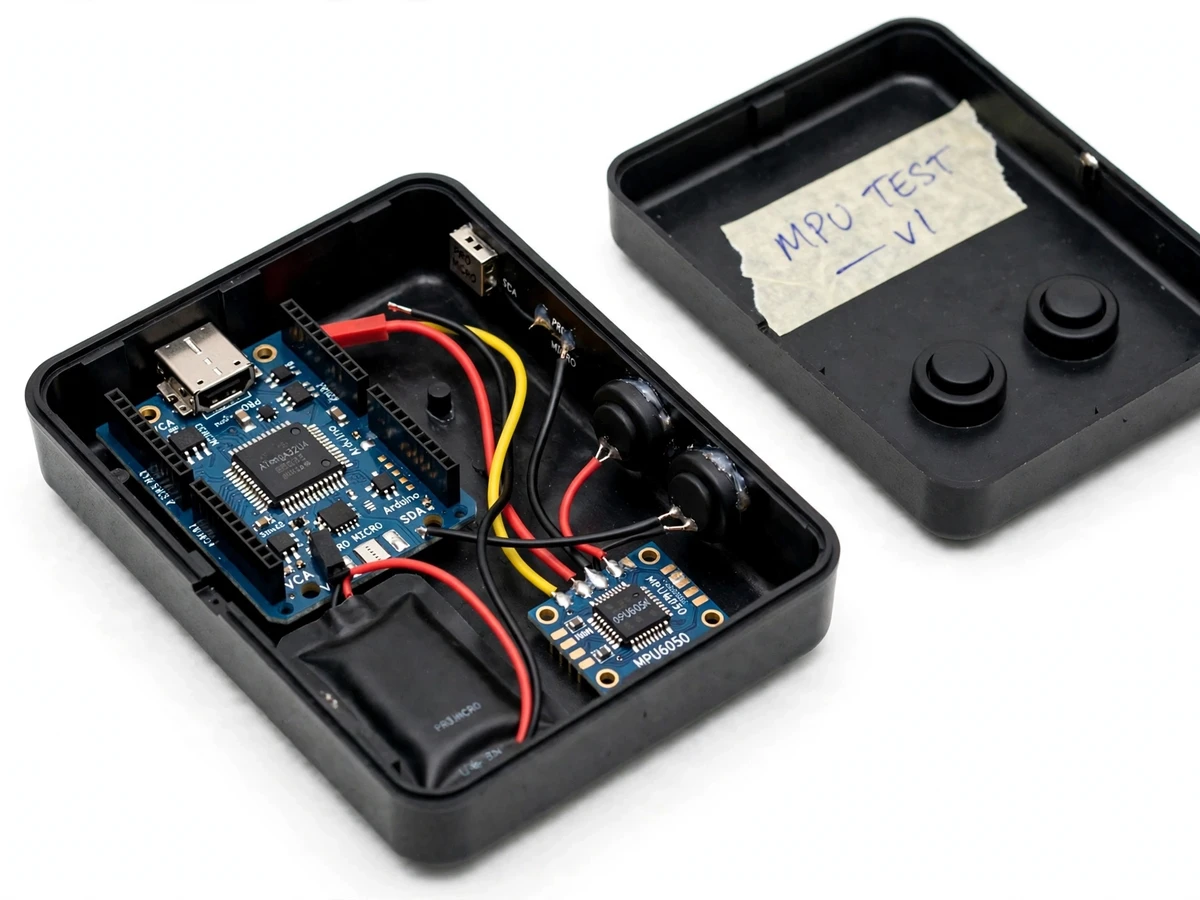
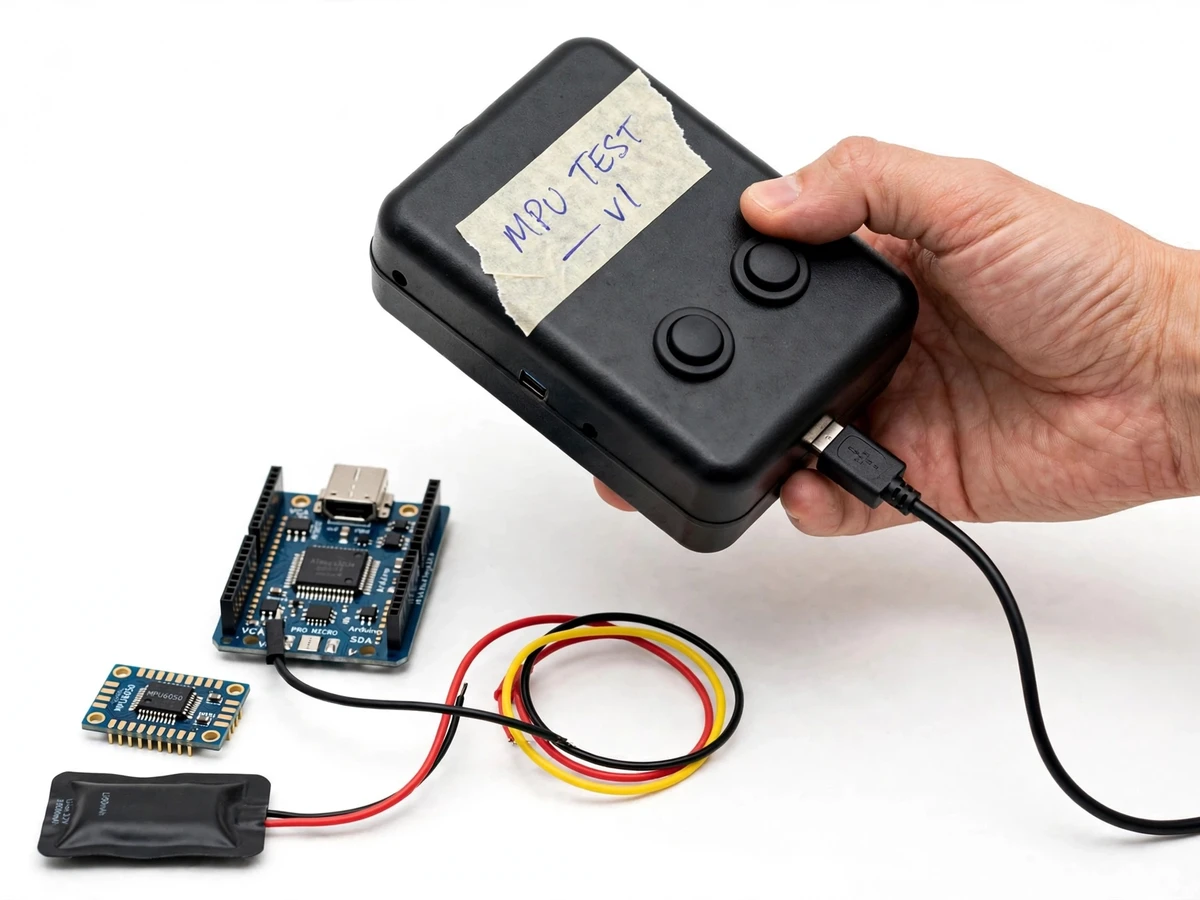
Wrist tilt is the input; two push buttons duplicate next and previous.
Follow the working sequence
How it works
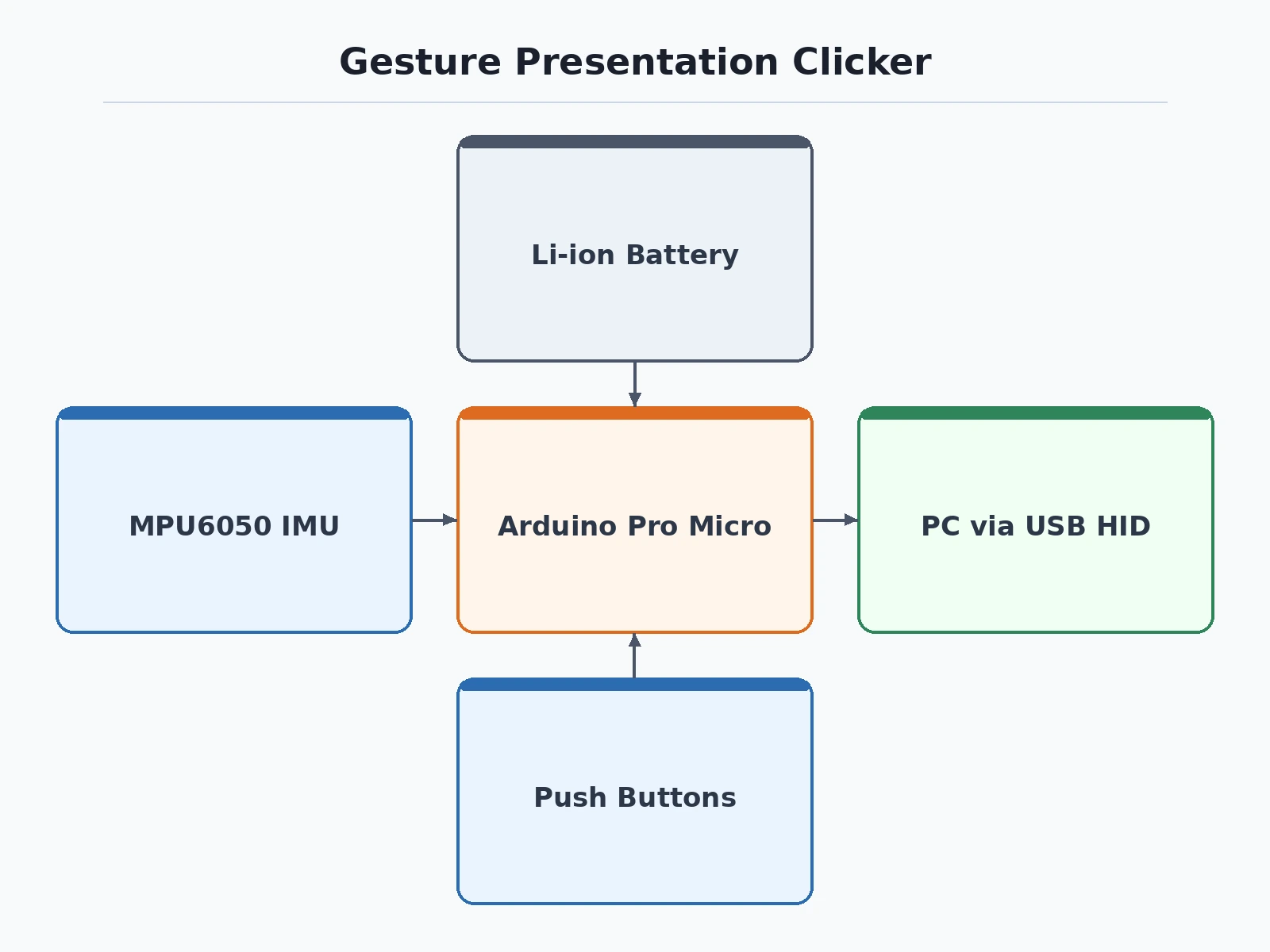
The Gesture Controlled Wireless Presentation Clicker using MPU6050 works by turning wrist motion into keyboard keystrokes, end to end: the MPU6050 samples acceleration and angular velocity at the firmware loop rate; a complementary filter fuses the accelerometer's slow, gravity-anchored tilt with the gyroscope's fast rotation data into one stable angle; the firmware compares that angle against the user's calibrated level pose, and when it passes the trigger threshold (design target approximately 25°) the Arduino Keyboard library sends PageDown or PageUp through the Pro Micro's native USB HID interface; a roughly 100 ms debounce window (design target, confirmed in bench testing) suppresses the second trigger one flick would otherwise produce; and the two push buttons bypass the gesture path entirely, sending the same keystrokes on press. The computer sees only an ordinary USB keyboard, so nothing is installed anywhere.
- At power-up the user holds the clicker level for about 2 s while the firmware records the reference pose and computes per-user trigger thresholds — approximately ±25° from level (design target).
- The Pro Micro polls the MPU6050 over I2C (address 0x68, datasheet) at the firmware loop rate, reading ±2 g accelerometer and ±250 °/s gyroscope data (datasheet default ranges).
- A complementary filter fuses the two streams: accelerometer data pulls the angle estimate toward gravity over the long term while gyroscope data supplies fast rotation response, cancelling drift and jitter.
- The firmware compares the filtered roll angle with the calibrated thresholds — crossing +25° sends PageDown (next slide), crossing −25° sends PageUp (previous).
- After every keystroke a ~100 ms debounce window (design target) ignores further triggers, so one wrist flick cannot skip two slides.
- Pressing NEXT or PREV sends the same keystrokes immediately through the gesture path's shared send function; a long action sends F5 to start the slideshow from the first slide.
- All keystrokes leave the Pro Micro over native USB HID — the computer receives them exactly as if a real keyboard typed them.
Tech stack:
- Arduino Pro Micro (ATmega32U4, 5 V / 16 MHz, native USB)
- MPU6050 6-axis IMU (I2C, address 0x68)
- Arduino Keyboard library (USB HID)
- Complementary filter (sensor fusion)
- Embedded C/C++ (Arduino)
- Arduino IDE
- TP4056 Li-ion charging module
- 3.7 V Li-ion single-cell battery
| Parameter | Value |
|---|---|
| IMU | MPU6050 6-axis (3-axis accelerometer + 3-axis gyroscope) |
| Accelerometer range | ±2 g (datasheet, default range) |
| Gyroscope range | ±250 °/s (datasheet, default range) |
| IMU interface | I2C, address 0x68 (datasheet) |
| Controller | Arduino Pro Micro, ATmega32U4, 5 V / 16 MHz (datasheet) |
| Computer interface | Native USB HID keyboard (Arduino Keyboard library) |
| Gestures | Tilt right → PageDown (next); tilt left → PageUp (previous) |
| Tilt trigger angle | Approximately ±25° from level (design target, user-calibrated) |
| Debounce window | Approximately 100 ms (design target; bench-tested) |
| Buttons | 2 × tactile push buttons (next / previous; F5 slideshow start) |
| Battery | 3.7 V single-cell Li-ion, approximately 500 mAh (design target) |
| Runtime | Approximately 12–16 h mixed use per charge (design estimate) |
| Charging | TP4056 module; approximately 2–3 h full charge (design estimate) |
| Enclosure | Prefab ABS handheld box, approximately 90 × 60 × 25 mm (typical) |
| Host compatibility | Any OS accepting USB HID keyboards (Windows, macOS, Linux); no drivers |
Project features
Four capabilities define the Gesture Controlled Wireless Presentation Clicker using MPU6050: HID keystroke control — the Arduino Pro Micro enumerates as a USB keyboard, sending PageUp, PageDown and F5 so PowerPoint, Impress and PDF readers respond with no drivers installed; tilt-gesture navigation — the MPU6050's accelerometer and gyroscope feed a complementary filter that fuses the accelerometer's slow, gravity-anchored stability with the gyroscope's fast rotation response into one clean tilt angle, triggering next or previous slide past a user-calibrated angle (design target approximately 25°); redundant button control — two tactile push buttons duplicate next and previous so a miscalibrated gesture never strands the presenter; and self-contained power — a 3.7 V Li-ion cell runs the handheld unit with no bench supply. A startup calibration routine learns each user's level-hand pose, because tilt thresholds are personal, not universal.
- [USB HID keyboard emulation] The ATmega32U4's native USB lets the board appear as a standard HID keyboard through the Arduino Keyboard library — the computer accepts PageUp, PageDown and F5 with no drivers, and no software is installed on the presenter's machine.
- [Tilt-gesture slide navigation] Rolling the unit right past the calibrated threshold sends PageDown (next slide); rolling left sends PageUp (previous). Thresholds are learned per user at startup, not hardcoded.
- [Complementary-filter tilt estimation] The firmware fuses accelerometer and gyroscope data: the accelerometer anchors the angle to gravity over the long term while the gyroscope supplies fast rotation response, cancelling gyro drift and accelerometer jitter in one stable tilt reading.
- [~100 ms debounce window] A debounce timer (design target; bench observation — without it a single wrist flick skipped two slides) blocks accidental double-triggering from one motion.
- [Redundant push buttons] Two tactile buttons duplicate next and previous through the same keystroke-send function, so the talk continues even if gestures misfire.
- [Startup calibration routine] Holding the clicker level for about 2 s at power-up records the reference pose and sets trigger thresholds relative to it, so different users get consistent gestures.
- [Battery-powered handheld build] A 3.7 V single-cell Li-ion pack with a charging module powers the unit independently — approximately 12–16 h mixed use per charge (design estimate).
- [Enclosed prototype] Pro Micro, MPU6050 module, buttons and battery mount inside a handheld ABS enclosure with a labeled layout for the demo table.
What is included
- Handheld prototype: ABS enclosure with Arduino Pro Micro, MPU6050 module, 2 push buttons, 3.7 V Li-ion cell and charging module, wired and tested
- Firmware source code (Arduino C/C++) with calibration routine, complementary filter, debounce and USB HID keystroke logic
- Wiring diagram and component list
- Calibration and demo procedure (level-pose capture, threshold check, bench test)
- Project report PDF (background, IMU theory, sensor fusion, USB HID design, methodology, results)
- PPT presentation for the final review
- Viva Q&A preparation document (I2C, sensor fusion, HID, debouncing, limitations)
Limitations & prerequisites
- Tilt thresholds need per-user calibration — the level-hand pose differs between users, so the startup calibration is mandatory, not optional; skipping it makes gestures unreliable.
- Accidental gestures are possible: a sharp wrist movement mid-talk can trigger a slide. The ~100 ms debounce (design target) reduces double-triggers — bench observation: without it, one flick skipped two slides — but it cannot tell intentional from accidental flicks.
- The base build connects to the computer over USB: the Pro Micro appears as a wired USB HID keyboard, so the unit is battery-powered and self-contained but the computer link is a USB cable, not a radio link. A true radio link (ESP32 BLE HID keyboard variant) is an optional customization.
- Keycodes follow the host's keyboard layout: PageUp/PageDown/F5 depend on the active OS layout; unusual layouts need a firmware remap.
- Battery runtime is a design estimate: approximately 12–16 h mixed use per charge from the ~500 mAh cell; heavy gesturing shortens it.
- No laser pointer in the base build — available as an optional customization with proper laser-safety labeling.
Frequently Asked Questions
Is this project suitable for a final-year project?
Yes — for Electronics, E&TC and Electrical Engineering programs. It demonstrates IMU interfacing over I2C, sensor fusion with a complementary filter, USB HID device design on the ATmega32U4, and threshold-plus-debounce gesture logic. That is a complete sensing-to-action embedded pipeline with genuine viva material, not a copy-paste build. The report explains accelerometer and gyroscope theory, why gyro-only drifts and accel-only jitters, and how the filter resolves the conflict. No AI or radio-wireless claims are made anywhere; the page states exactly what the hardware does.
Is this a cursor mouse or a slide clicker?
Strictly a slide clicker. It sends keyboard keystrokes — PageDown, PageUp and F5 — through USB HID, and never moves the on-screen cursor or performs clicks. The distinction matters in the viva: mouse emulation needs relative-motion HID reports and cursor mapping, while this project uses keyboard HID reports with thresholded gestures. Buttons and gestures share one keystroke-send function in the firmware, so the logic stays clean and demo behavior is identical either way.
Why an Arduino Pro Micro instead of an Arduino Uno?
Because the Uno's ATmega328P has no native USB, it cannot present itself as a USB HID keyboard at all. Only boards with native USB — the ATmega32U4 family (Pro Micro, Leonardo, Micro) — work with the Arduino Keyboard library out of the box, which is the entire basis of the plug-and-play clicker. Uno-based keyboard projects need risky firmware hacks on the USB-serial chip, which is exactly why this build uses the Pro Micro.
Does the computer need any software or drivers?
No. The Pro Micro enumerates as a standard USB HID keyboard, so Windows, macOS and Linux accept it instantly, and PowerPoint, LibreOffice Impress and PDF readers all respond to PageUp/PageDown/F5 with zero installation. The only software in the whole project is the Arduino IDE used to flash the firmware during the build. Nothing is ever installed on the presenter's laptop, so venue computers work without admin rights.
Can a laser pointer be added?
Not in the base build, which deliberately ships without one. A low-power red laser diode module with a push-to-hold interlock and laser-safety labeling is a common optional customization, and the base enclosure layout already leaves room for it. The diode needs its own switched supply tap and a mechanical mount. Mention it at quotation time and it ships integrated and tested.
What are the main limitations I should know before ordering?
Three honest ones: tilt thresholds need per-user calibration at every power-up, or gestures become unreliable; a sharp accidental wrist flick can still change a slide despite the ~100 ms debounce; and the base build's computer link is a USB cable — the unit is battery-powered and self-contained, but not a radio link. A BLE wireless variant and a laser pointer are optional customizations, quoted separately — the full Limitations section quantifies each point.
Components & software requirements
- Arduino Pro Micro (ATmega32U4, 5 V / 16 MHz, native USB)
- MPU6050 6-axis IMU (I2C, address 0x68)
- Arduino Keyboard library (USB HID)
- Complementary filter (sensor fusion)
- Embedded C/C++ (Arduino)
- Arduino IDE
- TP4056 Li-ion charging module
- 3.7 V Li-ion single-cell battery
Delivery information
Built-to-order project. Delivery timeline is shared after order confirmation based on current queue.
Support terms
Complete documentation, setup guide, and viva preparation included. Support for setup and explanation provided.
Download free synopsis (PDF)
Enter your name and WhatsApp number — the synopsis PDF downloads immediately. We may send occasional project updates on WhatsApp; no spam.