
More project photos (2)
The problem
Fuel Price Watch is an Android app that shows the daily petrol and diesel prices for a chosen city, finds the nearest petrol pumps, and alerts the driver when a price falls to a target level. Petrol and diesel prices in India are revised every morning at 6:00 AM, and the price of the same fuel can differ by several rupees per litre between pumps only a few kilometres apart. Most drivers fill up at the nearest pump out of habit and never learn a cheaper pump was a short detour away, or that a waited-for price drop happened yesterday. The app closes that gap: it presents the revised price for the morning, ranks nearby pumps by distance and price, and watches the driver's own target prices so a drop is never missed. For a student, the build covers the full Android stack — data refresh, local storage, location handling and notifications — around a problem every vehicle owner understands.
Morning petrol and diesel revision for saved cities, published each day at 6:00 AM.
Follow the working sequence
How it works
Fuel Price Watch works as a short daily loop: price data in, comparison and alert checks, then a notification or a ranked list out. Each morning the app pulls the revised petrol and diesel prices for the saved cities and stores them locally, so the board is readable offline for the rest of the day. When the driver opens the app, it takes the phone's location, measures the distance to each pump in the saved pump list, and ranks the pumps by distance or by price as the driver chooses. At the same time the alert engine compares the new prices against every saved target price; when a target is met it raises a local notification naming the pump and the price. The 14-day history chart is drawn from the same stored daily prices, so the trend the driver sees always matches the alert decisions.
- The app fetches the morning price revision for each saved city and stores the petrol and diesel prices in the local database with the revision date.
- On launch, the app reads the phone's last known location and computes the distance to every pump in the saved pump list.
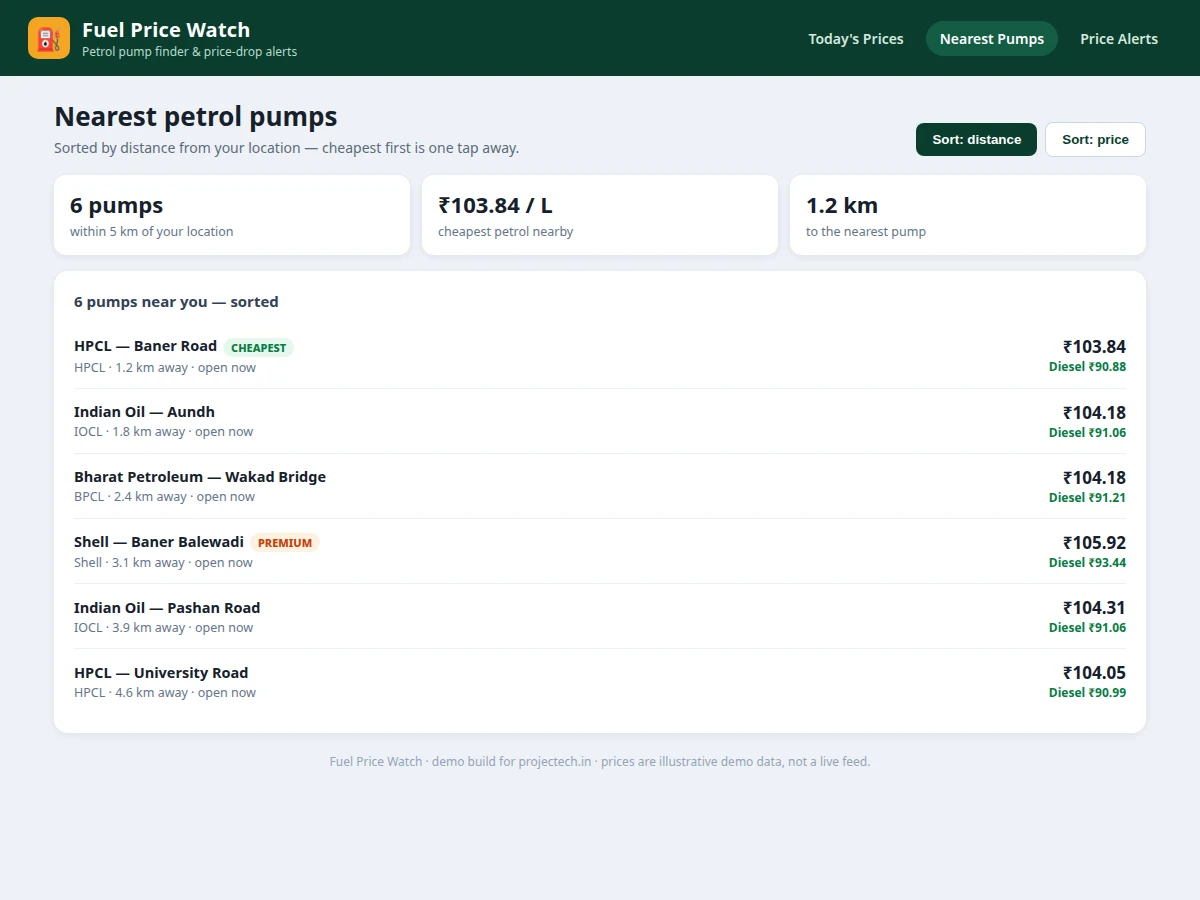
- The pump list is ranked by distance by default, or re-sorted by cheapest petrol when the driver taps the price sort.
- The alert engine compares the new prices against every saved target price and price-rise step for that city and fuel.
- When a target is met, a local notification is raised naming the fuel, the pump and the price that triggered it.
- The history chart renders from the stored daily prices, so the 14-day trend always matches the values the alert engine checked.
Tech stack:
- Kotlin
- Jetpack Compose · Material 3
- Room database · DataStore
- WorkManager · AlarmManager scheduling
- Retrofit · REST price feed
- Fused Location Provider
- Compose Canvas charts
- JUnit · Espresso testing
| Parameter | Value |
|---|---|
| Supported cities | 4 cities (design target: Pune · Mumbai · Delhi · Bengaluru) |
| Fuels tracked | 2 fuels: petrol and diesel |
| Price history | 14 days per fuel (design target) |
| Pump list size | 6 pumps within 5 km (demo build measurement) |
| Price refresh | Once per day at 6:00 AM (expected, matching the daily revision) |
| Alert types | 4 alert types (design target: drop alert · rise warning · weekly summary · target hit) |
| Minimum Android version | Android 8.0 · API level 26 (design target) |
| Offline storage | 14 days of stored prices per city (design target) |
| App size | Approximately 12 MB (expected) |
| Demo build measurement | 14 daily points plotted per fuel from 28 stored price values; 6 pumps sorted by distance |
Project features
Fuel Price Watch is built around four capabilities that work together: a city price board, a nearest-pump finder, a 14-day price history chart, and per-fuel price-drop alerts. The price board shows the morning-revised petrol and diesel prices for the selected city with the change since yesterday, so the driver sees today's position at a glance. The pump finder lists nearby pumps with distance, brand and both fuel prices, sortable by distance or by cheapest petrol, so the cheapest nearby option is one tap away. The history chart plots the last 14 days of prices per fuel, making it easy to judge whether today is a good day to fill up. The alert engine watches the driver's target prices and notifies them the morning a target is hit, turning a passive price list into a tool that saves money on every tank.
- [City price board] Morning-revised petrol and diesel prices for each saved city, with the change since yesterday shown next to each price, so today's position is visible at a glance.
- [Nearest pump finder] Pumps listed with distance, brand, petrol price and diesel price, sortable by distance or by cheapest petrol, with a cheapest-pump highlight on every list.
- [14-day price history chart] A per-fuel trend chart drawn from the stored daily prices, so the driver can see whether today's price is high, low or ordinary for the last two weeks.
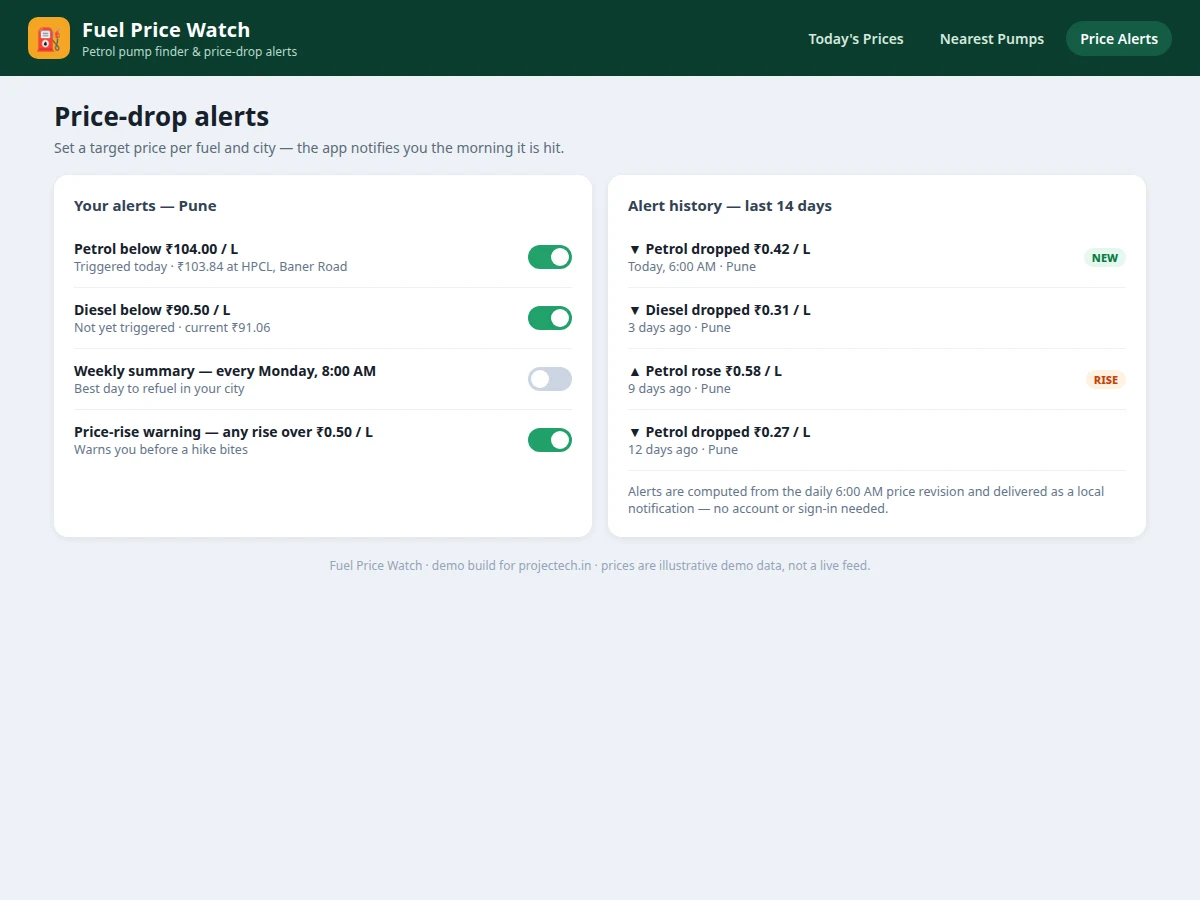
- [Price-drop alerts] Per-fuel, per-city target prices set by the driver; the app checks each morning revision and raises a local notification naming the pump and the price when a target is met.
- [Price-rise warnings] An optional warning when any saved fuel rises by more than a driver-set step (default step: ₹0.50 per litre), so a hike never comes as a surprise at the pump.
- [Saved cities and offline reading] Saved cities, pumps and alert history live in a local database, so yesterday's board and the full 14-day history stay readable without a connection.
- [Weekly refuel summary — optional extension] A Monday-morning summary naming the cheapest day of the past week per city; clearly optional, it can be dropped without affecting the core app.
- [Route-aware pump suggestions — future scope] Suggesting pumps along a planned route is documented as future scope only; it is not implemented in the shipped build.
What is included
- Complete Android app source code (Kotlin + Jetpack Compose)
- Working demo build with 4 cities, 6 pumps and 14-day history data
- Project report PDF (background, architecture, data flow, alert logic, testing)
- PPT presentation for final review
- Viva Q&A preparation document (Android components, WorkManager, Room, notifications)
- Setup and build guide for Android Studio
- Abstract PDF matching this page
Limitations & prerequisites
- Prices depend on the daily revision feed; if a revision is delayed, the board shows the previous day's prices with a last-updated stamp.
- The pump list covers saved pumps only; it is not a live map of every pump in the city.
- Distances are straight-line estimates from the phone's last known location, not road distances, until the driver opens navigation.
- Alerts are local notifications and need notification permission; they stop if the phone blocks background work.
- Demo prices in the demo build are illustrative; the shipped app wires the official feed and must be tested against it before submission.
- No payment, booking or fuel-delivery feature — the app only informs the refuelling decision.
Frequently Asked Questions
Where do the fuel prices come from?
The shipped app reads the official daily price revision published each morning at 6:00 AM and stores the petrol and diesel prices per saved city in its local database. The board then shows the morning price with the change since yesterday, and the 14-day history chart is drawn from those same stored revisions. The demo build bundled with the project uses illustrative prices for 4 cities so every screen can be demonstrated before the feed is wired.
How do price-drop alerts work?
The driver sets a target price per fuel and city, for example petrol below ₹104.00 per litre in Pune, and the alert engine compares each morning revision against every saved target. When a target is met, the app raises a local notification naming the fuel, the pump and the price that triggered it. Alerts need notification permission and run as local notifications, so no account or sign-in is required.
Does the app work offline?
Yes, for reading. Saved cities, pumps, alert history and 14 days of stored prices live in the local Room database, so yesterday's board and the full history chart stay readable without a connection. Only the morning price refresh needs connectivity. If a revision cannot be fetched, the board keeps showing the last stored prices with a last-updated stamp.
How does the pump finder rank pumps?
The finder takes the phone's last known location, measures the straight-line distance to each pump in the saved list, and ranks by distance by default. Tapping the price sort re-ranks by cheapest petrol instead, with the cheapest pump highlighted on the list. Each row shows brand, distance, petrol price and diesel price, so the trade-off between a short detour and a lower price is visible.
Is this project suitable for a final-year project?
Yes — for Computer Science, IT and Android Application Development programs. It demonstrates the full Android stack in one build: background scheduling with WorkManager, local storage with Room, location handling, notifications and chart rendering, all wrapped around a problem every vehicle owner understands and every examiner can test on a phone.
Components & software requirements
- Kotlin
- Jetpack Compose · Material 3
- Room database · DataStore
- WorkManager · AlarmManager scheduling
- Retrofit · REST price feed
- Fused Location Provider
- Compose Canvas charts
- JUnit · Espresso testing
Delivery information
Built-to-order project. Delivery timeline is shared after order confirmation based on current queue.
Support terms
Complete documentation, setup guide, and viva preparation included. Support for setup and explanation provided.
Download free synopsis (PDF)
Enter your name and WhatsApp number — the synopsis PDF downloads immediately. We may send occasional project updates on WhatsApp; no spam.