
More project photos (2)
The problem
College fests run on chaos: posters on walls, WhatsApp forwards, and a schedule PDF nobody can find when the EDM night starts. Attendees miss events they would have loved simply because discovery is broken — the lineup lives in one Instagram story, the venue map in another, and timings change without notice. This project builds the attendee-side fix as an Android event guide app for a 3-day cultural festival: a home screen with dates, venue and headline artists; a schedule browser with day tabs covering all 42 events; event detail pages with time, venue, entry fee and description; an interactive venue map that spotlights the selected event's location; and a starred shortlist so each attendee builds a personal plan. The content model is a static-but-structured event dataset — exactly how real fest apps ship their first version — with an offline-first design so the guide works when 5,000 phones crush the campus network.
How it works
- The app loads the festival dataset (3 days, events, venues, artists) bundled as structured local content.
- The home screen renders festival dates, venue, stats and the headline artist cards.
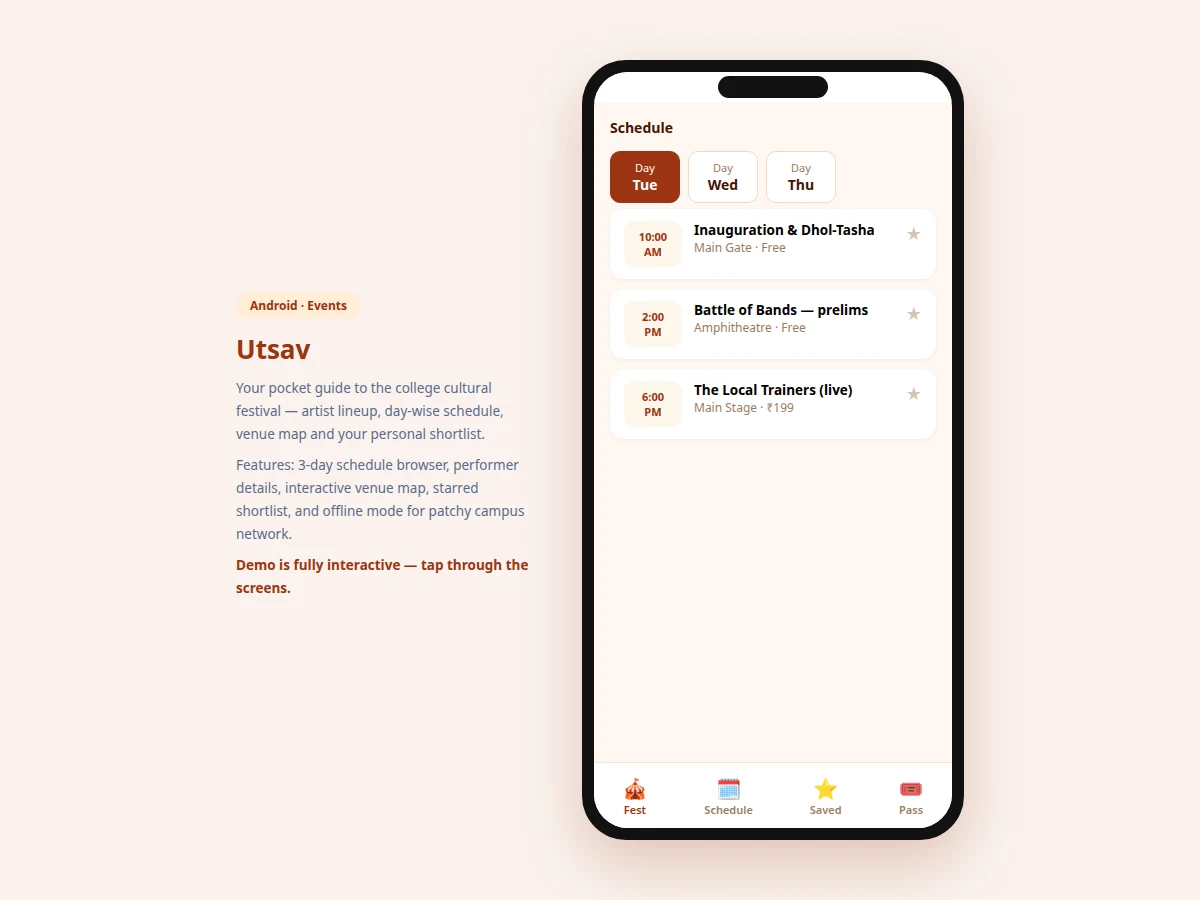
- The Schedule tab shows day tabs; selecting a day lists that day's events as tappable cards.
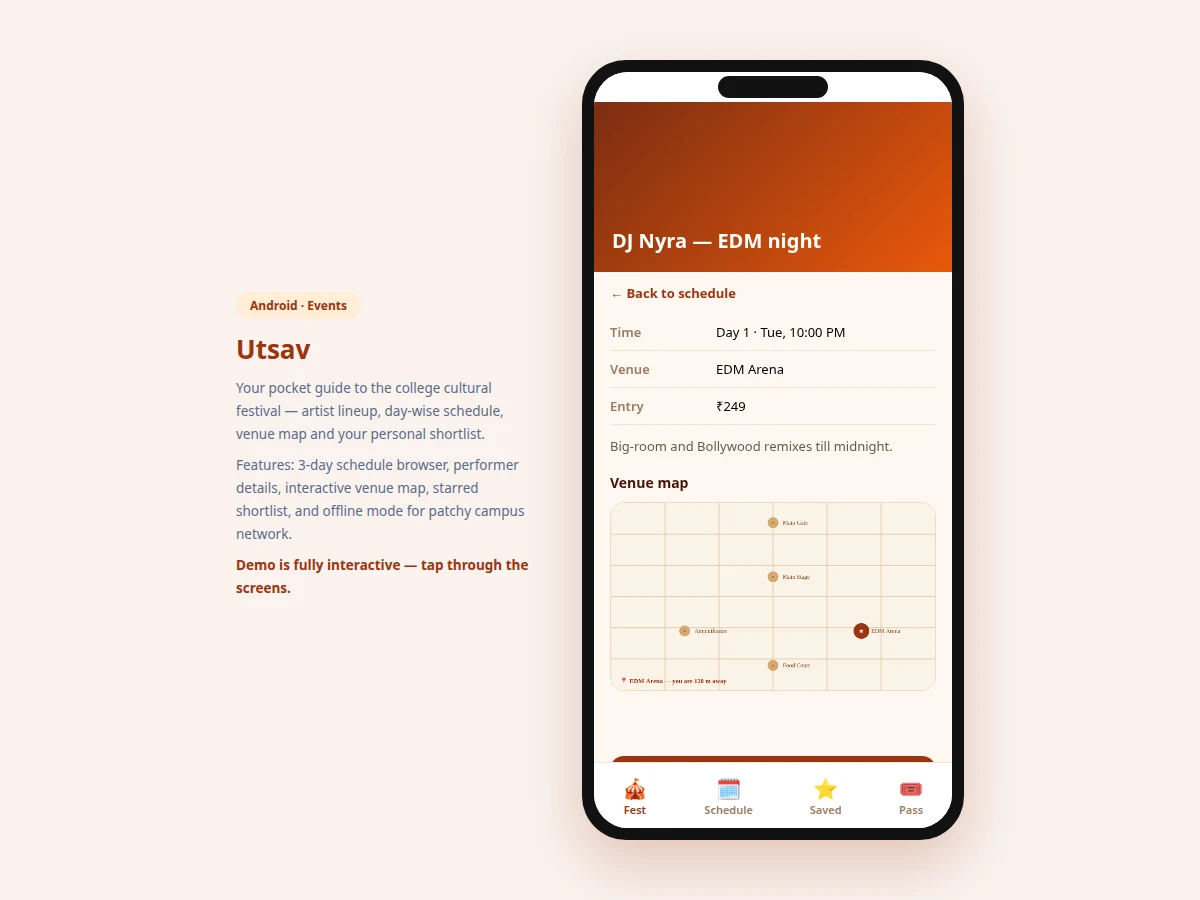
- Tapping an event opens its detail page — time, venue, fee, description — and draws the venue map with that event's location highlighted.
- The star control on cards and detail pages toggles shortlist membership, persisted locally.
- The Saved tab aggregates all starred events into the attendee's personal plan, ordered by day and time.
Tech stack:
- Android (Kotlin) — native app target
- Offline-first local content model (JSON dataset)
- Canvas-based venue map rendering
- MVVM architecture
- Material Design components
| Parameter | Value |
|---|---|
| Screens | 4 (home, schedule, event detail + map, saved) |
| Demo content | 3-day festival, 10 events, 5 venues, 4 headline artists |
| Venue map | Canvas-drawn, per-event highlight |
| Shortlist | Starred events, locally persisted |
| Network needed | None — offline-first by design |
| Target | Android 8.0 (API 26) and above (design target) |
Project features
- [Headline artist lineup] Home screen showcases the star performers with set times and stages — the first thing every attendee looks for.
- [Day-wise schedule browser] Three day tabs covering the full program; each event card shows time, name, venue and entry fee.
- [Event detail pages] Time, venue, entry fee and a description paragraph per event, so attendees can decide what is worth the walk.
- [Interactive venue map] A canvas-drawn campus map with Main Stage, Amphitheatre, EDM Arena, Food Court and Main Gate; the selected event's venue is highlighted with walking distance.
- [Personal shortlist] Star any event to build your own plan; starred state persists across screens.
- [Offline-first content] The event dataset ships inside the app — schedule, map and details work with zero network, which is when you need them most.
- [Bottom navigation] Fest, Schedule, Saved and Pass tabs mirror real event-app structure.
What is included
- Complete Android app source code (Kotlin)
- Festival content dataset (JSON: events, venues, artists)
- Venue map rendering module
- App icon and graphic assets
- Project report PDF (background, offline-first design, content modeling, methodology)
- PPT presentation for final review
- Viva Q&A preparation document (Android, offline strategies, canvas drawing, UX)
Limitations & prerequisites
- The demo uses a fixed festival dataset; a CMS for organizers to edit events live is designed but not built — content updates ship as app updates in this version.
- No live schedule-change push notifications; the offline-first model means last-minute changes need a content refresh (documented as future scope with a backend).
- The venue map is schematic, not to scale — it guides, it does not navigate turn-by-turn.
- Ticket purchase is out of scope; the Pass tab is structural, with payment integration listed as future work.
- Crowd-density or "how full is the venue" features would need on-ground data feeds not available to a student project.
Frequently Asked Questions
Why offline-first?
At a fest with 5,000 attendees, the campus network collapses exactly when everyone checks "where is the EDM arena". Bundling the schedule, map and details inside the app means the guide works when it is needed most.
How do organizers update the schedule?
In this version, content ships with the app — updates go out as app updates. The report documents the CMS-plus-backend design that would enable live edits and push alerts as the next step.
Is the venue map accurate?
It is schematic: correct relative positions of stages and gates, not a surveyed map. Enough to answer "where is the Amphitheatre", not for turn-by-turn navigation.
What is the shortlist for?
With 42 events across 3 days, nobody attends everything. Starring builds a personal plan — "my Friday" — ordered by time, so attendees stop missing the events they care about.
Can this be reused for other fests?
Yes — the event/venue/artist content is a clean JSON dataset. Swapping in another festival's program is a content change, not a code change, which the report calls out as a strength.
Is this project suitable for a final-year project?
Yes — for Computer Science, IT and mobile-development programs. It demonstrates content modeling, offline-first mobile design, custom canvas drawing and complete event UX. Suitable for B.E./B.Tech final-year projects in Computer Science, Information Technology and Mobile Application Development.
Components & software requirements
- Android (Kotlin) — native app target
- Offline-first local content model (JSON dataset)
- Canvas-based venue map rendering
- MVVM architecture
- Material Design components
Delivery information
Built-to-order project. Delivery timeline is shared after order confirmation based on current queue.
Support terms
Complete documentation, setup guide, and viva preparation included. Support for setup and explanation provided.